5.0RC5 Ethernet ports flapping on two different RB-750s

I’m getting log entries like what’s posted below. The link comes up at 10M half duplex then drops a second later. This is happening throughout the day. The timing is irregular happening around every 45 minutes but sometimes sooner, sometimes longer. At first I thought it was a problem with the hardware attached to the RB-750 but it’s happening on another RB-750 as well. Is this a bug? Thanks! Greg

This is from one RB-750

dec/12/2010 05:02:17 memory interface,info ether3-local-slave link up (speed 10M, half duplex)
dec/12/2010 05:02:20 memory interface,info ether3-local-slave link down
dec/12/2010 05:04:28 memory interface,info ether4-local-slave link up (speed 10M, half duplex)
dec/12/2010 05:04:29 memory interface,info ether4-local-slave link down
dec/12/2010 05:48:21 memory interface,info ether4-local-slave link up (speed 10M, half duplex)
dec/12/2010 05:48:24 memory interface,info ether4-local-slave link down
dec/12/2010 06:09:34 memory interface,info ether4-local-slave link up (speed 10M, half duplex)
dec/12/2010 06:09:35 memory interface,info ether4-local-slave link down
dec/12/2010 06:29:35 memory interface,info ether3-local-slave link up (speed 10M, half duplex)
dec/12/2010 06:29:36 memory interface,info ether3-local-slave link down
dec/12/2010 07:38:29 memory interface,info ether3-local-slave link up (speed 10M, half duplex)
dec/12/2010 07:38:30 memory interface,info ether3-local-slave link down

This is from another


dec/11/2010 21:36:00 memory interface,info ether5-local-slave link up (speed 10M, half duplex)
dec/11/2010 21:36:01 memory interface,info ether5-local-slave link down
dec/11/2010 21:36:02 memory interface,info ether5-local-slave link up (speed 10M, half duplex)
dec/11/2010 21:36:03 memory interface,info ether5-local-slave link down
dec/11/2010 23:14:18 memory interface,info ether5-local-slave link up (speed 10M, half duplex)
dec/11/2010 23:14:19 memory interface,info ether5-local-slave link down
dec/11/2010 23:30:07 memory interface,info ether5-local-slave link up (speed 10M, half duplex)
dec/11/2010 23:30:08 memory interface,info ether5-local-slave link down
dec/12/2010 00:13:15 memory interface,info ether5-local-slave link up (speed 10M, half duplex)
dec/12/2010 00:13:16 memory interface,info ether5-local-slave link down
dec/12/2010 02:49:28 memory interface,info ether5-local-slave link up (speed 10M, half duplex)
dec/12/2010 02:49:29 memory interface,info ether5-local-slave link down
dec/12/2010 03:04:56 memory interface,info ether5-local-slave link up (speed 10M, half duplex)
dec/12/2010 03:04:57 memory interface,info ether5-local-slave link down
dec/12/2010 03:43:14 memory interface,info ether5-local-slave link up (speed 10M, half duplex)
dec/12/2010 03:43:15 memory interface,info ether5-local-slave link down
dec/12/2010 05:00:41 memory interface,info ether5-local-slave link up (speed 10M, half duplex)
dec/12/2010 05:00:42 memory interface,info ether5-local-slave link down
dec/12/2010 05:24:47 memory interface,info ether5-local-slave link up (speed 10M, half duplex)
dec/12/2010 05:24:48 memory interface,info ether5-local-slave link down
dec/12/2010 05:35:37 memory interface,info ether5-local-slave link up (speed 10M, half duplex)
dec/12/2010 05:35:38 memory interface,info ether5-local-slave link down
dec/12/2010 06:15:16 memory interface,info ether5-local-slave link up (speed 10M, half duplex)
dec/12/2010 06:15:17 memory interface,info ether5-local-slave link down
dec/12/2010 06:40:33 memory interface,info ether5-local-slave link up (speed 10M, half duplex)
dec/12/2010 06:40:34 memory interface,info ether5-local-slave link down
dec/12/2010 08:18:46 memory interface,info ether5-local-slave link up (speed 10M, half duplex)
dec/12/2010 08:18:47 memory interface,info ether5-local-slave link down

confirm. I have the same situation with the RB 750

Same problem with RB750.

Same problem with RB750.

There is nothing connected on the flapping interfaces.


I tried to disable ARP on them (ether3,4,5). The problem disappeared a few minutes and come back.


Then i tried to disable autonegociation but the problem is still here.

I have the same issue on RB493

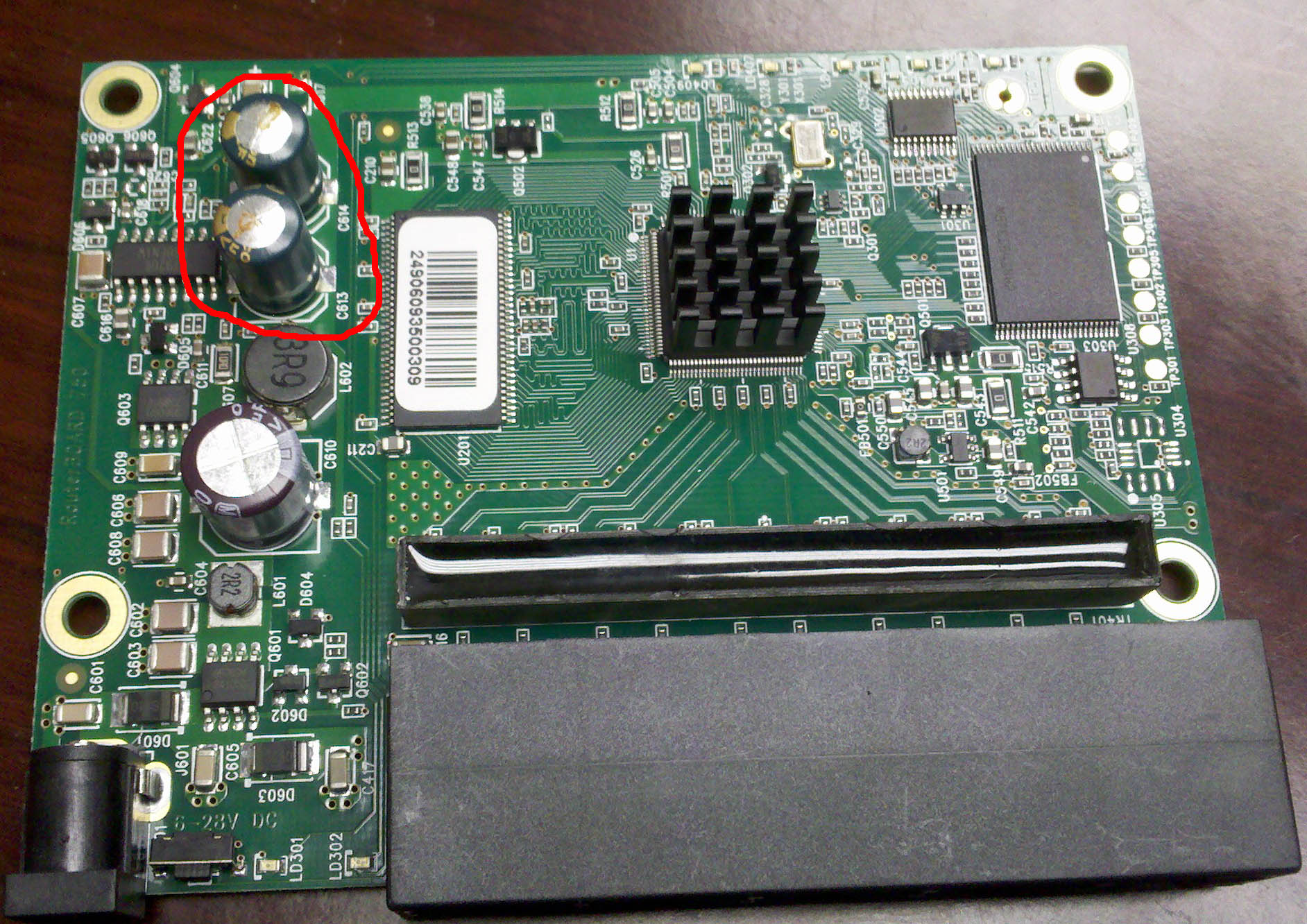
Check to see if you have some green capictors on the board with an X on the top of them. It may be obvious that they have leaked fluid and or are swollen. Even if they do not show signs of this they are still probably your issue if your board has them.
RB750BadCaps.jpg
Mikrotik removed the capacitors from the design of new RB750’s.
-Louis

Louis,

Did they change capacitors or decide they weren’t needed period? It seems strange that they’d eliminate the capacitors because of a problem that appears to be a defect in manufacturing of the capacitors themselves.

So what do us folks do who have RB750’s with caps?

Also it seems strange though not totally impossible that the caps would cause a problem only with a certain version of the firmware.

Greg

I don’t think that it is because of this software version that it is happening. I only think that this software version is actually reporting it is happening.

The two primary symptoms that tip me off to look at the caps are all the lights come on when powering up and stay on. The other is wonky Ethernet issues like traffic not passing as expected or not getting an Ethernet Link. I have had these issues on numerous RB450’s and RB750’s. We replace the suspected caps with 6.3v 1000uF capacitors and the issues go away.

-Louis

The picture posted before show us that the capacitors are dead. They are Su’scon capacitor. Su’scon has a very strict quality control process. they are on the market since 1978.

http://www.su-scon.com.tw/


I hope it is not a capacitor problem, because if it is, they will continu to destroy themself and it will be costly to change rb750 at client sites only after 11 monthes of production…


We have only one site with this problem, if it is a capacitor problem, it will appear for sure at other sites in a few weeks.

We had a similar problem with Asus WL500gp routers (dead capacitors). We had to repair ourself at each site.


I’d like to have some informations fastly from Mikrotik about this problem and how we can solve it, as we are still in the warranty period.

That’s a very good point.

Greg

capacitors replaced. Nothing has changed. :frowning:((

Other peoples replacing capacitors without success ?

Or with success ?

I’ve new RB750 with same problem, but this issue occurs only on rc5. On stable versions device works fine.

same thing on rb600

Same here, RB750 plugged onto another RB750 fixed 100mbps or 10mbps and it flaps. 5.0b5 version.

Regards,
Marcelo

I didn’t see this covered in the 5RC6 release notes. Did this one slip off the radar?

Greg

5.0beta6 same problem.

takoateli hrvoje nkbss
Make sure the log entries are not present because of link was actually going down (reboot, any problems, etc).


Do you have the same problem with MikroTik RouterOS 5.0rc7 installed?
Make sure the latest firmware is installed on the board, you can do it,
/system routerboard upgrade

In case the same problem is present, please provide us with following,

  • steps required to reproduce the problematic configuration;
  • device connected on the other end;
  • cable length.

I know i wasn´t asked, but better more info than none.

Problem persists with rc7, firmware 2.29.
Steps to reproduce: update to rc5 or later (haven´t tested earlier rc), wait a few minutes and check log.
Device connected to the other end: it had happened with ubnt bullets, ubnt nanobridges, other rb750 and with ports with nothing plugged in.
Cable lenght: ubnt bullets & nbs, about 10 meters, other rb750 about 1 meter.

I can give you login access to those 2 rb750 plugged between them, you can see a port flapping in one side and no flap at the other side, that´s why i think it may be hardware related…

Regards,
Marcelo

Confirmed.
Problem persists with rc7, firmware 2.29. RB750.
Ports flapping even there is no cable connected. Factory defaults with only one device connected. BUT! this happens not so often then under RC5-6.