Good day!
Please teach me how to set up the work of CAPsMAN on CAP AC in 5ghz range.If I don’t specify anything in the “channels” then everything works fine, but at 2.4 Ghz..
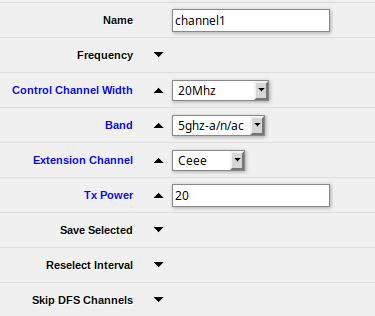
As soon as I try to set the range explicitly, I get an error “no supported channel”. Details on the screenshot above:
You must set a frequency for that channel, and make sure the relative extension channels don’t fall in a restricted portion of band denied by your country regulatory domain (if set) or out of band at all.
So automatic channel selection can’t work on 5 GHz?
If I don’t specify a band at all, I get automatic channel selection on 2.4 and 5 GHz within the limits of the country setting, Unfortunately the same SSID appears on both bands. I haven’t figured out how to do separate SSIDs on the two bands, yet.
one thing that might help others help is posting the output of
Note that I have moved beyond the initial case. I now have multiple SSIDs per band. I'm working on moving many of them to VLANs to suit their individual special applications. Just as soon as I get load balancing and failover working. More notes at the end.
country="united states3" is set to match my country locked APs
Provisioning entry order matters. Provisioning files are executed in order and the first match wins.
The first provisioning entry is present to lock a specific AP to provide only 'riot2'
'riot' is 'Radio IoT' to let me isolate my growing number of Internet of Things things from the main LAN. It will be VLANd straight to the WAN. Band specific SSIDs so I can keep as much at 5 GHz as possible to preserve 2.4 GHz capacity.
The redundant "datapath=BridgeDP datapath.bridge=bridge" entries in the configuration files only need to be "datapath=BridgeDP" These are an artifact of my hacking around to get it to work. I've not yet cleaned everything up.
Hi guys - your posts have been a great help getting to grips with CAPS.
One question though - why the use of the slave channels? Isn’t it simpler to set define the allowed frequencies in /caps-man configuration
eg
Here’s my complete script - at the moment we’re only fixing the 2GHz channels. Not found an issue on the 5GHz radio yet
# CAPsMAN Setup (v1)
#
# Script sets up CAPsMAN on main router ready to provision any (hardwired) slave devices.
# If local radios also to be controlled via CAPsMAN the firewall also needs to be updated with following line
#
# add action=accept chain=input comment="Local CAPS Access to CAPsMAN" dst-address-type=local src-address-type=local
#
# before the "Drop All" filter on the input chain.
# See bottom of this file
#

#
# Edit following lines for local config.
#

:local SSID "WiFi-2G";
:local SSID2 "WiFi-5G";
:local PSK "password";

#
# Set up CAPsMAN
#

#
# Set WiFi channels
# Reselect-interval - look for clearer channel at regular intervals
# 2G Channels: 2412, 2437, 2462
#

/caps-man channel
add band=2ghz-b/g/n name=2g reselect-interval=1d
add band=5ghz-a/n/ac name=5g reselect-interval=1d


/caps-man interface
add disabled=no mac-address=00:00:00:00:00:00 master-interface=none name=cap-master radio-mac=00:00:00:00:00:00

/caps-man datapath
add bridge=bridge name=BridgeDP

/caps-man security
add authentication-types=wpa-psk,wpa2-psk encryption=aes-ccm,tkip group-key-update=1h name=CAPS-Security passphrase=$PSK

/caps-man configuration
add channel=5g country="united kingdom" datapath=BridgeDP datapath.bridge=\
    bridge name=5GHz rx-chains=0,1 security=CAPS-Security ssid=$SSID2 \
    tx-chains=0,1
add channel=2g channel.frequency=2412,2437,2462 comment=\
    "2.4 GHz Channel 1,6 and 11" country="united kingdom" datapath=BridgeDP \
    datapath.bridge=bridge name=2GHz rx-chains=0,1 security=CAPS-Security ssid=\
    $SSID tx-chains=0,1


#
# Force weakly connected clients off the AP in an attempt to steer them onto a closer AP
#

/caps-man access-list
add action=accept interface=all signal-range=-80..120 allow-signal-out-of-range=10s
add action=reject interface=all signal-range=-120..-81

/caps-man manager
set enabled=yes

/caps-man manager interface
set [ find default=yes ] forbid=no
add disabled=no interface=bridge

/caps-man provisioning
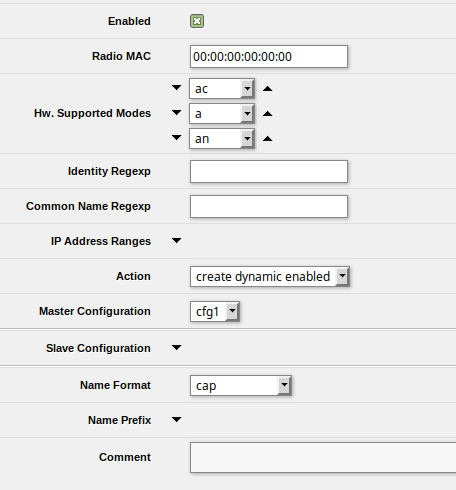
add action=create-dynamic-enabled hw-supported-modes=ac master-configuration=5GHz
add action=create-dynamic-enabled comment="2GHz provisioning of ch 1,6,11" \
    hw-supported-modes=gn master-configuration=2GHz


#
# Put the local WiFi under CAPsMAN control
#

/interface wireless cap
set bridge=bridge discovery-interfaces=bridge enabled=yes interfaces=wlan1,wlan2

#
# Adjust firewall for CAPS on same device as CAPsMAN
# NOTE - this rule needs to be moved above the Drop All Input rule
#

/ip firewall filter
add action=accept chain=input comment="F4RN Local CAPS Access to CAPsMAN" dst-address-type=local src-address-type=local
One question though - why the use of the slave channels? Isn’t it simpler to set define the allowed frequencies in /caps-man configuration
The short answer is: “I don’t know”
The longer answer is that I used the web interface to configure and provision the wireless. When setting it up you get one master drop-down and as many slaves as you want.
 More notes at the end.