rb750 : reset router.
- eth1=192.168.1.1/24=NAT:outinterface=eth1 action=masquerade
- pc101=192.168.1.11
- pc102=192.168.1.12
eth2=192.168.2.1/24=NAT:outinterface=eth2 action=masquerade
- pc201=192.168.2.11
the picture almost like http://wiki.mikrotik.com/wiki/Manual:IP/ARP#Proxy_ARP :
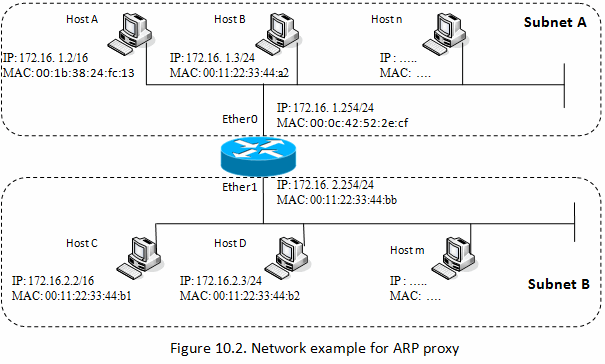
i can call :
- eth1
- from pc101 or 192.168.1.11 to "\192.168.1.12" or “http://192.168.1.12/”
from pc102 or 192.168.1.12 to "\192.168.1.11"
from pc101 to "\pc102"
from pc102 to "\pc101"
eth2 same
between eth
i can call :
- from 192.168.1.11 to "\192.168.2.11"
from 192.168.2.11 to "\192.168.1.11"
but i CANT call
- from 192.168.1.11 (pc101) to "\pc201"
from 192.168.2.11 (pc201) to "\pc101"
including ping : Ping request could not find host pc101. Please check the name and try again.
each pc : windows xp, no firewall, windows firewall=disabled
question :
- how can i connect/call/ping “hostname” between eth
- eth3 and eth4 uses DHCP server, can i use “answer no.1” method ?
i already tried :
change subnet mask (every pc) from 255.255.255.0 to 255.255.0.0 = didnt worked
change to “/interface ethernet set X arp=proxy-arp” = didnt worked
i posted this on 2013, no one help ?
Windows network protocol works over broadcasts and can not discover computers which are located on other subnets.
On each subnet there is a election process in which one machine will be established as a local master browser, which provides name resolution to the subnet, but has no knowledge about what is happening on the other subnet.
To solve this, you need a master browser connected to BOTH networks, e.g. a linux machine with 2 network interfaces running samba (I think 3.6 and up is needed), and set up be the master browser for your specific workgroup (only one is possible).
In this case, if all your computers in both subnets are members of the SAME workgroup like tho one the samba server belongs to, it will be possible to browse the complete network content and resolve all computer names for all member machines.
A second solution would be to get your DNS server to resolve the computer names, but this will become much more complicated if DHCP is involved, and you will not be able to browse all the machines under “Network”.
The third (kind of obsolete) option would be to set up a WINS server and get all machines to register to it (again, samba is able to do that). The WINS server address can be provided via DHCP. In this case, the Netbios name resolution will be done by the WINS server, which is aware of all registered machines and fallback to broadcast if the name is not found.