RB1100AHx2 ver 6.38.3(stable)
dhcp client Windows 7 (some Lenovo laptop) cant get dynamic IP from router.
log picture in attachment
if you need more info please let me know.

RB1100AHx2 ver 6.38.3(stable)
dhcp client Windows 7 (some Lenovo laptop) cant get dynamic IP from router.
log picture in attachment
if you need more info please let me know.
Have you tried 6.37.5?
Most useful info for these issues is a packet capture, see https://wiki.mikrotik.com/wiki/Manual:Tools/Packet_Sniffer that way actual “conversation” between ROS and client can be followed.
You may also enable dhcp debugging: go to System > Logging then add a new rule with Topics=dhcp and action=disk so that you can easily filter other logging by setting disk dropdown on log view.
on version 6.37.5 i have problems with CAPSMAN and CAP devices (they can’t connect), but this is another story.
dhcp debug response from logs
Mar/15/2017 14:52:40 dhcp,debug,packet dhcpDebug: dhcp1 received discover with id 2626241787 from 0.0.0.0
Mar/15/2017 14:52:40 dhcp,debug,packet dhcpDebug:     ciaddr = 0.0.0.0
Mar/15/2017 14:52:40 dhcp,debug,packet dhcpDebug:     chaddr = 1C:39:47:EC:8B:F4
Mar/15/2017 14:52:40 dhcp,debug,packet dhcpDebug:     Msg-Type = discover
Mar/15/2017 14:52:40 dhcp,debug,packet dhcpDebug:     Client-Id = 01-1C-39-47-EC-8B-F4
Mar/15/2017 14:52:40 dhcp,debug,packet dhcpDebug:     Host-Name = "DMIdea"
Mar/15/2017 14:52:40 dhcp,debug,packet dhcpDebug:     Class-Id = "MSFT 5.0"
Mar/15/2017 14:52:40 dhcp,debug,packet dhcpDebug:     Parameter-List = Subnet-Mask,Router,Domain-Server,Domain-Name,Router-Discovery,Static-Route,Vendor-Specific,NETBIOS-Name-Server,NETBIOS-Node-Type,NETBIOS-Scope,Classless-Route,MS-Classless-Route,Auto-Proxy-Config
Mar/15/2017 14:52:40 dhcp,warning dhcpDebug: dhcp1 offering lease 10.10.10.81 for 1C:39:47:EC:8B:F4 without success
Mar/15/2017 14:52:40 dhcp,debug,packet dhcpDebug: dhcp1 sending offer with id 2626241787 to 10.10.10.81
Mar/15/2017 14:52:40 dhcp,debug,packet dhcpDebug:     ciaddr = 0.0.0.0
Mar/15/2017 14:52:40 dhcp,debug,packet dhcpDebug:     yiaddr = 10.10.10.81
Mar/15/2017 14:52:40 dhcp,debug,packet dhcpDebug:     siaddr = 10.10.10.1
Mar/15/2017 14:52:40 dhcp,debug,packet dhcpDebug:     chaddr = 1C:39:47:EC:8B:F4
Mar/15/2017 14:52:40 dhcp,debug,packet dhcpDebug:     Msg-Type = offer
Mar/15/2017 14:52:40 dhcp,debug,packet dhcpDebug:     Server-Id = 10.10.10.1
Mar/15/2017 14:52:40 dhcp,debug,packet dhcpDebug:     Address-Time = 29400
Mar/15/2017 14:52:40 dhcp,debug,packet dhcpDebug:     Subnet-Mask = 255.255.255.0
Mar/15/2017 14:52:40 dhcp,debug,packet dhcpDebug:     Router = 10.10.10.1
Mar/15/2017 14:52:40 dhcp,debug,packet dhcpDebug:     Domain-Server = 10.10.10.1
Mar/15/2017 14:52:40 dhcp,debug,packet dhcpDebug: dhcp1 received request with id 2626241787 from 0.0.0.0
Mar/15/2017 14:52:40 dhcp,debug,packet dhcpDebug:     ciaddr = 0.0.0.0
Mar/15/2017 14:52:40 dhcp,debug,packet dhcpDebug:     chaddr = 1C:39:47:EC:8B:F4
Mar/15/2017 14:52:40 dhcp,debug,packet dhcpDebug:     Msg-Type = request
Mar/15/2017 14:52:40 dhcp,debug,packet dhcpDebug:     Client-Id = 01-1C-39-47-EC-8B-F4
Mar/15/2017 14:52:40 dhcp,debug,packet dhcpDebug:     Address-Request = 10.10.10.81
Mar/15/2017 14:52:40 dhcp,debug,packet dhcpDebug:     Server-Id = 10.10.10.1
Mar/15/2017 14:52:40 dhcp,debug,packet dhcpDebug:     Host-Name = "DMIdea"
Mar/15/2017 14:52:40 dhcp,debug,packet dhcpDebug:     Client-FQDN = 00-00-00-44-4D-49-64-65-61
Mar/15/2017 14:52:40 dhcp,debug,packet dhcpDebug:     Class-Id = "MSFT 5.0"
Mar/15/2017 14:52:40 dhcp,debug,packet dhcpDebug:     Parameter-List = Subnet-Mask,Router,Domain-Server,Domain-Name,Router-Discovery,Static-Route,Vendor-Specific,NETBIOS-Name-Server,NETBIOS-Node-Type,NETBIOS-Scope,Classless-Route,MS-Classless-Route,Auto-Proxy-Config
Mar/15/2017 14:52:40 dhcp,info dhcpDebug: dhcp1 assigned 10.10.10.81 to 1C:39:47:EC:8B:F4
Mar/15/2017 14:52:40 dhcp,debug,packet dhcpDebug: dhcp1 sending ack with id 2626241787 to 10.10.10.81
Mar/15/2017 14:52:40 dhcp,debug,packet dhcpDebug:     ciaddr = 0.0.0.0
Mar/15/2017 14:52:40 dhcp,debug,packet dhcpDebug:     yiaddr = 10.10.10.81
Mar/15/2017 14:52:40 dhcp,debug,packet dhcpDebug:     siaddr = 10.10.10.1
Mar/15/2017 14:52:40 dhcp,debug,packet dhcpDebug:     chaddr = 1C:39:47:EC:8B:F4
Mar/15/2017 14:52:40 dhcp,debug,packet dhcpDebug:     Msg-Type = ack
Mar/15/2017 14:52:40 dhcp,debug,packet dhcpDebug:     Server-Id = 10.10.10.1
Mar/15/2017 14:52:40 dhcp,debug,packet dhcpDebug:     Address-Time = 29400
Mar/15/2017 14:52:40 dhcp,debug,packet dhcpDebug:     Subnet-Mask = 255.255.255.0
Mar/15/2017 14:52:40 dhcp,debug,packet dhcpDebug:     Router = 10.10.10.1
Mar/15/2017 14:52:40 dhcp,debug,packet dhcpDebug:     Domain-Server = 10.10.10.1
Mar/15/2017 14:52:44 dhcp,debug,packet dhcpDebug: dhcp1 received request with id 2626241787 from 0.0.0.0
Mar/15/2017 14:52:44 dhcp,debug,packet dhcpDebug:     ciaddr = 0.0.0.0
Mar/15/2017 14:52:44 dhcp,debug,packet dhcpDebug:     chaddr = 1C:39:47:EC:8B:F4
Mar/15/2017 14:52:44 dhcp,debug,packet dhcpDebug:     Msg-Type = request
Mar/15/2017 14:52:44 dhcp,debug,packet dhcpDebug:     Client-Id = 01-1C-39-47-EC-8B-F4
Mar/15/2017 14:52:44 dhcp,debug,packet dhcpDebug:     Address-Request = 10.10.10.81
Mar/15/2017 14:52:44 dhcp,debug,packet dhcpDebug:     Server-Id = 10.10.10.1
Mar/15/2017 14:52:44 dhcp,debug,packet dhcpDebug:     Host-Name = "DMIdea"
Mar/15/2017 14:52:44 dhcp,debug,packet dhcpDebug:     Client-FQDN = 00-00-00-44-4D-49-64-65-61
Mar/15/2017 14:52:44 dhcp,debug,packet dhcpDebug:     Class-Id = "MSFT 5.0"
Mar/15/2017 14:52:44 dhcp,debug,packet dhcpDebug:     Parameter-List = Subnet-Mask,Router,Domain-Server,Domain-Name,Router-Discovery,Static-Route,Vendor-Specific,NETBIOS-Name-Server,NETBIOS-Node-Type,NETBIOS-Scope,Classless-Route,MS-Classless-Route,Auto-Proxy-Config
Mar/15/2017 14:52:44 dhcp,debug,packet dhcpDebug: dhcp1 sending ack with id 2626241787 to 10.10.10.81
Mar/15/2017 14:52:44 dhcp,debug,packet dhcpDebug:     ciaddr = 0.0.0.0
Mar/15/2017 14:52:44 dhcp,debug,packet dhcpDebug:     yiaddr = 10.10.10.81
Mar/15/2017 14:52:44 dhcp,debug,packet dhcpDebug:     siaddr = 10.10.10.1
Mar/15/2017 14:52:44 dhcp,debug,packet dhcpDebug:     chaddr = 1C:39:47:EC:8B:F4
Mar/15/2017 14:52:44 dhcp,debug,packet dhcpDebug:     Msg-Type = ack
Mar/15/2017 14:52:44 dhcp,debug,packet dhcpDebug:     Server-Id = 10.10.10.1
Mar/15/2017 14:52:44 dhcp,debug,packet dhcpDebug:     Address-Time = 29397
Mar/15/2017 14:52:44 dhcp,debug,packet dhcpDebug:     Subnet-Mask = 255.255.255.0
Mar/15/2017 14:52:44 dhcp,debug,packet dhcpDebug:     Router = 10.10.10.1
Mar/15/2017 14:52:44 dhcp,debug,packet dhcpDebug:     Domain-Server = 10.10.10.1
Mar/15/2017 14:52:53 dhcp,debug,packet dhcpDebug: dhcp1 received request with id 2626241787 from 0.0.0.0
Mar/15/2017 14:52:53 dhcp,debug,packet dhcpDebug:     ciaddr = 0.0.0.0
Mar/15/2017 14:52:53 dhcp,debug,packet dhcpDebug:     chaddr = 1C:39:47:EC:8B:F4
Mar/15/2017 14:52:53 dhcp,debug,packet dhcpDebug:     Msg-Type = request
Mar/15/2017 14:52:53 dhcp,debug,packet dhcpDebug:     Client-Id = 01-1C-39-47-EC-8B-F4
Mar/15/2017 14:52:53 dhcp,debug,packet dhcpDebug:     Address-Request = 10.10.10.81
Mar/15/2017 14:52:53 dhcp,debug,packet dhcpDebug:     Server-Id = 10.10.10.1
Mar/15/2017 14:52:53 dhcp,debug,packet dhcpDebug:     Host-Name = "DMIdea"
Mar/15/2017 14:52:53 dhcp,debug,packet dhcpDebug:     Client-FQDN = 00-00-00-44-4D-49-64-65-61
Mar/15/2017 14:52:53 dhcp,debug,packet dhcpDebug:     Class-Id = "MSFT 5.0"
Mar/15/2017 14:52:53 dhcp,debug,packet dhcpDebug:     Parameter-List = Subnet-Mask,Router,Domain-Server,Domain-Name,Router-Discovery,Static-Route,Vendor-Specific,NETBIOS-Name-Server,NETBIOS-Node-Type,NETBIOS-Scope,Classless-Route,MS-Classless-Route,Auto-Proxy-Config
Mar/15/2017 14:52:53 dhcp,debug,packet dhcpDebug: dhcp1 sending ack with id 2626241787 to 10.10.10.81
Mar/15/2017 14:52:53 dhcp,debug,packet dhcpDebug:     ciaddr = 0.0.0.0
Mar/15/2017 14:52:53 dhcp,debug,packet dhcpDebug:     yiaddr = 10.10.10.81
Mar/15/2017 14:52:53 dhcp,debug,packet dhcpDebug:     siaddr = 10.10.10.1
Mar/15/2017 14:52:53 dhcp,debug,packet dhcpDebug:     chaddr = 1C:39:47:EC:8B:F4
Mar/15/2017 14:52:53 dhcp,debug,packet dhcpDebug:     Msg-Type = ack
Mar/15/2017 14:52:53 dhcp,debug,packet dhcpDebug:     Server-Id = 10.10.10.1
Mar/15/2017 14:52:53 dhcp,debug,packet dhcpDebug:     Address-Time = 29388
Mar/15/2017 14:52:53 dhcp,debug,packet dhcpDebug:     Subnet-Mask = 255.255.255.0
Mar/15/2017 14:52:53 dhcp,debug,packet dhcpDebug:     Router = 10.10.10.1
Mar/15/2017 14:52:53 dhcp,debug,packet dhcpDebug:     Domain-Server = 10.10.10.1
Maybe my topic is the same as General->“ROS 6.38 serious DHCP server problem”.
Yes, could be related.
Try running wireshark on that windows machine, to see if the mikrotik offers are getting received on the windows interface.
You can run 6.37.5 on the CAPsMAN controller with 6.38.5 CAPs… verified.
if that session is enough? (please see attachment).
as i can see Windows PC only sent discover.
dump file in gzip archive
bootp_dhcp.dump.gz (1.98 KB)

but from my PC with Ubuntu Linux in same subnet it looks normal.
picture in attachment. very strange for me 

As I suspected, the windows machine isn’t receiving anything.
ROS → Lenovo communication works, but Lenovo → ROS doesn’t.
Possible causes:
problem with 6.38 L2; if DHCP server is run on a bridge, try disabling RSTP on it. Try (for a test) to set up a standalone DHCP server on a single ether and plug the lenovo there, does it make a difference?
Try a different driver on Lenovo laptop. Make sure there’s nothing unusual in its ethernet configuration.
Try disabling the drop invalid firewall rule on input chain.
tested with another device HAP ac(v6.38.3 and v6.38.5)
PC directly connected over LAN cable, routeros with default settings. same Windows PC only sent discovery packet and no answer from router.
maybe is is broken LAN card in PC.
I had similar issue with HP laptop. Mikrotik offered IP but laptop never get it.
Solution was to turn OFF bootp on DHCP server.
i have changed MAC address in LAN card driver and now it worked ~ 5 min. after same result “dhcp1 offering lease XX:XX mac wihout success.”. How i can find where this MAC address is blocked or something similar?
Thanks.
I’d say 6.38 related… generate a supout with a new mac address (working) and another while DHCP is not working and submit it to support.
On a VLAN? Set the MTU to 1504.
Last news.
Upgraded firmware to version 6.38.5, disabled rstp on brige interface. and problem still exist. will start meeting with support.
(but currently my CAPSMAN is working)
You can test 6.37.5 only on the CAPs manager…
morning,
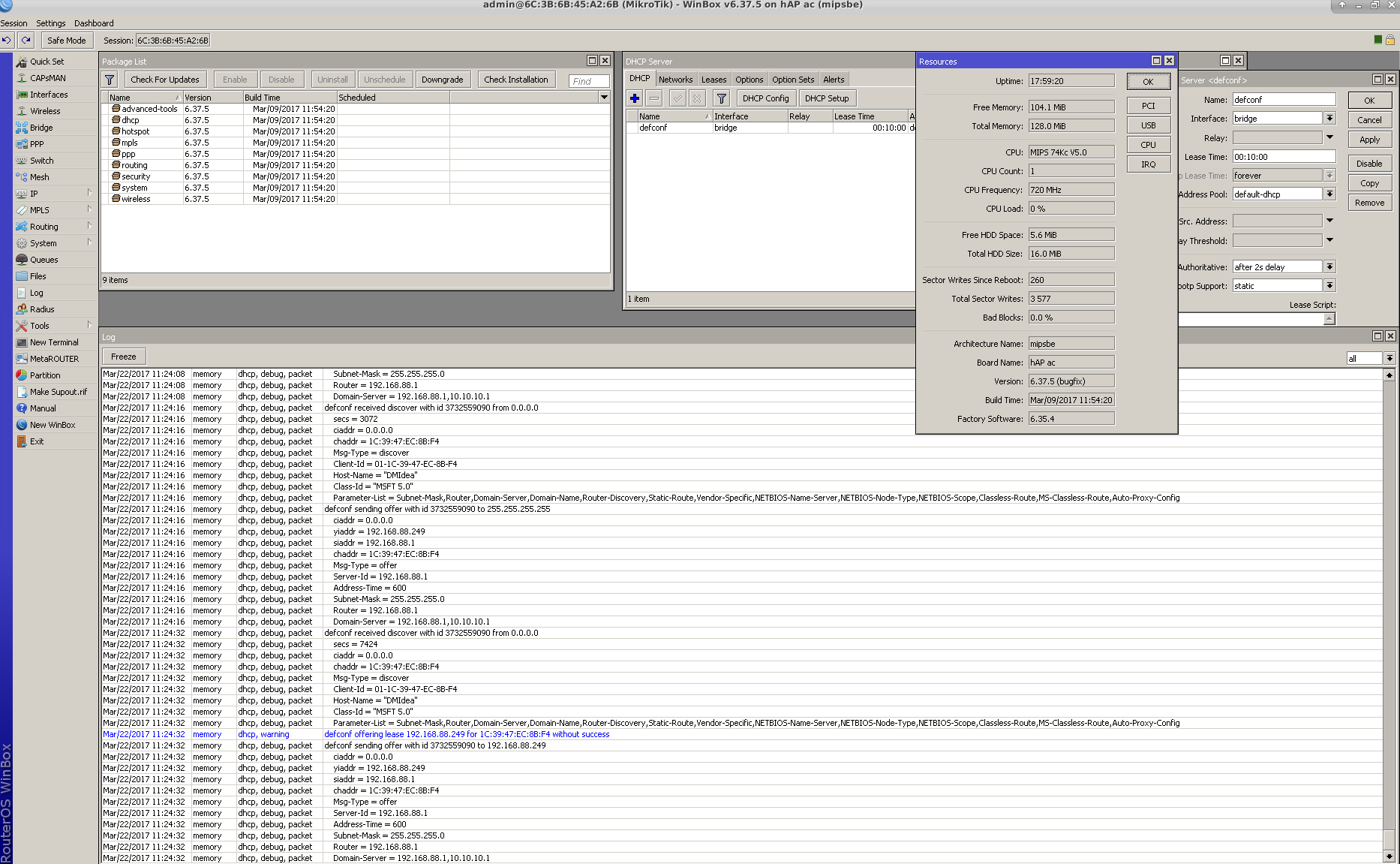
tested with version 6.37.5 on HAP ac with default config. same results “defconf offering lease without success”
please see big picture in attachment.
hi niemi, Did you manage to solve the problem of DHCP server offering lease without success?
regards
Try setting authoritative=yes on DHCP Server settings. Reboot advised.
A duplicate client MAC could cause this.
While it’s failing, check the arp table on the Mikrotik. It’s under Switch > Host, or Switch > FDB. It should show your PC’s mac address as being down one of the interfaces.
Tools > Packet Sniffer on the Mikrotik will also show if the Mikrotik is in fact actually sending the offer. Check the dst-mac of the offer packet, it should be your PC.
Hi Guys,
I’m having this error, Has everyone fixed it yet? Router OS: 6.44.3
Thanks Guys!!