HAP AX3 - low throughput

Unfortunately I have an issue with my new router (pretty much the same as this topic: http://forum.mikrotik.com/t/mikrotik-hap-ax3-poor-wifi-performance/163692/1). My HAP AX3 performance is very unsatisfactory - regarding download and upload speed (via iPerf3 TCP) it is pretty much the same as HAP AC2 (about 200-300 Mbps), that is worse than my primary router HAP AC3 with wifiwave2. I used multiple ax devices for testing - Galaxy S20+, Galaxy Tab S8, iPhone 12 Pro and Thinkpad E14 with some mediatek WiFi chip - each of these devices were using Wifi ax and 2 chains. Best results were obtained via laptop (about 400 Mbps). All other devices were having troubles reaching 300 Mbps. I tried every possible version of Router OS and different configurations (i.e no country settings for highest transmit power, UNII 3 frequencies etc.) but nothing helped. That is realy bad considering this is an AX device - such speeds (and even much higher speeds at 5xx Mbps) can be achieved with old AC devices from competition’s devices…

An interesting fact is that, upload speeds using Speedtest.net (I have 1 gbps ISP connection) are noticeably better at roughly 7xx Mbps, whereas download speeds are about the same as iperf3 results. Neverheless, I upgraded to HAP AX3 solely for the reason to get higher wifi speeds (I was hoping for 700+ Mbps) as some users reported they were getting. However the speeds are pretty much the same as my old HAP AC2 used as an AP.

Is there a hope for an improvement with newer RouterOS releases or some sort of immediate fix? Or is it some sort of HW limitation like in HAP AC2 case (custom drivers, low ROM)…?

I’m really considering returning Mikrotik and going fo Unifi 6 Lite/Pro to get the desired speeds, but I’d like to get Mikrotik one more chance…

Thanks

Hi, use latest ROS 7.8 only and play with settings…few meters from router you should get 800 Mbps. Your settings must be wrong..they may get 700 but very close to the router…

There is a few different threads on AX3 performance.

Interestingly if you run iperf3 test with udp you will get full speed

For me,

iperf3 over tcp: 160mbps down 280 up
iperf3 over udp: 1005mbps down 1010 up
fast.com 1010 (tls over tcp)
smb file copy: 160mbps down 280 up
scp file copy: 160mbps down 280 up

Definitely something odd going on especially since tls seems immune to the issues presented by regular tcp connections, My only advice is to consider opening a support case, as that’s the only way things like this can get fixed.

Edit: Adding an observation I just had this morning.

In tests above, I had AX3 connected by eth1 to mikrotik sfp+ @2.5gb link to a CSR317. Moving to eth2 @ 1gb had same results, however moving off the CSR317 to a CSR328 no longer using SFP+, I get 300mbps bi directional on iperf3 tcp run, still not as fast as udp or fast.com but interesting how that made an improvement.

Well, I tried reconfiguring the router from scratch as well as using Quickset options (Home Dual AP), downgrading to older Router OS releases, etc., but the troughput is always the same. Realisticaly speaking ~300-400 Mbps using Wi-Fi 6 (ax) devices. Transfer speeds using SMB results in ~40-45 MB/s which corresponds to iperf3 speeds… Interestingly enough, pretty much the same speeds are obtained using older Wi-Fi 5 (ac) devices…

Well, your speeds are downright terrible - this is what I was getting in the first months of using HAP AC2 (now it is somewhat better). I will try iperf3 with UDP (just out of curiosity as I already decided to return the item and buy something else…) to see, if I can saturate my 1 Gbps link this way over wireless…

I have the same issues on two different ax3 devices.

There is something strange happening recently with ax3. Traffic from Wi-Fi to eth2-4 is bad, traffic to eth1 seems to be better. Also multithreaded iperf, like tcp, 8 streams can load Wi-Fi better than 1 stream.
I think they will fix it one day. Right now we are all beta testers :rofl:

More info needed. Post your full config.

Hi Normis!
Here is my current conf.
What is interesting, recently, on the ‘new’ ax3, I have a wifi1 channel override by the system:
changed intended channel to 5280/ax/eCee
Strange, I can’t recall such actions on my previous ax3 and 7.6/7.7

Here is a full config. There is no performance change on a basic config from QuickSet,

# apr/12/2023 11:12:33 by RouterOS 7.9rc2
# software id = 2H30-BMLY
#
# model = C53UiG+5HPaxD2HPaxD
# serial number = 
/container mounts
add dst=/etc/pihole name=etc_pihole src=/usb1-part1/etc
add dst=/etc/dnsmasq.d name=dnsmasq_pihole src=/usb1-part1/etc-dnsmasq.d
/disk
set usb1 type=hardware
add parent=usb1 partition-number=1 partition-offset=512 partition-size=\
    "125 292 248 576" type=partition
/interface bridge
add admin-mac=18:FD:74:FE:C8:D6 auto-mac=no comment=defconf name=bridge
add name=dockers
/interface ethernet
set [ find default-name=ether1 ] mac-address=18:FD:74:FE:C8:D5 poe-out=off
set [ find default-name=ether2 ] mac-address=18:FD:74:FE:C8:D6
set [ find default-name=ether3 ] comment=TV mac-address=18:FD:74:FE:C8:D7
set [ find default-name=ether4 ] mac-address=18:FD:74:FE:C8:D8
set [ find default-name=ether5 ] mac-address=18:FD:74:FE:C8:D9
/interface veth
add address=172.17.0.2/24 gateway=172.17.0.1 name=veth1
/interface list
add comment=defconf name=WAN
add comment=defconf name=LAN
/interface wifiwave2 channel
add frequency=2412,2432,2472 name=ch-2ghz width=20/40mhz-Ce
add name=ch-5ghz-auto skip-dfs-channels=10min-cac width=20/40/80mhz
add frequency=5180,5260,5500 name=ch-5ghz skip-dfs-channels=10min-cac width=\
    20/40/80mhz
add frequency=2432,2452,2462 name=ch-2ghz-adj width=20/40mhz
add name=ch-2ghz-auto width=20/40mhz
add disabled=no frequency=5500,5580,5660,5745,5825,5910 name=ch-5ghz-ext \
    skip-dfs-channels=10min-cac width=20/40/80mhz
add frequency=5180-5600 name=ch-5ghz-range skip-dfs-channels=10min-cac width=\
    20/40/80mhz
add disabled=no frequency=5500-5925 name=ch-5ghz-range-hi skip-dfs-channels=\
    10min-cac width=20/40/80mhz
add disabled=no frequency=2412,2437,2462 name=ch-2ghz-1-6-11 width=\
    20/40mhz-Ce
/interface wifiwave2 security
add authentication-types=wpa2-psk,wpa3-psk name=common-auth wps=disable
/interface wifiwave2 configuration
add country=Poland disabled=no name=common-conf security=common-auth ssid=xxxx
/interface wifiwave2
# changed intended channel to 5280/ax/eCee
set [ find default-name=wifi1 ] channel=ch-5ghz-range-hi configuration=\
    common-conf configuration.mode=ap disabled=no security=common-auth
set [ find default-name=wifi2 ] channel=ch-2ghz-1-6-11 channel.frequency=\
    2412,2437,2462 configuration=common-conf configuration.mode=ap disabled=\
    no security=common-auth
/ip pool
add name=dhcp ranges=192.168.200.10-192.168.200.154
/ip dhcp-server
add address-pool=dhcp interface=bridge lease-time=10m name=defconf
/port
set 0 name=serial0
/container
add envlist=pihole_envs interface=veth1 logging=yes mounts=\
    etc_pihole,dnsmasq_pihole root-dir=usb1-part1/pihole start-on-boot=yes
/container config
set ram-high=200.0MiB registry-url=https://registry-1.docker.io tmpdir=\
    usb1-part1/pull
/container envs
add key=TZ name=pihole_envs value=Europe/Warsaw
add key=WEBPASSWORD name=pihole_envs value=xxxx
add key=DNSMASQ_USER name=pihole_envs value=root
add key=DNSMASQ_LISTENING name=pihole_envs value=all
/interface bridge port
add bridge=bridge comment=defconf interface=ether2
add bridge=bridge comment=defconf interface=ether3
add bridge=bridge comment=defconf interface=ether4
add bridge=bridge comment=defconf interface=ether5
add bridge=bridge comment=defconf interface=*6
add bridge=bridge comment=defconf interface=*7
add bridge=dockers interface=veth1
add bridge=bridge interface=wifi1
add bridge=bridge interface=wifi2
/ip neighbor discovery-settings
set discover-interface-list=none lldp-med-net-policy-vlan=1 mode=rx-only \
    protocol=""
/ipv6 settings
set disable-ipv6=yes forward=no max-neighbor-entries=15360
/interface detect-internet
set detect-interface-list=all internet-interface-list=WAN lan-interface-list=\
    LAN wan-interface-list=WAN
/interface list member
add comment=defconf interface=bridge list=LAN
add comment=defconf interface=ether1 list=WAN
/ip address
add address=192.168.200.1/24 comment=defconf interface=bridge network=\
    192.168.200.0
add address=172.17.0.1/24 interface=dockers network=172.17.0.0
/ip dhcp-client
add comment=defconf interface=ether1
/ip dhcp-server network
add address=192.168.200.0/24 dns-server=192.168.200.1,1.1.1.1 gateway=\
    192.168.200.1 netmask=24
/ip dns
set allow-remote-requests=yes servers=192.168.200.1,8.8.8.8
/ip dns static
add address=192.168.200.1 comment=defconf name=router.lan
/ip firewall filter
add action=accept chain=input comment=\
    "defconf: accept established,related,untracked" connection-state=\
    established,related,untracked
add action=drop chain=input comment="defconf: drop invalid" connection-state=\
    invalid
add action=accept chain=input comment="defconf: accept ICMP" protocol=icmp
add action=accept chain=input comment=\
    "defconf: accept to local loopback (for CAPsMAN)" dst-address=127.0.0.1
add action=drop chain=input comment="defconf: drop all not coming from LAN" \
    in-interface-list=!LAN
add action=accept chain=forward comment="defconf: accept in ipsec policy" \
    ipsec-policy=in,ipsec
add action=accept chain=forward comment="defconf: accept out ipsec policy" \
    ipsec-policy=out,ipsec
add action=fasttrack-connection chain=forward comment="defconf: fasttrack" \
    connection-state=established,related hw-offload=yes
add action=accept chain=forward comment=\
    "defconf: accept established,related, untracked" connection-state=\
    established,related,untracked
add action=drop chain=forward comment="defconf: drop invalid" \
    connection-state=invalid
add action=drop chain=forward comment=\
    "defconf: drop all from WAN not DSTNATed" connection-nat-state=!dstnat \
    connection-state=new in-interface-list=WAN
/ip firewall nat
add action=masquerade chain=srcnat comment="defconf: masquerade" \
    ipsec-policy=out,none out-interface-list=WAN
add action=masquerade chain=srcnat out-interface-list=WAN src-address=\
    172.17.0.0/24
add action=dst-nat chain=dstnat dst-address=192.168.200.1 dst-port=53 \
    protocol=udp src-address=192.168.200.0/24 to-addresses=172.17.0.2 \
    to-ports=53
/ip service
set telnet disabled=yes
set ftp disabled=yes
set www address=192.168.200.0/24
set api disabled=yes
set api-ssl disabled=yes
/ip ssh
set strong-crypto=yes
/ipv6 firewall address-list
add address=::/128 comment="defconf: unspecified address" list=bad_ipv6
add address=::1/128 comment="defconf: lo" list=bad_ipv6
add address=fec0::/10 comment="defconf: site-local" list=bad_ipv6
add address=::ffff:0.0.0.0/96 comment="defconf: ipv4-mapped" list=bad_ipv6
add address=::/96 comment="defconf: ipv4 compat" list=bad_ipv6
add address=100::/64 comment="defconf: discard only " list=bad_ipv6
add address=2001:db8::/32 comment="defconf: documentation" list=bad_ipv6
add address=2001:10::/28 comment="defconf: ORCHID" list=bad_ipv6
add address=3ffe::/16 comment="defconf: 6bone" list=bad_ipv6
/ipv6 firewall filter
add action=accept chain=input comment=\
    "defconf: accept established,related,untracked" connection-state=\
    established,related,untracked
add action=drop chain=input comment="defconf: drop invalid" connection-state=\
    invalid
add action=accept chain=input comment="defconf: accept ICMPv6" protocol=\
    icmpv6
add action=accept chain=input comment="defconf: accept UDP traceroute" port=\
    33434-33534 protocol=udp
add action=accept chain=input comment=\
    "defconf: accept DHCPv6-Client prefix delegation." dst-port=546 protocol=\
    udp src-address=fe80::/10
add action=accept chain=input comment="defconf: accept IKE" dst-port=500,4500 \
    protocol=udp
add action=accept chain=input comment="defconf: accept ipsec AH" protocol=\
    ipsec-ah
add action=accept chain=input comment="defconf: accept ipsec ESP" protocol=\
    ipsec-esp
add action=accept chain=input comment=\
    "defconf: accept all that matches ipsec policy" ipsec-policy=in,ipsec
add action=drop chain=input comment=\
    "defconf: drop everything else not coming from LAN" in-interface-list=\
    !LAN
add action=accept chain=forward comment=\
    "defconf: accept established,related,untracked" connection-state=\
    established,related,untracked
add action=drop chain=forward comment="defconf: drop invalid" \
    connection-state=invalid
add action=drop chain=forward comment=\
    "defconf: drop packets with bad src ipv6" src-address-list=bad_ipv6
add action=drop chain=forward comment=\
    "defconf: drop packets with bad dst ipv6" dst-address-list=bad_ipv6
add action=drop chain=forward comment="defconf: rfc4890 drop hop-limit=1" \
    hop-limit=equal:1 protocol=icmpv6
add action=accept chain=forward comment="defconf: accept ICMPv6" protocol=\
    icmpv6
add action=accept chain=forward comment="defconf: accept HIP" protocol=139
add action=accept chain=forward comment="defconf: accept IKE" dst-port=\
    500,4500 protocol=udp
add action=accept chain=forward comment="defconf: accept ipsec AH" protocol=\
    ipsec-ah
add action=accept chain=forward comment="defconf: accept ipsec ESP" protocol=\
    ipsec-esp
add action=accept chain=forward comment=\
    "defconf: accept all that matches ipsec policy" ipsec-policy=in,ipsec
add action=drop chain=forward comment=\
    "defconf: drop everything else not coming from LAN" in-interface-list=\
    !LAN
/system clock
set time-zone-name=Europe/Warsaw
/system logging
set 3 action=memory
/system note
set show-at-login=no
/system package update
set channel=testing
/tool bandwidth-server
set enabled=no
/tool graphing interface
add allow-address=192.168.200.0/24
/tool graphing resource
add allow-address=192.168.200.0/24
/tool mac-server
set allowed-interface-list=LAN
/tool mac-server mac-winbox
set allowed-interface-list=LAN
/tool sniffer
set filter-interface=bridge filter-mac-protocol=ipv6

It would be important to check the signal strength and what wireless rates are reported while actively testing the connection, alongside what throughput you see. The changed intended channel is due to detected radar, so a different frequency was selected.
In addition, we would recommend you perform the test with 7.9rc, instead of 7.8 stable.
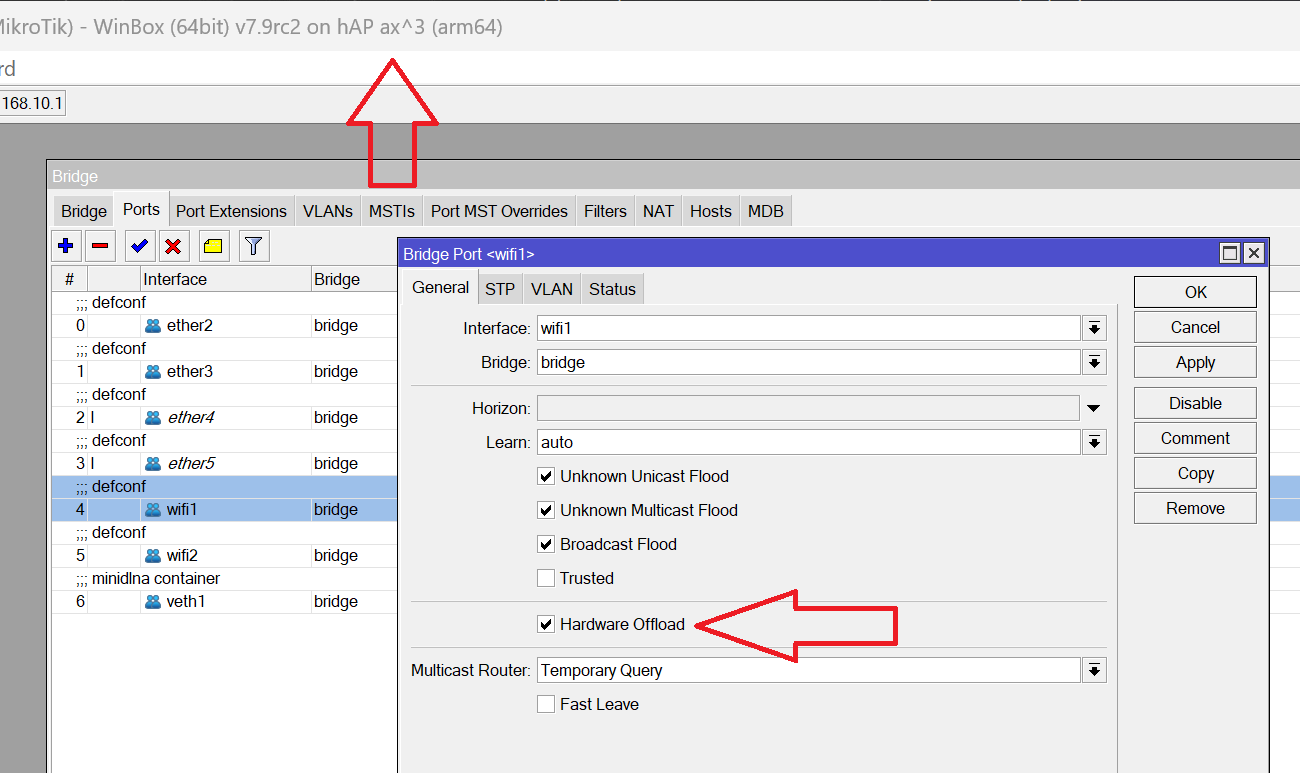
I’d also recommend making sure that hardware offloading is disabled, and checking if different frequencies produce better results.

I would echo guntis on using 7.9rc2, 7.8 should be renamed 7.8 gremlins (vice 7.8 stable). I had a devil of a problem trying to troubleshoot wireguard between two MT routers until I said okay EFF IT, going to upgrade both to 7.9rc2, bingo started working. I have read of other functionality not working on 7.8 but working when downgraded to 7.7 or now upgrading to 7.9rc2.

Hi Guntis,
It was tested also on 7.9rc2, which is the version I’m currently using, you can see it on the first line of the config.

My recent test: 2 meters from AP: public Internet speed test: 790Mbps average, iperf3 on eth, tcp, 600Mbps. Iperf wired 890Mbps
I will check the offload and other freq, still it acts strangely.

BR,
Piotr

Do you mean this which is active by default in all interfaces?
hap ax3.png

With 1 802.11ax client connected with 2x2:2 to one 802.11ax access point with 80 MHz you should get around stable 800 Mbit/s if it is sitting right next to the access point.

I’ve been doing some additional configuring and testing, and yet nothing seems to have improved the speed whatsoever. I used various frequencies (I’m even lucky enough to have most of the 5 GHz band “free”, so no other AP should cause an inteference), locations of the AP and devices, but no luck. The (download) speed is always around 200-400 Mbps (the best result I obtained was about 450 Mbps using my WiFi ax laptop) using iperf3, SMB transfer and Speedtest.net. Testing via Speedtest.net sometimes shows much better upload speeds (reaching 700-800 Mbps) but it seems to be unrealistic as iperf3 and transferring files using SMB indicates the speed is always below 300 Mbps (using smartphones/tablets) and below 450 Mbps using laptop.

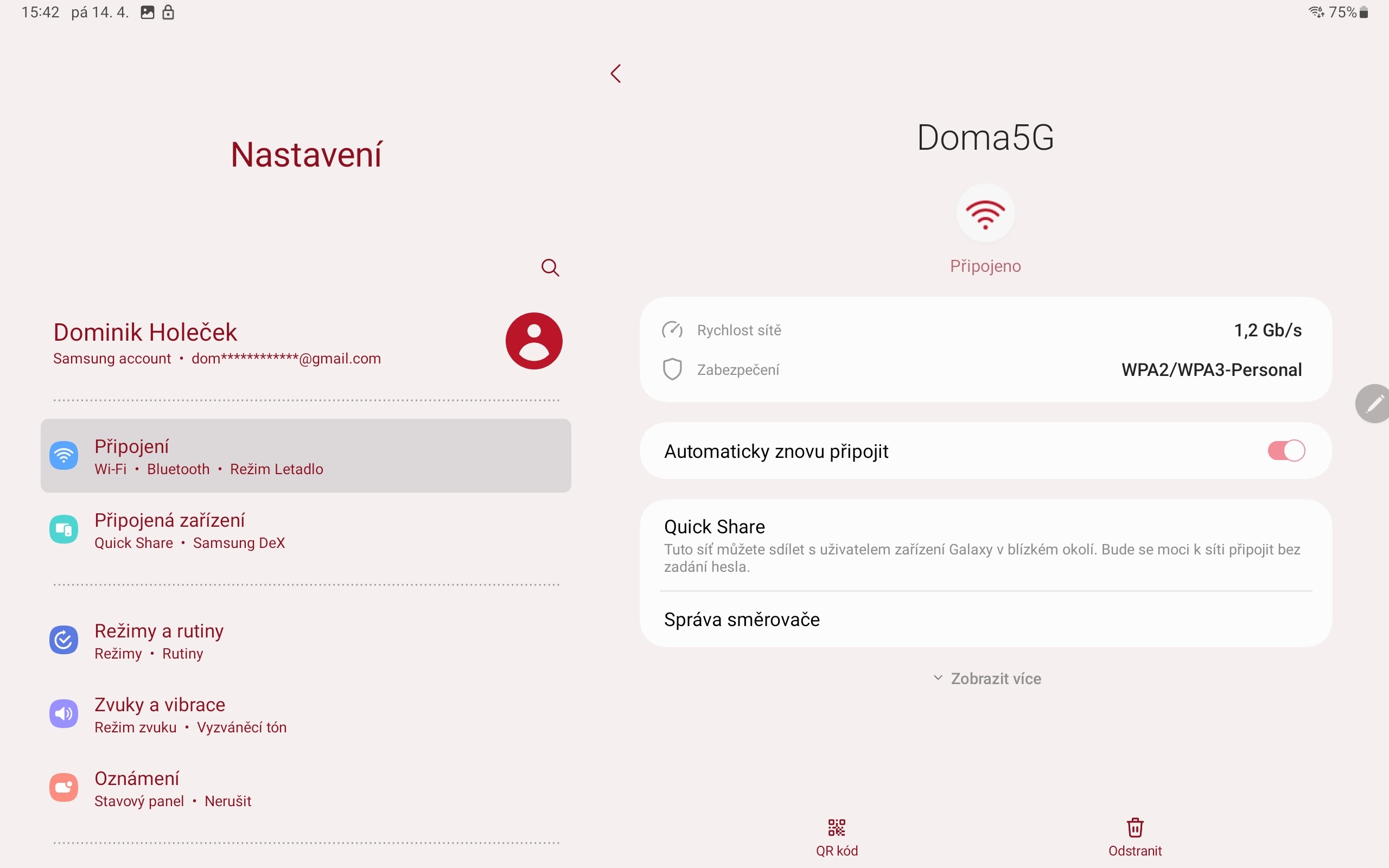
Moreover, I noticed, the Wi-Fi signal strength seems to be an issue, at least when using correct country settings (= Czechia) - 2 meters away from my AP (directly in front of it with no obstacles), I get about -60 dbm using 5 GHz. This might be the reason why I have a rather low theroretical troughput (link speed) - usually about 600-800 Mbps when using devices in the same room. I get 1,2 Gbps only when I’m few centimetres from the AP, and yet even then the speed is the same. With no country set, the Wi-Fi strength seems to be better, but the speed is still the same.

Here’s my current config using 7.9 RC3. (Mostly set via Quickset)

# jan/02/1970 03:12:42 by RouterOS 7.9rc3
# software id = K03M-YTK6
#
# model = C53UiG+5HPaxD2HPaxD
# serial number = HE808SA50NW
/interface bridge
add name=bridge1
/interface wifiwave2
set [ find default-name=wifi2 ] channel.band=2ghz-ax .width=20mhz \
    configuration.country=Czech .mode=ap .ssid=Doma disabled=no \
    security.authentication-types=wpa2-psk,wpa3-psk .encryption=ccmp \
    .group-encryption=ccmp
/interface list
add name=WAN
add name=LAN
/interface wifiwave2 channel
add name=channel1
/interface wifiwave2
set [ find default-name=wifi1 ] channel=channel1 channel.band=5ghz-ax \
    .skip-dfs-channels=all .width=20/40/80mhz configuration.country=Czech \
    .mode=ap .ssid=Doma5G disabled=no security.authentication-types=\
    wpa2-psk,wpa3-psk .encryption=ccmp .group-encryption=ccmp
/interface bridge port
add bridge=bridge1 interface=ether2
add bridge=bridge1 interface=ether3
add bridge=bridge1 interface=ether4
add bridge=bridge1 interface=ether5
add bridge=bridge1 interface=wifi1
add bridge=bridge1 interface=wifi2
/ip neighbor discovery-settings
set discover-interface-list=!dynamic
/interface list member
add interface=ether1 list=WAN
add interface=bridge1 list=LAN
/ip address
add address=192.168.88.10/16 interface=bridge1 network=192.168.0.0
/ip dhcp-client
add interface=ether1
/system note
set show-at-login=no

Screenshot_20230414_154201_Settings.jpg
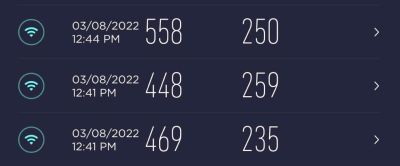
Screenshot_20230414_154012_WiFiman.jpg

Out of curiosity, what devices were used? I’m having troubles reaching even half of the speed you get… (I used every device in my household with Wi-Fi ax - 2 iPhone’s 12 Pro, Samsung Galaxy Tab S8, Samsung Galaxy S20+ and Thinkpad E14 Gen 3 with MediaTek Wi-Fi 6 MT7921)

That’s what I’d like to get, and some people claim they reach such speed with Hap AX2/AX3, and yet the rest of us (I’m definitely not alone) have troubles reaching even half of the speed… :slight_smile:

Hello asblitz,

It may have nothing to do with your problem, but this seems strange to me:

set [ find default-name=wifi1 ] channel=channel1 channel.band=5ghz-ax

First because channel1 is not present in your config.
Secondly because if it’s the real channel 1, then it’s on the 2,4Ghz band and not the 5Ghz, like in your config.

I would also try using 5180 frequency instead of such high one, as the allowed power on such frequency is limited on ETSI domain (SRD devices less than 25mw).

Best regards,

Got an ax3 last week. Seems to be working ok. Better speeds than the Deco x20. Internet is 800/200. Router is RB5009. All APs are wired.

Hope to test roaming soon. Once I get another unit of ax3, ax2 or cAP ax. Recommissioned the trusty old hAP ac for the time being.

hAP ax3 - iPhone 13 Pro 2x2 80Mhz 802.11ax (Link: 1200 Mbps)

Deco x20 - iPhone 13 Pro 2x2 80Mhz 802.11ax

More here:
hAP ax3: https://forum.lowyat.net/index.php?showtopic=2040480&view=findpost&p=107029010
Deco x20: https://forum.lowyat.net/index.php?showtopic=4658096&view=findpost&p=105043089
Deco hc4 (m4): https://forum.lowyat.net/index.php?showtopic=5252673&view=findpost&p=105783956

My test devices: MacBook Pro 2016 with WiFi ac, HP EliteBook on Win10 with Intel WiFi6 AX 201 160Mhz and iPhone 13 (iperf3 for ios)
Server: local: iperf3 on Raspberry Pi 4 via GE, internet: speedtest.com, fast.com

Check your antenna, is the connector installed tight?
I’ve noticed that the MikroTik antenna acts strangely. It is not exactly the same performance on both sides of flat stick. Sometimes when you rotate it 180 deg (the side of the stick, not the position of it), it can perform better.
It is another pain. It looks like the characteristic is not nicely oval but different.
You can also check your CPU temperature. It should be below 60 deg unless you have it in a hot cabinet.

I have the same problems. The wifi has a very bad performance compared to other cheaper routers. Less range and less speed. I have tried to change all possible parameters but nothing works. In my case it works the same with version 7.6 and 7.8

You can try to test it on 7.9rc3 plus play with freq, I’d keep it default as it seems to be working better on 7.9, it was terrible on 7.6/7.7

Looking at the AX3 WiFi performance only, I suggest staying away from it and going for a different vendor.
It is bad, and I’m afraid it will not get better :frowning: It is a pity that they are running away from this topic and not acknowledging issues.
Hard to say is it a bad design, poor quality or maybe issues with coding wireless chip from a new vendor? I’m naive hoping it is a SW issue and there will be a fix one day.

I could get a refund, but I stayed with it just because of the great performance with containers and RouterOS flexibility.
When I need WiFi performance, I turn on WiFi on my cable modem…