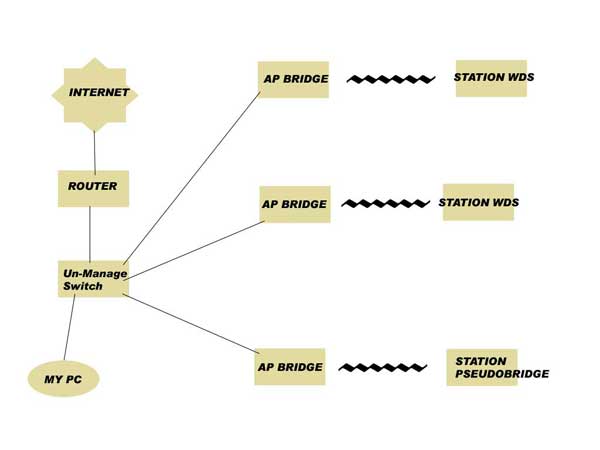
Please see my topology in picture
Yesterday, mikrotik which act as Station Pseudobridge was hit by lightning. The wireless still connected, but I could not ping client’s PC behind that mikrotik.
The problem is, after that all of my network was down. And MY PC (windows) which connected to Un-Manage Switch shows popup that said about IP Conflict.
This problem was solved after I disabled wlan1 interface in AP Bridge which connected to Station Pseudobridge.
My questions are:
Why windows said IP Conflict and why my whole network down ?
The most common IP conflict I experience is 192.168.88.1. Is that ip assigned to more than one interface in your setup? Check all ether1 interfaces on the RouterBoards.
does any of your clients have any ZIO access points in your network? they’ve given me a lot of trouble… I don’t know what happens to them but after a while they start to take any IP they find in the network and the only solution is to give them to a recycling company
Hy guys!
Does anyone resolve this problem? I have same problem on bridge network where there are 80/90 Mikrotik client (all station pseudobridge) and 2/3 mikrotik that act as ap-bridge.
I try to upgrade router os on client that freeze entire network, but problem is the same; i try to change radio MAC ADDRES but nothing. The only way to resolve problem is disconnect client or change it with another one.
I also think there is problem in RouterOS, but i try to upgrade to version 4.10 and 4.11 client that generate this problem but nothing.
I also try to change MAC ADDRESS of wlan1 but nothing.
The only way to resolve problem is change mikrotik client with another one.
Just a tip, if you change (clone) a mac address, let all the routers (Bridged network!) erase or renew their ARP tables. You may have a duplicate mac address (happened with me before!) and if that one is in the arp table of some router that also have another mac address in its table with the same IP (because you replace the mac but now this unit has a new mac but still with the old IP!). Now you have a IP conflict in your network.
I don’t know it this is the case in your networks.
The reason the whole network goes down when only one unit gives a problem is because the network is bridged and thus all routers work in the same network/subnet. If you have somewhere a IP conflict this conflict is everywhere in the same network.
This is another advantage of making your network a routed one. Then your network is split up in section and you have better control and problems don’t influence the whole network. And as a bonus, in case of heavy traffic or many units with physical branches (like a tree, like in the picture at the start of this topic) routing is faster.
By having a network fully bridged all packages are send to all devices, nevertheless if it has to be there or not. Routing, as the word says, makes sure packages are only traveling to destination where they are supposed to go to.
Dear guys,
sorry for delay…I try to change MAC-ADDRESS only after that I have problem and not first, so duplicate IP address is not generate from change of MAC.
Our network is already in route mode, and I have this problem in 3 different bridged network: one netowrk has 20 host, the other one has 100 hosts and the other one 150 hosts.
I think that problem is station-pseudo-bridge mode: is it possible?
P.s.-> If you want I can post a network packet sniffing when there was this network problem