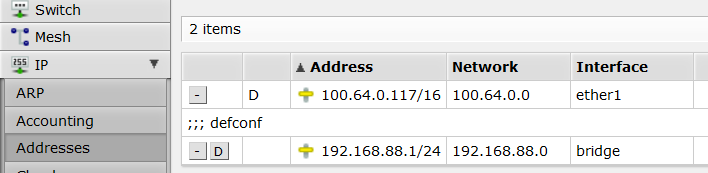
This is so simple I’m really surprised it’s giving me so much headache.
Last year I bought a hEx and using the initial instructions made only the absolutely required configuration to get it working with my ISP (in ether1, that’s the default), then plugged all the other stuff in ether2…ether5, checked that internet connectivity works and got on with my life, only checking in every now and then to see that the firmware is up to date. No problems there.
Fast forward to this week when I finally needed my computers, all located in the same lan (192.168.88.0/24, again everything default) to talk to each other. Noticed they weren’t doing that - no ping, no http, no nothing. I had assumed the default config would enable routing within lan, with this being a SOHO for-dummies model, but apparently not!
It looks like all the right ports are in the same bridge and since they’re in the same subnet this should just work unless the firewall isn’t playing nicely, so I added a forward chain accept firewall rule right after the drop invalid rule for any traffic that doesn’t come from WAN. I can see my http packets increasing the packet count on that rule but it’s still not working… I’ve also tried modifying the rule in various ways.
Being rather inexperienced with firewall and router configuration (I understand the theory but have rarely needed to do anything in practice) this has left me scratching my head. I’m 100% certain that the default config is stupid and 110% sure I’m making some stupid mistake trying to fix it but I just can’t figure out what it is that I’m doing wrong. I tried Google searches and previous posts on this forum but didn’t find the solution. Someone care to explain what I need to do to make this actually work?
You are correct, all on the same subnet on the same bridge. The only reason they cannot find each other would be due to firewalls on each PC.
To confirm, post your complete config
/export file=anynamewyouwant ( minus router serial number and any public WANIP information )
The only reason they cannot find each other would be due to firewalls on each PC.
Well I use one more way to make this happen ( eg splitting 5GHz wifi devices from 2.4GHz wifi devices), or separating devices on one AP from another AP, in a fully bridged LAN… Set same “horizon” value on those bridge ports, in the interconnecting bridge. (Use case : all can connect to internet, no inter-device connections)
That would be an EDGE case jajajajaja, I don’t think the OP has gone out of his way with fancy configuration modifications not exactly mainstream knowledge, to sabotage his own connectivity.
Fully agree @anav! It’s out of scope here.
But “the only reason” statement just triggered, my “in my managed networks often used (!) advanced config” reaction. Couldn’t resist posting this.
Used with 100’s of non-related users, that get internet via wifi, but should not interfere or interact with each other (virusses, skype, dropbox, NTLM broadcasts, Bonjour, … etc)
Creating a “tree styled” isolated free-wifi network.
The reason WAS overzealous firewall configurations in ALL of the PCs on the network. It’s going to take a while for me to reconfigure them but I have a couple of machines pinging each others successfully now. Thanks - if you hadn’t suggested that my config is actually just fine I wouldn’t have taken a closer look at the local firewalls.
P.S. Wasn’t me setting them up like that, at least I can dodge the blame for that…
From MT wiki …
“Bridge horizon feature allows to configure bridge ports with horizon setting so that packet received over port with horizon value X is not forwarded or flooded to any port with the same horizon value X.”
As said, I use this to separate wifi interfaces in the AP (no forwarding in wifi is valid for devices on the same wifi interface).
Powerbox with multiple AP’s connected: AP’s are on same horizon in Powerbox bridge, uplink horizon is not set.
This stops those chatty broadcasts between client devices.
This is off topic, but separating clients on a LAN is important in a wifi network.
Clients do talk (multicast, broadcast) a lot, without telling the owner.
Windows, Apple IOS, mDNS, Bonjour, dropbox, Skype, Microsoft Bits , … all try to find help in neigboring devices. These broadcasts/multicast do use “basic rates” (6Mbps, even 1Mbps sometimes) in wifi, consuming a lot of airtime.
Your school, campus or event network will be easily overloaded with this.
Imagine , just one iPhone , seeking it’s home printer on an event, with Bonjour broadcast. Event has 50 AP’s bridged together, for 400 devices (my case!) , all AP’s will broadcast that Bonjour message, at basic rate. My other brand AP’s yell “network busy” in the log, as not able to broadcast their beacon at that time.
Devices are in the same (V)LAN, because they are all there for the same purpose: students, visitors, public on event, employees, trade fair visitors, people at CES2024, shopping hall, city network, … etc etc. , but they are not supposed to work together or offer services to each other. (Or virus infect each others device).
I separate all users in wifi. That’s why there is the (non-)forwarding setting in the wifi options. But non-forwarding works only within the same (SSID) network. 2.4GHz and 5 GHz connections can still communicate to some opposite side. (other wifi interface, or other AP)
The requirements for your home network will differ. e.g. You may want to cast from a 2.4GHz device to your 5 GHz TV set.
True, and Windows clients did have ping blocked. They had almost everything else blocked as well, and Linux clients were pretty restricted too. Taught me to double check
Such a slick way of separating clients with bridge split-horizon! May I ask whether this method of separating the clients require less resources than achieving the same with firewall (despite that it disables hardware offloading)? or the reason for using this method is due to interoperability needs?
Losing HW offfload for wifi interfaces looks less impact, as the wifi interfaces are not serviced by the switch hardware, but via CPU anyway.
“Use IP firewall” is an option setting for the bridge, but that is not HW offloadable.
So in the AP, using bridge split-horizon should have minor performance impact, by losing the HW offload.
There is more than IP on a network, and the limitation of broadcast/multicast (based on MAC addresses) is what we are after with this.
The “default” default setting for the “Multicast Helper” equals “OFF” or “Disabled”, so multicasts and broadcasts go for those slow basic rates in wifi.
AP’s in a house in the resort are uplink connected via CSS106, with crosstalk among them disabled in SWOS.
So maybe it should also be handled in the switch settings of the Powerbox Pro, not in the bridge settings, to have the switch hardware do the work.
Network is not all-star-topology any more, after changing the design to a backbone bus-topology . Using consistent split-horizon on that bus structure is not easy.
Now using VLANs starting from the internet connection router, to separate the users in 4 groups (200 per group). The off-branches from the backbone are again pure star-topology
Off branches are (SXT SA5 - (SXT sq 5 - CSS106- (hAP ac2 - wAP ac - cAP ac))).
Users can roam in their assigned VLAN over multiple hAP,wAP,cAP in multiple houses, without losing their internet session.
Thank you for the detailed explanation and the insight on your design. If I understand right bridge IGMP/MLD snooping without the bridge split-horizon would not help either since it is for IP and also because current mobile devices are quite chatty.