hEX PoE (bridge mode) is only a switch ?

good evening, I am trying to figure out whether hEX PoE can do what I want or not.
The question is simple, it seems.
I have a Mikrotik RB760iGS router which gives me internet access.
In this router I have created 4 vlans.
PPOE enters eth1
Bridge goes out of eth3 to eth24 of a Mikrotik CR326-24G-2S+ switch

On the switch/settings page of the RB760iGS router I mirrored from eth3 to eth5 for further testing.

So far everything is working perfectly.

I continued by configuring a hAP ac lite as a bridge, connected eth1 to the eth5 port of the RB760iGS router and this also works by bringing me the various vlans on the set ports.

Now the problem arises with the hEX PoE.
If I reset it by setting it as a bridge and connect its eth1 port to the eth5 port of the RB760iGS router hEX does not get the ip address from the router (192.168.88.X) but if I connect it to an internet distribution switch on my network hEX gets the ip address and works as a switch.

Does this mean that hEX PoE cannot transport incoming bridges and is only a PoE switch or am I wrong?

Thanks

I would say yes you are most likely wrong, and that your configuration on or both devices is wrong.
Please post both for review.
/export file=anynameyouwish ( minus router serial number, any public WANIP information, keys )

When configuring the bridge and VLANs on the hEX PoE, don’t forget that it has a QCA8337 switch chip connecting the five ethernet ports. Which means to configure the VLANs you should use the /interface ethernet switch menu instead of Bridge VLAN Filtering.

See: https://help.mikrotik.com/docs/spaces/ROS/pages/15302988/Switch+Chip+Features#SwitchChipFeatures-SetupExamples

https://help.mikrotik.com/docs/spaces/ROS/pages/15302988/Switch+Chip+Features#SwitchChipFeatures-Introduction
https://help.mikrotik.com/docs/spaces/ROS/pages/328068/Bridging+and+Switching#BridgingandSwitching-BridgeHardwareOffloading

So, in that models:
C52iG-5HaxD2HaxD-TC (hAP ax2)
C53UiG+5HPaxD2HPaxD (hAP ax3)
cAPGi-5HaxD2HaxD (cAP ax)
Chateau ax

must be set

/int bri set [find] protocol-mode=none

But…

Currently, HW offloaded bridge support for the IPQ-PPE switch chip is still a work in progress. We recommend using, the default, non-HW offloaded bridge (enabled RSTP).

So on hAP ax2, hAP ax3, cAP ax and Chateau ax, is better disable hardware offload with

/int bri set [find] protocol-mode=rstp

I hadn’t noticed that the new models weren’t compatible with hardware offload…

This is turning into a dogs breakfast…
CRS3xx, CRS5xx series switches, CCR2116, CCR2216 and RTL8367, 88E6393X, 88E6191X, 88E6190, MT7621, MT7531 and EN7562CT switch chips can HW offload.

Would seem that includes also L1009, RB5009, CCR2004, RB4011, RB1011, Hex S, Hex Refresh


Newer devices in the wifi line use PHYs not chips, capax → QCA8072, ax3 → QCA8081 (ether1 only) and QCA8075
Can anyone speak intelligently on these PHYs and if they would likely be programmable in the future to be HW offloading…
In any case I still use bridge vlan filtering on these and they seem to work fine.

Is this a useful strategy in general…
/ip/firewall/filter
add action=fasttrack-connection chain=forward connection-state=established,related hw-offload**=yes** protocol**=tcp**
add action=fasttrack-connection chain=forward connection-state=established,related hw-offload**=no**
add action=accept chain=forward connection-state=established,related,untracked

I’m missing something… Why you do not want fasttrack UDP?

I read somewhere that fasttrack has limited resources in some cases and this is away to streamline fastrack for specific purpose…
ahh I think it was to ensure fastrack was available for TDP in hardware offloading, and not necessarily UDP, dont ask reasons just something I read…

# 2025-03-07 14:23:51 by RouterOS 7.18.1
# software id = KVFU-172G
#
# model = RB760iGS
# serial number = XXXXXXXXXX
/interface bridge
add arp=proxy-arp name=LOCAL port-cost-mode=short
/interface ethernet
set [ find default-name=ether1 ] name="ether1[Internet]"
set [ find default-name=ether2 ] comment=\
    "Porta di accesso libera in caso di problemi"
set [ find default-name=sfp1 ] advertise="10M-baseT-half,10M-baseT-full,100M-b\
    aseT-half,100M-baseT-full,1G-baseT-half,1G-baseT-full" l2mtu=1592 \
    loop-protect=on rx-flow-control=auto tx-flow-control=auto
/interface wireguard
add comment="WireGuard Interface" listen-port=13231 mtu=1420 name=wireguard1
/interface vlan
add interface=LOCAL name=vlan-Angela vlan-id=10
add interface=LOCAL name=vlan-Dvr vlan-id=20
add interface=LOCAL name=vlan-Nas vlan-id=35
add interface=LOCAL name=vlan-Wifi vlan-id=30
add interface=LOCAL name=vlan1 vlan-id=11
/interface pppoe-client
add add-default-route=yes disabled=no interface="ether1[Internet]" name=\
    pppoe-out1 use-peer-dns=yes user=WB9101418314
/disk
add parent=sd1 partition-number=1 partition-offset=512 partition-size=\
    "31 914 982 912" type=partition
/interface list
add name=WAN
add name=LAN
/interface wireless security-profiles
set [ find default=yes ] supplicant-identity=MikroTik
/iot lora servers
add address=eu.mikrotik.thethings.industries name=TTN-EU protocol=UDP
add address=us.mikrotik.thethings.industries name=TTN-US protocol=UDP
add address=eu1.cloud.thethings.industries name="TTS Cloud (eu1)" protocol=\
    UDP
add address=nam1.cloud.thethings.industries name="TTS Cloud (nam1)" protocol=\
    UDP
add address=au1.cloud.thethings.industries name="TTS Cloud (au1)" protocol=\
    UDP
add address=eu1.cloud.thethings.network name="TTN V3 (eu1)" protocol=UDP
add address=nam1.cloud.thethings.network name="TTN V3 (nam1)" protocol=UDP
add address=au1.cloud.thethings.network name="TTN V3 (au1)" protocol=UDP
/ip pool
add name=pDhcp-VL10 ranges=10.0.10.2-10.0.10.254
add name=pDhcp-VL20 ranges=10.0.20.3-10.0.20.254
add name=pDhcp-VL30 ranges=10.0.30.2-10.0.30.254
add name=pDhcp-VL35 ranges=10.0.35.2-10.0.35.254
add name=dhcp ranges=192.168.88.2-192.168.88.100
add name=pDhcp-OVPN ranges=10.0.100.2-10.0.100.10
/ip dhcp-server
add address-pool=pDhcp-VL10 interface=vlan-Angela lease-time=1h name=\
    dhcp-Angela
add address-pool=pDhcp-VL20 interface=vlan-Dvr lease-time=1h name=dhcp-Dvr
add address-pool=pDhcp-VL35 interface=vlan-Nas lease-time=1h name=dhcp-Nas
add address-pool=pDhcp-VL30 interface=vlan-Wifi lease-time=1h name=dhcp-Wifi
add address-lists="" address-pool=dhcp interface=LOCAL lease-time=1h name=\
    dhcp-Local
/ip smb users
set [ find default=yes ] disabled=yes
/port
set 0 name=serial0
/ppp profile
add bridge=LOCAL dns-server=8.8.8.8 local-address=10.0.100.1 name=\
    ovpn-profile remote-address=pDhcp-OVPN use-encryption=yes
/dude
set enabled=yes
/interface bridge port
add bridge=LOCAL interface=ether3 internal-path-cost=10 path-cost=10
add bridge=LOCAL interface=ether4 internal-path-cost=10 path-cost=10
add bridge=LOCAL interface=ether5 internal-path-cost=10 path-cost=10
add bridge=LOCAL interface=sfp1 internal-path-cost=10 path-cost=10
add bridge=LOCAL interface=ether2 internal-path-cost=10 path-cost=10
/ip firewall connection tracking
set udp-timeout=10s
/interface detect-internet
set detect-interface-list=all internet-interface-list=all lan-interface-list=\
    all wan-interface-list=all
/interface ethernet switch
set 0 mirror-source=ether3 mirror-target=ether5 name=switch1>HAPLite
/interface list member
add interface=LOCAL list=LAN
add interface="ether1[Internet]" list=WAN
add interface=pppoe-out1 list=WAN
/interface ovpn-server server
add auth=sha1,sha256 certificate=Server cipher="" default-profile=\
    ovpn-profile disabled=no mac-address=FE:66:EC:AB:75:FD name=ovpn-server1 \
    require-client-certificate=yes
/interface wifi cap
set caps-man-addresses=192.168.88.10 caps-man-certificate-common-names=\
    PROservice caps-man-names=PROService certificate=none \
    discovery-interfaces=LOCAL
/interface wifi capsman
# failed to create certificate: CA not found (4)
set ca-certificate=none certificate=auto enabled=yes interfaces=\
    "ether1[Internet]" package-path="" require-peer-certificate=no \
    upgrade-policy=none
/interface wireguard peers
add allowed-address=192.168.77.1/24 interface=wireguard1 name=peer1 \
    public-key="xxxxxxxxxxxxxxxxxxxxxxxxxxxxxxxxxxxxx"
/iot lora traffic options
set crc-errors=no
set crc-errors=no
/ip address
add address=10.0.10.1/24 comment="Vlan Angela" interface=vlan-Angela network=\
    10.0.10.0
add address=10.0.20.1/24 comment="Vlan DVR" interface=vlan-Dvr network=\
    10.0.20.0
add address=10.0.30.1/24 comment="Vlan WiFi" interface=vlan-Wifi network=\
    10.0.30.0
add address=10.0.35.1/24 comment="Vlan NAS" interface=vlan-Nas network=\
    10.0.35.0
add address=192.168.88.1/24 comment=WAN interface=LOCAL network=192.168.88.0
add address=192.168.77.1/24 comment=WireGuard interface=wireguard1 network=\
    192.168.77.0
/ip dhcp-client
add default-route-tables=main disabled=yes interface="ether1[Internet]"
/ip dhcp-server lease
add address=10.0.30.10 client-id=1:54:04:a6:81:62:d5 comment="PC stz01ps" \
    mac-address=54:04:A6:81:62:D5 server=dhcp-Wifi
add address=10.0.35.30 client-id=1:90:9:d0:2c:f1:69 comment=\
    "NAS sinology eth1" mac-address=90:09:D0:2C:F1:69 server=dhcp-Nas
add address=10.0.30.2 client-id=1:b0:f2:8:81:cb:87 comment="AP  FBox-Ufficio" \
    mac-address=B0:F2:08:81:CB:87 server=dhcp-Wifi
add address=10.0.30.230 client-id=\
    ff:cb:8:3e:ae:0:1:0:1:2c:7f:8c:39:b0:cf:cb:8:3e:ae comment=\
    "DEV Alexa ufficio" mac-address=B0:CF:CB:08:3E:AE server=dhcp-Wifi
add address=10.0.35.31 client-id=1:90:9:d0:2c:f1:68 comment=\
    "NAS sinology eth2" mac-address=90:09:D0:2C:F1:68 server=dhcp-Nas
add address=10.0.35.32 client-id=1:0:1:db:1e:14:42 comment="NAS freecom" \
    mac-address=00:01:DB:1E:14:42 server=dhcp-Nas
add address=10.0.30.231 comment="DEV Alexa" mac-address=44:00:49:21:D3:84 \
    server=dhcp-Wifi
add address=10.0.30.205 comment="Shelly 4CH" mac-address=90:E2:02:CC:A7:70 \
    server=dhcp-Wifi
add address=10.0.30.206 comment="Shelly lavanderia" mac-address=\
    EC:FA:BC:C4:21:94 server=dhcp-Wifi
add address=10.0.30.208 comment="Shelly cucina" mac-address=98:F4:AB:F2:9E:48 \
    server=dhcp-Wifi
add address=10.0.30.209 comment="Shelly salottino" mac-address=\
    8C:AA:B5:06:0E:75 server=dhcp-Wifi
add address=10.0.30.210 comment="Shelly pilastro" mac-address=\
    C8:2B:96:10:E3:33 server=dhcp-Wifi
add address=10.0.30.211 comment="Shelly pareti" mac-address=EC:FA:BC:C4:36:1C \
    server=dhcp-Wifi
add address=10.0.30.212 comment="Shelly tapparella sala" mac-address=\
    DC:4F:22:5C:F2:F7 server=dhcp-Wifi
add address=10.0.30.5 client-id=1:98:da:c4:5b:63:db comment="AP LSys-Cantina" \
    mac-address=98:DA:C4:5B:63:DB server=dhcp-Wifi
add address=10.0.30.232 comment="DEV Alexa" mac-address=68:9A:87:36:F1:71 \
    server=dhcp-Wifi
add address=10.0.30.41 client-id=1:b8:27:eb:f7:cc:d4 comment=Mirror \
    mac-address=B8:27:EB:F7:CC:D4 server=dhcp-Wifi
add address=10.0.30.3 client-id=1:dc:15:c8:57:e7:a5 comment="AP FBox-Sala" \
    mac-address=DC:15:C8:57:E7:A5 server=dhcp-Wifi
add address=10.0.30.213 comment="Shelly tapparella cucina" mac-address=\
    80:7D:3A:74:59:53 server=dhcp-Wifi
add address=10.0.30.214 comment="Shelly bagno 1" mac-address=\
    A4:CF:12:B9:CB:AC server=dhcp-Wifi
add address=10.0.30.215 comment="Shelly cameretta Siria" mac-address=\
    EC:FA:BC:C4:1E:F8 server=dhcp-Wifi
add address=10.0.30.40 client-id=1:b8:ae:ed:7c:f3:c comment=Homeassistant \
    mac-address=B8:AE:ED:7C:F3:0C server=dhcp-Wifi
add address=10.0.30.52 comment="DEV ring ha" mac-address=34:3E:A4:B1:4A:A6 \
    server=dhcp-Wifi
add address=10.0.30.4 client-id=1:b0:f2:8:81:b0:1a comment="AP FBox-sala 1" \
    mac-address=B0:F2:08:81:B0:1A server=dhcp-Wifi
add address=10.0.10.3 client-id=1:b0:f2:8:bd:d5:50 comment="AP FBox-Angela" \
    mac-address=B0:F2:08:BD:D5:50 server=dhcp-Angela
add address=10.0.10.21 client-id=1:1c:fe:2b:8a:3b:b8 mac-address=\
    1C:FE:2B:8A:3B:B8 server=dhcp-Angela
add address=10.0.30.220 client-id=1:4c:b0:8:10:4:6a comment="CAM ipcam 2" \
    mac-address=4C:B0:08:10:04:6A server=dhcp-Wifi
add address=10.0.30.12 client-id=1:14:13:33:16:83:e9 comment=\
    "PC stz05ps wifi" mac-address=14:13:33:16:83:E9 server=dhcp-Wifi
add address=10.0.30.201 comment="Shelly bagno 0" mac-address=\
    2C:F4:32:68:9E:33 server=dhcp-Wifi
add address=10.0.30.202 comment="Luci ufficio" mac-address=DC:4F:22:97:21:F2 \
    server=dhcp-Wifi
add address=10.0.30.203 comment="Shelly sala" mac-address=C8:2B:96:10:D9:28 \
    server=dhcp-Wifi
add address=10.0.30.204 comment="Shelly EM" mac-address=C4:5B:BE:77:80:5D \
    server=dhcp-Wifi
add address=10.0.30.217 client-id=1:24:df:a7:13:b0:f9 comment="Termostato P1" \
    mac-address=24:DF:A7:13:B0:F9 server=dhcp-Wifi
add address=10.0.30.223 client-id=1:40:24:b2:10:33:33 comment="DEV Firestick" \
    mac-address=40:24:B2:10:33:33 server=dhcp-Wifi
add address=10.0.30.219 client-id=1:94:e0:d6:e8:aa:be comment="CAM ipcam 1" \
    mac-address=94:E0:D6:E8:AA:BE server=dhcp-Wifi
add address=10.0.20.60 client-id=1:e0:61:b2:22:3b:89 comment=\
    "Videosorveglanza DVR" mac-address=E0:61:B2:22:3B:89 server=dhcp-Dvr
add address=10.0.30.11 client-id=1:90:1b:e:65:1e:f0 comment="PC stz04ps" \
    mac-address=90:1B:0E:65:1E:F0 server=dhcp-Wifi
add address=10.0.30.43 client-id=1:0:26:ab:97:10:8c comment=\
    "DEV stampante ufficio" mac-address=00:26:AB:97:10:8C server=dhcp-Wifi
add address=10.0.30.218 comment="DEV Broadlink" mac-address=24:DF:A7:E0:11:DD \
    server=dhcp-Wifi
add address=10.0.30.249 comment="Amazon \?" mac-address=FC:A1:83:38:F4:7B \
    server=dhcp-Wifi
add address=10.0.30.238 comment="Amazon \?" mac-address=3C:5C:C4:D6:F4:A7 \
    server=dhcp-Wifi
add address=10.0.30.247 comment="Amazon \?" mac-address=44:00:49:25:58:69 \
    server=dhcp-Wifi
add address=10.0.30.239 comment="Amazon \?" mac-address=3C:5C:C4:A3:04:7A \
    server=dhcp-Wifi
add address=10.0.30.6 client-id=1:80:2a:a8:26:46:a1 comment=\
    "AP Ubiquity piazzale" mac-address=80:2A:A8:26:46:A1 server=dhcp-Wifi
add address=10.0.30.222 comment="TV Chromecast" mac-address=48:D6:D5:4E:6F:2A \
    server=dhcp-Wifi
add address=10.0.30.224 client-id=1:0:9:34:42:46:e comment="DEV dm900" \
    mac-address=00:09:34:42:46:0E server=dhcp-Wifi
add address=10.0.10.5 client-id=1:d0:7e:35:e7:77:a comment="PC stz01an wifi" \
    mac-address=D0:7E:35:E7:77:0A server=dhcp-Angela
add address=10.0.35.33 client-id=1:2:50:43:14:29:22 comment="Lacie CloudBox Pl\
    ugout.net firmware Non prende IP assegnato ma ha IP fisso" mac-address=\
    02:50:43:14:29:22 server=dhcp-Nas
add address=10.0.30.250 client-id=1:88:24:c3:4a:12:82 comment=ABOX \
    mac-address=88:24:C3:4A:12:82 server=dhcp-Wifi
add address=10.0.30.26 client-id=1:8:3a:f2:7b:19:8 comment=\
    "Shelly 4CH per EXT" mac-address=08:3A:F2:7B:19:08 server=dhcp-Wifi
add address=10.0.30.7 comment=Terrazzo mac-address=A4:CF:12:BA:03:89 server=\
    dhcp-Wifi
add address=10.0.30.30 client-id=\
    ff:56:50:4d:98:0:2:0:0:ab:11:a5:66:93:d5:b5:c1:7e:2 mac-address=\
    00:E0:67:16:BA:C0 server=dhcp-Wifi
add address=10.0.30.16 client-id=1:48:a9:8a:e5:8a:72 comment=MT_MAP_Lite \
    mac-address=48:A9:8A:E5:8A:72 server=dhcp-Wifi
add address=192.168.88.3 client-id=1:48:a9:8a:cd:e7:c9 comment=\
    "hAP Lite per Angela \?" mac-address=48:A9:8A:CD:E7:C9 server=dhcp-Local
add address=192.168.88.2 client-id=1:18:fd:74:e4:ea:ff comment=\
    MT_Switch_CR326-24G-2S+ mac-address=18:FD:74:E4:EA:FF server=dhcp-Local
add address=192.168.88.4 client-id=1:78:9a:18:56:c8:f0 comment="hEX PoE" \
    mac-address=78:9A:18:56:C8:F0 server=dhcp-Local
/ip dhcp-server network
add address=10.0.10.0/24 dns-server=8.8.8.8,8.8.4.4 gateway=10.0.10.1
add address=10.0.20.0/24 dns-server=8.8.8.8,8.8.4.4 gateway=10.0.20.1
add address=10.0.30.0/24 dns-server=8.8.8.8,8.8.4.4 gateway=10.0.30.1
add address=10.0.35.0/24 dns-server=8.8.8.8,8.8.4.4 gateway=10.0.35.1
add address=192.168.88.0/24 dns-server=192.168.88.1 gateway=192.168.88.1 \
    netmask=24
/ip dns
set servers=192.168.1.1
/ip firewall address-list
add address=10.0.10.0/24 list=LAN_OK
add address=10.0.20.0/24 list=LAN_OK
add address=10.0.30.0/24 list=LAN_OK
add address=10.0.35.0/24 list=LAN_OK
add address=192.168.88.0/24 list=LAN_OK
add address=10.0.100.0/24 list=LAN_OK
/ip firewall filter
add action=fasttrack-connection chain=input hw-offload=yes
add action=accept chain=input connection-state=established,related
add action=accept chain=input src-address-list=LAN_OK
add action=accept chain=input comment=\
    "defconf: accept local loopback (forCAPsMAN)" dst-address=127.0.0.1
add action=accept chain=input comment=ovpn dst-port=1194 in-interface=\
    pppoe-out1 log=yes log-prefix=OVPN protocol=tcp
add action=accept chain=input dst-port=8291 protocol=tcp
add action=accept chain=input comment="WireGuard Consentito" dst-port=13231 \
    protocol=udp
add action=drop chain=input comment="defconf: drop all not coming from LAN" \
    dst-port=53 log=yes log-prefix=EXT_DNS protocol=udp src-address-list=\
    !LAN_OK
add action=accept chain=forward log=yes log-prefix=OVPN-IN src-address=\
    10.0.100.0/24 src-address-list=""
add action=accept chain=forward comment="defconf: accept in ipsec policy" \
    ipsec-policy=in,ipsec
add action=accept chain=forward comment="defconf: accept out ipsec policy" \
    ipsec-policy=out,ipsec
add action=add-src-to-address-list address-list=BAN address-list-timeout=\
    none-dynamic chain=input
add action=drop chain=input log=yes log-prefix="[BAN IP]" src-address-list=\
    BAN
add action=drop chain=input disabled=yes in-interface="!ether1[Internet]" \
    log=yes log-prefix="[DROP Input]"
add action=accept chain=forward comment="Accesso alla VL10 dalla VL30" \
    dst-address=10.0.10.0/24 log=yes log-prefix="DA V30 A V10" src-address=\
    10.0.30.0/24
add action=drop chain=forward comment="Blocco accesso alla VL20 dalla VL10" \
    dst-address=10.0.20.0/24 src-address=10.0.10.0/24
add action=drop chain=forward comment="Blocco accesso alla VL30 dalla VL10" \
    dst-address=10.0.30.0/24 src-address=10.0.10.0/24
add action=drop chain=forward comment="Blocco accesso alla VL35 dalla VL10" \
    dst-address=10.0.35.0/24 src-address=10.0.10.0/24
add action=fasttrack-connection chain=forward hw-offload=yes
add action=accept chain=forward dst-address-list=LAN_OK src-address-list=\
    LAN_OK
add action=accept chain=forward comment=\
    "defconf: accept estabilished, related, untracked" connection-state=\
    established,related,untracked
add action=accept chain=forward dst-port=443 protocol=tcp
add action=drop chain=forward connection-state=invalid log=yes log-prefix=\
    "[INVALID]"
add action=drop chain=forward in-interface="ether1[Internet]" log=yes \
    log-prefix=!public_from_LAN out-interface="!ether1[Internet]"
/ip firewall nat
add action=masquerade chain=srcnat
add action=masquerade chain=srcnat out-interface-list=WAN
add action=dst-nat chain=dstnat comment="NAT HOMEASSISTANT" dst-port=8123 \
    protocol=tcp to-addresses=10.0.30.40 to-ports=8123
add action=dst-nat chain=dstnat comment="NAT SRT VMIX PORTA 5000" dst-port=\
    5000 in-interface-list=WAN protocol=udp src-port="" to-addresses=\
    10.0.30.12 to-ports=5000
add action=dst-nat chain=dstnat comment="Sinology443 WEB Portal" dst-port=443 \
    in-interface-list=WAN protocol=tcp to-addresses=10.0.35.30 to-ports=4434
add action=dst-nat chain=dstnat comment="PANEL SERVER UBUNTU" dst-port=10000 \
    in-interface-list=WAN log=yes protocol=tcp to-addresses=10.0.30.30 \
    to-ports=10000
add action=dst-nat chain=dstnat comment="NGINX RTMP SERVER" dst-port=8080 \
    in-interface-list=WAN log=yes protocol=tcp to-addresses=10.0.30.30 \
    to-ports=8080
add action=dst-nat chain=dstnat comment="WEB SERVER UBUNTU" dst-port=443 \
    in-interface-list=WAN protocol=tcp to-addresses=10.0.30.30 to-ports=443
add action=dst-nat chain=dstnat comment="FTP SERVER UBUNTU" dst-port=22 \
    in-interface-list=WAN log=yes protocol=tcp to-addresses=10.0.30.30 \
    to-ports=22
add action=dst-nat chain=dstnat comment="RTMP SERVER UBUNTU" dst-port=1935 \
    in-interface-list=WAN protocol=tcp to-addresses=10.0.30.30 to-ports=1935
add action=dst-nat chain=dstnat comment="WORDPRESS SERVER" dst-port=8081 \
    in-interface-list=WAN protocol=tcp to-addresses=10.0.30.30 to-ports=8081
add action=dst-nat chain=dstnat comment="JOOMLA SERVER" dst-port=8082 \
    in-interface-list=WAN protocol=tcp to-addresses=10.0.30.30 to-ports=8082
add action=accept chain=dstnat comment="ACCESSO ALLO SWITCH MIKROTIK" \
    dst-address=192.168.88.0/24 protocol=tcp src-address=10.0.30.0/24 \
    src-port=""
add action=masquerade chain=srcnat comment="WireGuard Nat" src-address=\
    192.168.77.0/24
/ip hotspot profile
set [ find default=yes ] html-directory=hotspot
/ip ipsec profile
set [ find default=yes ] dpd-interval=2m dpd-maximum-failures=5
/ip service
set telnet disabled=yes
set ftp disabled=yes
set www disabled=yes
set ssh disabled=yes
set api disabled=yes
set api-ssl disabled=yes
/ip smb shares
set [ find default=yes ] directory=/flash/pub
/ip traffic-flow
set interfaces=vlan-Angela
/ip upnp
set enabled=yes
/ppp secret
add name=Clients profile=ovpn-profile service=ovpn
/system clock
set time-zone-name=Europe/Rome
/system identity
set name=RB760iGS-INTERNET
/system note
set show-at-login=no
/system scheduler
add interval=5m name=ipsec on-event="# Created Jotne && rextended 2022 v1.5\r\
    \n#\r\
    \n# This script add ip of user who with \"IPSEC negotiation failed\", \"SP\
    I* not registered\", \"failed to get valid proposal\", and \"Invalid excha\
    nge\" to a block list for 7 days\r\
    \n# Schedule the script to run every 5 min\r\
    \n# It should run on all routerOS version\r\
    \n# 1.3 added \"Invalid exchange\"\r\
    \n# 1.4 added dot behind \"negotiation failed\" to get only lines with IP\
    \r\
    \n# 1.4 made all inn to one loop, based on idea by rextended\r\
    \n# 1.5 Fixed typo\r\
    \n\r\
    \n# :log info message=\"block-failed-vpn-attempts started\"\r\
    \n\r\
    \n:local logMessage \"\"\r\
    \n:local logIp \"\"\r\
    \n\r\
    \n# This script is very brittle.  This excludes a few test messages which \
    include things like \"logMessages\"\r\
    \n/log\r\
    \n:foreach i in=[find where !(message~\"test\" or message~\":find\" or mes\
    sage~\"ffff\" or message~\"default-v2\" or message~\"logMessage\" or messa\
    ge~\"checking\") and (message~\"phase1 negotiation failed\\\\.\" or messag\
    e~\"SPI.*not regist\" or message~\"failed to get valid proposal.\" or mess\
    age~\"Invalid exchange\")] do={\r\
    \n    :set logMessage [get \$i message]\r\
    \n\r\
    \n    # :log info message=\"logMessage is \$logMessage\"\r\
    \n\r\
    \n\r\
    \n    :if (\$logMessage~\"phase1 negotiation failed\\\\.\") do={\r\
    \n        :set logIp [:toip [:pick \$logMessage -1 [:find \$logMessage \" \
    \"]]]\r\
    \n        :if ([:len [/ip fire addr find where list=IPSECBLACKLIST address\
    =\$logIp]] < 1) do={\r\
    \n            /ip fire addr add address=\$logIp list=IPSECBLACKLIST timeou\
    t=7d\r\
    \n            :log info message=\"script=IPSEC_failed src_ip=\$logIp why=n\
    egotiation_failed\"\r\
    \n        }\r\
    \n    }\r\
    \n\r\
    \n    :if (\$logMessage~\"SPI .* not registered for\") do={\r\
    \n        :set logIp [:toip [:pick \$logMessage ([:find \$logMessage \"for\
    \_\"]+4) [:find \$logMessage \"[\"]]]\r\
    \n        :if ([:len [/ip fire addr find where list=IPSECBLACKLIST address\
    =\$logIp]] < 1) do={\r\
    \n            /ip fire addr add address=\$logIp list=IPSECBLACKLIST timeou\
    t=7d\r\
    \n\t\t\t:log info message=\"script=IPSEC_failed src_ip=\$logIp why=SPI_not\
    _registered\"\r\
    \n        }\r\
    \n    }\r\
    \n\r\
    \n    :if (\$logMessage~\"failed to get valid proposal.\") do={\r\
    \n        :set logIp [:toip [:pick \$logMessage -1 [:find \$logMessage \"[\
    \"]]]\r\
    \n        :if ([:len [/ip fire addr find where list=IPSECBLACKLIST address\
    =\$logIp]] < 1) do={\r\
    \n            /ip fire addr add address=\$logIp list=IPSECBLACKLIST timeou\
    t=7d\r\
    \n\t\t\t:log info message=\"script=IPSEC_failed src_ip=\$logIp why=vailed_\
    to_get_valid_proposal\"\r\
    \n        }\r\
    \n    }\r\
    \n\r\
    \n    :if (\$logMessage~\"Invalid exchange\") do={\r\
    \n        :set logIp [:toip [:pick \$logMessage ([:find \$logMessage \"fro\
    m \"]+5) [:find \$logMessage \"[\"]]]\r\
    \n        :if ([:len [/ip fire addr find where list=IPSECBLACKLIST address\
    =\$logIp]] < 1) do={\r\
    \n            /ip fire addr add address=\$logIp list=IPSECBLACKLIST timeou\
    t=7d\r\
    \n\t\t\t:log info message=\"script=IPSEC_failed src_ip=\$logIp why=Invalid\
    _exchange\"\r\
    \n        }\r\
    \n    }\r\
    \n}\r\
    \n\r\
    \n# :log info message=\"block-failed-vpn-attempts finished\"" start-date=\
    2025-03-06 start-time=21:54:11
/system script
add dont-require-permissions=no name=ipsec owner=@Home policy=\
    ftp,reboot,read,write,policy,test,password,sniff,sensitive,romon source="#\
    \_Created Jotne && rextended 2022 v1.5\r\
    \n#\r\
    \n# This script add ip of user who with \"IPSEC negotiation failed\", \"SP\
    I* not registered\", \"failed to get valid proposal\", and \"Invalid excha\
    nge\" to a block list for 7 days\r\
    \n# Schedule the script to run every 5 min\r\
    \n# It should run on all routerOS version\r\
    \n# 1.3 added \"Invalid exchange\"\r\
    \n# 1.4 added dot behind \"negotiation failed\" to get only lines with IP\
    \r\
    \n# 1.4 made all inn to one loop, based on idea by rextended\r\
    \n# 1.5 Fixed typo\r\
    \n\r\
    \n# :log info message=\"block-failed-vpn-attempts started\"\r\
    \n\r\
    \n:local logMessage \"\"\r\
    \n:local logIp \"\"\r\
    \n\r\
    \n# This script is very brittle.  This excludes a few test messages which \
    include things like \"logMessages\"\r\
    \n/log\r\
    \n:foreach i in=[find where !(message~\"test\" or message~\":find\" or mes\
    sage~\"ffff\" or message~\"default-v2\" or message~\"logMessage\" or messa\
    ge~\"checking\") and (message~\"phase1 negotiation failed\\\\.\" or messag\
    e~\"SPI.*not regist\" or message~\"failed to get valid proposal.\" or mess\
    age~\"Invalid exchange\")] do={\r\
    \n    :set logMessage [get \$i message]\r\
    \n\r\
    \n    # :log info message=\"logMessage is \$logMessage\"\r\
    \n\r\
    \n\r\
    \n    :if (\$logMessage~\"phase1 negotiation failed\\\\.\") do={\r\
    \n        :set logIp [:toip [:pick \$logMessage -1 [:find \$logMessage \" \
    \"]]]\r\
    \n        :if ([:len [/ip fire addr find where list=IPSECBLACKLIST address\
    =\$logIp]] < 1) do={\r\
    \n            /ip fire addr add address=\$logIp list=IPSECBLACKLIST timeou\
    t=7d\r\
    \n            :log info message=\"script=IPSEC_failed src_ip=\$logIp why=n\
    egotiation_failed\"\r\
    \n        }\r\
    \n    }\r\
    \n\r\
    \n    :if (\$logMessage~\"SPI .* not registered for\") do={\r\
    \n        :set logIp [:toip [:pick \$logMessage ([:find \$logMessage \"for\
    \_\"]+4) [:find \$logMessage \"[\"]]]\r\
    \n        :if ([:len [/ip fire addr find where list=IPSECBLACKLIST address\
    =\$logIp]] < 1) do={\r\
    \n            /ip fire addr add address=\$logIp list=IPSECBLACKLIST timeou\
    t=7d\r\
    \n\t\t\t:log info message=\"script=IPSEC_failed src_ip=\$logIp why=SPI_not\
    _registered\"\r\
    \n        }\r\
    \n    }\r\
    \n\r\
    \n    :if (\$logMessage~\"failed to get valid proposal.\") do={\r\
    \n        :set logIp [:toip [:pick \$logMessage -1 [:find \$logMessage \"[\
    \"]]]\r\
    \n        :if ([:len [/ip fire addr find where list=IPSECBLACKLIST address\
    =\$logIp]] < 1) do={\r\
    \n            /ip fire addr add address=\$logIp list=IPSECBLACKLIST timeou\
    t=7d\r\
    \n\t\t\t:log info message=\"script=IPSEC_failed src_ip=\$logIp why=vailed_\
    to_get_valid_proposal\"\r\
    \n        }\r\
    \n    }\r\
    \n\r\
    \n    :if (\$logMessage~\"Invalid exchange\") do={\r\
    \n        :set logIp [:toip [:pick \$logMessage ([:find \$logMessage \"fro\
    m \"]+5) [:find \$logMessage \"[\"]]]\r\
    \n        :if ([:len [/ip fire addr find where list=IPSECBLACKLIST address\
    =\$logIp]] < 1) do={\r\
    \n            /ip fire addr add address=\$logIp list=IPSECBLACKLIST timeou\
    t=7d\r\
    \n\t\t\t:log info message=\"script=IPSEC_failed src_ip=\$logIp why=Invalid\
    _exchange\"\r\
    \n        }\r\
    \n    }\r\
    \n}\r\
    \n\r\
    \n# :log info message=\"block-failed-vpn-attempts finished\""

Hi CGG.
I would like to know the real world results practical difference in configuring the HEx Poe
using switch menu, vice bridge vlan filtering .

Is there any appreciable difference for example in a users experience with the internet ( the most common use )

For normal WAN - LAN usage there might be not much difference, because the offloading of the switch chip is not really being used, the CPU has to do most of the work moving packets between the off-bridge WAN port and any other on-bridge LAN ports. In case the LAN use VLAN then the switch chip might help a bit with removing / adding the headers.

What will make a difference is when you are moving data between the different ports of the same VLAN (not inter-VLAN, because then the CPU will again be involved), where only L2 switching is involved. On the devices with hardware offload that use /interface ethernet switch and /interface ethernet switch vlan, such traffic will not see the CPU. But if on those routers we use Bridge VLAN Filtering to configure the VLANs then that simple traffic between two ports of the same VLAN will need to travel to the CPU and back, and the CPU will need to do the tagging/untagging/filtering of every single frames. Which means the intra-VLAN (not inter-VLAN) switching will use the CPU similar to the routing-without-firewall case, plus any extra processing for the handling of the VLAN tags, instead of being free (CPU wise).

On Monday I’ll be able to bring another wired device to my hAP ac² at another location and will configure the bridge with VLAN in both ways and compare the throughput and CPU usage when using the bridge as L2 switch with VLAN. The hAP ac² has the Atheros8327 switch chip where it’s recommended to use /interface ethernet switch instead of Bridge VLAN Filtering.

Okay so to be accurate, the advantage of using the proper method is when you have the SAME VLAN traversing different ports on the switch ( not the wan port)
AND, the traffic is from user on one port to user on another port, on the same VLAN.

So the right question to ask the OP is what is the bulk of traffic on vlans.
a. vlans to internet
b. vlanA to vlanB
c. traffic within VLANA same port
d. traffic with VLANB same port
e. traffic within VLANA but across ports
f. traffic within VLANB but across ports

Yes, it mostly affects the switching functionality. Like when you have your NAS connected to one port of the router (maybe behind other switches), and your PC on another port (also maybe behind other switches), and both devices are in the same layer 2 network (same VLAN, same subnet let’s say 192.168.20.0/24). Now when you stream movies from the NAS to the PC, with Bridge VLAN Filtering and those old devices, the frames/packets need to be processed by the CPU (and travel up-link to the CPU and down back to the switch chip), including adding/removing VLAN tag. If instead the “switch” menu and it’s vlan submenu were used for the configuration, then no CPU power is consumed when you stream videos from the NAS to your PC, and the frames do not have to leave the switch chip to go to the CPU and back.

If traffic is inter-VLAN then in both configurations the frames will need to go to the CPU and back, and CPU has to do the routing and firewalling in both cases. But in case of Bridge VLAN Filtering the CPU also needs to do the tagging/untagging/filtering/sorting of the VLAN, while if configure with the “switch” menu such tasks are done by the switch chip.

Much thanks!! Yes streaming would be a biggie for sure.

As promised, here are some test results from my hAP ac². Two wired PCs are connected directly to ports ether2 and ether5 of the router and run iperf3 (in one direction).

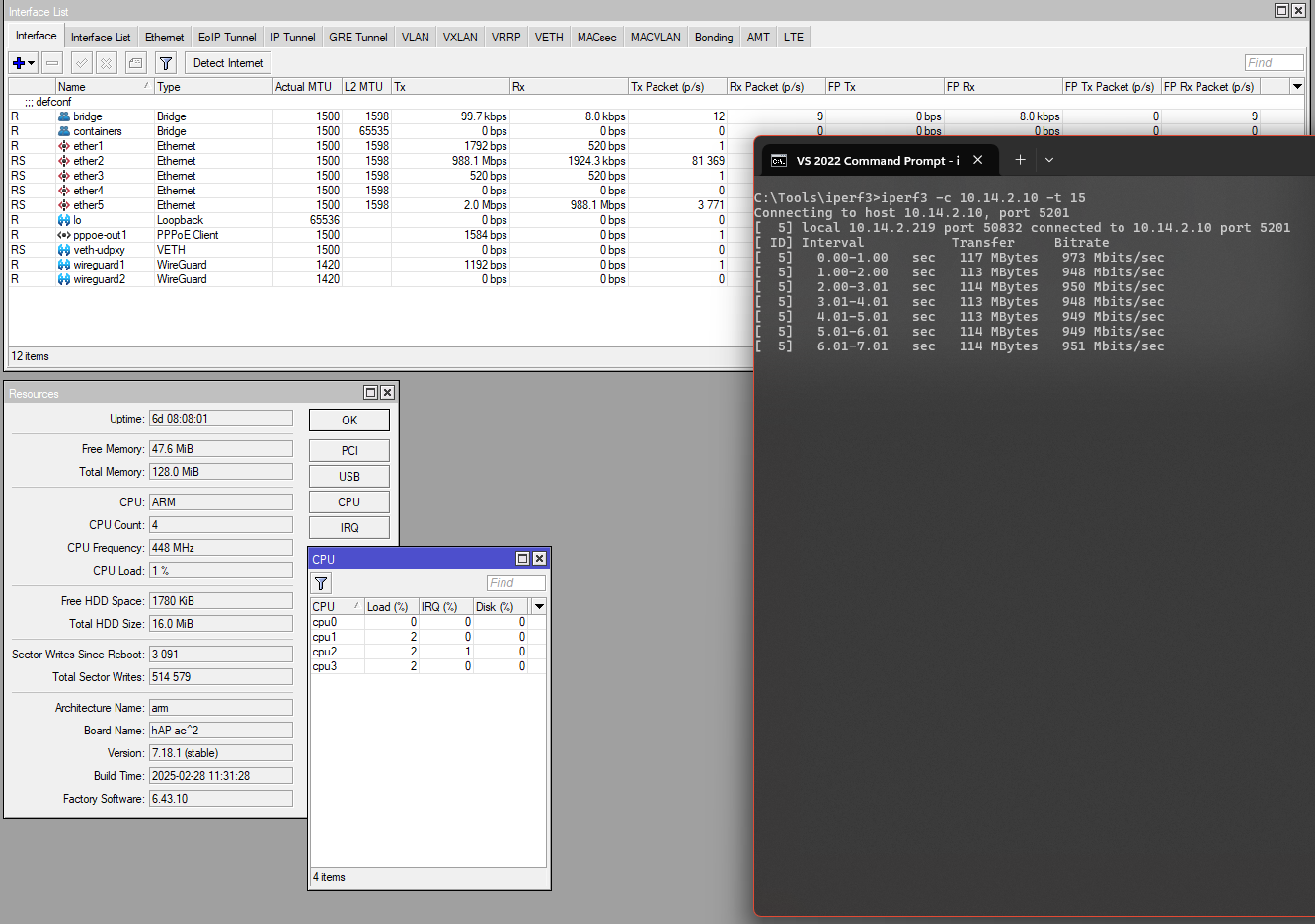
  • First the bridge as configured by defconf is used. No VLAN is configured. 10.14.2.0/24 is the subnet of the bridge. CPU usage is minimal (not used for the transfer):

hap-ac2-defconf-bridge-iperf3.png

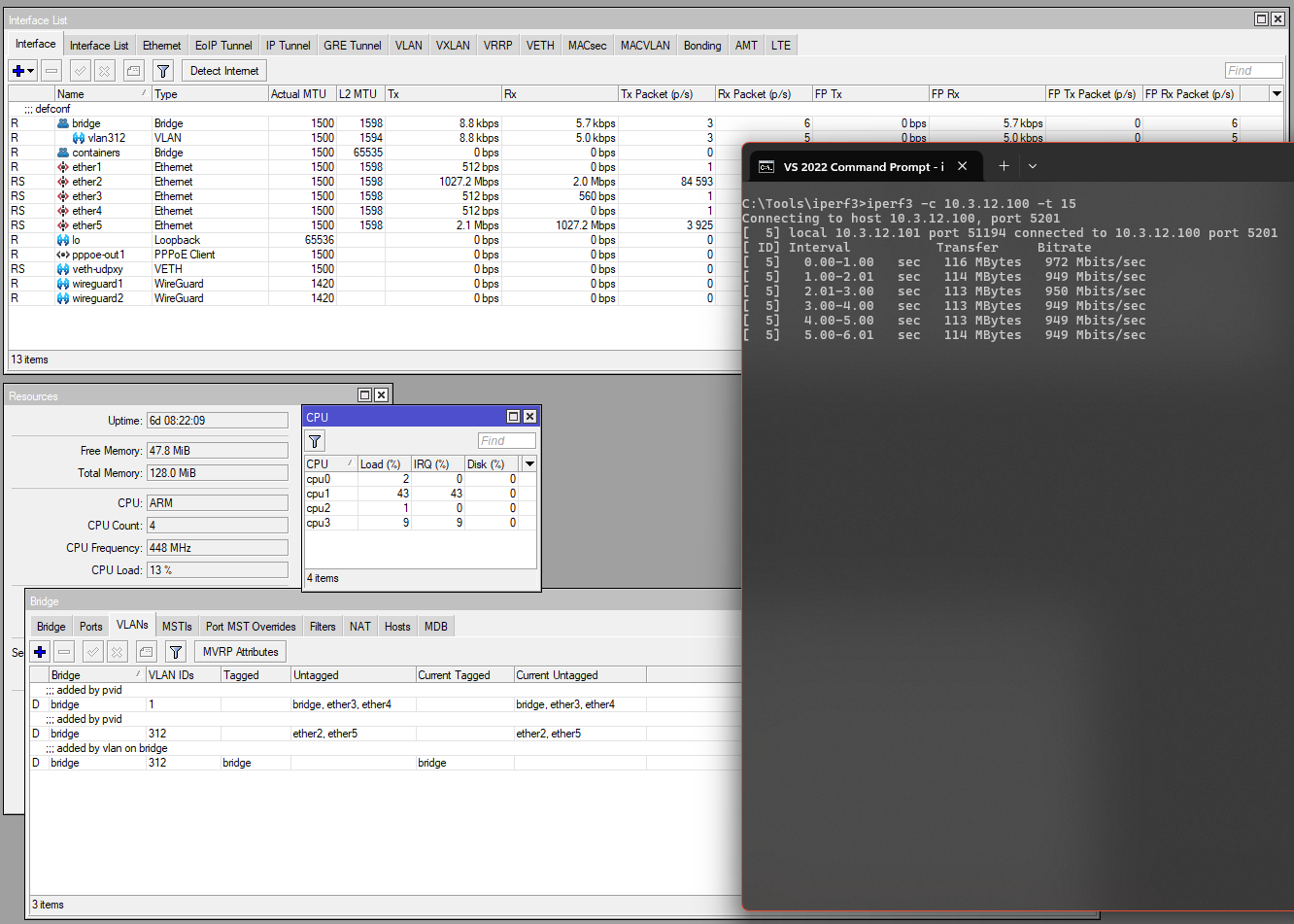
  • Next, a vlan312 interface is configured with Bridge VLAN Filtering, by just setting PVID on the ports, setting Frame Types, and turning on VLAN filtering on the main bridge. 10.3.12.0/24 is the subnet of the VLAN interface:

hap-ac2-bridge-vlan-filtering-iperf3.png
iperf3 throughput is maintained at 950Mbps without problem, but we can see that half of a core are now used (13% = 1/8 of 4 cores) because switching is now done by the main CPU. The CPU frequency is only at 50% (448MHz from 896MHz) though.

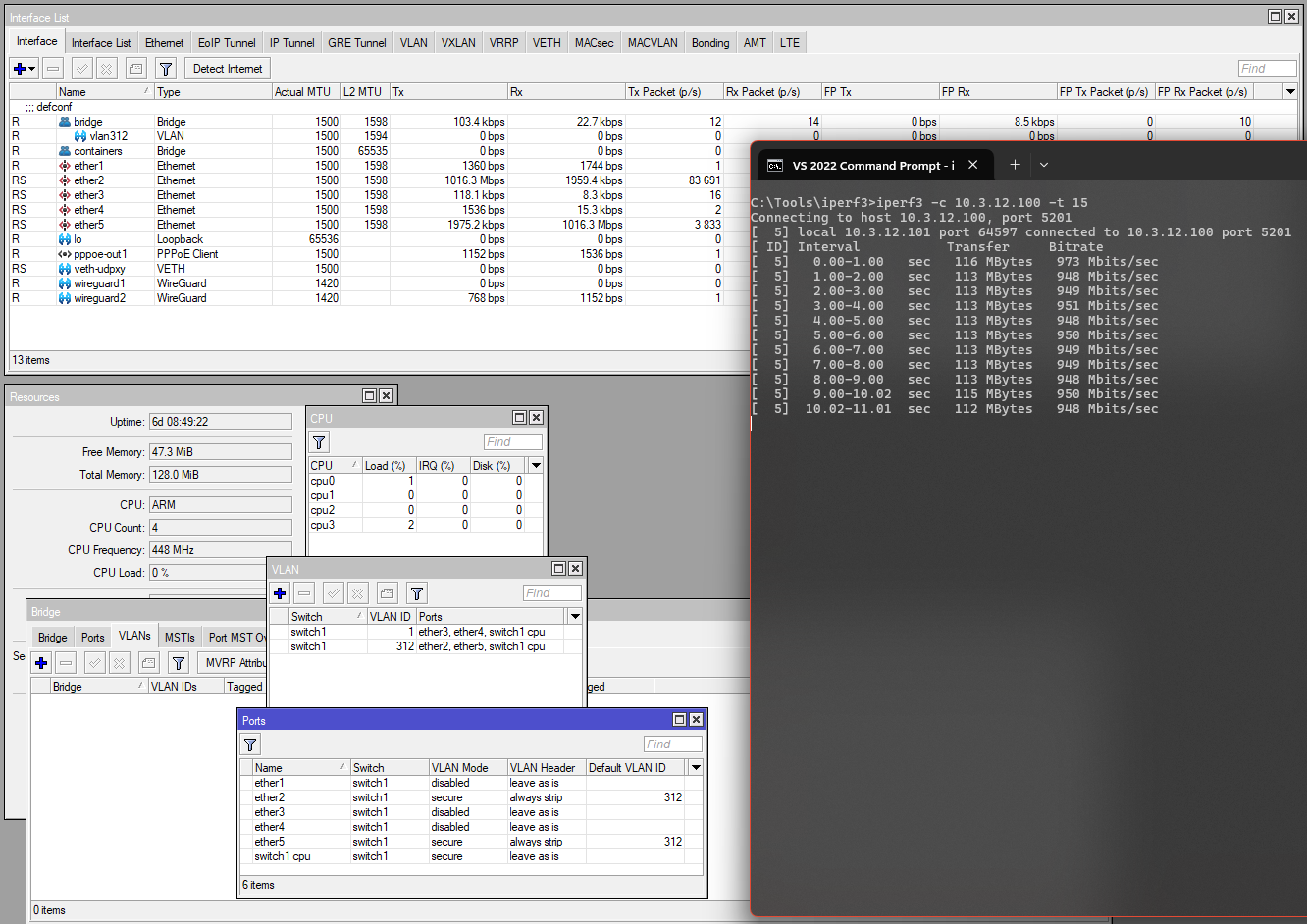
  • Finally, Bridge VLAN Filtering is removed. VLAN 312 is now configured with /interface ethernet switch:

hap-ac2-switch-vlan-iperf3.png
CPU usage is again negligible, because now everything is handled by the switch chip again.

The hAP ac² has a quad-core ARM32 CPU @ max 896MHz, but the hEX PoE from OP only has a single core MIPSBE @ 800MHz. Assuming that MIPSBE is efficient as the ARM in the hAP ac² (can do the same amount of work per MHz, which I don’t think it’s the case), we can interpolate that not using hardware offload for VLAN on the hEX PoE may push the CPU load to

13% * 4 cores * 448MHz / 800MHz ≈ 29%

for a half-duplex 1Gbps throughput between two ports. If OP want to use his hEX PoE as a VLAN capable switch, using all 5 ethernet ports, he should definitely use /interface ethernet switch submenu for configuration. Otherwise switching will be limited by of the only available 1Gbps link between the CPU and the switch chip (this effectively only allows wire speed switching between at most two ports at the same time), and will also waste a lot of CPU.

@CGGXANNX

Very interesting. :slight_smile:

Can you post the text export of the relevant settings for your VLAN 312, both the “bridge” and the “switch” settings, so that I can maybe understand how the “normal” bridge ones are translated into the switch ones?

I am trying to help a user with his configuration, and now everything seemingly works with bridge, and wanted to see if switch would bring any advantage, JFYI:
http://forum.mikrotik.com/t/dhcp-relay-on-one-interface-only/182004/1

  1. Thanks CGG, very clear and useful info.
  2. According to what CGG stated, Yes! The CPU will get less loaded regardless and that should help, also the hint of changing freq may help a bit.
    If the OP in question has significant vlan traffic across Ports, the change will be the most significant.

Those settings were temporary, so I am not able to use the export command to restore them at the moment, but it was just like this:

  • This was the common configuration of the vlan312 interface and address + DHCP server, used in both cases


/interface vlan
add arp=reply-only interface=bridge name=vlan312 vlan-id=312
/interface list member
add interface=vlan312 list=LAN
/ip address
add address=10.3.12.1/24 interface=vlan312 network=10.3.12.0
/ip pool
add name=dhcp-vlan312 ranges=10.3.12.100-10.3.12.250
/ip dhcp-server network
add address=10.3.12.0/24 dns-server=10.3.12.1 gateway=10.3.12.1
/ip dhcp-server
add add-arp=yes address-pool=dhcp-vlan312 interface=vlan312 lease-time=10m \
    name=dhcp-vlan312
  • For the Bridge VLAN Filtering tests, port ether2 and ether5 has been switched to become access port of VLAN 312. I did the changes in the WinBox GUI, but it was just this:


/interface bridge port
set [find bridge=bridge interface=ether2] pvid=312 \
    frame-types=admit-only-untagged-and-priority-tagged
set [find bridge=bridge interface=ether5] pvid=312 \
    frame-types=admit-only-untagged-and-priority-tagged
/interface bridge 
set bridge vlan-filtering=yes

Current version of RouterOS automatically creates the dynamic entries in the /interface bridge vlan table as you can see from the screenshot above, and because this was a temporary configuration, so I didn’t bother to explicitly create the static entries in /interface bridge vlan.

  • Moving to the configuration using /interface ethernet switch, first, the Bridge VLAN Filtering config was undone:


/interface bridge 
set bridge vlan-filtering=no
/interface bridge port
set [find bridge=bridge interface=ether2] pvid=1 frame-types=admit-all
set [find bridge=bridge interface=ether5] pvid=1 frame-types=admit-all

As a result, the dynamically created entries in /interface bridge vlan also disappered. Next, I added just the changes to replicate the config above, with ether2 and ether5 being access port of VLAN 312, ether1 stays outside of the bridge and is the WAN port, ether3 and ether4 are access port of the default bridge and are not touched.

This is similar to the port assignment in /interface bridge vlan, with the difference that there is no specific tagged/untagged separation, and instead of the bridge as CPU port, we use the switch1-cpu port.


/interface ethernet switch vlan
add independent-learning=yes ports=ether3,ether4,switch1-cpu switch=switch1 vlan-id=1
add independent-learning=yes ports=ether2,ether5,switch1-cpu switch=switch1 vlan-id=312

Next is something similar to the configuration on the VLAN tab of the Bridge → Ports entries.


/interface ethernet switch port
set ether2 default-vlan-id=312 vlan-mode=secure vlan-header=always-strip
set ether5 default-vlan-id=312 vlan-mode=secure vlan-header=always-strip
set switch1-cpu vlan-mode=secure

This worked and was what I used in the test. But in case of my hAP ac² with Atheros8327 and of OP’s hEX PoE with QCA8337, vlan-header is ignored anyway, and can actually be left with the default leave-as-it value. Additionally, if we want to explicitly configure ether3 and ether4 (which are member of the default bridge interface) as VLAN too (access port of VLAN 1), as well as specify the VLAN ID for the switch as 1 instead of default, we can do this instead (for Atheros8327 and QCA8337):


/interface ethernet switch port
set ether2 default-vlan-id=312 vlan-mode=secure
set ether3 default-vlan-id=1 vlan-mode=secure
set ether4 default-vlan-id=1 vlan-mode=secure
set ether5 default-vlan-id=312 vlan-mode=secure
set switch1-cpu default-vlan-id=1 vlan-mode=secure

Here is another example where ether2 is trunk port of VLAN 312, ether3 and ether4 are hybrid ports with 312 tagged and 1 (the bridge) untagged, and ether5 is access port of the bridge. Again, for Atheros8327 and QCA8337 vlan-header should always be leave-as-it, and it’s the default value, which means you don’t need to specify vlan-header, but I am still adding it for the other switch chips:


/interface ethernet switch vlan
add independent-learning=yes ports=ether3,ether4,ether5,switch1-cpu switch=switch1 vlan-id=1
add independent-learning=yes ports=ether2,ether3,ether4,switch1-cpu switch=switch1 vlan-id=312
/interface ethernet switch port
set ether2 vlan-mode=secure vlan-header=add-if-missing
set ether3 default-vlan-id=1 vlan-mode=secure vlan-header=leave-as-it
set ether4 default-vlan-id=1 vlan-mode=secure vlan-header=leave-as-it
set ether5 default-vlan-id=1 vlan-mode=secure vlan-header=always-strip
set switch1-cpu default-vlan-id=1 vlan-mode=secure vlan-header=leave-as-is
Thank you very much, very good reference to study. :slight_smile: