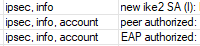
Hello! Using this guide, I’ve set up my router to pass traffic to some sites through a ProtonVPN IPsec tunnel. Generally, everything works fine, but there is one little flaw: the dynamic policy doesn’t always appear in IPsec policies after the router reboots. And no policy means traffic won’t go through VPN.
If I disable-enable IPsec Identity, the policy immediately shows up just fine. But in both cases (when the policy appears and when it doesn’t) logs show exactly the same thing (see attached image).
Is there a fix to that? Or maybe a rough workaround which is, say, going to toggle the identity off and on a few seconds after the router boots?
Thanks!
Model: hAP ac2
Firmware: RouterOS 7.2.3
Config:
# IPsec config
/ip ipsec mode-config add connection-mark=pass-through-vpn name="ProtonVPN mode config" responder=no use-responder-dns=no
/ip ipsec policy group add name=ProtonVPN
/ip ipsec profile add dh-group=modp4096,modp2048,modp1024 dpd-interval=disable-dpd enc-algorithm=aes-256 hash-algorithm=sha256 name="ProtonVPN profile"
/ip ipsec peer add address="<omitted>" exchange-mode=ike2 name="ProtonVPN Server" profile="ProtonVPN profile"
/ip ipsec proposal add auth-algorithms=sha256 enc-algorithms=aes-256-cbc lifetime=0s name="ProtonVPN proposal" pfs-group=none
/ip ipsec identity add auth-method=eap certificate="Proton VPN CA" eap-methods=eap-mschapv2 generate-policy=port-strict mode-config="ProtonVPN mode config" peer="ProtonVPN Server" policy-template-group=ProtonVPN username="<omitted>"
/ip ipsec policy add dst-address=0.0.0.0/0 group=ProtonVPN proposal="ProtonVPN proposal" src-address=0.0.0.0/0 template=yes

# Adding sites to redirect the traffic to like so
/ip firewall address-list add address=example.com list=PASS_THROUGH_VPN

# Marking connections
/ip firewall mangle add action=mark-connection chain=prerouting dst-address-list=PASS_THROUGH_VPN new-connection-mark=pass-through-vpn passthrough=yes
/ip firewall mangle add chain=forward action=change-mss connection-mark=pass-through-vpn tcp-mss=!0-1375 new-mss=1360 protocol=tcp tcp-flags=syn passthrough=yes

# Fasttrack rule that ignores marked connections
/ip firewall filter add action=fasttrack-connection chain=forward connection-mark=no-mark connection-state=established,related hw-offload=yes