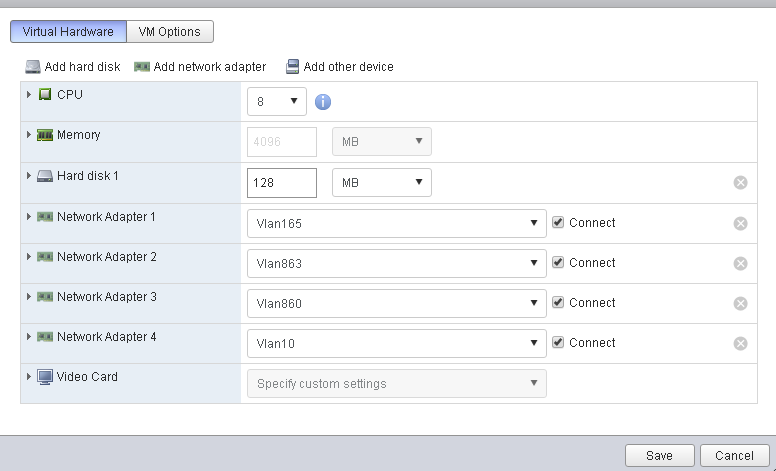
I have mikrotik chr 6.42.7 router on my esxi 6.0 u3 hypervisor with P10 licence, which connect to couple subnets.All my virtual machines use VMXNET3 adapter with 10Gb speed, speed between hosts in one subnet(network) 4-5Gb, but I see that when I send traffic betweent subnets speed is going down and became to 2Gb.I have pretty simple config of my microtik
/interface ethernet
set [ find default-name=ether2 ] mtu=1500
set [ find default-name=ether3 ] mtu=1500
/ip address
add address=10.10.10.1/24 interface=ether2 network=10.10.10.0
add address=10.10.11.1/24 interface=ether3 network=10.10.11.0
To measuge speed I use iperf.
And I do not understand why it happend, please help me.
What is the CPU usage? How many cores have you assigned to CHR?
Finally have you enabled FastTrack?
CPU usage 10-15%, virtual machine use 4 core, on my hypervisor I have two Xeon X5670 processor
Yes I try to use fasttrack but it did not bring any results
A method to get more speed out of a very busy CHR router:
On the physical computer , in the BIOS , disable hyper-threading & set for maximum performance.
On the hyper-visor (VmWare ESXi , set for performance.
Then on the virtual CHR router , enable 8 processors.
Limit other virtual hosted servers on the hyper-visor.
Note - with hyper-threading disabled, the guest hosted CHR now actually has twice the power (providing you are using the same processor count). And - also of note - now your processor CPU cache is more efficient and will have more CPU cache hits.
FYI - With a CHR, you should be able to perform a udp btest (send or receive) to 127.0.0.1 and acheive around 20-Gig.
If you can only acheive 15 Gig or less , then you are running on an old-slow-tired physical computer.
If you can acheive 21 Gig or faster, then you are running on a normal decent physical server.
If you can acheive over 25 Gig, then you are probable running on a newer high-end physical server.
FYI - My CHR systems btest to 127.0.0.1 at 23.6 Gbps.
I have never seen any mikrotik board even come close to 1/3 to 1/2 these speeds on a btest to 127.0.0.1
North Idaho Tom Jones
Hi guys,
I am new to this forum, I was wondering if anyone got better performance by disabling hyper threading. I will need to take down production routers to do this. We have a 9 core cloud core router doing 5x more traffic and the CPU usage is around 40-50% at peak. I have 2x CHR routers with 8 cores of 2.6GHZ Xeon processor, doing around 15Mbps of traffic per interface (WAN and LAN) and the CPU is sitting around 15-25% which I feel is very high for the CPU spec.
These are VM’s running on ESXi 6.0.0, similarly, I have used VMXNET3 and the Licence is P1, I won’t need more than 1Gbps. My firewall rules are limited to dropping invalid connections and anything that doesn’t match my allow rules, there are 11 rules. No NAT rules, no Mangle rules.
I am keen to find a solution to this issue, anyone input would be appreciated. I have attached some screenshots below:


do you use virtio-net of you VM
it may reduce cpu useage

I don’t see that setting, are you sure it is available in ESXi 6.0.0?
i am not sure,but you can check it online.i use the Virtualbox, when i use virto-net ,the cpu usage reduce 20%.
It’s a virtualization technology.
General virtual machines have this function
It can significantly improve network performance and reduce cpu usage
Thanks I will try and find a way to do it, I saw a post regarding setting it up on ESXi, it helps with allowing the tx and rx to use multiple CPU’s thus helping the I/O queuing.
I am also going to try a bandwidth test between two CHR’s, I want to see where the load is coming in, I don’t think it is on the firewall side but I will try enable fast track and disable the Conntrack to lessen the load.
Re: I was wondering if anyone got better performance by disabling hyper threading
YES - BIG time.
Also , on your physical hypervisor server (in my case , VMware ESXi ) , there are some more things you can do to give it more throughput power.
- Configure your hypervisor to use delayed_ack = 1 ( nstead of the defualt delayed_ack = 0 )
- Increase your hypervisor network buffer sizes ( helps give you more throughput )
- If you are using a NFS , disable sync ( and also set your NFS server for delayed_ack = 1 )
- Your hypervisor should always have extra un-assigned ram memory and at least 1 free CPU. This gives you some processing power for hypervisor overhead tasks such as snapshots and/or copying/moving datastores.
- When ever possible , use 10-Gig physical network cards
- When ever possible , use paravirtulized devices ( example vmxnet-3 )
- On your physical and on your virtual machines , disable and remove as many devices as possible. You want to keep you interrupts low and free up resources.
North Idaho Tom Jones
Disable hyper-threading on the physical computer in the BIOS.
Thanks for the feedback, will give it a try.
I did try a Bandwidth test from one router to the other last night, from LAN interface to LAN interface I got just under a Gbps both ways which is acceptable, the CPU was under 10% which is confusing. I’m still not sure if the issue is with the firewall or with the routing of packets between two interfaces on two different subnets. Will investigate further and post results.
Thanks again!
Just an update, I have not yet hanged BIOS settings, however, we are using these routers to cross-connect with voice network providers. I noticed that SIP direct media was enabled, I have previously had issues with this setting, do you think it could have been causing load? we only push SIP traffic over these routers.
That (voip) explains the high packet rate but low bandwidth I saw on your screenshots.
Unless you use NAT, you don’t need the SIP direct media helper (and I think it doesn’t even get involved in forwarded traffic when there is no NAT).
Also, connection tracking in general, with lots of connections and/or packet rate can cause high load. If you can, disable it altogether, or if you don’t need the voip traffic to be tracked, then apply no-track rules in the Raw table for that particular traffic.
Doing a bandwidth test can yield high bandwidth numbers with low CPU usage because the bandwidth test uses just a few connections and large sized packets.
Whereas having 14Kpps in voip traffic, must mean you have tons of simultaneous calls/connections - which is more heavy for connection-tracking.
That’s official Intel recommendation, if virtualization is used. HyperThreading does more harm than good, in this case. 
Isn’t that mainly because of security (Meltdown & co)?
No. This is from far earlier than that. It’s about performance: it is better without HyperThreading (this kind of workload is).
Why disable hyper-threading ?
Hyper-Threading is a CPU trick to make a CPU core appear and function as if it were two CPU cores.
Some teckie info on Hyper-Threading - - - What is actually happening when Hyper-Threading is enabled is this:
- There is a software configured SMI interrupt (System Management Interrupt) that
A) Stops the CPU
B) POPs the stack (It copies the contents of CPU registers to a temporary memory location).
C) It then PUSHes the stack (It copies the contents of a different temporary memory location into the CPU registers)
D) It then allows the CPU to resume running.
E) After a few clock cycles, another SMI event occurs and this time the SMI process POPs and PUSHes the stacks then resumes running the original CPU contents. This process constantly repeats which to make it appear as if a CPU core is is two CPU cores.
There are two big problems with Hyper-Threading:
- Hyper-Threading is a waste of CPU clock cycles in the SMI process which could be used to keep programs running when Hyper-Threading is disabled.
- Hyper-Threading chews up built-in CPU cache memory and often creates CPU cache MISSes. A CPU cache MISS forces the CPU to slow down to RAM memory speed instead using the faster built-in CPU CACHE memory speed.
For a faster CHR running on a Hyper-Visor system (like VmWare ESXi):
- Disable Hyper-Threading
- Use Physical 10-Gig network cards (with 10-Gig switches)
- Use ParaVirtual devices (HyperVisor optomised drivers such as VMXNET-3 network interfaces and when possible also use “VMware Paravirtual” SCSI controllers)
- Remove any unnecesary devices not needed (such as CD-Drives, serial-ports, floppy disk drives …)
- Do not over assign the physical CPUs and memory to virtual machines. Try to keep at least one free CPU
- When possible, move non-essential non-high-speed virtual machines to a different slower Hyper-Visor system (keep your core running fast).
Hey, let me just get into this thread because we’re experiencing the same issue.
Don’t want to hijack but maybe it gives more insight to the problem and we can pinpoint more?
Our setup is the following:
Tyan Server: GT62F-B8026 with firmware R3.00
Processors: AMD EPYC 7551P 32-Core Processor
Hypervisor: VMware ESXi, 6.5.0, 7967591
NICs: Mellanox MT27630 (ConnectX-4 LX)
Storage: Full Flash Dorado 5000v3
So the following has been tested and applied:
- Disabled SMT
- Paravirtualisation Enabled
- Delayed Ack on HBA inheritance off and manually Enabled
- CPU is 8 sockets with 1 core for this test device
- Storage is on IDE
- VMXNet3 adapter with DirectIO enabled

This is the result when testing to its own BTest: (This is the ONLY VM running on this host while doing the test)
And CPU is on 12% stable

Pirlet ,
FYI - I assume you are running a Mikrotik CHR (64-Bit ROS).
Heads up - I don’t think you need the “SCSI controller 0” in your configuration. If I am correct , the CHR does not even have SCSI drivers and the virtual CHR hard disk is actually IDE.
By removing the SCSI controller , you free up some resources and at least one interrupt.
Here is my configuration on my CHR which happens to be one of my BGP routers: