I just set up hAP ax3 and noticed significantly worse WiFi performance compared to hAP ac3.
I did some tests using iperf3 and hAP ax3 had 30% worse performance. Indicated signal strength (on Android phone) was on average 20% worse on ax3. Test details are in attached file.
probably the old ASUS do not care about new wifi regulation and use maximum power of radio. I have very good experience with ASUS and with they MESH system I do recomend asus rt-ax56u.
You can change the country for better signal, but do not expect miracles. And be careful router can use specific 5 ghz frequency and some clinets/device can have problem when they are set to czešch country.
I see.
I will try Czešch country and then i will decide what to do.
I love routerboard inside, so maybe i will disable wifi6 and leave wifi to be managed by the old one as a dumb AP only.
Does S20 support more than 1 chain (MIMO)? Did you ever observe it using 2S (in wireless registration table) while performing throughput test? I have a few android devices (phones and tablets) and none actually support 2 chains (2S) … which logically reduces throughput quite severely.
You are using 40MHz bandwidth on the 2.4GHz radio of the MikroTik while the Asus is 20MHz. That will make a huge difference, especially looking at the saturation of the 2.4GHz band. Next, if you want to compare you should use the same settings (bands) on both devices (ofcourse not at the same time).
As I wrote you asus probably do not care about new regulation. I fully agree with erlinden if you are comparing 20Mhz with 40Mhz you probably do not know what are you doing You must compare router on the axact place, with the axact same Mhz and on exact same band and of course one by one…not both at the same time…
Signal -37 is better/stronger than -47 on the 2,4Ghz and the signal -59 is bit worse than -58 on 5,4Hgz. You yould also try the throughput if you have something like ipref or openspeedtest server on your local network…Worse signal on wifi 5,6Ghz AX will have better throughput than better signal on 5,4Ghz AC
Yeah .. but ax can work with single chain as well … and will perform slightly better than ac with same single chain due to better modulation scheme available (1024QAM vs. 256QAM). Device manufacturers tend to pick lowest possible denominator when displaying indicators of “advanced” functionality.
yes i know that -37 is higher..
just look at the graph, not at a specific moment.
I don’t care about throughput. When i need throught i use Ethernet, not wifi.
What i need is coverage for all the devices. ( an simple IOT device need just to connect)
I simply cannot unplug the Asus and plug the HAP, because some device will be completely offline.
However, maybe it’s because of new EU laws about emissions..
My posts are not intended to just say the HAP is not good. I’m just saying it gives less coverage or maybe i’m doing a mistake, so i appreciate any comment toward the solution.
I will try to put them in same conditions..
Thank you
 Thank you!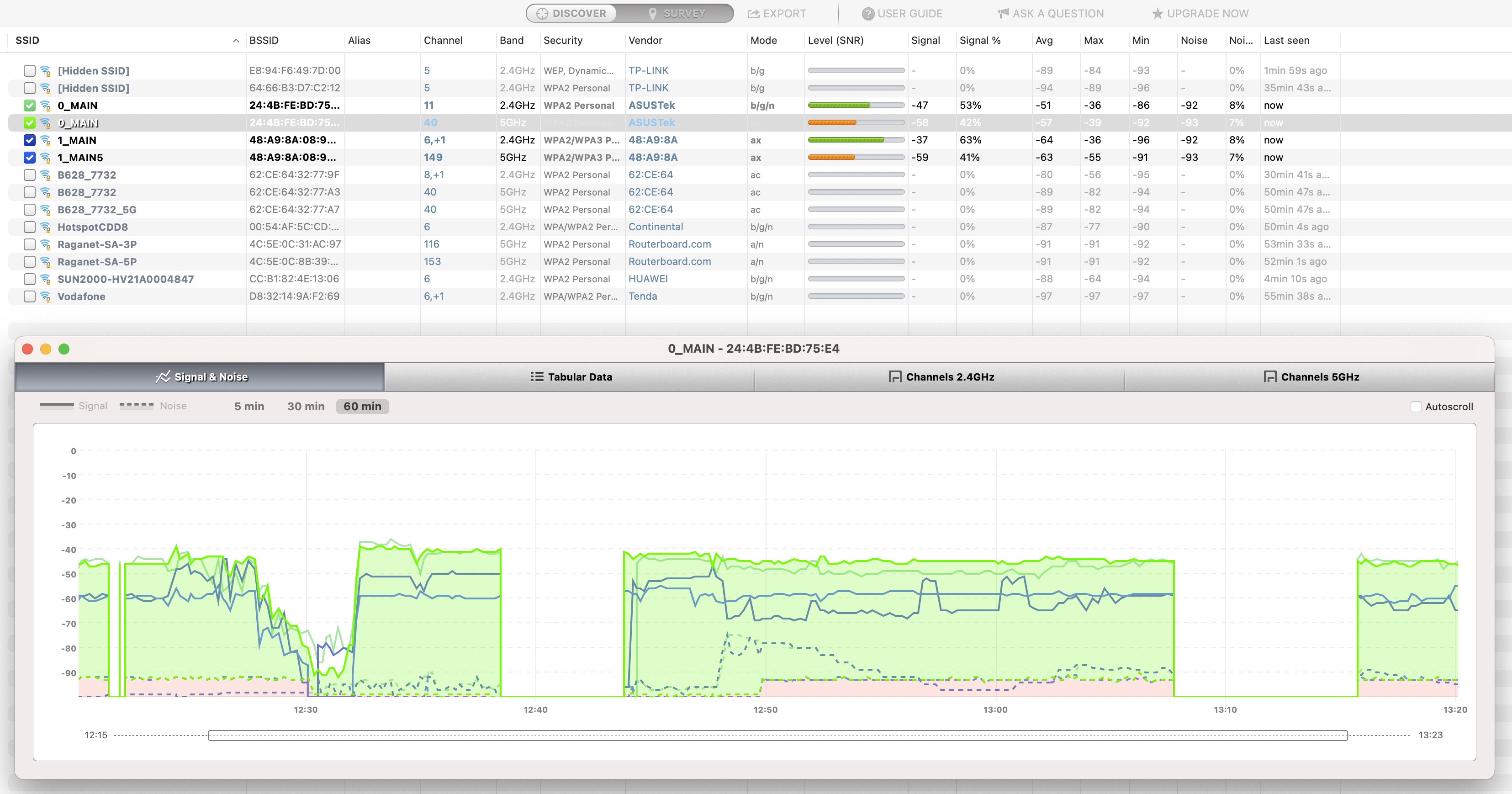

 You must compare router on the axact place, with the axact same Mhz and on exact same band and of course one by one…not both at the same time…