Yes, I tried this, but without success.
I already checked, if “forced disconnects” would help, but as I had enough overlap, clients did roam, before the “kick” would have happened.
Kicking the client or making the wifi hostile to the client to force it to roam will never be better than letting the client roam on its own. (After the kick the process for roaming has still to start as a reaction to the kick, this adds some reaction time to the roaming process). 3-5 seconds is long!!! Knowing where, in what state the time is spend those 5 seconds is crucial.
This is my experience (production site) … client devices not under control.
By centralizing the “wireless log” one can see that the association to the new WLAN comes before the disassociation of the old WLAN if a device migrates from 2.4GHz to 5 GHz on the same AP.
If hopping from AP to AP then the AP interconnection and the switch MAC tables must follow the topology change asap.
Configuration is stand-alone AP’s (no CAPsMAN), switch is RB260GSP.
HI gotsprings, the problem with that (in my case ) is a user will then most likely stick with the AP on a very weak signal when a much better signal is available???
Yes they do. And this can happen very frequently.
Also handheld devices have regular dips in the signal strength because of hand and body obstruction. Therefore I set “Allow Signal out of range” to 30sec.
And then the units behind a wall or other obstacle… strong enough signal but very bad CCQ (<30%) , would like them to use another AP.
Thanks I will adjust timings to 30 seconds.
Thus my 0-75 out of range time is now 30 seconds → If the signal drops to low, i dont want to kick off a device prematurely
SHOULD I, change my -76 to -120 delay time to 5 seconds LOL, or keep at 10. ----> Presumably if the signal is poor, the quicker I force the device to a better AP, the better???
Well I don’t know. My information comes from the wiki, and even the ‘help’ reincarnation of the wiki. But that leaves me clueless
It says the following:
For example, if client's signal during connection is -41 and we have ACL rule

/interface wireless access-list
add authentication=yes forwarding=yes interface=wlan2 signal-range=-55..0
Then connection is not matched to any ACL rule and if signal drops to -70..-80, client will not be disconnected.


To make it work correctly it is required that client is matched by any of ACL rules.

If we modify ACL rules in previous example to:

/interface wireless access-list
add interface=wlan2 signal-range=-55
add authentication=no forwarding=no interface=wlan2 signal-range=-120..-56
Then if signal drops to -56, client will be disconnected.
What? “Then connection is not matched to any ACL rule” , so -41 is not in the signal-range=-55..0 ? Is it not ?
and a second time, probably less accurate
signal-range (NUM..NUM - both NUM are numbers in the range -120..120; Default: -120..120)

Rule matches if signal strength of the station is within the range.
If signal strength of the station will go out of the range that is specified in the rule, access point will disconnect that station.
The information about the " Allow Signal Out Of Range" is more cryptic , it is:
(void)
The full wiki-class information is missing: it would look like:
Allow Signal Out Of Range (time); default 0:00:10) Time the signal is allowed out-of-range
Is the “Allow Signal Out Of Range” ever used in case of a denial (no authentication)? In what meaning? The fact that that rule is active even if the signal is strong ??? NO!
How to know? Experiments to confirm some hypothesis?
Mikrotik has no “concept manual”, no “theory of operation manual”, no “administrator guide”, just a “command reference” even with parts missing.
no-LOL. We are wasting lots of time by misunderstanding the wiki.
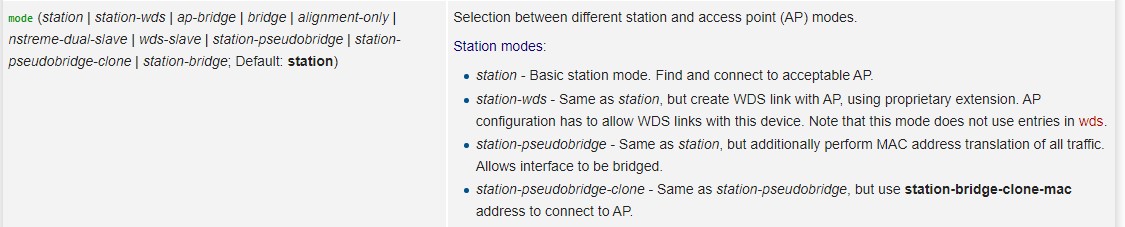
(Try to find the information for mode “station-bridge” …and “mode” information is not yet transferred to the ‘help’ reincarnation)
EDIT: after checks not sure of the “NO!” anymore
Is the “Allow Signal Out Of Range” ever used in case of a denial (no authentication)? In what meaning? The fact that that rule is active even if the signal is strong ??? NO!
How to know? Experiments to confirm some hypothesis?
There is more in this “access list” accept-reject process, than just these 2 cases.
But where is the “message manual” so we can understand the informative debug messages?
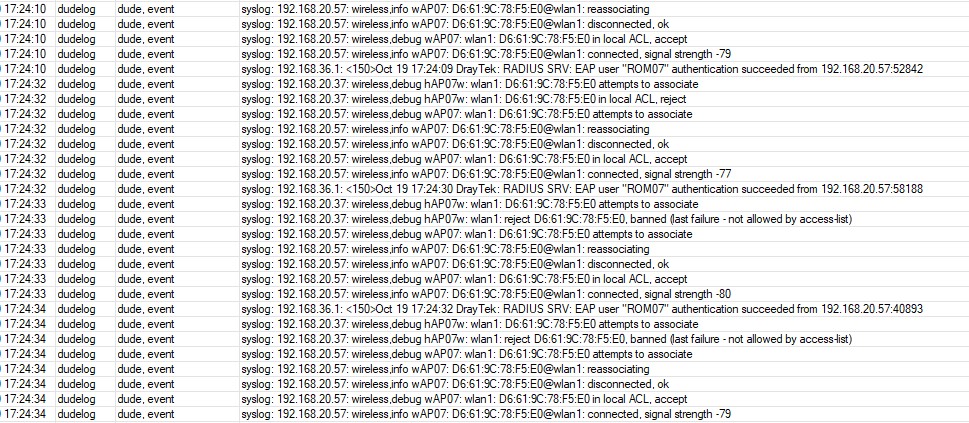
Accept/reject OK. But what is “banned (last failure - not allowed by access-list)”. Comes after repeated rejects?
Or is this indeed the “Allow signal out of range” time for the reject rule ???
(2 AP’s for roaming hAP07w and wAP07. Elapsed time 3 sec)
Well this might be an excellent idea. After 24 hours, with a much lower (3 sec) out of range time in the reject rule , I had no more “banned (last failure - not allowed by access-list)” messages !!!
So far the long out of range time in the reject rule seems to have triggered that banned condition.
Current setting: "Allow signal out of range " time for the authenticate rule (120..-86) is 30 sec, and 3 sec for the no-authenticate rule (-87..-120)
If you don’t enable “default authenticate” in the interface settings you do not need the NO-authentification rule!
Makes life easier for wifi admins and both rules will then not compete anymore or create race conditions …
Was also my deduction, in trying to understand the mechanism behind this.
This makes the “wiki” compleet “wacko” on this topic. ‘Then connection is not matched to any ACL rule and if signal drops to -70..-80, client will not be disconnected.’
In general I see 10 db(?) (or what ever the signal strength is measured in) as the needed overlap between rules
for one device, to ensure it can always connect to one or the other device.
Shorter time outs than 30 secs are a problem as Wifi signal can quickly deteriorate or change as you said.
It also prevents ping pong effect between two AP or Wifi interfaces.
Hello bpwl !
can you explain us how do you get a roaming time of less than 3-5 seconds? I’ve been trying various configurations for months and I can assure you that RouterOS has just those times and they can’t compress them. Both L3 and L2. Even disabling RSTP/STP the times are still high just to reach again an L2 client that transmits data in broadcast.