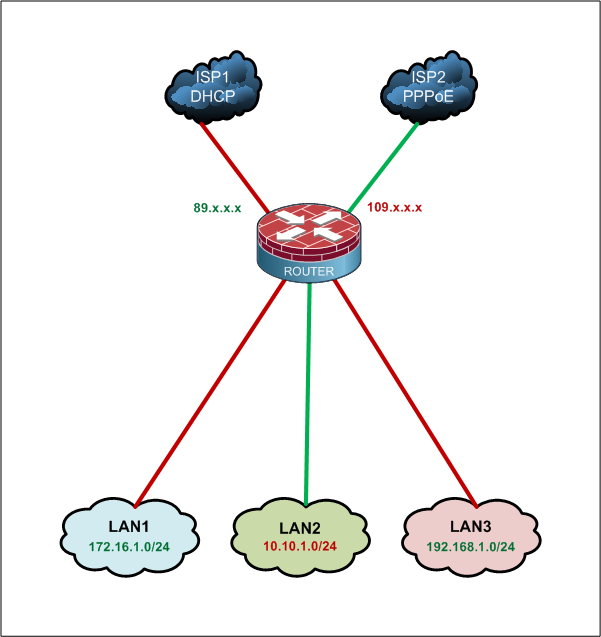
I have 2 internet connections through 2 different ISP’s that I’m connecting to a Mikrotik router. One connection provides the Mikrotik with it’s own public IP address. With the other one, I’m assigning a private IP to the Mikrotik and forwarding the appropriate management port to that IP from a modem, which has a public IP.
Remote access works on each WAN connection individually if I connect just one at a time. The problem I’m having is that when both WAN connections are connected to the Mikrotik, I can only access it remotely on the interface with the public IP. Does anyone have any idea why this might be happening?
Most likely because you have a default route pointing out one ISP. When you connect through the second ISP return traffic is still coming through the first ISP, with the IP address from that ISP. At that point your client on the Internet is receiving packets with a source IP it didn’t initiate traffic with, so it discards them.
While you’re not using PCC, that portion of configuration applies to your situation. Use connection marks, routing marks, and routes for those routing marks to ensure that all packets for connections established via a specific ISP remain on that ISP.
Fewi, should he also take care of traffic in the forward chain? I use to mark this chain the same way as the input chain to make sure dst-nat is also working. I also saw you in another similar topic using the prerouting chain to mark the traffic, in this case no need to mark the forward chain since all traffic comming into wan1 and wan2 interface will be mark with the prerouting chain. Can you elaborate on which method you prefer and why?
In this case he’s only talking about router access so input and output are sufficient. Once traffic through the router is added to the picture it is time to re-evaluate.
I personally prefer the prerouting chain because it happens before any NAT. I partially earn my living being a CCSP dealing with Cisco firewalls. Before 8.3 their ASA ACLs refer to before NAT IPs. That’s all. Once I get comfortable with using 8.3+ where real IPs are used after NAT I will probably start preferring other chains like I should.
In this case he’s only talking about router access so input and output are sufficient. Once traffic through the router is added to the picture it is time to re-evaluate.
I personally prefer the prerouting chain because it happens before any NAT. I partially earn my living dealing with Cisco firewalls. My main professional use of RouterOS is Hotspots. Before 8.3 their ASA ACLs refer to before NAT IPs. That’s all. Once I get comfortable with using 8.3+ where real IPs are used after NAT I will probably start preferring other chains like I should.
Thanks for the info, Fewi. I used the configs you posted and now remote access works through both interfaces. I also checked out the PCC Manual you posted, adjusted the quick start configs, and got traffic moving through the router. Actually, I had traffic moving through before, but it seems like it’s being balanced more evenly now and I have a feeling that adding those configs just solved some future problems. Thanks again!
The rest to working config is what you already have, some configuration (IP address, gateway) for each WAN.
And all you need to do is add two duplicate default routes, only they won’t be exactly duplicate, because each will be in different routing table. Then add the four mangle rules and you’re done.
The best way for new routes depends on what type of config you have (static, DHCP, PPPoE, …). So rather than asking for example config (which probably wouldn’t help you anyway), better share what you have and decribe what you don’t understand.
If you had PCC based on example config (https://wiki.mikrotik.com/wiki/Manual:PCC), then connecting to both public addresses would already work. Check that page. First you mark incoming connections in prerouting, based on WAN interface. Then you mark routing for responses in output, based on connection marks.
There are different methods. You can just add ISP2 gateway to ISP1 routing table with higher distance and check-gateway option for both, or you can try something more complex like Advanced Routing Failover without Scripting.