I have question. Is MT OVPN UDP implementation compatible with openvpn.net implementation ?
I have following configuration on OpenVPN Server (OpenVPN 2.6.3 x86_64-pc-linux-gnu Debian 12)
server 172.16.0.0 255.255.255.0
topology subnet
dev tun
proto tcp
port 1194
keepalive 10 120

ca ca.crt
cert server.crt
key server.key
dh dh.pem

auth SHA256
data-ciphers AES-256-GCM:AES-256-CBC:AES-128-GCM:AES-128-CBC
data-ciphers-fallback AES-256-CBC
engine aesni
On TCP mode woks perfect (with Hardware Acceleration)
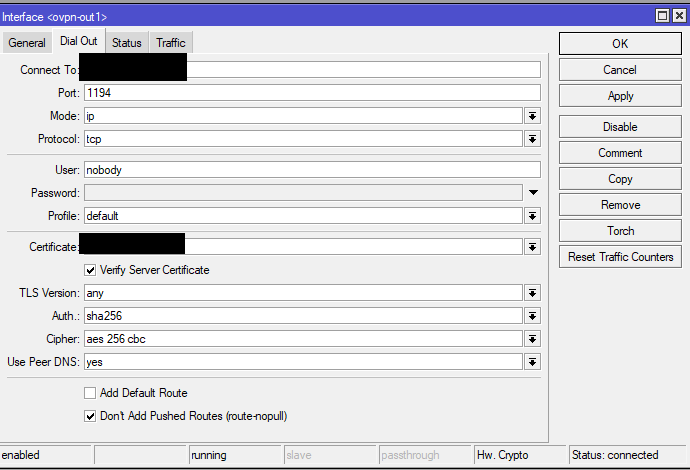
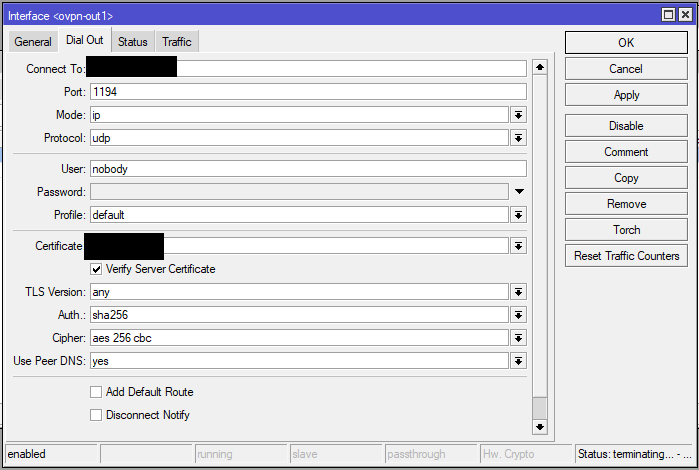
When I simply switch configuration to udp (replacing only one line):
proto udp
Connection to MT OVPN client stopped working:
Some logs from server:
2023-07-02 14:37:13 OpenVPN 2.6.3 x86_64-pc-linux-gnu [SSL (OpenSSL)] [LZO] [LZ4] [EPOLL] [PKCS11] [MH/PKTINFO] [AEAD] [DCO]
2023-07-02 14:37:13 library versions: OpenSSL 3.0.9 30 May 2023, LZO 2.10
2023-07-02 14:37:13 DCO version: N/A
2023-07-02 14:37:13 TUN/TAP device tun0 opened
2023-07-02 14:37:13 net_iface_mtu_set: mtu 1500 for tun0
2023-07-02 14:37:13 net_iface_up: set tun0 up
2023-07-02 14:37:13 net_addr_v4_add: 172.16.0.1/24 dev tun0
2023-07-02 14:37:13 Could not determine IPv4/IPv6 protocol. Using AF_INET
2023-07-02 14:37:13 UDPv4 link local (bound): [AF_INET][undef]:1194
2023-07-02 14:37:13 UDPv4 link remote: [AF_UNSPEC]
2023-07-02 14:37:13 Initialization Sequence Completed
2023-07-02 14:37:19 0.0.0.0:50847 Note: OpenSSL hardware crypto engine functionality is not available
2023-07-02 14:37:19 0.0.0.0:50847 TLS Error: Unroutable control packet received from [AF_INET]0.0.0.0:50847 (si=3 op=P_CONTROL_V1)
2023-07-02 14:37:19 0.0.0.0:50847 TLS Error: Unroutable control packet received from [AF_INET]0.0.0.0:50847 (si=3 op=P_ACK_V1)
2023-07-02 14:37:20 0.0.0.0:50847 TLS Error: Unroutable control packet received from [AF_INET]0.0.0.0:50847 (si=3 op=P_CONTROL_V1)
2023-07-02 14:37:21 0.0.0.0:50847 TLS Error: Unroutable control packet received from [AF_INET]0.0.0.0:50847 (si=3 op=P_CONTROL_V1)
2023-07-02 14:37:22 0.0.0.0:50847 TLS Error: Unroutable control packet received from [AF_INET]0.0.0.0:50847 (si=3 op=P_CONTROL_V1)
2023-07-02 14:37:23 0.0.0.0:50847 TLS Error: Unroutable control packet received from [AF_INET]0.0.0.0:50847 (si=3 op=P_CONTROL_V1)
2023-07-02 14:37:24 0.0.0.0:50847 TLS Error: Unroutable control packet received from [AF_INET]0.0.0.0:50847 (si=3 op=P_CONTROL_V1)
2023-07-02 14:37:25 0.0.0.0:50847 TLS Error: Unroutable control packet received from [AF_INET]0.0.0.0:50847 (si=3 op=P_CONTROL_V1)
2023-07-02 14:37:26 0.0.0.0:50847 TLS Error: Unroutable control packet received from [AF_INET]0.0.0.0:50847 (si=3 op=P_CONTROL_V1)
2023-07-02 14:37:27 0.0.0.0:50847 TLS Error: Unroutable control packet received from [AF_INET]0.0.0.0:50847 (si=3 op=P_CONTROL_V1)
2023-07-02 14:37:28 0.0.0.0:50847 TLS Error: Unroutable control packet received from [AF_INET]0.0.0.0:50847 (si=3 op=P_CONTROL_V1)
2023-07-02 14:37:29 0.0.0.0:50847 TLS Error: Unroutable control packet received from [AF_INET]0.0.0.0:50847 (si=3 op=P_CONTROL_V1)
2023-07-02 14:37:30 0.0.0.0:50847 TLS Error: Unroutable control packet received from [AF_INET]0.0.0.0:50847 (si=3 op=P_CONTROL_V1)
2023-07-02 14:37:31 0.0.0.0:50847 TLS Error: Unroutable control packet received from [AF_INET]0.0.0.0:50847 (si=3 op=P_CONTROL_V1)
2023-07-02 14:37:32 0.0.0.0:50847 TLS Error: Unroutable control packet received from [AF_INET]0.0.0.0:50847 (si=3 op=P_CONTROL_V1)
2023-07-02 14:37:33 0.0.0.0:50847 TLS Error: Unroutable control packet received from [AF_INET]0.0.0.0:50847 (si=3 op=P_CONTROL_V1)
2023-07-02 14:37:34 0.0.0.0:50847 TLS Error: Unroutable control packet received from [AF_INET]0.0.0.0:50847 (si=3 op=P_CONTROL_V1)
2023-07-02 14:37:35 0.0.0.0:50847 TLS Error: Unroutable control packet received from [AF_INET]0.0.0.0:50847 (si=3 op=P_CONTROL_V1)
2023-07-02 14:37:36 0.0.0.0:50847 TLS Error: Unroutable control packet received from [AF_INET]0.0.0.0:50847 (si=3 op=P_CONTROL_V1)
2023-07-02 14:37:37 0.0.0.0:50847 TLS Error: Unroutable control packet received from [AF_INET]0.0.0.0:50847 (si=3 op=P_CONTROL_V1)
2023-07-02 14:37:38 0.0.0.0:50847 TLS Error: Unroutable control packet received from [AF_INET]0.0.0.0:50847 (si=3 op=P_CONTROL_V1)
2023-07-02 14:37:39 0.0.0.0:50847 TLS Error: Unroutable control packet received from [AF_INET]0.0.0.0:50847 (si=3 op=P_CONTROL_V1)
2023-07-02 14:37:40 0.0.0.0:50847 TLS Error: Unroutable control packet received from [AF_INET]0.0.0.0:50847 (si=3 op=P_CONTROL_V1)
2023-07-02 14:37:41 0.0.0.0:50847 TLS Error: Unroutable control packet received from [AF_INET]0.0.0.0:50847 (si=3 op=P_CONTROL_V1)
2023-07-02 14:37:42 0.0.0.0:50847 TLS Error: Unroutable control packet received from [AF_INET]0.0.0.0:50847 (si=3 op=P_CONTROL_V1)
2023-07-02 14:37:43 0.0.0.0:50847 TLS Error: Unroutable control packet received from [AF_INET]0.0.0.0:50847 (si=3 op=P_CONTROL_V1)
2023-07-02 14:37:44 0.0.0.0:50847 TLS Error: Unroutable control packet received from [AF_INET]0.0.0.0:50847 (si=3 op=P_CONTROL_V1)
2023-07-02 14:37:45 0.0.0.0:50847 TLS Error: Unroutable control packet received from [AF_INET]0.0.0.0:50847 (si=3 op=P_CONTROL_V1)
2023-07-02 14:37:46 0.0.0.0:50847 TLS Error: Unroutable control packet received from [AF_INET]0.0.0.0:50847 (si=3 op=P_CONTROL_V1)
2023-07-02 14:37:47 0.0.0.0:50847 TLS Error: Unroutable control packet received from [AF_INET]0.0.0.0:50847 (si=3 op=P_CONTROL_V1)
2023-07-02 14:37:48 0.0.0.0:50847 TLS Error: Unroutable control packet received from [AF_INET]0.0.0.0:50847 (si=3 op=P_CONTROL_V1)
^C2023-07-02 14:37:51 event_wait : Interrupted system call (fd=-1,code=4)
2023-07-02 14:37:51 net_addr_v4_del: 172.16.0.1 dev tun0
2023-07-02 14:37:51 SIGINT[hard,] received, process exiting