Hello everyone,
We purchased CRS328-24P-4S+RM and bunch of RBwAP2nD WAPs.
When i connect WAP to CRS328-24P-4S+RM port turns red and i cannot see the device in WInbox.
I also have 2 - RB260GSP, and 2 MikroTik SXTsq Lite5 connected to the same switch, and they visible and accessible without any problem.
I’ve tried swapping RBwAP2nD for another same unit and changing cables, but no success.
Any pointers or help would be appreciated.
I got the same with RB260GSP (CSS106-1G-4P-1S) I just bought that I wanted to run my wAP ac (RBwAPG-5HacT2HnD). Is it possible that these two MikroTik devices are not compatible in their POE implementations?!
RBwAPG-5HacT2HnD specs say:
PoE in 802.3af/at
PoE in input Voltage 11-57 V
Max power consumption 12 W
RB260GSP (CSS106-1G-4P-1S) specs say:
PoE out Passive PoE
Max out per port output (input < 30 V) 1 A
Max total out (A) 2 A
Is there any way to make them work with each other?!
Would wAP ac (RBwAPG-5HacT2HnD) work correctly with hEX PoE (RB960PGS)?
hEX PoE (RB960PGS) specs say:
PoE out 802.3af/at
Max out per port output (input < 30 V) 1 A
Max out per port output (input > 30 V) 450 mA
@emilk Have a look at your set of devices you listed as they also have a mix of PoE standards (Passive and 802.3af/at) but, based on your comment, you have some strange combinations working. You say that CRS328-24P-4S+RM with 802.3af/at successfully powers RB260GSP with Passive POE while it won’t power RBwAP2nD with 802.3af/at. Which is opposite of the case I have.
The color indicates POE output type. IIRC green is for passive POE and red is for 802.3af/at.
This is not related to the link.
But why do i not see it in Winbox?
I see all other devices. Ive reset it, and also nothing 
I checked swOS and port light turning red indicated short circuit (power delivery issue) being detected in my case.
On RB260GSP red is when PoE power is delivered (e.g. to wAP, hAP, Omnitik, SXTsq …) , green when no power is delivered.
https://i.mt.lv/cdn/product_files/CSS106-series-qg_200234.pdf
Power Output
The CSS106-1G-4P-1S model can supply PoE powering to external devices from its Ethernet ports. This is
convenient, as you don’t need any additional PoE injectors to power other devices. The output Voltage will be the
same as input Voltage. By default it is set to “auto”, so it is safe to plug any device into the powered ports.
Maximum power output of each ethernet port in this mode is 1 A, total for all ports 2 A. Once Power Output is
enabled in RouterOS, the Ethernet LED light turns from Green, to Red. Red LED means the port is currently
providing PoE power. For best PoE output functionality, please use the power jack to power the CSS unit.
The wAP has a default configuration with the ethernet port defined as WAN port. Management access is NOT possible due to the firewall blocking access.
Connect via Wifi, and attach ether1 to the bridge, or change the interface list to LAN for ether1. (Or edit the firewall rules)
Would wAP ac (RBwAPG-5HacT2HnD) work correctly with hEX PoE (RB960PGS)?
YES. No problem at all.
For management access connect once to the wAP ac via wifi, and do one of these things:
- add ether1 to the bridge, and replace DHCP-server by DHCP-client on bridge
- change the interface list from WAN to LAN for ether1
- change the firewall rules (allow 8291 from ether1) or modify/disable firewall.
By default ether1 is the WAN port for a wAP ac. ! ! !
Thanks bpwl! I’m aware of inability to access mgmt from WAN port but my problem is that swOS is saying that there is short circuit when I connect wAP ac to it. I just misinterpreted that red light indicates that as well. wAP ac works normaly if I inject power via adapter.
Is it correct that RB260GSP cannot power wAP?
I have multiple wAP ac’s hanging off the RB260GSP, using the power supply from in the box.
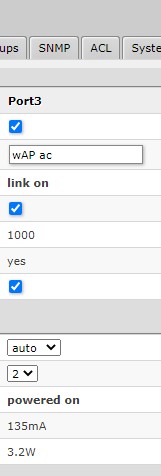
You are right! Thanks a lot. I connected them directly with short cable and it works! There’s something in my house installation that doesn’t work if power comes from RB260GSP vs when it comes from provided adapter. They are bith injected at the same place so maybe different voltages play role or something.
Thank you for your reply!
when i plugged WAP into a switch, all lights on WAP itself looked like normal boot, so i assume it is as you say, management is blocked until configured.
Its just SXTs showed up fine and were accessible right away, but WAPs all showed red, which i understand was because of PoE in 802.3af/at.
My problem now, its a remote site, i left switches and devices connected hoping to finish configuring them remotely 
Looks like i’ll have to go there again and reconnect to all 20 WAPs manually one by one
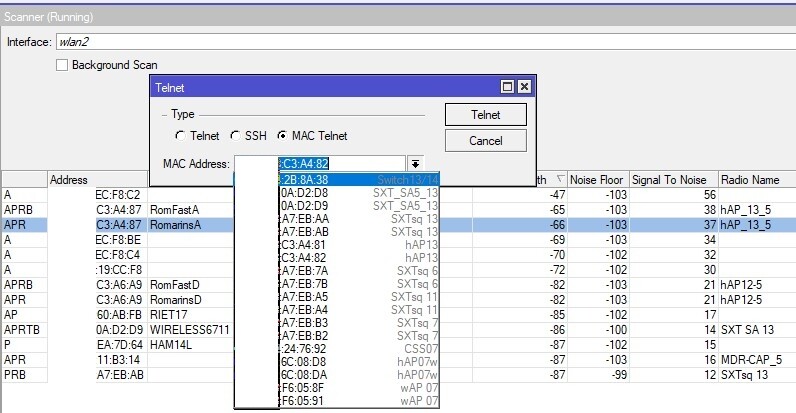
I know this problem. Used to do remote installations. If you have 1 operational Mikrotik there it could be done … connect to the wifi of the wAP with that device, and then do Telnet MAC from that operational Mikrotik. The SXTsq cannot use indoor-only frequencies when in regulatory domain, so maybe it cannot find the wAP channel (unless superchannel would allow more)
that is actually a great idea, except i left them all facing down next to each other, but will definitely try it
Holly molly - it worked!!!
i’m connected, just got to figure out what change to get access to it from the switch :))))
Oh well, i got overly excited and connected to myself 
The MAC address is in the “registration” table.
Running “snooper” might give an overview.
I opened wlan1 options and did scan. Found Mikrotik SSID and connected to it. Next to SSID was MAC address
used: /tool mac-telnet c4:ad:34:79:4b:18
to telnet to it.
Can’t remember when, but at some point that MAC address showed up in Winbox with board name of the WAP and default IP 192.168.88.1
the weird part was, when i tried to connect to it using Winbox, it would connect to SXT.
i think it poped up in Winbox after i used this command in telnet
add admin-mac=C4:AD:34:79:4B:18 auto-mac=no comment=“default bridge” name=bridge
… just add ether1 to the bridge in the wAP …
to confirm, i’m doing it right,
i telnet to the MAC address of WAP AP that shows next to SSID in scan list, correct?
Yes.
I even have the drop-down list (by neighbors/discovery over ethernet I think). But the MAC addresses via the scan are different (WLAN interface)
.