Thank you both for your answer.
I started following the first thread, and had some issues until I realized there was a small typo in the firewall nat rules, where action and chain are swapped.
Once this was fixed, the solution was working as intended.
What still needs to be cleared (at least to me) is whether the netmap and the dst-nat actions can be exchanged at will or not (it seems that in cases like this one both work, so it is not clear if there is a reason to prefer the one over the other).
To be fair sindy did attempt to explain the difference:
the difference between netmap and (src|dst)-nat actions is that in case of netmap, the to-addresses parameter holds a prefix that is used to replace the prefix of the original address, leaving the suffix unchanged, whereas in case of (src|dst)-nat, to-addresses contains a list or range from which a whole address is “randomly” chosen to replace the original one. But same like (src|dst)-nat, the netmap action also replaces only one address, destination or source, depending on the chain where it is used (dstnat or srcnat).
but I still fail to appreciate the (possibly too subtle for my limited experience) difference in practice, i.e. when to use the one or the other.
I noticed a weird behavior with both versions though:
if I remove the connection (pull the cable) on ether2, the PC will display the page of the second machine on 192.168.1.200 instead of timing out.
It looks like the default dynamic route is used when the interface is not reachable.
How can I prevent this ?
edit: my routes are:
/ip route> print
Flags: X - disabled, A - active, D - dynamic,
C - connect, S - static, r - rip, b - bgp, o - ospf, m - mme,
B - blackhole, U - unreachable, P - prohibit
 #      DST-ADDRESS        PREF-SRC        GATEWAY            DISTANCE
 0 A S  10.1.1.0/24                        ether2                    1
 1 A S  10.1.1.0/24                        ether3                    1
 2 ADC  10.1.1.0/24        10.1.1.1        ether2                    0
                                           ether3
 3 ADC  192.168.1.0/24     192.168.1.1     ether1                    0
What are the routes (/ip route print) at the time the machine is disconnected (pull the cable)?
Very likely the routing rule (that is for “new-routing-mark=port1”) that in your posted output is #0 is not anymore AS (Active, Static) but becomes just S or IS (Inactive), and either the “generic” route takes precedence or (for whatever reason) the other identical route (which should be for “new-routing-mark=port2” only) is used.
I suspect the first, the router tries desperately to reach destination, but cannot say for sure.
In these cases usually a blackhole rule is added with a higher distance, you would need two of them, like:
/ip route
add blackhole distance=2 dst-address=10.1.1.0/24 routing-mark=via-ether2
add blackhole distance=2 dst-address=10.1.1.0/24 routing-mark=via-ether3
The idea is that since distance is 2 these two are never actually used when the devices are present and working.
But when one (or both) the routes with distance 1 become inactive, the rules with higher distance become instantly in use.
Thanks for the explanation. It was indeed the default rule that took precedence (#0 became S when cable is unplugged).
Adding the 2 blackholes rules solves this issue and is required to maintain clear separation between the 2 machines when one of them is unplugged.
Here the full working config in case someone needs it:
Almost caught up. Just trying to follow the traffic flow starting at the controller. My logic is missing something in these steps.
How does the controller know to look for a machine at 192.168.200 or 192.168.201.
Assuming it knows for some reason, following the bouncing ball…
Since mangling happens first, we capture the traffic originating in ether1 heading for an IP address in the same subnet.
Is that even possible? Its within the same subnet so my thought was it could not be captured by a router (since its mac address traffic not requiring IP???)
Okay so lets say its possible, and it makes sense, sigh. We ensure that the traffic when routed will go to the correct etherport via the mangling and tables etc…
Then the traffic hits destination NAT, where it changes the the destination IP to the actual IP of the machine.
The traffic goes to the appropriate route that holds now the correct destination and due to mangling the correct port.
Good so far…
RETURN Traffic, what is important here is noting that the source address of the traffic has not changed and is still the IP of the controller.
Therefore upon leaving the port, the traffic has the correct destination IP and due to source nat is given the generic IP of the subnet that is common to ether2,3,4. I am not sure why this latter point is important??? What would happen if source address was the actual machine IP and not sourcenatted?
In any case the traffic can follow normal routing back to the controller.
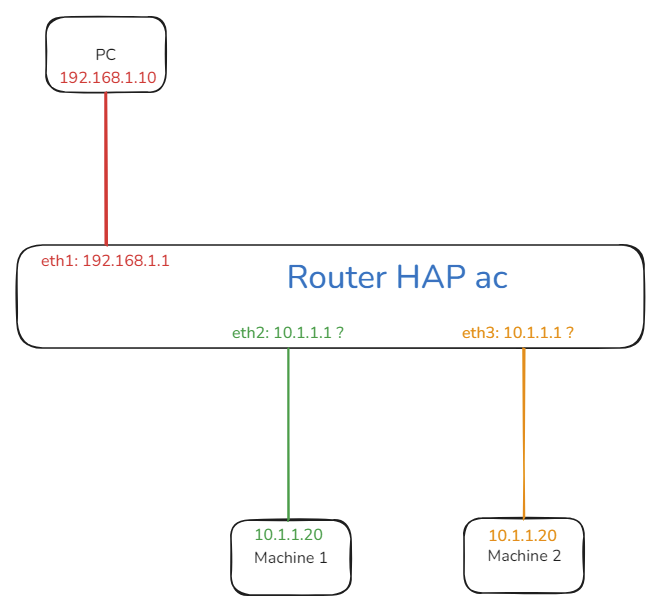


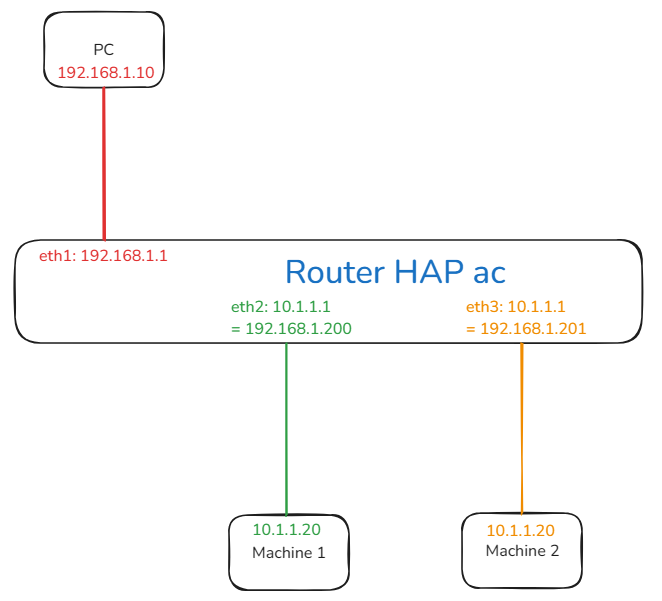
 , but I see you adapted it to your Ros 6.x just fine
