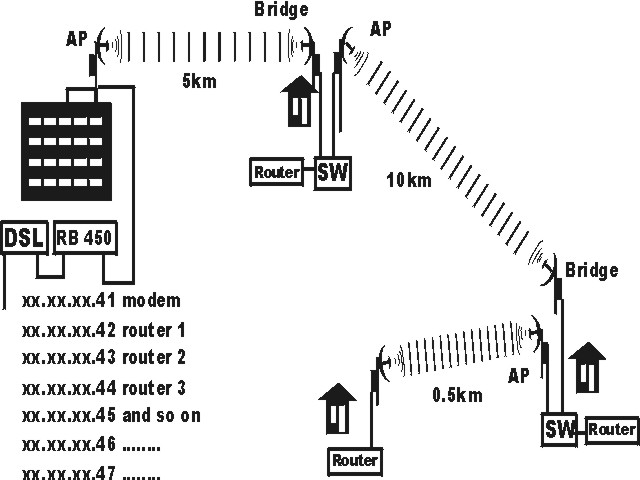
I have a DSL (set in bridge mode) with 5mb down and 700k up that connected to port 5 (router is set to do the PPPOE dialing) and on port 1 an long range access point on top of high building linking it out of town 5km to a relay point (at friend home) were it sent on to my home 10km and send some to my brother home and his kids next door.
I have 6 public ip that I like to sent to a router at each point
one to a router at the relay point outside of town
one or more to a router at my home
and one to a router at my brother house
dsl—long range AP------------------bridge receiver—switch box (were a router plug into switch box) (long range AP plug in to switch box) AP-------------------bridge receiver (at my home)–switch box–(router and AP plug into ports on switch) AP------Bridge–router (at brother)
right now the MT is acting as a router sharing one connection to everyone along to network
I was told this can be done were I order the MT box (RB450)
DSL is on port 1 and the AP is on port 5
I would like to give each router it own public IP
The AP / Bridge have two Mac address, one on wired and one on wireless.
I would like to send the IP to the mac address of each routers.
give me a minute bro, im doing the same thing and when i figure it out in the next 10 min - 2 hours i’ll post
OK maybe not doing the same thing but let me get this straight
You have a DSL modem and your DSL provider gave you 5 static IP addresses
You want to push? or statically assign? each ip to a friend’s wireless device?
DSL is plugged into a mikrotik board but mikrotik board is NOT the AP?
Please describe the equipment used and where located
Example:
DSL is at home so H1
Mikrotik is router so R1
Access point plugged into mikrotik so AP1
Friend wireless is CPE1
etc
DSL box plug into RB450 preloaded with MikroTik 3.10 license level 4
DSL plug into port 5 and port 1 is a EnGenius EOC-2610 is a long range outdoor wireless Access Point
that goto the fist bridge/access point relay were the fist linksys router is and everything plug into a switch box, same thing at the second relay point (my home)
look at the above diagram way up there back many post ago
right now it one network and sharing one public ip xx.xx.xx.41 witch is the modem, each computer is getting 192.168.1.100 - 192.168.1.101 - 192.168.1.102 - 192.168.1.103 and so on.
no routers plug in yet at each locations, the RB450 is setup as a router for now