Radius Problem with WebFig

Hi,

Since ROS 6.1 I’ve tried to get RADIUS Authentication working on WebFig.
The RADIUS Authentication is working for ssh and telnet, but when I’m trying to access the MT via WebFig, the CLI gives me the following message:
echo: system,info,account user fkayser logged in from 192.168.0.1 via web.
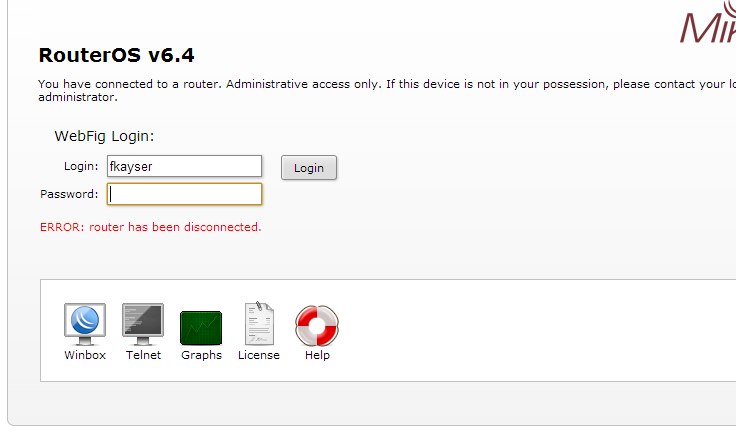
but the browser is showing for a short time the “Loading screen” and then I get the following message:
ERROR: router has been disconnected.
MT_radius_webfig.png
The Problem still exists in 6.4.
Like I said, RADIUS authentication via SSH or Telnet is working, so my config should be correct
Do I need to specify something special in order to get RADIUS authentication working with WebFig, or is there a Bug?

We are managing about 700 MT’s at the moment with one “hard coded” user an we’d really appreciate if we could take advantage of RADIUS authentication for WebFig, you could imagine. :slight_smile:

Webfig is MSCHAPv2.
Winbox is CHAP.
Console/SSH/Terminal is PAP.

Are you sure your radius will accept MSCHAPv2?

OH good point!
I thought that WebFig was using PAP.
I’ll have a look at it. Thanks for the quick reply!

I’ve checked the radius config and MSCHAPv2 is allowed.
I also see the return from the radius server giving me the configured user group.
So for me the problem should be at the WebFig.
Has anybody running WebFig with radius authentication?
If yes, are there any special config parameters to set?

Here my config:

/user
add comment="system default user" group=full name=admin
add group=full name=user1
/user aaa
set default-group=full use-radius=yes
/radius
add address=x.x.x.x secret=testlab service=login src-address=192.168.254.71

Here is my settings, webfix and all others work fine (v6.4):
/user group
add name=restricted
/user aaa
set default-group=restricted use-radius=yes

/radius
add address=1.1.1.1 secret=“secret” service=login src-address=2.2.2.2Note that I have a “restricted” group that has no permissions by default and then explicitely send a group from Radius for each user.
This is just for security, should not effect the bevaviour on your side.

Hi I am helping fkayser to solve this issue and so far we have not been able to login into the webfig using Radius Authenication. What I've tried was to enable radius debugging messages on the Mikrotik Router. Following is the current configuration. Radius is sending the packet to the mikrotik router perfectly and MSCHAP_2 seems to be working fine. Althoug we still have the same effect the after the Mikrotik is trying to login and redirects you to a page with an Error: router has been disconnected like fkayser shows in the screenshot.

Config/radius
add address=x.x.x.x secret=testlab service=login src-address=192.168.254.71
/user group
add name=restricted
/user aaa
set default-group=restricted use-radius=yesRadius debug messages

  • 192.168.10.1 = Radius Server
  • 192.168.0.25 = Desktop station
  • 192.168.254.71 = NAS-IP Mgt IP Mikrotik

12:42:22 radius,debug new request 0d:48 code=Access-Request service=login
12:42:22 radius,debug sending 0d:48 to 192.168.10.1:1812
12:42:22 radius,debug,packet sending Access-Request with id 103 to 192.168.10.1:1812
12:42:22 radius,debug,packet Signature = 0xc336d52d08e79b4961ec66747a2226c5
12:42:22 radius,debug,packet Service-Type = 1
12:42:22 radius,debug,packet User-Name = "username"
12:42:22 radius,debug,packet MS-CHAP-Challenge = 0xc6ac40723c24329f02f2638d03fcbb0f
12:42:22 radius,debug,packet MS-CHAP2-Response = 0x000021402324255e262a28295f2b3a33
12:42:22 radius,debug,packet 7c7e0000000000000000332f79ad6e65
12:42:22 radius,debug,packet d77483d697dfbea7c1b4d908d73ea04f
12:42:22 radius,debug,packet d637
12:42:22 radius,debug,packet Calling-Station-Id = "192.168.0.25"
12:42:22 radius,debug,packet NAS-Identifier = "MT2011L_Test"
12:42:22 radius,debug,packet NAS-IP-Address = 192.168.254.71
12:42:22 radius,debug,packet received Access-Accept with id 103 from 192.168.10.1:1812
12:42:22 system,info,account user username logged in from 192.168.0.25 via web
12:42:22 radius,debug,packet Signature = 0x061d05946e1151641b4a0650dc050845
12:42:22 radius,debug,packet User-Name = "username"
12:42:22 radius,debug,packet Class = 0x434143533a7461636163732d696e7431
12:42:22 radius,debug,packet 2f3136363437313832312f3831363730
12:42:22 radius,debug,packet 33
12:42:22 radius,debug,packet MS-CHAP2-Success = 0x00533d43463844363641423733434541
12:42:22 radius,debug,packet 34313434314341344535443643393443
12:42:22 radius,debug,packet 3544364144413345353236
12:42:22 radius,debug,packet MT-Group = "full"
12:42:22 radius,debug received reply for 0d:48
12:42:22 radius,debug new request 0d:00 code=Accounting-Request service=login
12:42:22 radius,debug sending 0d:00 to 192.168.10.1:1813
12:42:22 radius,debug,packet sending Accounting-Request with id 104 to 192.168.10.1:1813
12:42:22 radius,debug,packet Signature = 0x3639dfdfdb78bae921fb357a4990eeec
12:42:22 radius,debug,packet Service-Type = 1
12:42:22 radius,debug,packet User-Name = "username"
12:42:22 radius,debug,packet Calling-Station-Id = "192.168.0.25"
12:42:22 radius,debug,packet Acct-Status-Type = 1
12:42:22 radius,debug,packet Acct-Session-Id = "84000026"
12:42:22 radius,debug,packet NAS-Identifier = "MT2011L_Test"
12:42:22 radius,debug,packet Acct-Delay-Time = 0
12:42:22 radius,debug,packet NAS-IP-Address = 192.168.254.71
12:42:22 radius,debug,packet received Accounting-Response with id 104 from 192.168.10.1:1813
12:42:22 radius,debug,packet Signature = 0x47a0546ecfdc07aa3a0f27f44629cecf
12:42:22 radius,debug received reply for 0d:00
12:42:22 radius,debug request 0d:00 processed
Radius packet send back

VENDOR 14988
  ATTRIBUTE 3: "full"

Another strange behavior we've noticed was that active user sessions were kept even on failed Webfig logins.
/user active> print
Flags: R - radius

WHEN NAME ADDRESS VIA

0 R jan/02/1970 00:01:32 username 192.168.0.25 web
1 R jan/02/1970 00:01:52 username 192.168.0.25 web
2 R jan/02/1970 00:02:20 username 192.168.0.25 web
3 R jan/02/1970 00:02:49 username 192.168.0.25 web
4 jan/02/1970 00:05:49 admin 192.168.0.25 web
5 R jan/02/1970 00:11:11 username 192.168.0.25 web
6 R jan/02/1970 00:54:02 username 192.168.0.25 web
7 jan/02/1970 01:22:47 admin 192.168.0.25 web
8 R jan/02/1970 02:29:44 username 192.168.0.25 web
9 R jan/02/1970 02:30:02 username 192.168.0.25 web
10 R jan/02/1970 02:30:15 username 192.168.0.25 web
11 R oct/08/2013 09:46:26 username 192.168.0.25 web
12 oct/08/2013 10:49:50 admin 192.168.0.25 web
13 R oct/08/2013 11:40:39 username 192.168.0.25 web
14 R oct/08/2013 11:41:29 username 192.168.0.25 web
15 oct/08/2013 11:44:24 admin 192.168.0.25 web
16 R oct/08/2013 11:51:20 username 192.168.0.25 web
17 oct/08/2013 11:51:42 admin 192.168.0.25 web
18 R oct/08/2013 12:10:27 username 192.168.0.25 web
19 R oct/08/2013 12:12:39 username 192.168.0.25 ssh
20 R oct/08/2013 12:12:48 username 192.168.0.25 web
21 R oct/08/2013 12:16:15 username 192.168.0.25 web
22 R oct/08/2013 12:18:29 username 192.168.0.25 web
23 oct/08/2013 12:19:41 admin 192.168.0.25 web
24 R oct/08/2013 12:32:25 username 192.168.0.25 web
25 R oct/08/2013 12:37:29 username 192.168.0.25 web
26 R oct/08/2013 12:40:55 username 192.168.0.25 ssh
27 R oct/08/2013 12:42:22 username 192.168.0.25 web
28 R oct/08/2013 12:49:59 username 192.168.0.25 web
29 R oct/08/2013 12:50:24 username 192.168.0.25 web
30 R oct/08/2013 12:51:38 username 192.168.0.25 web
31 R oct/08/2013 13:03:54 username 192.168.0.25 web
Well, that is just strange. You can see Radius is sending accepts and a group attribute, and the hanged sessions are even stranger.

I dont think its a problem with the login process into the webfig itself, rather something wrong with webfix, the template the user uses, the firewall, or something else.

At this point, I would say contact support@mikrotik.com with the supout file and the screenshots/configs you posted.

Hi guys!
I have exactly the same problem and I also have exactly the same scenario.
How do you solve it?

Hi guys!
I have exactly the same problem as you have right now.
How do you solve it?

In our current setup we are using Cisco ACS v5.6.0.22-2. The problem elaborated by @fkayser is still present. I wanted to give a reply on this thread and to explain more in detail what our current setup is. I will first start with the MikroTik side of the setup and then quickly elaborate the setup on Cisco ACS and later show some log entries we get when we are trying to log into the MikroTik devices.


Radius config on Mikrotik
radius_setup_mikrotik.png
Cisco ACS Configuration Allowed Protocols and Rule
cisco_acs_Protocols.png
cisco_acs_Rule.png
Cisco ACS Logs SSH
cisco_acs_log_ssh.png
Cisco ACS Logs WEB Login
cisco_acs_log_web.png
cisco_acs_log_web_fail.png
Not sure why this is happening, does anyone have a similar setup with a Cisco ACS as radius/tacacs server?

I wish you could configure what authentication mechanism was used for all of these.
My company had a userdb with encrypted passwords, so we could not use RADIUS auth for winbox sessions (chap requires cleartext password db).

I mentioned this to one of the Mikrotik developers at MUM12 USA, and he basically said to just use webfig if I wanted AAA.

That’s pretty typical…

I felt like Bill Murray in Ghostbusters II - “But, I’m a voter. Aren’t you supposed to lie to me and kiss my butt?” :slight_smile:

Hello all!

Does anyone found a solution? I have same problem and when I saw this post I got really worried about that cause we want to deploy some Mikrotiks and they being managed by webfig using a radius authentication and it seem no solution at all. I use a Radiator and it works properly with winbox… but we also need webfig.

Radius log seems fine, just web server stop to work.

Thanks in advance

Bump. ..bump..
Looks like not resolved issue yet.
I have same issue. Webfig closing connection. ROS version: 6.35.2 (stable). SSH/Telnet have no issue.
And this is for SURE not an issue of password representation PAP vs MS-CHAPv2, Since I do see log messages that user logging in via www service and then logging out.
where ‘Acct-Terminate-Cause = 1’ mean it been requested by client.
nexusadmin@maxwell] >
(35 messages discarded)
echo: radius,debug,packet sending Accounting-Request with id 227 to x.x.x.x:1813
echo: radius,debug,packet Signature = 0x663a3a1041a711264fb1eecf531302ca
echo: radius,debug,packet Service-Type = 1
echo: radius,debug,packet User-Name = “admintest”
echo: radius,debug,packet Calling-Station-Id = “y.y.y.y.y”
echo: radius,debug,packet Acct-Session-Time = 0
echo: radius,debug,packet Acct-Terminate-Cause = 1
echo: radius,debug,packet Acct-Status-Type = 2
echo: radius,debug,packet Acct-Session-Id = “84000002”
echo: radius,debug,packet NAS-Identifier = “maxwell”
echo: radius,debug,packet Acct-Delay-Time = 0
echo: radius,debug,packet NAS-IP-Address = Y.Y.Y.Y

log print
11:00:27 system,info,account user admintest logged in from X.x.x.x via web

11:00:27 system,info,account user admintest logged out from x.x.x.x via web

Hi,
Someone have a solution for this issue ?
I've implemented Freeradius with Active Driectory and SSH/Telnet management are working fine, on the other hand webfig is not working, the user request and answer are fine, and the user seems logued in the console, but the gui keeps "loading" until the login screen appears again.

09:04:29 radius,debug new request 0d:04 code=Access-Request service=login
09:04:29 radius,debug sending 0d:04 to 80.67.96.155:18120
09:04:29 radius,debug,packet sending Access-Request with id 7 to 80.67.96.155:18120
09:04:29 radius,debug,packet Signature = 0x7c7d23b6df788f73a76d8ad62a5a4c2e
09:04:29 radius,debug,packet Service-Type = 1
09:04:29 radius,debug,packet User-Name = "pruebaigj"
09:04:29 radius,debug,packet MS-CHAP-Challenge = 0xlllllllllllllllllllllll
09:04:29 radius,debug,packet MS-CHAP2-Response = 0xkkkkkkkkkkkkkkkkkkkkkkkkkkkkkkkkkk
09:04:29 radius,debug,packet Calling-Station-Id = "192.168.92.13"
09:04:29 radius,debug,packet NAS-Identifier = "CPE"
09:04:29 radius,debug,packet NAS-IP-Address = 192.168.92.11
09:04:29 radius,debug,packet received Access-Accept with id 7 from XX.XX.XX.XX:18120
09:04:29 radius,debug,packet Signature = 0x467ce9a1645ca6e550429695
09:04:29 radius,debug,packet MT-Group = "full"
09:04:29 radius,debug,packet MT-Rate-Limit = "1024k/1024k"
09:04:29 radius,debug,packet Service-Type = 1
09:04:29 radius,debug received reply for 0d:04
09:04:29 system,info,account user pruebaigj logged in from 192.168.92.13 via web


[admin@CPE] > user active print
Flags: R - radius, M - by-romon

WHEN NAME ADDRESS VIA

0 jul/19/2017 08:52:47 admin 192.168.92.13 web
2 R jul/19/2017 09:04:29 pruebaigj 192.168.92.13 web

Ditto. Stumped to see CHAP2 has been thrown into the mix too now :open_mouth:

Needless to say, webfig shall never be used then. Not prepared to change massive architectures to just accommodate something like this. MT needs to get with the program.

I’ve been able to solve the issue, I can login via web and ssh with ActiveDirectory and FreeRadius. I can share the config if someone have problems.

What about WinBox? Web and SSH use PAP authentication because the client but Winbox uses CHAP, which requires the AAA server to have access to the cleartext password. (Maybe Windows’s password encryption is reversible, but I would doubt it - I’m not a sysadmin so I can’t say for sure).

If Winbox can hit a Mikrotik utilizing AAA based on AD (no FreeRadius) then I’d be interested to see the Mikrotik-side configuration.

Windows can store the passwords using “reversable” encryption. It’s very possible to do, but 1) it’s not secure, and 2) it still doesn’t help anyone one bit that does NOT use AD, and do NOT have passwords available in clear-text.

IMHO, All AAA services should support PAP AND CHAP, and that’s it. I doubt WebFig makes use of ANY of the enhanced functionality that CHAPv2 provides in any case.

Apologies for reviving an old thread… but it’s almost mid 2018, we’re on 6.42.1, and RADIUS-based WebFig login still does not work. My RADIUS server is sending all the right replies. Log shows:

Message		RADIUS:     MS-CHAP2-Success = 0x00533d35443744314535453536393636
Message		user test.user logged in from 10.20.0.100 via web

Every time I do a login attempt, one more session is added to the Active Users tab, with an “R” to signify RADIUS:

radius	not by romon
Name		test.user
At		Apr/25/2018 19:15:09
From		10.20.0.100
By RoMON		 
Via		web
Group		full

Sessions keep piling up and they never seem to end.

I would much rather Mikrotik just disable this altogether, rather than make us “play” with it every time an update comes along, just to see if it got fixed.

I recommend that you contact support@mikrotik.com directly. I can log user into Webfig without any problems by using RADIUS services.