Hi,
RB3011
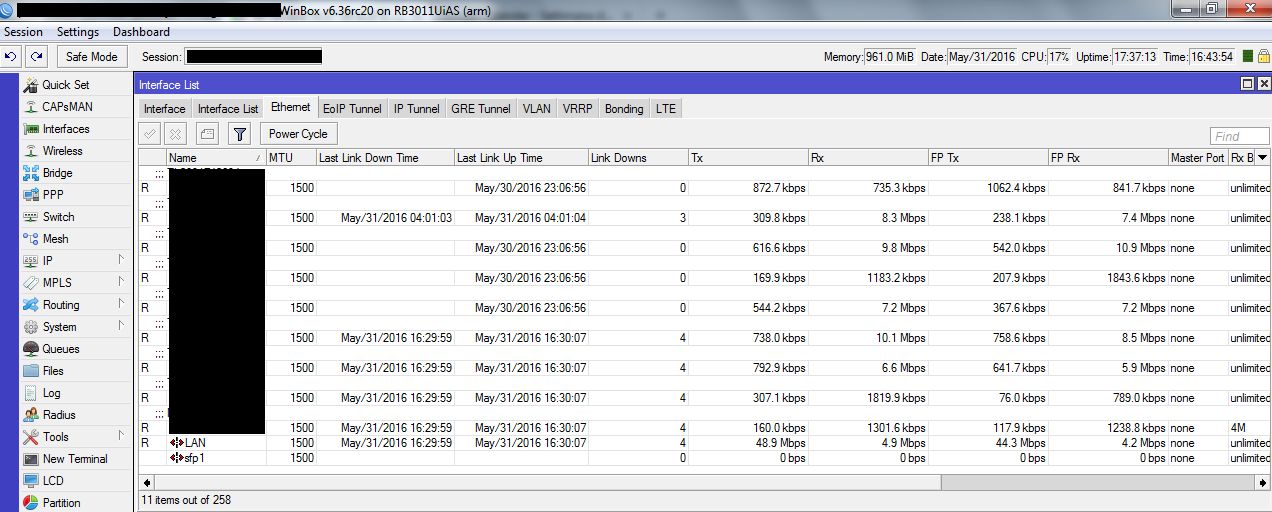
I'm having trouble with the interfaces 6 to 10. They lose link every 2 seconds after start receiving traffic. The most stable config it is with fixed speed to 10m or 100m on the neighbor and does not works always. 1G or auto negotiation fails. Interfaces 1 to 5 works fine. Routers are up to date and I tested 10 of them with the same problem.
Try upgrading to the latest RouterOS v6.35rc10 from http://www.mikrotik.com/download
If problem remains, write to MikroTik support and send us supout file.
This is an ongoing problem. MT support have confirmed they have replicated it and are working on a fix however that was probably over a week ago and they said the fix would come in “days”.
I’m currently using RC29 and it still has not fixed it yet.
Every minute rb3011 stop passing traffic for 5-10 seconds and time to time log show on sfp1 in interface: “port received packet with own address as source address (probably loop)”. Where loop on incomming interface ? SFP removed from switch 2 !
100 clients very angry… and I.
I wait for good news 1 month…
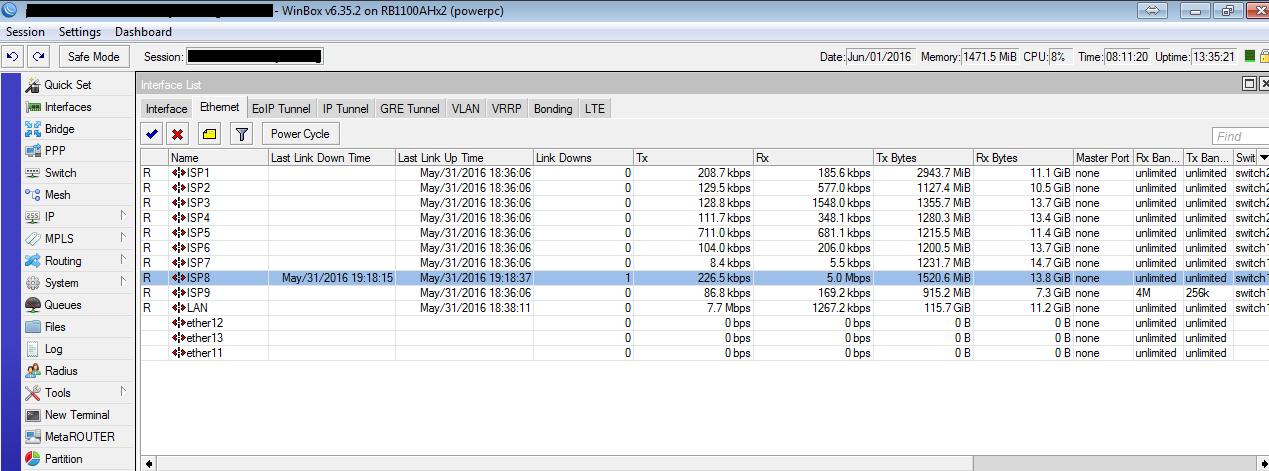
On rb1100ah same problem accured and I replaced it with rb3011, but problem not solved.
Somehow packages are able to stop mikrotik ?
The latest release mentions something about link down messages and RB3011, perhaps this has finally been fixed? I can’t confirm at the moment since I don’t have physical access to the device that was exhibiting the issue.
We want to inform you that it appear solved only through a new official OS by Netinstall http://wiki.mikrotik.com/wiki/Manual:Netinstall and after updating (as e-mail received from support) to last RC version. Only now there are residual re-login of customers group, but it appear without a specific cluster. But since we use UBNT Rocket at moment (https://www.ubnt.com/airmax/rocketm/) we need to investigate if that is caused by them or what other.
Sorry, guys. I think…it was solved, because after last setup of previous post, RB3011 was about 8h without problems.
But…now about 1 down every 4 hours, but there is. With identical configuration on RB1100 on the same place, no problems.
Attached screens.
I am browsing this forum because I too have a new RB 3011, OS 6.38.1 and it is constantly link down/up on all frequently ports at the same time, give or take a second.
Ore the RB 3011 defective design? Google finds this has been a problem for a long time with this model?
Here is an example of the log:
12:36:42 interface,info ether1 link up (speed 1G, full duplex)
12:36:42 interface,info ether5 link up (speed 1G, full duplex)
12:36:43 interface,info ether2-master link up
12:40:37 system,info item added
12:40:37 system,info item added
12:48:35 interface,info ether1 link down
12:48:35 interface,info ether2-master link down
12:48:35 interface,info ether5 link down
12:48:35 system,info item removed
12:48:35 system,info item removed
12:48:38 interface,info ether1 link up (speed 1G, full duplex)
12:48:38 interface,info ether5 link up (speed 1G, full duplex)
12:48:39 interface,info ether2-master link up
12:48:43 system,info item added
12:48:43 system,info item added
16:28:41 interface,info ether1 link down
16:28:41 system,info item removed
16:28:41 system,info item removed
16:28:44 interface,info ether1 link up (speed 1G, full duplex)
16:28:45 system,info item added
16:28:45 system,info item added
16:33:23 interface,info ether9 link up (speed 100M, full duplex)
16:33:24 interface,info ether6-master link up
16:34:35 interface,info ether9 link down
16:34:36 interface,info ether6-master link down
16:34:36 interface,info ether9 link up (speed 1G, full duplex)
16:34:37 interface,info ether6-master link up
16:34:44 dhcp,info defconf assigned 192.168.88.254 to 6C:F0:49:5E:66:19
16:38:00 interface,info ether1 link down
16:38:00 interface,info ether2-master link down
16:38:00 interface,info ether5 link down
16:38:00 interface,info ether6-master link down
16:38:00 interface,info ether9 link down
16:38:00 system,info item removed
16:38:00 system,info item removed
16:38:03 interface,info ether1 link up (speed 1G, full duplex)
16:38:04 interface,info ether5 link up (speed 1G, full duplex)
16:38:04 interface,info ether9 link up (speed 1G, full duplex)
16:38:05 interface,info ether2-master link up
16:38:05 interface,info ether6-master link up
16:38:08 system,info item added
16:38:08 system,info item added
I have this exact problem with both RB3011 and RB2011(x2) connected to Alcatel-Lucent ONT.
(link flapping up and down every 5-30 mins). 3-7 times per hour common. Been going on for a
week after gigabit upgrade. Down grade link to 100Mbps, problem disappears
I appear to have solved the problem by inserting RBFTC11 with UTP/SFP between RB3011 and ONT.
Link running for 2 hours without problem, and with some significant load testing.
Curiously, RB3011, with modest config (PPPoE over Vlan10, very basic firewall) runs significantly
slower (550Mbps download) than ISP preferred Fritzbox (980Mbps download). However
Fritzbox appears to have no firewall, and unknown config. And I am not keen on router vendor
that automatically sends config off to places unknown, and lets provider login (yes I know RoMON does
this, but I control where there config goes/does not go.)