I received my RB4011 last friday. Very happy with the design of the device. I use it as a replacement for my RB2011 which has been running perfectly for about 5 years.
I backupped the running config of the RB2011, and selectively imported this script to the RB4011. Everything seemed to be running fine, but after 24 hours, the 5GHz network disappeared. I rebooted the device, and it was available again. Last night, again after 24 hours, the network disappeared again.
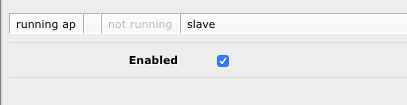
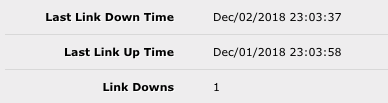
The wlan1 device is enabled, but when I open it, it says ‘not running’. Also, under status it shows the date the link went down last, but it seems it never came back up.
What does it say in the logs?
5Ghz may be disabling itself if it “thinks” it is seeing DFS and is in a DFS channel. You need to provide more of your config for further help.
I didn’t see any updates before, pretty sure I checked… Just installed 6.43.7. I’ll have to wait another 24 hours to see if it has fixed my wlan1 interface going down.
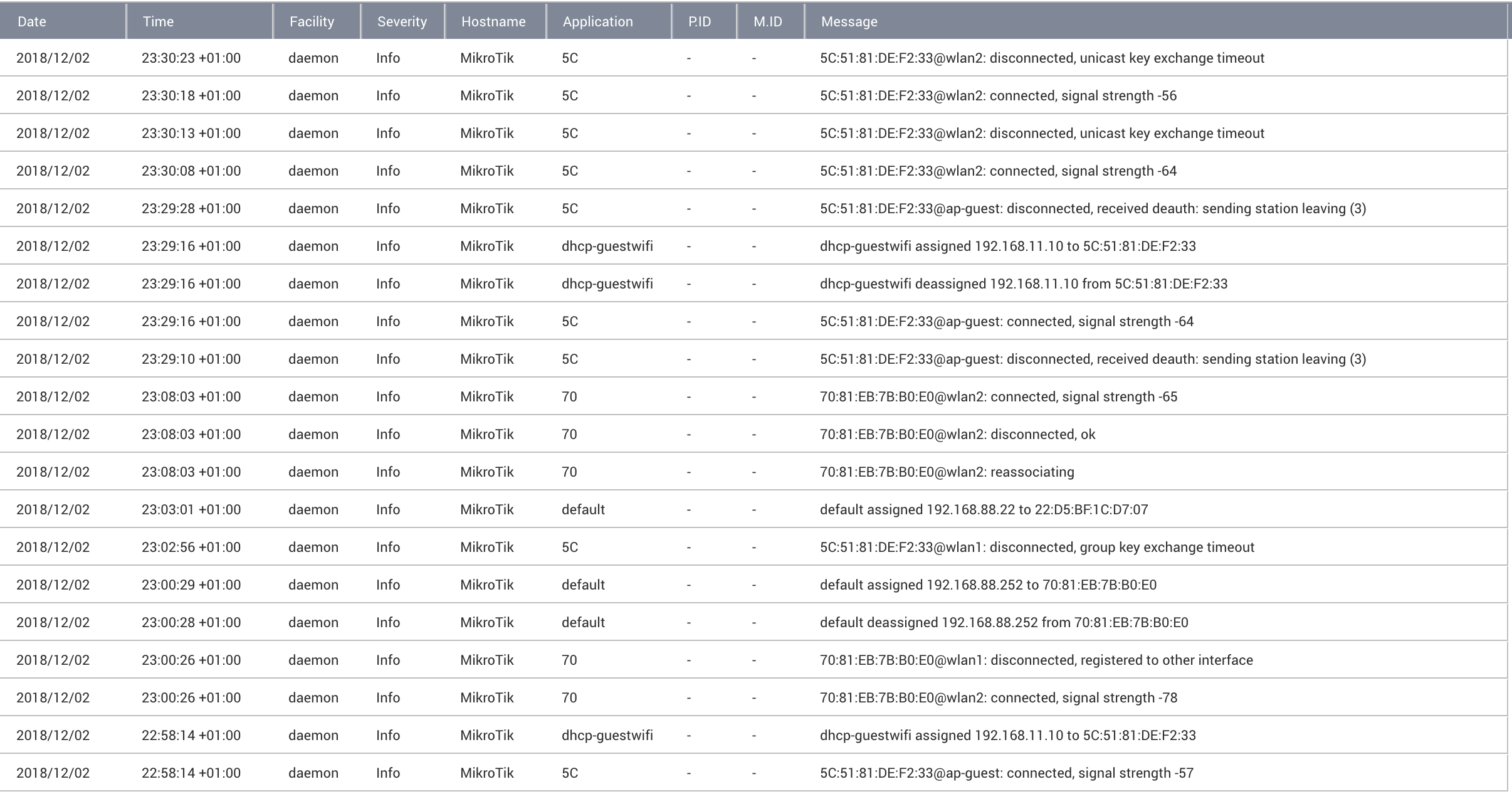
@Steveocee: I don’t see anything specific in the logs (see attachment) explaining why the interface was down. If it was DFS, shouldn’t it automatically come back online, after a while?
Anything specific you want to know about the config? I have two interfaces, wlan1 (5ghz) and wlan2 (2.4ghz), with a virtual AP for guest on wlan2.
wlan1 is in ap bridge mode, 5GHz-N/AC, 20/40/80Mhz Ceee channel width, auto frequency
wlan2 is in ap bridge mode, 2GHz-B/G/N, 20/40MHz Ce channel width, 2412MHz frequency
Are you using the same SSID name for both your 5G network and 2G network? Devices roaming from 5G to 2G would leave the 5G AP as running but not active. My P20 Lite is a PITA as it’s dual band and I have done everything I can to get it to prefer 5G but it always ends up on 2.4G
Steveocee: The solution to this is to reduse the 2,4GHz transmit power a bit so that clients sees the 5GHz net as the strongest when close.
This would reduce the 2,4GHz theoretical coverage, but normally not the actual/usable coverage, since coverage is normally limited by tx power on client.
Yep, my 2.4Ghz network broadcasts 7dB lower than my 5Ghz. I use UBNT AP’s so I also try to make use of band steering to push clients to 5Ghz. Just my P20 Lite that doesn’t seem to play nicely with it.
I’m having similar issues, but mine do not appear to go away after a reboot.
I have two units (one on the basement and one up on the 2nd floor), for the sake of the discussion we will refer to them as “primary” and “secondary”. Days 1 & 2: All devices connect and communicate immediately and without issues with primary’s wlan1, but have difficulties discovering secondary’s wlan1.
After a while, once they discover secondary’s wlan1, connection and communication is flawless after that. Day 3 and onwards: All devices still connect and communicate immediately and without issues with primary’s wlan1, but now are unable to discover secondary’s wlan1.
Tried the following:
Enabling/Disabling wlan1
Multiple reboots
Restoring a backup
Downgrading RouterOS/Firmware (factory)
Re-upgrading RouterOS/Firmware (latest)
Nothing solved it, so I thought I’d try fiddling with the channel width.
The interesting thing however is: All of my 5GHz-capable devices will discover/connect/work fine with the “20/40/80/160MHz eeeeeeeC” option on the primary unit
None of these devices will discover/connect/work with the secondary unit, unless the “20/40/80MHz eeeC” option is selected. (But how exactly were they working before???)
It’s definitely not a compatibility issue with the client devices, that much I can tell. But what would cause the “eeeeeeeC” option to irrevocably cease function on one device only?
DFS might be a possible answer yes.. but at the basement floor that the secondary unit resides, not even cellular signal reaches - how can a much weaker 5GHz “rogue” frequency do?
I’m all out of ideas at this point. (I’ve also opened up a support ticket for this)
A few more extra questions:
I never understood exactly how to decipher those “Ceee, eCee, eeCe, eeeC, XXXX” settings.
From what I have gathered so far “e” is supposed to be a representation of a 20MHz-stepping and “C” denoting the control frequency.
But what exactly is a control frequency and what is a exactly the difference between all of these options/offerings in layman’s terms? And what’s the one in Xs supposed to represent?
How do these settings impact the frequency option listed below? What if said option is defined as auto?
Does log contain anything about wireless? Does some “wifi scanning” software (on a phone) show wifi signal from secondary unit?
C is the 20MHz channel where SSID is actually broadcasted. So if any (legacy) device does quick scan of occupied channels, it’ll only see the channel C as occupied. Only devices supporting newer WiFi standards (n, ac) will check for 40/80/160 MHz channles and notice that adjacent channels are occupied as well.
‘e’ are for adjacent 20MHz channels … either with lower (if left from C) or higher (if right from C) centre frequency. I don’t have any idea about 'X’es.
If option is set to auto, AP will choose (I don’t know the order of preference) one of possibilities. E.g. if AP chooses lowest possible channel for C, it’ll choose Ce(ee(eeee)). If AP chooses highest possible channel for C, it’ll choose ((eeee)ee)eC. If C is placed somewhere mid-band, then I don’t know hish kind of e placement will choose.
Sadly nothing, otherwise I would’ve mentioned it. Good thing that you brought it up though.
One thing that differs though, and apologies for forgetting to mention it, is that due to the lack of cellular signal - a femtocell unit is installed in the basement.
Could they be the source of the problem? But wouldn’t normally these operate between 1.9 and 2.6GHz?
So basically the rule of the thumb is to aim for a “C” placement that is known to work with older/legacy devices, as newer ones won’t care about it anyways. Gotcha.
If “auto” can change the positioning of “C” then what purpose would selecting the “C” option serve in the first place? Just preference?
How does the “C” option affect the static values besides “auto”, does it shift them in any shape or form? I’m currently away from the device so I cannot test it myself.
What about wifi device scan near secondary AP, does it show its wifi signal?
Re femtocell: it really depends on which bands a MNO operates, but yes, usually they are below 2.6GHz. This doesn’t mean femto can’t interfere, if (built-in?) antennae are faulty, some higher frequency mixing products might appear. You can easily rule this out by switching off the femto for some time.
Re selection of C: this is description about how it works for 2.4GHz 802.11n (20+20)… When AP is set to support legacy wifi revisions, then legacy devices (i.e. 802.11g) will use only the C channel. Thus in mixed environment, the C channel will receive higher load. Legacy APs will also only notice C as being occupied when selecting channel and e’s might getbsome more interference due to that.
In my case (802.11n) I have set channel width to 20/40 eC and frequency to 2472 MHz (channel 13). Legacy clients see SSID only as channel 13 while n clients see it as 9+13. When AP is set to completely auto mode, it scans for other SSIDs on air and it might select the least interferred channel for C and then select the eCe pattern accordingly. Or it might do some other magic, I don’t have a clue.
I guess that when manually setting things, ROS won’t accept illegal mix. I.e. you can’t set frequency to highest possible and select Ce(e*).
mkx: Devices are unable to find the SSID. Frequency scanner/snooping does work, but it will show 0% usage on the scanned channels/frequencies in the environment.
The funny thing is that the primary device works fine.. I’m dumbfounded.
Update #1:
Okay, wlan1 on the secondary unit has died completely (I still haven’t touched anything since the last post). Now it doesn’t work even with the “20/40/80MHz” options.
Only thing I could see in log, was that a client disconnected from wlan1 due to group key exchange timeout, nothing else.
What’s particularly interesting is that I ran the frequency scanner (out of curiosity) and I was getting absolutely no results even though I left it running for a couple of minutes.
Rebooting the device fixed that for now. I’m starting to believe that I either got dealt a unit with a faulty QCA9984 or that there are some serious issue with how current RouterOS handles it.
I also tried the “20/40/80/160MHz” settings again just out of curiosity, they still won’t work.
On the selection of C topic:
The wiki apparently says that the 'X’es are an automatic selection of the control channel (https://wiki.mikrotik.com/wiki/Manual:Interface/Wireless).
Also the frequencies listed in bold, are apparently the scanlist frequencies - which means they are frequencies that client devices will search for SSIDs if I understood correctly. If so, I probably need to stick to either them or auto, if I want the SSID to be discovered by clients in the first place. So it’s more like selecting where you want the extended channels to be, instead of selecting the control channel.
Could I bother you to explain step-by-step your procedure on selecting both channel-width and frequency options? What’s the math/logic behind translating these into let’s say Channels X + Y?
I pulled a list of the 5GHz frequencies/channels from here, but I still don’t quite yet how to make sense of all the supplied information. The 5GHz situation is a tad more complex than the 2.4 one.
I should clarify at this point that all troubleshooting/tests for the secondary unit’s wlan1 are being done with frequency set to auto. Regardless of what we discuss about selecting C (that discussion is so I can finally make sense of what it does, mostly)
Update #2:
The 5GHz WiFi on the -primary- device has just ceased function too. (Was working fine with “20/40/80/160” for about a week)
I’m now definitely convinced that there’s some sort of software issue when selecting 160MHz width.
The good thing about 5GHz is that it doesn’t penetrate walls that well. As I don’t care about high Tx powers (clients need to overcome same path loss as AP) I keep using the low frequency part (indoor only …). Usually I do a quick scan to see if some channel is occupied. And I tend to select frequency mode in a way that control channel is not at frequency band boundary … in case some other AP targets same part of spectrum and wants to use multiple channels as well, I’ll protect the extreme part of spectrum for my own use to certain extent.
One thing to remember: most WiFi devices (APs included) are capable of certain total power per Tx chain. If multiple channels are used, the same power is dustributed to multiple channels thus reducing signal/noise ratio. If noise is really low and signal pathloss low, then this doesn’t matter. If external noise is notable (or pathloss is higher due to larger distance or obstacles), then it’s sometimes better to operate smaller number of channels (i.e. 40MHz instead of 80MHz) and the end result might even be better.
Understood, but the tests with the 160MHz width were conducted about half a meter away from each AP - so I would rule out noise/pathloss.
I would also rule out the total power per Tx chain capabilities of the client devices, simply because they were working for 2 days and 1 week respectively on the secondary and primary AP.
For now I have settled for “auto” + “20/40/80 XXXX”, but I’m still curious to see why the “20/40/80/160MHz” options irrevocably decided to stop working all of a sudden.
There was no “radar detected” entry in the logs however. And in the case of the secondary unit, for the duration it was operational, the devices only struggled finding it - but they did find it eventually.
And also, isn’t DFS supposed to switch frequency to a non-overlapping one instead? Completely shutting wireless off is news to me.
I also find it very hard to believe that it wouldn’t manage to find a free channel with the amount of them that are available in general.
Thanks for the information, these greatly helped explain the phenomena I’ve been observing.
And as a matter of fact, yesterday I ran a few more tests and I did see the dreaded “radar detected on frequency 5500” message on the primary unit.
So perhaps the devices have previously somehow failed to display that information in the log, prompting me into a wild goose chase.
My question however is, why are frequencies 5180-5320 (channel 50) not available as an option for us to select? Only frequencies 5500-5700 are offered when using a 160MHz channel width.
According to https://en.wikipedia.org/wiki/List_of_WLAN_channels#5_GHz_(802.11a/h/j/n/ac/ax) they are clearly allowed in Europe. There’s no reason the international model shouldn’t provide them.
So when it detects that ******* radar, I can kiss my 160MHz wide SSID bye bye for 30 minutes (due to the blacklist) and I cannot switch from channel 114 to channel 50 (temporarily or even permanently).
Well yeah, I also avoid wireless like the plague if I can help it. I’d rather use a pair of PLC devices instead of WiFi to reach areas where cabling isn’t possible.
But for some types of devices (i.e. media players) is a nice to have, if not a must (i.e. smartphones).
But since I paid for the WiFi version of the 4011, I don’t believe my last question goes entirely unwarranted. I just wanted to close on that.