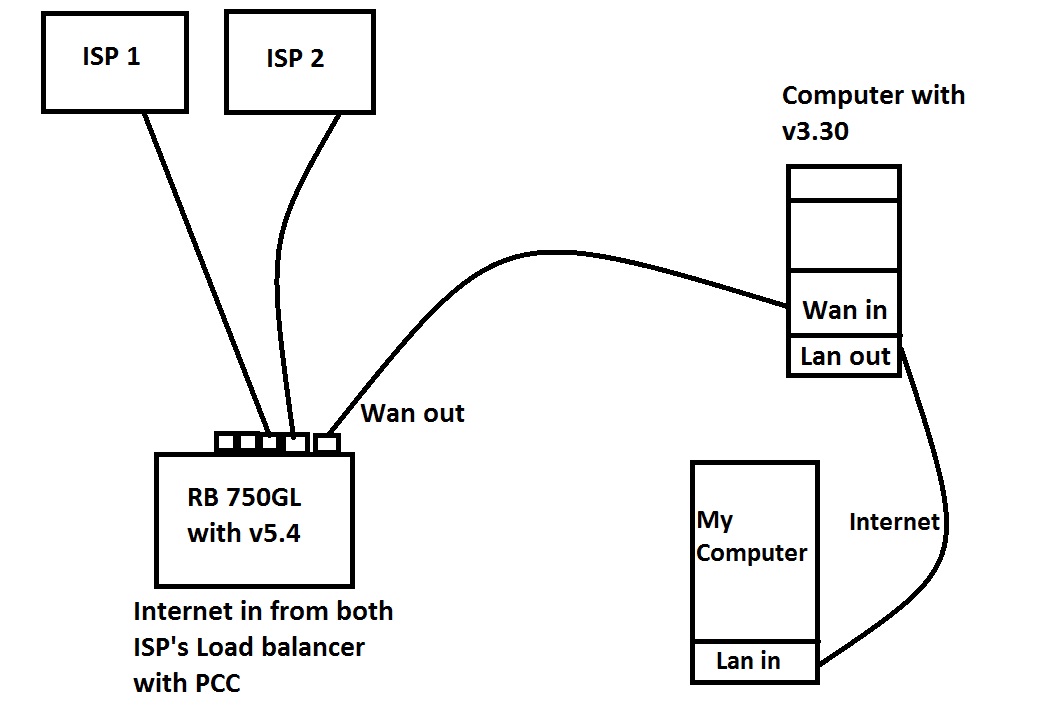
i was using computer with Mikrotik RouterOS v3.30. But now i am using Mikrotik RB750GL with Router OS v5.7. I have UPS for home and also using that for the Internet Routers with Mikrotik Router. When Electricity gone and Home electricity converted automatically on UPS then Mikrotik RB750GL do not give me access to the internet.When electricity came back then its work fine. Previously on computer that work fine on UPS.
Settings is same as computer in Router OS.
I also plug cable direct to ISP modem for checking Internet but Internet was available on both ISP Modems.
But when i again plug again to Mikrotik its don’t give me access to internet.
Hi,
Would you give more information about your network?
Configurations, Network Diagram and so on.
By the way
When this situation happens, login to RB via winbox and test your internet Connection.
My Network is very simple i have 2 dsl modems merging speed and getting out internet from 1 lan port. Its working fine. There is not Problem in Configuration i think.
When this situation happens in login in RB via winbox its connected to the internet also ping was working fine from the RB.
Interesting problem. So what could be different when the system is running on UPS power? There must be something.
Is it a continuous system or is there some switching delay? (do the router or the modems lose power and reboot)
Have you checked the routes when it’s running on the UPS? Are the different than when running on normal power?
Is the router getting a DHCP address from upstream or is it a static address? If it’s DHCP have you tried renewing the lease?
Have you tried rebooting the router after the power cuts over to the UPS? If there is a switching delay or some upstream component also has to switch over and stabilize maybe the router is coming up faster?
Do you have any QOS switching configured? Maybe under UPS power it’s ending up in an odd state?
My next step would be to print and capture all the dynamic settings (DHCP, DNS, routes, …) while the router is running on normal power, then do the same with it running on UPS power and compare them.
Is it a continuous system or is there some switching delay? (do the router or the modems lose power and reboot)
its continuous system no reboot.
Have you checked the routes when it's running on the UPS? Are the different than when running on normal power?
Routes working fine on ups as normal.
Is the router getting a DHCP address from upstream or is it a static address? If it's DHCP have you tried renewing the lease?
Yes Router have DHCP. I release and renew many times Router bound successfully but no internet access.
Have you tried rebooting the router after the power cuts over to the UPS? If there is a switching delay or some upstream component also has to switch over and stabilize maybe the router is coming up faster?
When above mentioned problem occurs i restart RB. After restarting 2 or 3 times sometimes its works but sometime not.
Do you have any QOS switching configured? Maybe under UPS power it's ending up in an odd state?
No i don’t have QOS. i directly connected to the RB with wire on lan 4.
QOS also applies to hard wired systems. If you have multiple lines and do load balancing, or fail over, or … you are probably using some kind of quality of service based rules to send the traffic over the “best” available links. That’s mostly what I meant.
Have you tried running traceroute to/from the router when it’s running on the UPS?
Did you have the same issues when your RB750GL was running v5.4? Or only after upgrade to v5.7? I want to make sure that this is not a software issue, but a power issue, like sigxcpu said
i am not sure about v5.4 i am trying to downgrade. and i check on many ups but its reacting still same. My computers tplink routers and isp modems are working fine on this ups.
i check on v5.4 its same as above mention problem..
My network diagram is following.
On ups when i ping from Main computer to RB750gl it shows timeout but when i ping from RB750gl to Main computer its work.
i am going mad … can anyone please help me…
its work fine on light and if i replace rb750gl with another computer. as mention in my first post.
in that computer we also use PCI Wireless Cards of Ubnt for throwing signals to customer. we are giving internet to that pc for throwing signals and giving internet to customers.
if we remove connection with that pc then rb750gl work fine on ups also..
Sounds like a power problem, and not related to ROS anyhow.
Have you checked the state of ethernet cards on RB750GL and that PC-router?
Maybe because of not enough power they can not auto negotiate the link speed.
Are you running ethernet cables near the UPS?