On my RB4001 on RouterOS 7, my RDP connection to my Jumpbox keeps dying. When I had it on 6.48.x, the connection was stable. Any suggestions what might be causing this or what to look at?
I use 7.1rc3 and work few h per many RDP sessions… .
Check a connection tab in firewall. Double client at proper connection and show it us.
Here you go
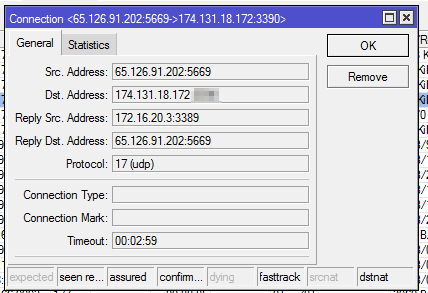
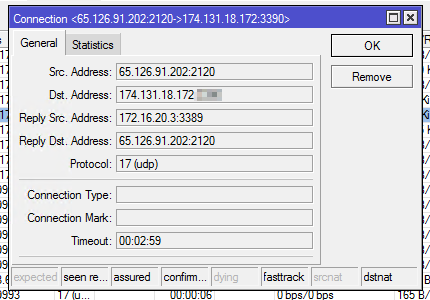
You have all frags ok.
Your RB works in location when your server rdp is, true ?
Means traffic from internet you DNAT to your RDP machine.
My suggestion is to disable fasttrack, reboot and check again.
When this not help then contact with support because your RDP works but is not stable at ros7.1rc*.
Yes, my RB4011 is my home router. You mean fully disable fasttrack on my RB4011 and try again? I can do that, tomorrow. Just funny that it worked on 6.48.
Just disable fasttrack, issue is still occurring. Would posting my entire config help?
I think better will be write a case directly to MikroTik at help.microtik.com becasue this is only DNAT and this works you at Ros6.
If you want to check this, yes you can share export and I will check.
I am planning on flattening my network in the future.
# jan/02/2002 09:35:19 by RouterOS 7.1rc3
# software id = NO-NO
#
# model = RB4011iGS+
# serial number = NO
/interface ethernet
set [ find default-name=ether2 ] disabled=yes
set [ find default-name=ether3 ] disabled=yes
set [ find default-name=ether4 ] disabled=yes
set [ find default-name=ether5 ] disabled=yes
set [ find default-name=ether6 ] disabled=yes
set [ find default-name=ether7 ] disabled=yes
set [ find default-name=ether8 ] disabled=yes
set [ find default-name=ether9 ] disabled=yes
set [ find default-name=ether10 ] disabled=yes poe-out=off
/interface vlan
add interface=sfp-sfpplus1 name="Guest Wifi" vlan-id=200
add interface=sfp-sfpplus1 name=IoT vlan-id=10
add interface=sfp-sfpplus1 name=VMs vlan-id=20
add interface=sfp-sfpplus1 name=Wifi vlan-id=7
/interface pppoe-client
add add-default-route=yes disabled=no interface=ether1 name=pppoe-out user=NO
/interface list
add name=WAN
add name=LAN
/interface lte apn
set [ find default=yes ] ip-type=ipv4
/interface wireless security-profiles
set [ find default=yes ] supplicant-identity=MikroTik
/ip dhcp-server option
add code=42 name=NTPVMs value="'172.16.20.1'"
add code=42 name=NTPLAN value="'172.16.6.1'"
add code=42 name=NTPIoT value="'172.16.10.1'"
add code=42 name=NTPWifi value="'172.16.7.1'"
add code=42 name="NTPGuest Wifi" value="'172.16.200.1'"
/ip dhcp-server option sets
add name=Wifi options=NTPWifi
add name=LAN options=NTPLAN
add name=VMs options=NTPVMs
add name="Guest Wifi" options="NTPGuest Wifi"
add name=IoT options=NTPIoT
/ip ipsec profile
set [ find default=yes ] dh-group=modp2048 enc-algorithm=aes-128 hash-algorithm=sha256
/ip ipsec proposal
set [ find default=yes ] auth-algorithms=sha256 enc-algorithms=aes-256-gcm,aes-192-ctr,aes-192-gcm,aes-128-gcm lifetime=0s pfs-group=modp2048
/ip pool
add name=IoT_pool ranges=172.16.10.100-172.16.10.254
add name=LAN_pool ranges=172.16.6.100-172.16.6.254
add name="Guest Wifi_pool" ranges=172.16.200.2-172.16.200.254
add name=VMs_pool ranges=172.16.20.100-172.16.20.254
add name=Wifi_pool ranges=172.16.7.100-172.16.7.254
/ip dhcp-server
add address-pool=IoT_pool dhcp-option-set=IoT interface=IoT lease-time=1w name=IoT
add address-pool=LAN_pool dhcp-option-set=LAN interface=sfp-sfpplus1 lease-time=1w name=LAN
add address-pool="Guest Wifi_pool" dhcp-option-set="Guest Wifi" interface="Guest Wifi" lease-time=1w name="Guest Wifi"
add address-pool=VMs_pool dhcp-option-set=VMs interface=VMs lease-time=1w name=VMs
add address-pool=Wifi_pool dhcp-option-set=Wifi interface=Wifi lease-time=1w name=Wifi
/queue simple
add burst-limit=2M/2M burst-threshold=2M/2M burst-time=10s/10s comment="Guest Wifi" limit-at=1M/1M max-limit=1M/1M name="Guest Wifi" priority=6/6 queue=default/default target="Guest Wifi"
/routing bgp template
set default as=65530 disabled=no name=default output.network=bgp-networks
/routing table
add fib name=""
/system logging action
set 3 remote=172.16.6.2
/zerotier
set zt1 comment="ZeroTier Central controller - https://my.zerotier.com/" identity="NO" name=zt1 port=9993
/zerotier interface
add instance=zt1 mac-address=62:8F:2E:C8:F7:2F name=zerotier1 network=NO
/ip neighbor discovery-settings
set discover-interface-list=none
/interface list member
add interface=ether1 list=WAN
add interface=sfp-sfpplus1 list=LAN
add interface="Guest Wifi" list=LAN
add interface=IoT list=LAN
add interface=VMs list=LAN
add interface=Wifi list=LAN
add interface=pppoe-out list=WAN
/ip address
add address=172.16.6.1/24 interface=sfp-sfpplus1 network=172.16.6.0
add address=172.16.7.1/24 interface=Wifi network=172.16.7.0
add address=172.16.10.1/24 interface=IoT network=172.16.10.0
add address=172.16.20.1/24 interface=VMs network=172.16.20.0
add address=172.16.200.1/24 interface="Guest Wifi" network=172.16.200.0
add address=192.168.254.253/24 interface=ether1 network=192.168.254.0
/ip cloud
set ddns-enabled=yes
/ip dhcp-server lease
add address=172.16.6.15 client-id=apc mac-address=00:C0:B7:31:A7:AD
add address=172.16.10.2 client-id=HeidiNightstand mac-address=60:38:E0:F1:C8:71
add address=172.16.10.5 client-id=HueBridge mac-address=00:17:88:A5:42:D9
add address=172.16.7.5 client-id=erx mac-address=04:18:D6:06:18:6F
add address=172.16.7.15 mac-address=70:2C:09:69:FF:88
add address=172.16.10.4 client-id=1:b0:be:76:46:b9:92 mac-address=B0:BE:76:46:B9:92 server=IoT
add address=172.16.7.4 client-id=1:44:90:bb:5:c0:cd mac-address=44:90:BB:05:C0:CD server=Wifi
add address=172.16.10.3 client-id=1:2c:aa:8e:d6:93:4c mac-address=2C:AA:8E:D6:93:4C server=IoT
add address=172.16.7.3 client-id=1:dc:52:85:d4:15:9f mac-address=DC:52:85:D4:15:9F server=Wifi
add address=172.16.20.3 client-id=1:52:54:0:c8:d0:49 mac-address=52:54:00:C8:D0:49 server=VMs
add address=172.16.20.4 client-id=1:52:54:0:be:8c:1c mac-address=52:54:00:BE:8C:1C server=VMs
/ip dhcp-server network
add address=172.16.6.0/24 dns-server=172.16.6.1 domain=mccloud.lan gateway=172.16.6.1 netmask=24
add address=172.16.7.0/24 dns-server=172.16.7.1 domain=mccloud.lan gateway=172.16.7.1
add address=172.16.10.0/24 dns-server=172.16.10.1 domain=mccloud.lan gateway=172.16.10.1
add address=172.16.20.0/24 dns-server=172.16.20.1 domain=mccloud.lan gateway=172.16.20.1
add address=172.16.200.0/24 dns-server=172.16.200.1 domain=mccloud.lan gateway=172.16.200.1
/ip dns
set allow-remote-requests=yes servers=1.1.1.1,1.0.0.1
/ip dns static
add address=172.16.6.2 name=transmission.smccloud.com
add address=172.16.6.2 name=unimus.smccloud.com
add address=172.16.6.2 name=airsonic.smccloud.com
add address=172.16.6.2 name=home.smccloud.com
add address=172.16.6.2 name=jackett.smccloud.com
add address=172.16.20.3 name=jenkins.smccloud.com
add address=172.16.6.2 name=lidarr.smccloud.com
add address=172.16.6.2 name=nzbget.smccloud.com
add address=172.16.6.2 name=omada.smccloud.com
add address=172.16.6.2 name=ombi.smccloud.com
add address=172.16.6.2 name=paperless.smccloud.com
add address=172.16.6.2 name=piwigo.smccloud.com
add address=172.16.6.2 name=plex.smccloud.com
add address=172.16.6.2 name=radarr.smccloud.com
add address=172.16.6.2 name=sonarr.smccloud.com
add address=172.16.6.2 name=speedtest.smccloud.com
add address=172.16.6.2 name=subversion.smccloud.com
add address=172.16.6.2 name=syncthing.smccloud.com
add address=172.16.6.2 name=tautulli.smccloud.com
add address=172.16.6.2 name=tdarr.smccloud.com
add address=172.16.20.3 name=jumpbox
add address=172.16.6.2 name=bb-8
add address=172.16.20.3 name=jumpbox.mccloud.lan
add address=172.16.6.2 name=bb-8.mccloud.lan
/ip firewall filter
add action=fasttrack-connection chain=forward connection-mark=!ipsec connection-state=established,related hw-offload=yes
add action=accept chain=forward connection-state=established,related,untracked
add action=fasttrack-connection chain=input connection-mark=!ipsec connection-state=established,related hw-offload=yes
add action=accept chain=input connection-state=established,related,untracked
add action=fasttrack-connection chain=output connection-mark=!ipsec connection-state=established,related hw-offload=yes
add action=accept chain=output connection-state=established,related,untracked
add action=accept chain=input connection-state=established,related
add action=drop chain=input connection-state=invalid
add action=accept chain=input in-interface=pppoe-out protocol=icmp
add action=drop chain=input in-interface=pppoe-out
add action=fasttrack-connection chain=forward comment="defconf: fasttrack" connection-mark=!ipsec connection-state=established,related hw-offload=yes
add action=accept chain=forward comment="defconf: accept established,related, untracked" connection-state=established,related,untracked
add action=drop chain=forward comment="defconf: drop invalid" connection-state=invalid
add action=accept chain=forward comment="defconf: accept established,related, untracked" connection-state=established,related,untracked
add action=drop chain=forward comment="defconf: drop invalid" connection-state=invalid
add action=drop chain=forward comment="defconf: drop invalid" connection-state=invalid
add action=drop chain=forward comment="defconf: drop all from WAN not DSTNATed" connection-nat-state=!dstnat connection-state=new in-interface-list=WAN
add action=drop chain=forward in-interface="Guest Wifi" out-interface=IoT
add action=drop chain=forward in-interface="Guest Wifi" out-interface=VMs
add action=drop chain=forward in-interface="Guest Wifi" out-interface=Wifi
add action=drop chain=forward in-interface="Guest Wifi" out-interface=sfp-sfpplus1
add action=drop chain=forward in-interface=IoT out-interface="Guest Wifi"
add action=drop chain=forward in-interface=VMs out-interface="Guest Wifi"
add action=drop chain=forward in-interface=Wifi out-interface="Guest Wifi"
add action=drop chain=forward in-interface=sfp-sfpplus1 out-interface="Guest Wifi"
/ip firewall nat
add action=dst-nat chain=dstnat comment=SSH in-interface=pppoe-out port=NO protocol=tcp to-addresses=172.16.6.2 to-ports=NO
add action=dst-nat chain=dstnat comment=HTTP in-interface=pppoe-out port=NO protocol=tcp to-addresses=172.16.6.2 to-ports=NO
add action=dst-nat chain=dstnat comment=HTTPS in-interface=pppoe-out port=NO protocol=tcp to-addresses=172.16.6.2 to-ports=NO
add action=dst-nat chain=dstnat comment=RDP in-interface=pppoe-out port=NO protocol=tcp to-addresses=172.16.20.3 to-ports=NO
add action=dst-nat chain=dstnat comment=RDP in-interface=pppoe-out port=NO protocol=udp to-addresses=172.16.20.3 to-ports=NO
add action=dst-nat chain=dstnat comment=Plex in-interface=pppoe-out port=NO protocol=tcp to-addresses=172.16.6.2 to-ports=NO
add action=dst-nat chain=dstnat comment=Syncthing in-interface=pppoe-out port=NO protocol=tcp to-addresses=172.16.6.2 to-ports=NO
add action=dst-nat chain=dstnat comment=Syncthing port=NO protocol=udp to-addresses=172.16.6.2 to-ports=NO
add action=dst-nat chain=dstnat comment=Transmission dst-address=172.16.6.2 in-interface=pppoe-out port=NO protocol=tcp to-addresses=172.16.6.2 to-ports=NO
add action=dst-nat chain=dstnat comment=Transmission dst-address=172.16.6.2 in-interface=pppoe-out port=NO protocol=udp to-addresses=172.16.6.2 to-ports=NO
add action=dst-nat chain=dstnat comment="Resilio Sync" in-interface=pppoe-out port=NO protocol=tcp to-addresses=172.16.6.2 to-ports=NO
add action=dst-nat chain=dstnat comment="Resilio Sync" in-interface=pppoe-out port=NO protocol=tcp to-addresses=172.16.6.2 to-ports=NO
add action=dst-nat chain=dstnat comment="Resilio Sync" in-interface=pppoe-out port=NO protocol=udp to-addresses=172.16.6.2 to-ports=NO
add action=masquerade chain=srcnat comment="nat to modem" dst-address=192.168.254.254 out-interface=ether1
add action=masquerade chain=srcnat comment=Masquerade out-interface-list=WAN
/ip service
set telnet disabled=yes
set ftp disabled=yes
set www disabled=yes
set www-ssl certificate=router disabled=no tls-version=only-1.2
set api disabled=yes
set api-ssl certificate=router tls-version=only-1.2
/ip ssh
set strong-crypto=yes
/ipv6 nd
set [ find default=yes ] advertise-dns=no
/snmp
set contact=smccloud@smccloud.com enabled=yes location="Mechanical  Room"
/system clock
set time-zone-name=America/Chicago
/system identity
set name=RB4011iGS+RM
/system logging
add action=remote topics=critical
add action=remote topics=error
add action=remote topics=info
add action=remote topics=warning
/system ntp client
set enabled=yes mode=multicast
/system ntp server
set enabled=yes manycast=yes multicast=yes
/system ntp client servers
add address=128.101.101.101
add address=134.84.84.84
/system package update
set channel=development
/system resource irq rps
set sfp-sfpplus1 disabled=no
/tool bandwidth-server
set authenticate=no enabled=no
/tool mac-server
set allowed-interface-list=none
/tool mac-server mac-winbox
set allowed-interface-list=none
/tool mac-server ping
set enabled=no
I must say that I’ve had the same problem since upgrading my RB4011 to v7.1rc1.
Mostly connections to Windows 2012 R2 servers. They are probably really sensitive to interrupted data streams.
I am using direct RDP, TCP+UDP, over IPSEC.
And mine is a 2012 R2 server.
Only strange stuff at your config is just fastrack at all chains, means with input & output.
If I can suggest you then please add some rule dedicated to accept DNATed traffic, I not like that default rule know as “defconf: drop all from WAN not DSTNATed”
/ip firewall filter
add action=accept chain=forward comment=“all from WAN DSTNATed” connection-nat-state=dstnat connection-state=new in-interface-list=WAN
Hi,
Perhaps block the UDP, and see if that helps (or not).
(Give Mikrotik something more targeted to look at)
I have examined logs and traces but could not find a cause for this issue.. unfortunately RDP is extremely sensitive and will initiate a TCP RST as soon as ‘something’ is off.. disconnecting after 5 to 15 seconds, leaving these unhelpful events in the log (Event Viewer/Application and Services Logs/Microsoft/Windows/TerminalServices-LocalSessionManager/Operational):
Session 5 has been disconnected, reason code 0
This occurs with multiple servers, over ipsec, from the same client.
Downgraded the router from v7.1rc4 to v6.49rc1, RDP connections are rock solid.
My fix was to upgrade to Server 2019. But not everyone has that option.
Same problem. I updated the router to 7.1 today. RDP to the server with Windows Server 2012 disconnects for 1 sec.
Downgraded firmware to 6.49.2 - no problems seen.
Hi ! After replacing 4011 to 5009 got the same problem. When connecting via RDP to WS2012R2, the connection is disconnected every 30-40 seconds (approximately) and is restored after 5 seconds. In the Connection tracker, connection tcp state in an “established” position, then changes to the “close”, and after 5 seconds it disappears and a new one opens immediately, with other NAT ports. I dont know how to solve this problem.
I have the same problem with RDP on Windows Server 2012 R2. I managed to force the end the cyclic disconnection by reducing the MTU from 1500 to 1492. I reported a problem with version 7.x and RDP to technical support. I think he doesn’t believe me, than this problem exist. Also write to them, if there are more of us, they may believe.
I’m experiencing the same after upgrading from RouterOS 6.49 to 7.1.1.
RDP connection is slow to establish and is dropping after 5-20 seconds. RouterOS 7 is on my side from where i connect to different servers. Most of the servers works just fine, but some don’t.
Same for me. Different devices (4011, 3011, 1009, 2004) and can’t find where is the promble after upgrade to ROS7. The only one solution is to disable UDP for RDP client. Win 2012R2, Win 2016 and win 2019 all gives me a disconnect after 20-60 sec.
And as yours for me everything was good on ROS6, but we are living in 2021, OVPN over tcp is to slow.
Hmm, I update more and more RB to 7.1.1 and not have problem with RDP.. but many ppl report here problem.
Maybe it’s because my DNAT’a are just accepted as
ip firewall/filter/add connection-nat-state=dstnat action=accept comment=“DNAT Accept”
and just one big DENY below.
I not see errors in that config.
Please write to official support.
@ALL Please take your supout.rif and send it to support as “RDP Broke” and support channels are at help.mikrotik.com