RB2011UAS-2HnD hardware.
— SLOW – wireless connection
I get 34 Mbps when WIRED to the Mikrotik… but I get 0.77 Mbps when WIRELESS
I get 33.88 Mbps WIRELESS with my Cisco.
My setup is
Internet to Cisco wireless router, then Cisco Wireless to my LAPTOP 33.88 Mbps
-------hard wired from Cisco to Mikrotik, and Wireless to my LAPTOP 0**.**77 Mbps
-------hard wired from Cisco to Mikrotik, and hardwired to my DESKTOP 34 Mbps
I probably do not have something set correctly, but I have NO idea what it may be, even after hours of reading..
Any suggestions greatly appreciated.. Anne .. (NEW, like two days ago newbie)
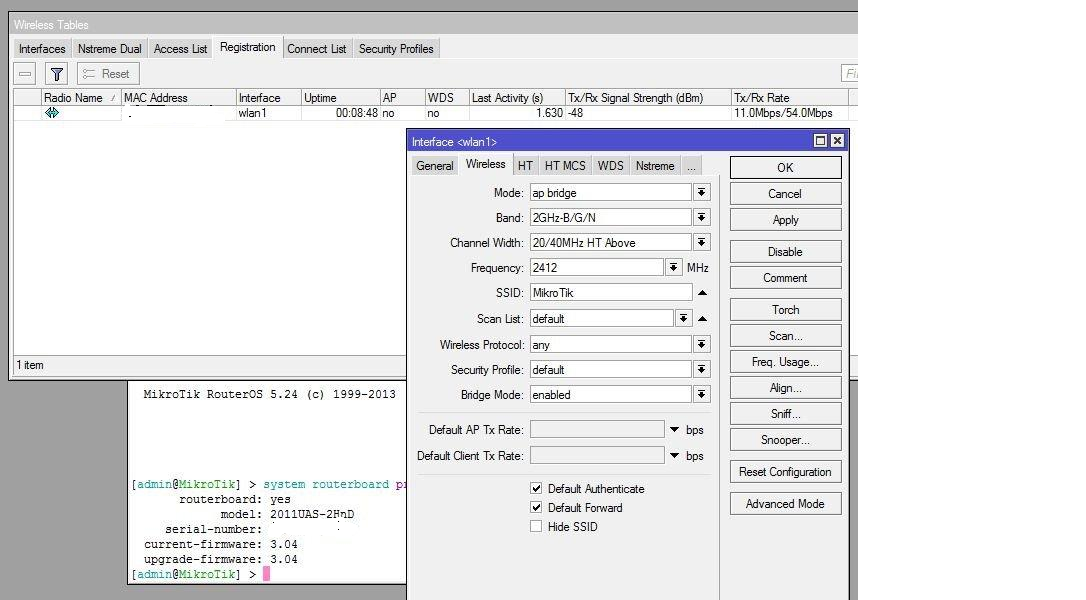
Couple of things…first, since you upgraded the ROS you probably need to upgrade the firmware. Open a terminal window. Type in system routerboard print. If the numbers don’t match then type in system routerboard upgrade and reboot (system reboot).
Second - open WinBox, log into your router and open the wireless window. Click on registration. You should see your wireless machine’s MAC address - what signal value are you getting?
Screen shots of the your wlan settings and the registration screen would be helpful.
Try this:
Make a survey to check what its the cleanest channel and use it, remember that in 2.4GHz only 1, 6 and 11 wont interfere with each other so you need to select the most clear and see that the nearby channels are clear too. Change the chanel
Make sure that you Point the antenas like this → | | do not use it like / or \ only | straight that will decrease the performance.
The rate in the Wireless-> Registration its bogus until traffic is passing by the wireless link, if the link its now using a minimum amouint of bandwith the signal level and the tx/rx rate are not realible, you need to check the rate when you are making the test so it will give you the most accurate signal /rate data.
Enable the 2 Chains in HT tab at wlan1 settings. chain0 and 1 on both sides.
In Advanced tab in Wlan1 settings set ACK TIMEOUT on indoors <— Very important to get a high troghput on close distance links like yours
set periodic calibration disabled and add Adaptive noise inmunity to AP-Client mode.
Have you tryd doing an online test whit a speed meter? cause i found that this gives me the atleats the correct speed of my connection even if i can not download stuff at same rate
If the clients are N clients then change the wireless selection to N only. That usually increases throughput although it seems something else may be wrong in this case.
Had the same problem. The issue seems to be with the TX-Rate selection on Mikrotik products. I’ve contacted Support and viewed numerous threads about this but never was able to rectify the issue. Sad to see it still hasn’t been fixed.
In the end, I used separate Ubiquiti AP’s and let Mikrotiks handle routing.
I was able to mostly alleviate the issue if I set the AP to B/G-Only, disabled WMM, 20mhz channel, Chain-1-only, antenna-A Only. You might try this, as long as you can deal with B/G speeds.
I was able to mostly alleviate the issue if I set the AP to B/G-Only, disabled WMM, 20mhz channel, Chain-1-only, antenna-A Only. You might try this, as long as you can deal with B/G speeds.