At start, VERY THANKS for cooperate and screenshot’s.
.
Just create other, separated LogAction for System+Info topics, you can still see them in separate list of logs. To not duplicate it in default info just add !system.
Example: Tested on editing script who do the system+info change.
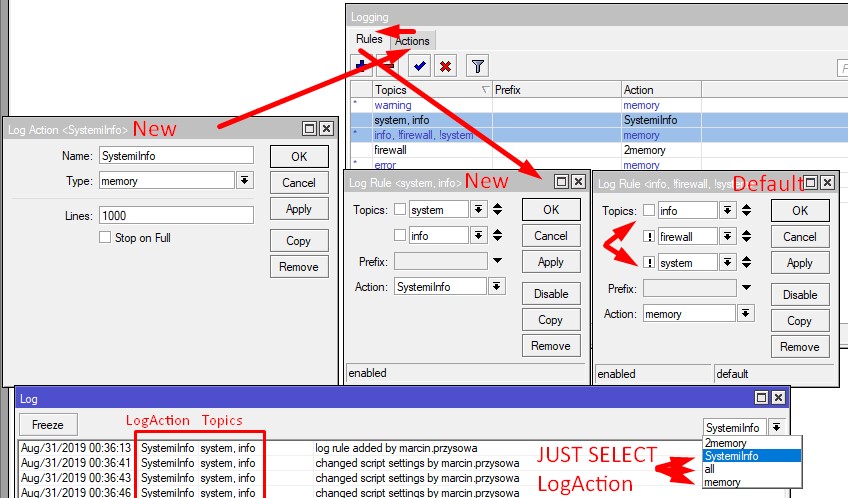
.
the logs are not flooding it
Done. No more duplicate of the same activation LED settings, only if LED count be change then it change. Look below.
.
As you can see on screenshot_8, my script i’m running on terminal, the CPU consuption is not too much
Mutch better if you run this script in /system scheduler with interval 1s or you must see 120Hz refreshing speed :).
Script can be place inside scheduler or run external /system script with our source code.
.
With this I can say that works well, but anyway I receive suggestions about it.
First Optimization… You change simple 34 lines code into 74 lines do-if-else-loop monster :).
Now this $rsrp1 live only inside do-loop and after exiting script save it as environment. Patch:
-interface lte info lte1 once do={:global rsrp1 $"rsrp"; ...
+local Rsrp ([/interface lte info lte1 once as-value]->"rsrp")
Now we can use $Rsrp in whole area of script and we not must remove “dBm” suffix text.
Use Functions, education examples in viewtopic.php?f=9&t=151539#p746898 , simplest example:
local ChangeLeds do={put "Display $1 leds"}; # $1 - first argument
$ChangeLeds 4; # Run function and say to change leds to on 4
.
Instead creating new and new the same global’s just change it value, patch:
-global a "new value 1"
-global a "new value 2"
...
+set $a "new value 3"
+set $a "new value 4"
# This check is global exist, true only when global exist with any of value:
put ([system script environment find name=a]!="")
# Instead:
-:global runloop true; do {...} while={$runloop}
+do while=(1=1) {delay 1s;...} # Really, Scheduler with 1s interval.
.
.
Final Release … works without duplication, base on feedback from $LedsCurrent = LastState, it’s only must be global variable . Paste in CLI and check.
global LedsCurrent 0
local LteRsrp -121

local ControlLed do={
  if ($1 != $4) do={ system leds set 1 leds=$2 type=$3 }
  return $1
}

do while=(1=1) {
  delay 1s
  set $LteRsrp ([/interface lte info lte1 once as-value]->"rsrp");
  if ($LteRsrp >= -80) do={set $LedsCurrent [$ControlLed 5 led1,led2,led3,led4,led5 on $LedsCurrent ] };
  if (($LteRsrp >= -90) && ($LteRsrp <= -81)) do={set $LedsCurrent [$ControlLed 4 led1,led2,led3,led4 on $LedsCurrent ] };
  if (($LteRsrp >= -100) && ($LteRsrp <= -91)) do={set $LedsCurrent [$ControlLed 3 led1,led2,led3 on $LedsCurrent ] };
  if (($LteRsrp >= -110) && ($LteRsrp <= -101)) do={set $LedsCurrent [$ControlLed 2 led1,led2 on $LedsCurrent ] };
  if (($LteRsrp >= -120) && ($LteRsrp <= -111)) do={set $LedsCurrent [$ControlLed 1 led1 on $LedsCurrent ] };
  if ($LteRsrp <= -121) do={set $LedsCurrent [$ControlLed 0 led1,led2,led3,led4,led5 off $LedsCurrent ] };
}
.
Additional BTW Questions:
Please put result of:
put [/interface lte get lte1 band]
or maybe this info is at WinBox > Interfaces > LTE > lte1 > General or Status tab (you show the Cellular tab before).
Cell-Monitor exist to search band/cell@BTS but maybe you know how to check current used band.
If you think this is solution for a post then mark this answer.
P.S. I am at Telegram if you not understand the final script.