continuing:
my vlan list looks like this:
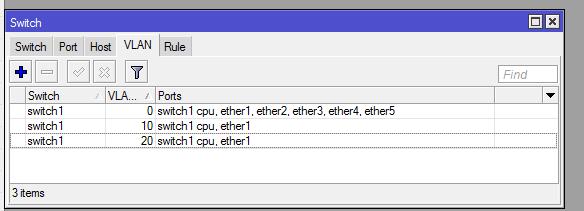
now configure the ports:

First thing to do is configure native vlan as default vlan on all ports you want, including switch cpu port in this case all ports use vlan0 as native vlan.
Then configure vlan header= always strip on accessports using only one vlan for end devices in this case ether2 to ether5
Configure vlan header= leave as is on trunk ports and switch cpu port, in this case ether1 is a trunk
and finally configure vlan mode=secure to enforce your configuration
Now add your vlan interfaces to configure router ip address using master port of the switch as the physical interface for this vlans:

from now on you can do what you want with your vlans, for example add a vlan to a bridge to another interface like virtual ap to use this vlan on a separate wireless lan, or configure dhcp server etc etc.
i invested several hours trying to understand this, i hope this can help somebody to do vlans quickly and take advantage of this nice functionality.
any doubt, errata or comment please comment i will be happy to answer