Hello, we recently started to use the dude as our main monitoring tool.
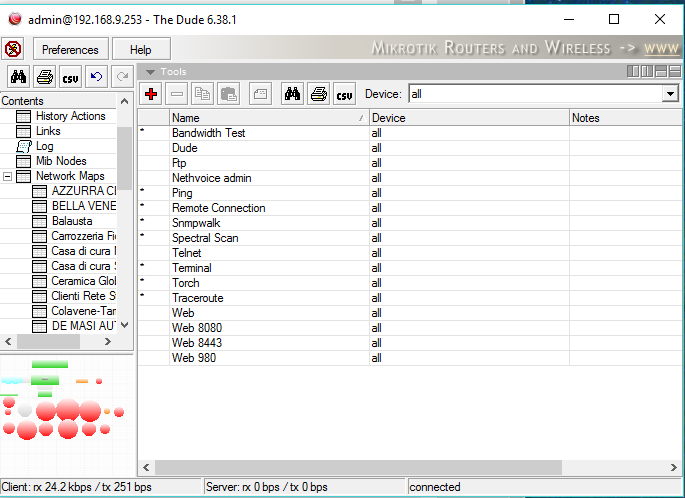
After upgrading from 6.36 to 6.38 tools/winbox disappeared from the list.
How can I restore this funcion??
Hello, we recently started to use the dude as our main monitoring tool.
After upgrading from 6.36 to 6.38 tools/winbox disappeared from the list.
How can I restore this funcion??
Hi,
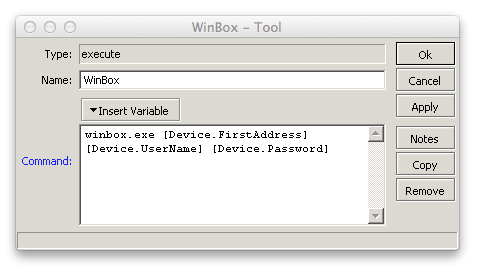
you had to create a new tool, with “+” button and then you had to create an object as this attached image.

Where you see C:\winbox.exe , you can put the path of your Executable Winbox file on the server.
Best Regards!
Thanks…
OK, But when winbox will be returned ?
MT removes winbox because:
v6.38 Major changes:
Removed - Since default Winbox used in the Dude wasn’t fully compatible with all RouterOS devices, we removed i completely.
It is not very comfortable adding on every client WinBox.exe.
Alternatively, please option that could winbox.exe be hosted on a dude server.
so that there was no need to make a link to the local PC storage.
In addition, that calling the binary method transmits the password in plain text.
You can add it under Devices->Types to the “Mikro Tik Device”. Then it will show up for all devices having that type.
You might have not understood me.
It’s about adding a winbox executable to the dude files tree
Or update the executable winbox file in the dude server.
Then is no need to upload dude to each client
The Solution showed by camp4t will work only on WINDOWS MACHINES with winbox on C:\
for me is not suitable because i am using the dude on MAC OS X with wine
Other solutions???
Hi mates,
Well, The Dude became unusable for some of our techs due the the fact that embedded Winbox disappeared. There’re more than one discussions about that (here).
Using custom Tool with the link to local folder (different for each user) is a pain. It’s even more pain for non-Windows admins.
So, what is the recommended solution by MikroTik support?
I’ve previously asked this in another thread here but I’ll continue in this thread instead.
My question to MT is then:
If the Winbox included in the Dude wasn’t compatible and the standalone one IS, then why not just include the latter in the Dude distros?
we waiting for “unremove”  winbox and update to actual version.
How is this “pain” exactly?
Goes without saying Normis…
Having to configure the Dude to load Windows from a local location is very inconvenient.
We are running Dude clients on several machines connecting to a Dude server on an RB1100AHX4 Dude ed. When we create a global Tool in the Dude, it requires the Winbox.exe to be located on the very same disk address on every client computer connecting to the Dude server…
Why not incorporate the latest Winbox in the Dude distribution?
I was able to get this working on my Mac. However I feel there should be an easier way to do it than what I did. First I tried copying it directly into the app package contents. Which didn’t work.
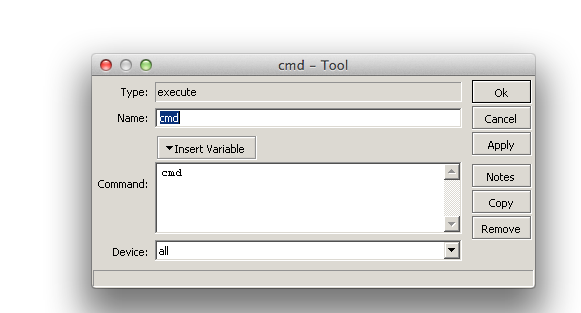
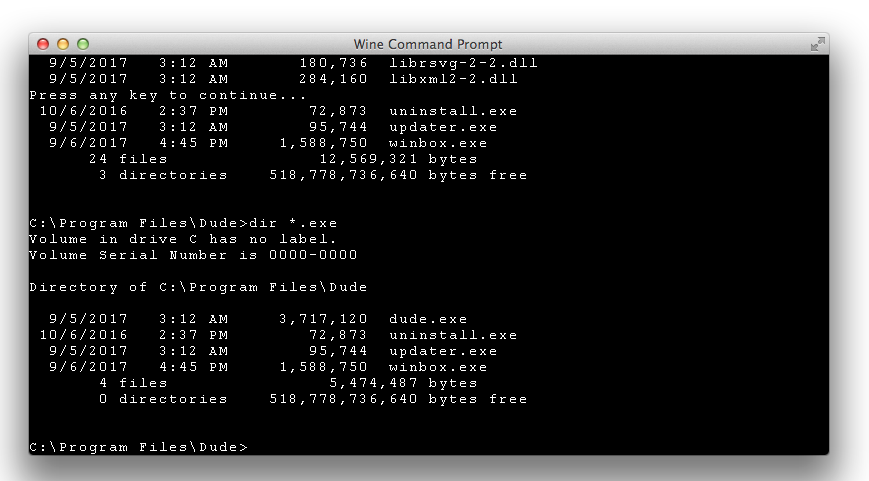
Also for windows users like Bomber67. Place winbox.exe directly in the dude’s program file directory. Then the code below will work on everyone’s install.
The way that worked for me was to:
winbox.exe [Device.FirstAddress] [Device.UserName] [Device.Password]
Also is there any way to get the cool winbox icon attached back to your custom tool? Instead of the generic window icon.

very good, it has served me great with my mac
thank you very much great contribution
where I have to place the file winbox.exe? my Dude is on Mikrotik, but no matter where I place the winbox.exe, it cannot execute it… help pls
Thank you so much I had the same problem and this solution worked !!!