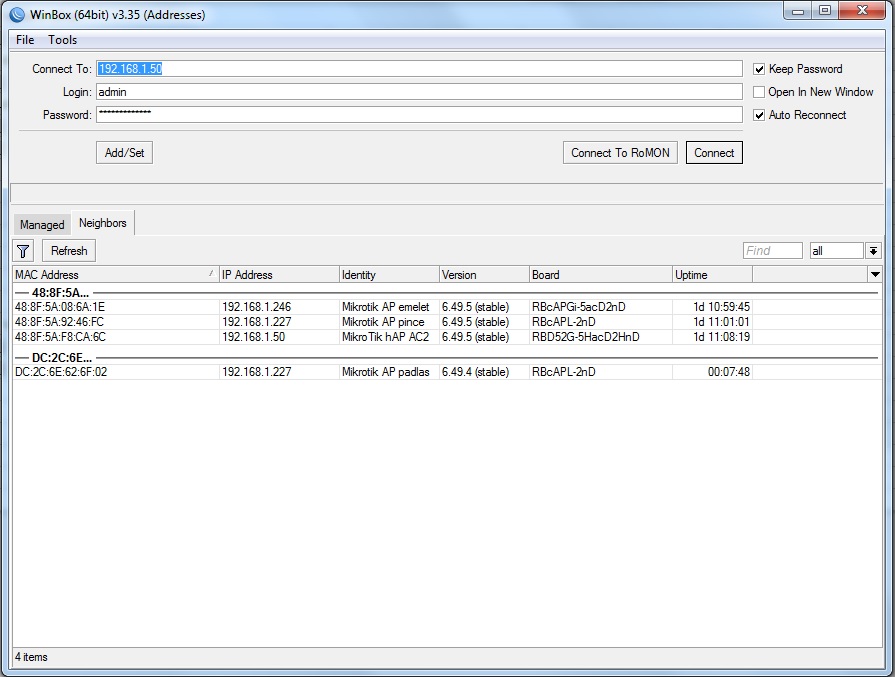
I have added a new cap lite to my network but it looks there is some trouble with the ip addresses. I exported the setting from one of my cap lite and just import to the new one. Of coures i have modified the identity name and the wireless ssid name. It’s working well but from the hAP 2 router they get the same ip address. why? i checked the exported file but there is no relevant information for IP addresses.
Now i can only find in winbox, in the router leases dont have row related to the new cap. (or somehow the old dissapear and i can see the new)
What can be the problem?
Export file from the existing cap: cAPLite_pince_v6494_20220317.rsc (1.25 KB)
winbox pic:
Thanks!
The bridges MAC address is in the rsc file. If you import this into another device, they will have the same MAC address (and DHCP will just use one IP address for that MAC address)
remove the “admin-mac=MAC address” , and maybe set it back to “auto-mac=yes”
General rule when importing RSC files … remove the MAC addresses before importing into another device.
Otherwise just now set the administrative MAC address of the bridge to the ether1 address without reloading the rsc. MAC addresses must be different just to get access to both of the devices. So the first device may just have that address correctly set. Then change it to some of the other interfaces, so you can reach the other incorrect device as well.