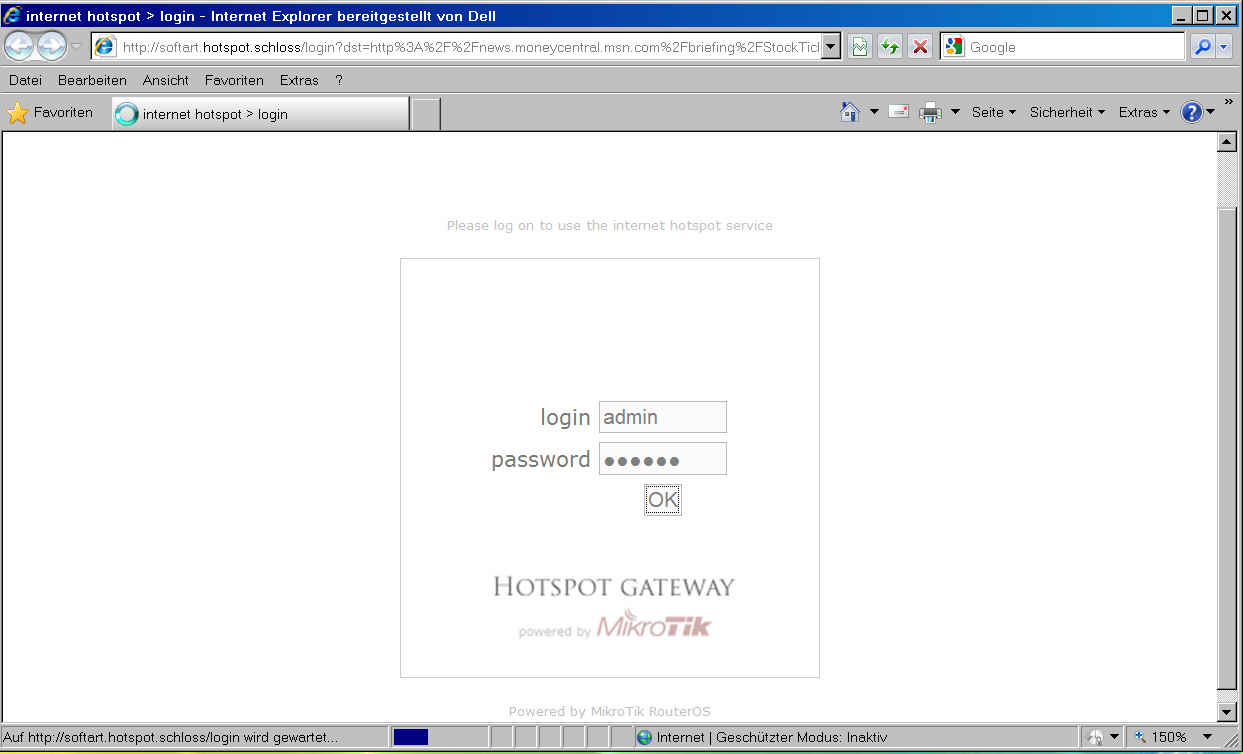
I have a working Hotspot, ROS 3.23, with customized login-page. And the same configuration on a test-PC, fortunately. After upgrade from 3.23 to 3.28 on my test-PC (fortunately, sigh) the login did not work any more. Suspecting some change in the Mikrotik-login-page, I did a fresh install of 3.28, with original Mikrotik-Login. And the same effect:
The login-page shows up on the client, but, after entering usr/pwd and clicking OK, the browser hangs in “Waiting for …” However, after clicking “Refresh” of the browser, the show goes on.
Similar effect on logout: Trying to logout accessing 192.168.1.1/logout, browser hangs in “Waiting for …”. However, after clicking “Refresh” button of browser, logout completes.
Any real solution on this one from MT ?
According to the thread mentioned above, this is a bug introduced during update from 3.27 to 3.28.
I do not use Open DNS. From thread mentioned above it looks like a DNS-problem, related to using
/ip hotspot profile
set default dns-name=SoftArt.HotSpot.Schloss
which worked in 3.23 for me, but not any more. DNS-name “SoftArt.HotSpot.Schloss” is just used locally.
Sorry, my problem (and from other guys mentioned in the other thread) is different:
Login does not complete after pressing “OK”; it continues to display the Login-Form, until I use the “Refresh” button of the browser.
Worked in 3.23 for me; and according to other thread it worked in 3.27, but not in 3.28.
Which version do you have running ?
Just an update: MT-support still checking my infos. They were not very eager in reproducing the problem themselves, simply stated, that it works with 3.30.
So they asked me to supply more data to help them to figure out what is going on with 3.28
Looks like every MT-customer is a beta-tester.
OK, did a fresh install of 3.30: No difference. Login of hotspot hanging, too, until “Refresh” button pressed. Same for logout, BTW.
I first setup the MT-PC completely including PPPoE-client, DNS, NTP-server, DHCP, NAT, default gateway, so I could access the web from client thru MT-PC without problems. Then I installed hotspot, and, voila: Login hanging …
I am experiencing the same problem as reinerotto. The ROS version is routeros-x86-3.30.npk. I played around to see under what condition the problem with hotspot login occurs. Here is the sequence in detail; it may help the MT people to locate the problem.
Open Internet Explorer and enter a web address. This causes the login box to be displayed.
After entering name and password and pressing OK, on the browser tab heading it says “internet hotspot > login” and the circle on the left of the tab rotates. This condition remains indefinitely.
To get out of this condition one can either press the refresh button or press OK in the login box again. The text on the browser tab then changes to “internet hotspot > redirect” for a brief moment and then the web page opens.
Notes:
The above sequence only occurrs when the network connection on the client PC is set up with “Obtain an IP address automatically”. When a fixed IP address is used the login behaves correctly, i.e., after pressing OK in the login box the web page opens directly. Thereby it does not matter if the IP address corresponds to the routers wireless network address or if it is some arbitrary address, i.e., one-on-one NAT works correctly.
When Cookie login is enabled on the router, only the first login behaves as described. For later reconnections no login is required.
Most of our clients are inexperienced PC users and this router behaviour throws them off completly. I had upgraded the router from v 3.22 to 3.28 and when all those complaints came in I had to downgrade again to 3.22. I am stating this to make it clear that it is not a trivial matter.
When looking at all the posts regarding this issue, all the rifs I sent and no serious reaction from MT-support, you have to conclude, that the first policy of a reaction to a bug-report to MT simply is: “Ignore”.
Until, some pile of user complaints shows up, may be.
Eventually, now thanks to your post this might change.
MT, you should have some concern regarding your image, because of your ignorant behaviour regarding bug-reports. Take your users serious, and be more pro-active in fixing problems, and not ignorant-reactive !
I suspect that due to security reasons, browsers are very suspicious of these non standard names.<
First of all, it worked on 3.23.
Second, before you continue simply guessing around, why don’t you first do some careful checking of all the info I provided ?
Because then you would notice, that with my last email to the support, which included a rif-file for 3.30, I did not specify any static DNS name at all for the hotspot. And the same problem on 3.30 showed up.
Why do I produce rifs, when they are not used ???
So, unfortunately, your response also proofes, that serious investigation of bug reports are not the standard at MT.
The erroneous login behaviour is repeatable. I suggest you have somebody repeat the test I described in my post on 25.09.09. Just make sure the network setting on the PC is “Obtain an IP address automatically”.