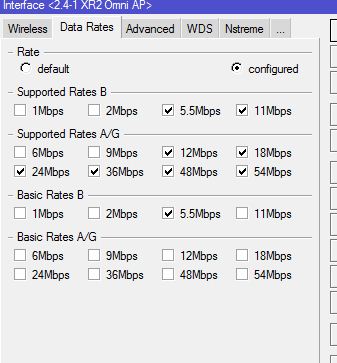
Customizing your data rates (and if using N all-around completely turning off all b/g rates, and customizing the HT rates) can get you better performance, fewer disconnects, and higher average CCQ, but its very dependent on the environment you are in (with respect to interference and noise).
Basically, the slower rates take longer to send a packet, providing more time for an interfering signal to appear. 802.11 typical response is to retransmit using an even slower rate, making that packet even more likely to be interfered with, IF competing transmissions are the cause of your problems. (and, you’re probably interfering with them, making them more likely to retransmit, with longer packets…).
So, you have to find the highest rate that works reliably when there is no interference, and then pick one or two of the next slower fallback rates, just in case (and to account for atmospheric (non-interference related) issues/variations over time; “rain fade”), and not let it use any slower ones beyond that.
However, this entire post is based on my experience tuning point to point links. Point to multipoint becomes vastly more complicated.
Basically, this overrides 802.11 normal mechanism, which assumes corrupt packets are due to inadequate signal strength for the modulation mode employed and current path conditions, rather than from someone else talking over you; now you’re forcing it to try to get the packets through “edgewise” so to speak, instead of talking slower and slower each time it repeats itself.
p.s. If restricting the data-rates, you have to make sure the clients and APs have compatible settings, or they will refuse to associate (last I checked, you get a log message about incompatible rates, maybe only if you have wireless logging on).