RouterOS version 6.42.10 has been released in public “long-term” channel!
Before an upgrade:
Remember to make backup/export files before an upgrade and save them on another storage device;
Make sure the device will not lose power during upgrade process;
Device has enough free storage space for all RouterOS packages to be downloaded.
What’s new in 6.42.10 (2018-Nov-14 15:04):
**MAJOR CHANGES IN v6.42.10:
!) upgrade - release channels renamed - “bugfix” to “long-term”, “current” to “stable” and “release candidate” to “testing”;
!) upgrade - “testing” release channel now can contain “beta” together with “release-candidate” versions;
----------------------**
*) bridge - do not learn untagged frames when filtering only tagged packets;
*) bridge - fixed possible memory leak when VLAN filtering is used;
*) bridge - improved packet handling when hardware offloading is being disabled;
*) bridge - properly disable dynamic CAP interfaces;
*) certificate - fixed time zone adjustment for SCEP requests;
*) crs328 - improved link status update on disabled SFP and SFP+ interfaces;
*) crs328 - improved link status update on disabled SFP+ interface when using DAC;
*) crs3xx - fixed possible memory leak when disabling bridge interface;
*) defconf - automatically accept default configuration if reset done by holding button;
*) defconf - properly load default configuration after reset (introduced in v6.42.9);
*) health - fixed bad voltage readings on RB493G;
*) ipsec - fixed hw-aead (H) flag presence under Installed SAs on startup;
*) ipsec - improved stability when uninstalling multiple SAs at once;
*) ipsec - properly update warnings under peer menu;
*) led - added “dark-mode” functionality for LHG and LDF series devices;
*) led - fixed default LED configuration for SXT LTE kit and wAP 60G AP devices;
*) led - fixed power LED turning on after reboot when “dark-mode” is used;
*) ntp - fixed possible NTP server stuck in “started” state;
*) ospf - improved stability while handling type-5 LSAs;
*) romon - improved packet processing when MTU in path is lower than 1500;
*) routerboard - renamed SIM slots to “a” and “b” on SXT LTE kit;
*) routerboard - show “boot-os” and “force-backup-booter” options only on devices that have such feature;
*) timezone - updated timezone information from tzdata2018g release;
*) traffic-flow - fixed post NAT port reporting;
*) traffic-flow - fixed “src-mac-address” and added “post-src-mac-address” fields;
*) tunnel - made “ipsec-secret” parameter sensitive;
*) usb - fixed power-reset for hAP ac^2 devices;
*) w60g - fixed misleading license level requirement log message;
*) w60g - fixed “scan” functionality when in bridge mode;
*) w60g - renamed “frequency-list” to “scan-list”;
*) winbox - allow to specify SIM slot on LtAP mini;
*) winbox - enabled “fast-forward” by default when adding new bridge;
*) winbox - show “System/Health” only on boards that have health monitoring;
*) winbox - show “W60G” wireless tab on wAP 60G AP;
To upgrade, click “Check for updates” at /system package in your RouterOS configuration interface, or head to our download page: http://www.mikrotik.com/download
If you experience version related issues, then please send supout file from your router to support@mikrotik.com. File must be generated while router is not working as suspected or after some problem has appeared on device
Please keep this forum topic strictly related to this specific RouterOS release.
Thank you very much for this! With the bridge VLAN filtering memory leak fix, we can now test this for rollout on our network to replace the older 6.40.x long-term release.
Finally, thank you for sharing this wonderful news and the tips before upgrading.
Things need to be upgraded to be able to make it the competitions nowadays. I am currently working on redesigning Petstreetmall, but you can still purchase products such as heated pet beds which is perfect since it is starting to get cold.
Hi every one
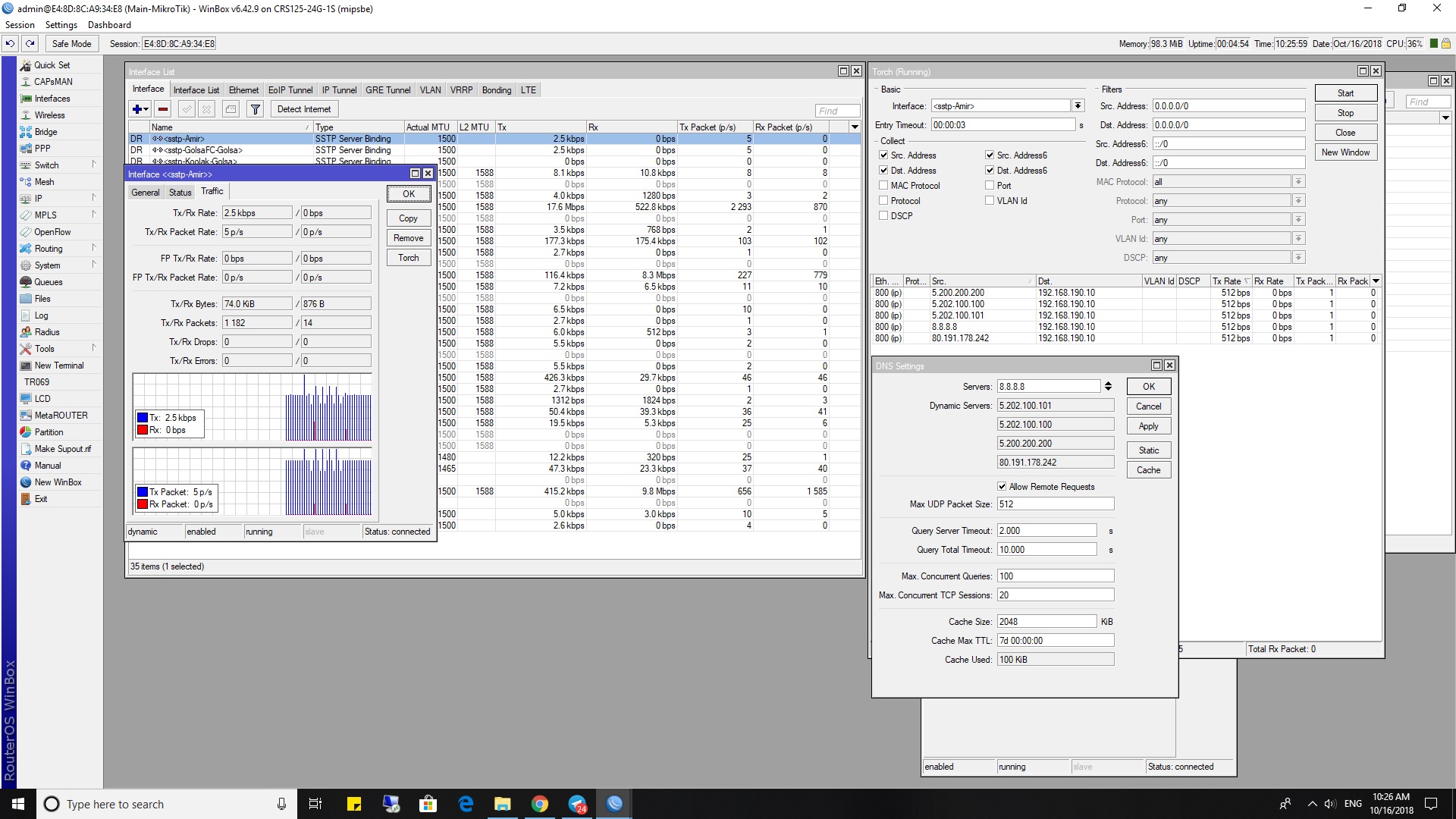
I have a problem with 6.42.10 long term and I had with 6.43 too.
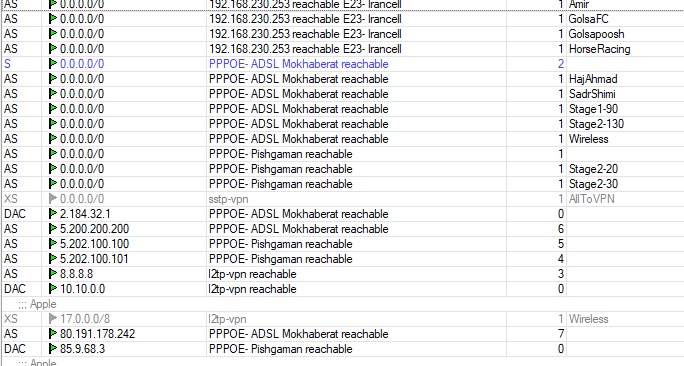
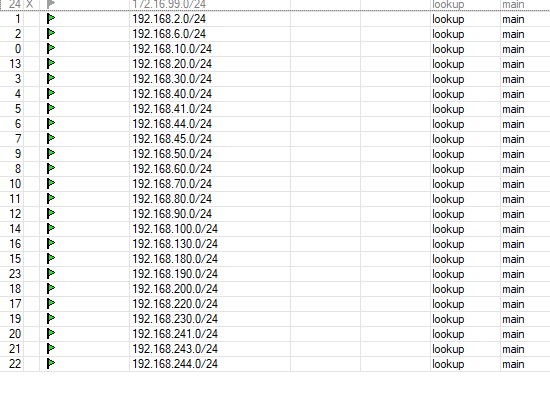
I have some mangles for route traffic for internet gateway, have 3 internet lines. Also using MK for dns too.
The problem is that when I update the ROS to 6.42.10 or 6.43 there will be a connection to all DNS IP addresses from every interface with no mangle like sstp or l2dp or Ethernet , although I have a rule in route that says the gateway for dns is what interface, BUT when I downgrade to 6.40.9 the problem is solved.
Maybe the route is not working. What is wrong with my config ?
You can see in picture.
@MirhosseiniAmir could you please create a new topic for your question?
This problem is not related to this specific release (6.42.10).
Please do not post screenshots but state your issue as clear as possible, with examples, and with a configuration export ( Terminal > /export hide-sensitive ).
problem with this version on cloud system on rb750 and rb951. after update both ros and firmware cloud system stuck to previous public ip not properly recognizing new public ip and could not update mikrotik dns!!! had to upgrade to stable (6.43.7) to make it work again. STAY AWAY from this version if you manage remote systems which you cannot physically connect to router or you will be locked out!!!
That sounds like typical issue which happens, when you upgrade/downgrade without disabling cloud first. Recommended fix from staff: upgrade/downgrade back to original version, disable cloud, upgrade/downgrade to your target version, enable cloud.
There will be plenty of people like you nowadays as Long-Term is stuck on 6.42.x and uses old cloud, while Stable is 6.43.x and uses new cloud2. Those two clouds are not compatible and they do not override each other correctly as I suggested. On early release of 6.43, everyone was aware. Now, less and less people will know and this situation will become daily bread for everyone here on forum
since when?
that has never happened to me from the time mikrotik implemented cloud system, accross ros updates. thats why it was so weird to me. and then why it recovered by upgrading it to next stable version? maybe mikrotik developers should put a script to disable cloud before upgrade and re enable it after if this causes a problem user cannot make a guess if this is going to crash after because it was enabled.
 When Long term switches to