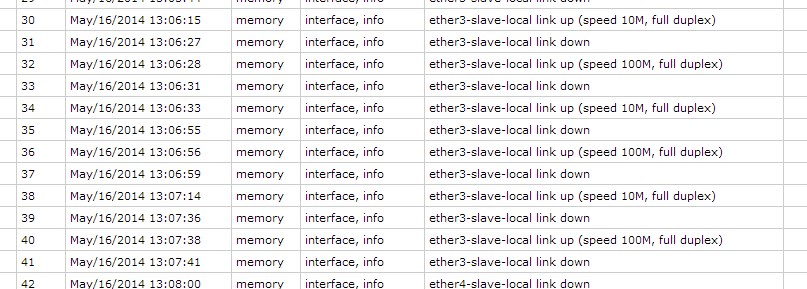
And I noticed that only “slave” ports (3-4-5) usually have log records about “flapping”. I’ve examined logs for two days and discovered that log records about port 1 (gateway) and 2 (master) appear only once when the device is powered on.
I hope the information will be useful.
Same problem,
firmware: 2.29
board: 750
version 5.0rc7
I have an RB750 and have this problem also.
I have two dsl modems running into ether1 and ether2. The PPP client on ether2 has been restarting over 50 times a day, and it wasn’t until I looked in the log that I noticed that prior to the link going down, ether2 was stating it was down, then up again a second later, causing several seconds of no connectivity.
ether4 does it also, which is slaved to ether5 and has an AP connected to it. Both of these ports flap up and down regardless of whether anything is connected to them. Removing link 1, and hooking link 2 to ether1 instead, ppp has been running for almost 24 hours now, while in the log ether2 and ether4 have been up and down like a yoyo all day.
Is this a hardware problem or will it be fixed in software. I can get around the ppp issue by using ether1 and 3 for my links instead, but that’s not ideal, and it still means that connectivity to my AP is being lost upwards of 50 times a day.
I am getting this flapping reported by customers using rc5, rc7 and rc8 on RB750s
Do mikrotik have a fix for this yet, or even know the cause ???
Nick.
I can confirm this bug on new rb750.
Firmware 2.28, rc8.
How we can help MT to reproduce this bug?
I can give an access to router (that is located in Latvia).
I can confirm that this port flapping issue is fixed when downgrading to 4.16!
Definitely a 5.x issue only 
I’d be happy with using 4.16 if VRRP worked…
I have the same issue on Rc5.0 beta 7 and 8. Have reverted back to 4.16 and all is fine again. Definitely a software issue - RC5.0 unusable until this is fixed. Please!
Thank you very much for your reports. This bug will be fixed in next release of RouterOS.
was resolved this issue?? i have serious problem with routerboard 493AH and 5.25 RouterOS Version.
Hi everyone, just a note on my experience yesterday with the RB750UP; (AND my fix)
I purchased a unit to run three ubiquiti devices in a switch mode, but then noticed at 12v i may go over the 500ma limit of POE each port. So i wired two nanobridges up (apparently 8watt) with power seperately. But then when trying to run my third device (Airgrid 5 HP) through the mikrotik which should be ok (3-6watt depending on where you look!), it kept power cycling every 20 seconds, 2 seconds, 20seconds… etc, not even enough time to log into it. Some describe this as flapping. Log messages were “link up” Link down" repeating every few seconds …
This was all before I found that my RB 750UP should be able to output 1amp (1000ma) per port. See here: http://wiki.mikrotik.com/wiki/Manual:PoE-Out
So, long story short, I found my problem was a cheap 5m Chinese Cat5 cable! This tested fine on my Cat5e cable tester! But must be far inferior in design at 5 meters.
Anyway, i’m unsure if the Mikrotik POE current reading is accurate but my Airgrid runs at approx 280mA, but i’ve seen it as high as 400 mA briefly (at startup i think), and when temporarily testing a NanoBridge it drew about 350mA ?? (450 max). So i will eventually try running all three devices and may then give an update here.
Further update from me here on running all three devices: http://forum.mikrotik.com/t/rb750up-issue/52918/257
A year on, another update (first fix improved it, but didn’t totally fix it!), now i have fixed it:
/interface ethernet poe settings set ether1-poe-in-long-cable=yes
(http://forum.mikrotik.com/t/winbox-3-rc/84760/461)