If you want to know what Valid Lifetime and Preferred Lifetime mean in general for IPv6 SLAAC, you can read this page: How to Understand SLAAC Address Lifetimes.
But if you already know about that, and only wonder why you see those two values next to the /ipv6 address assignment in RouterOS then:
-
Before RouterOS 7.21, when you add
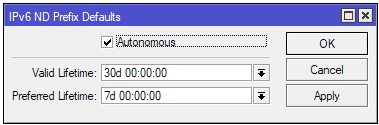
/ipv6 addressentries and enable the Advertise flag, the router will send out Router Advertisement (RA) messages with the assigned prefix. The Valid Lifetime and Preferred Lifetime sent with those advertisements are values coming from these global default settings: -
Version 7.21 introduced this change item:
The IPv6 address pools now can have their own pair of lifetime parameters, that will automatically count down.
-
If you create
/ipv6 addressentries from pools, and with Advertise turned on, and the pool has their own lifetime parameters, then the address entries will use those lifetime values (which are live and counting down) whenever the router sends out RA messages for those entries, instead of using the values from the global default.If the pool has no lifetime parameters, then the RA messages sent will use the lifetime values from the global settings mentioned above.
-
The Valid Lifetime and Preferred Lifetime (introduced with 7.21) of a pool cannot be set if you manually create a pool with hardcoded prefix!
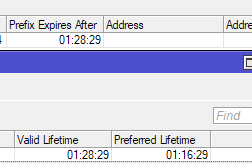
If instead that pool was populated by a DHCPv6 client instance requesting prefix from upstream, then the lifetime values come from the DHCPv6 response to the prefix request. You'll see that the valid lifetime is usually equal to the value seen in the Prefix Expires After column in the DHCPv6 Clients table. The preferred lifetime might be the same or shorter, depending on the DHCPv6 server.
-
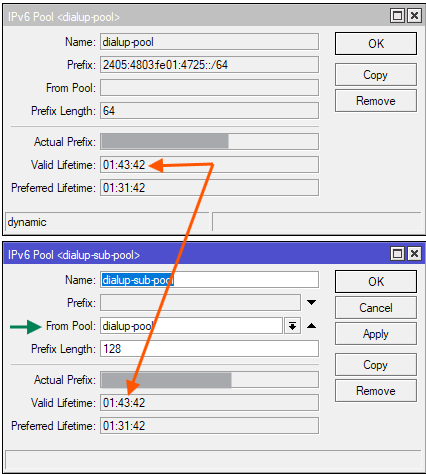
Another way for a pool to have the lifetime parameters, is that it was created as a sub-pool of another pool that have those parameters:
The ability to create sub-pool from a parent pool is a new feature introduced by RouterOS 7.22:
-
Now about this issue:
This appears to be a bug right now. From my observations, when you first create the
/ipv6 addressentry, or after a router reboot, the values displayed in the VALID and PREFERRED columns by/ipv6 address printwill match the values of the referenced pool. However, when the DHCPv6 client renew its lease (normally after half of the lease time has elapsed) then the displayed numbers by/ipv6 address printare no longer kept in sync and will disappear when elapsed.BUT this is only a display issue. The Router Advertisement (RA) messages sent by the router still have the correct Valid Lifetime and Preferred Lifetime value coming from the pool, and those values are normally reset each time the DHCPv6 client obtains a new lease. On the client operating systems you can use the commands mentioned at the end of the article linked at the top of my post, and see that the lifetimes values usually match what's left in the relevant IPv6 pool.
EDIT: Here is a screenshot for the out-of-sync situation: The DHCPv6 server sends a Valid Lifetime of 2 hours. After half of that elapsed (after 1 hour) the DHCPv6 client request a renewal of the lease and the Lifetime resets back to 2 hours. The screenshots show (from top to bottom) the DHCPv6 lease, the associated IPv6 pool lifetime, and the /ipv6 address print output:
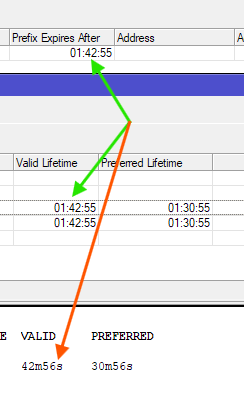
As you can see, the /ipv6 address print shows lifetimes that are 1 hour shorter, because the renewal happened 1 hour after the original lease assignment.