If you're coming directly from 7.24.5 stable then the only changes from that version to this version are in thread. But sooner or later you'll need to upgrade to 7.25 anyway since once 7.26 is out, 7.25 will become long-term. Also CVE-2026-98432 doesn't seem to be fixed in 7.25 either way.
It's a security fix. Should be out soon.
Same for me, first time that I've put all of my real devices in the long-term channel instead of stable.
I'm going to skip 7.25 and then take another look at 7.26 as soon as it's stable 
The vulnerability CVE-2026-98432 has been fixed in the LTS version 7.24.6.
See the link: https://mikrotik.com/supportsec/cve-2026-98432/
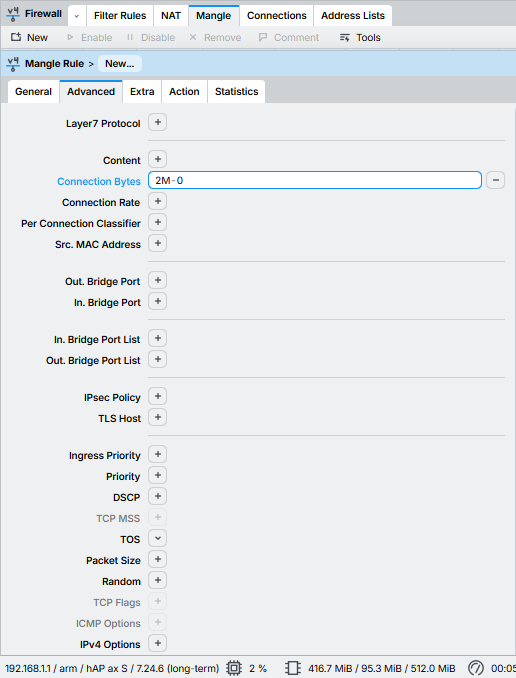
In my view, the word isn't "fixed."
The phrasing should be "adjusted to avoid errors."
"Fixed" would imply:
- Silently changing "2M-0" to "0-2M" during the update process.
- Preventing the use of an inverted range—both in the CLI and in Winbox—from a certain version onwards.
But, yes...
The red error message no longer appears.
This was my fear updating to 7.24.6 Longterm from 7.23.8
13:48:44 echo: wireless,debug 84:2A@cap-1(001) disassociated, connection lost, signal strength -60
13:48:51 echo: wireless,debug 84:2A@wifi1(001) associated, signal strength -65
14:37:12 echo: wireless,debug 84:2A@wifi1(001) disassociated, connection lost, signal strength -59
14:37:18 echo: wireless,debug 84:2A@wifi1(001) associated, signal strength -63
15:01:16 echo: wireless,debug 84:2A@wifi1(001) disassociated, connection lost, signal strength -59
15:01:23 echo: wireless,debug 84:2A@wifi1(001) associated, signal strength -63
iot devices playing up again 
Perhaps related to this discussion…
I have this issue with one device since several months
i also had issues going from 7.23.8 to 7.24.6 with wireless. I have the 5.2GHz radio on my Audience set up for my doorbell camera. The signal is weak as it's mounted on brick but it's always worked fine by itself on that radio. After going to 7.24.6 it connects and disconnects so much it's not usable. I tried freq switching at first, but downgrading to 7.23.8 fixed it immediately.
That would be very welcome update especially after replacing the great WinBox 3 with BloatwareBox 4 
Quick feedback on this version and relevant security note (https://mikrotik.com/supportsec/cve-2026-98432/)
THANK YOU! this is exactly what many of us asked for. The note clearly states what is the issue, who is affected, and what can be done to avoid misuse until update can be safely performed.
Please, make future security notes clear and open, same like this. Keeping secrets no longer prevents hackers from figuring everything out. But it makes life of ordinary admin much harder. Thanks again.
Has the default config been altered in 7.24.6 lts in the 7.23.8 is working? set up an old hap ac2 wireless ipv4 dhcp default config for somebody updated to 7.24.6, reseted and has only 3 fw rules, reverted to 7.23.8. on 7.25.1 is working aswell only on 7.24.6 not. the router was powered with reset.
Hi,
Could you elaborate more on the problem you have, please.
Yes, at least on RB760iGS when comparing to 7.23.8
Then you must have changed things, because the the defconf firewall rules were not what changed.
If you want more info, start a new thread and provide evidence.
How to export, sanitize and post config on forum - gigabyte091
Please follow the standard litany when giving a problem report. From Frequently Given Answers written by JdeBP
How to Report Bugs Effectively from PuTTY author Simon Tatham's Home Page
is it possible to update from 6.49.23 to 7.24.6 without losing current config?
Went to 7.24.6 (from 7.23.8) on my RB5009, 2 CRS-305, 3 CAP-ax, hAP-ax2, and wAP-ax with zero issues . . . .
Is it possible for a human to hold their breath for 6 minutes?
The answer to both is yes. But that doesn't mean that you can with your unspecified configuration.
Only ask questions with yes/no answers if you want "yes" or "no" as the answer.
What free chatgpt says.
the router was upgraded from 7.1x version before lts went straight to 7.24.6, had missing default config even powered with reset. updated to 7.23.8 and was working. update to 7.24.6 after config has no problems but reseting it, config is missing again. kept the old version. updating from v6 might not work entirely depending on config. most problems i had with these refurbished router, like this came with v6 in 2020, then was resold in eu with 7.1, 7.2.x, this one with 7.2.3
You haven't specified at all what you're talking about.