Until now, Firewall rules did not affect the behavior of IPv4 DHCP. You could add a rule that matches the ports 67/68 and it would trigger and could be used to log the traffic, but blocking or allowing made no difference to the DHCP result. Maybe that behavior has now been changed? That could result in interesting problems indeed.
For IPv6 DHCP the rules to allow the traffic were always required.
Version 7.25.1 has been released:
- Thank you for the report, we will see what we can do.
- Yes, the particular issue is fixed in 26 beta.
- Feature request created.
- We will see what we can do about that "disabled=no".
Well, I have seen the "disabled=no" pop up in other settings as well. Indeed it is sometimes annoying in exports that are further processed.
Edit: in my config disabled=no can be found in:
- l2tp client
- dhcp-server alert
- bfd configuration
- routing filter num-list
- routing filter rule
- ip route
- bgp instance
- bgp template
- bgp connection
- routing rule
- netwatch
for sure it looks more like generic "once you disable something and re-enable it, this is left behind" problem!
Yes, particularly if you quickly compare two configurations ( a "before" and an "after") the setting will be in most cases be considered as "different" even if it was not really-really changed.
7.25.1 should fix reported issue, let us know.
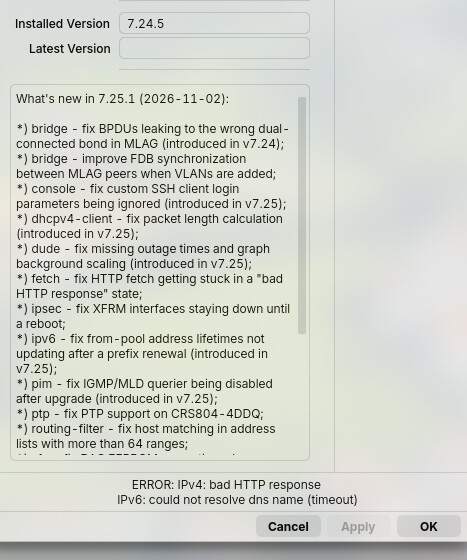
thats fixed on 7.25.1, go download the rb5009 RoS package from the mikrotik website and put it in the files then reboot the router.
I was also experiencing the exact same issue on my CCR2216 and had previously submitted a report under SUP-226760.
The latest RouterOS 7.25.1 patch release was just rolled out, and after upgrading, I can confirm that this critical DHCPv4 client issue from 7.25 has been resolved.
The DHCPv4 client gets stuck in the searching... state, ignoring DHCPv4 Offer packets from certain ISPs. In my case, this occurred under SK Broadband (South Korea) using a CCR2216.
*) dhcpv4-client - fix packet length calculation (introduced in v7.25);
The issue was caused by a bug in the DHCPv4 packet length calculation, which led to incorrect checksums and caused the system to drop the incoming packets.
After installing 7.25.1, the DHCPv4 client now successfully recognizes the packets and obtains an IP immediately.
Done! Thank you! It worked fine!
I observed change in package size of wifi-qcom-ac as in below:
24/07/2024 19:33 2,740,369 wifi-qcom-ac-7.15.3-arm.npk
04/02/2026 00:45 2,711,697 wifi-qcom-ac-7.20.8-arm.npk
04/02/2026 01:01 2,666,641 wifi-qcom-ac-7.21.2-arm.npk
23/09/2026 03:31 2,691,217 wifi-qcom-ac-7.24.4-arm.npk
07/11/2026 14:32 2,691,217 wifi-qcom-ac-7.24.6-arm.npk
07/11/2026 14:43 2,326,673 wifi-qcom-ac-7.25-arm.npk
07/11/2026 14:33 2,326,673 wifi-qcom-ac-7.25.1-arm.npk
Has anyone tested this new slimmed version? Is WiFi connection stable after upgrade to 7.25.x ?
I noticed I was loosing access to ESP32 devices (Shelly, WLED) connected to 2.4GHz AP even on 7.25.1 with hAP ac. Downgraded to LTS 7.24.6 and it seems to work fine.
I put it (7.25.1) on an hAP-ac2, and it seems to run fine, but I don't have much time on it. About 600K free with it . . .
It was disclosed on one of the beta threads that the slimming is simply the result of changing (I think) 4k alignment to 256B in the squashfs packs.
So whatever changes to the driver occurred are only related to the slimming as a coincidence.
any update?