I am back, I lost my config and had to recreate it. Forgot the steps I did before because I didn't document it and stumbled through it again. I want to say I am not an expert in any means but continued to make changes until I was able to get it to work.
Included the config for passing a mode-config to the spokes. (In this case it's just a p2p topology but it should work just the same with hub and spoke topology)
Some things to note, there does seem to be some bugs as once I had to restart R1 just for the XFRM interface to show it was being used.
Also could be wrong but so far it looks like you have to create a manual 0.0.0.0/0 policy for each end with tunnel specified otherwise it will try to use tunnel=no
Export for R1
/ip ipsec mode-config
add address=10.20.0.2 name=R2_ADDRESS
/ip ipsec peer
add exchange-mode=ike2 name=TO_R2 passive=yes send-initial-contact=no
/interface ethernet
set [ find default-name=ether1 ] disable-running-check=no
set [ find default-name=ether2 ] disable-running-check=no
set [ find default-name=ether3 ] disable-running-check=no
set [ find default-name=ether4 ] disable-running-check=no
set [ find default-name=ether5 ] disable-running-check=no
/interface xfrm
add mtu=1400 name=xfrm0
/ip address
add address=10.0.0.1/30 interface=ether1 network=10.0.0.0
add address=10.20.0.1/24 interface=xfrm0 network=10.20.0.0
/ip ipsec policy group
add interface=xfrm0 name=VTI_Tunnel
/ip ipsec identity
add generate-policy=port-strict mode-config=R2_ADDRESS peer=TO_R2 policy-template-group=VTI_Tunnel secret=Test123
/ip ipsec policy
add dst-address=0.0.0.0/0 group=VTI_Tunnel level=unique peer=TO_R2 src-address=0.0.0.0/0 tunnel=yes
/system identity
set name=R1
Export for R2
/ip ipsec peer
add address=10.0.0.1/32 exchange-mode=ike2 name=TO_R1
/interface ethernet
set [ find default-name=ether1 ] disable-running-check=no
set [ find default-name=ether2 ] disable-running-check=no
set [ find default-name=ether3 ] disable-running-check=no
set [ find default-name=ether4 ] disable-running-check=no
set [ find default-name=ether5 ] disable-running-check=no
/interface xfrm
add mtu=1400 name=xfrm0
/ip address
add address=10.0.0.2/30 interface=ether1 network=10.0.0.0
/ip ipsec policy group
add interface=xfrm0 name=VTI_Tunnel
/ip ipsec identity
add generate-policy=port-strict mode-config=request-only peer=TO_R1 policy-template-group=VTI_Tunnel secret=Test123
/ip ipsec policy
add dst-address=0.0.0.0/0 group=VTI_Tunnel level=unique peer=TO_R1 src-address=0.0.0.0/0 tunnel=yes
/system identity
set name=R2
Few photos included
Topology:

IPSec Policy Status - Note that "Active-Interface" is xfrm0 which is important!

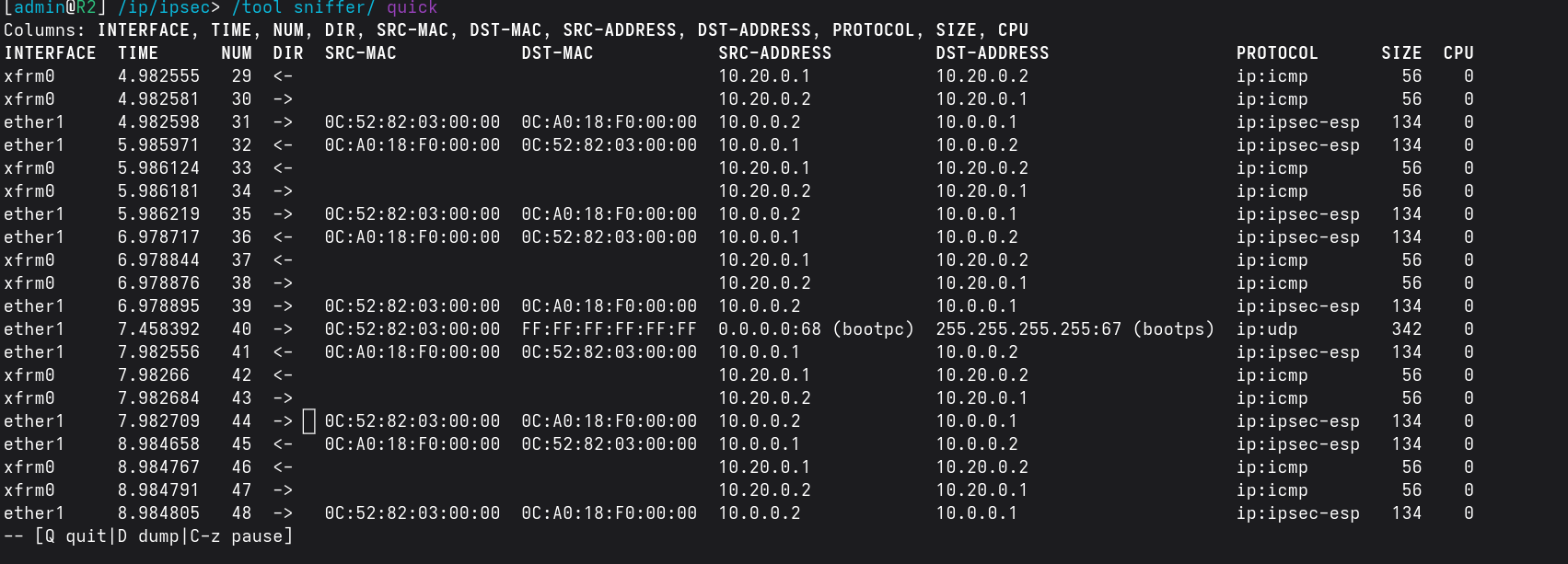
Quick sniffer on R2, showing the traffic. R1 is pinging the R2 virtual address