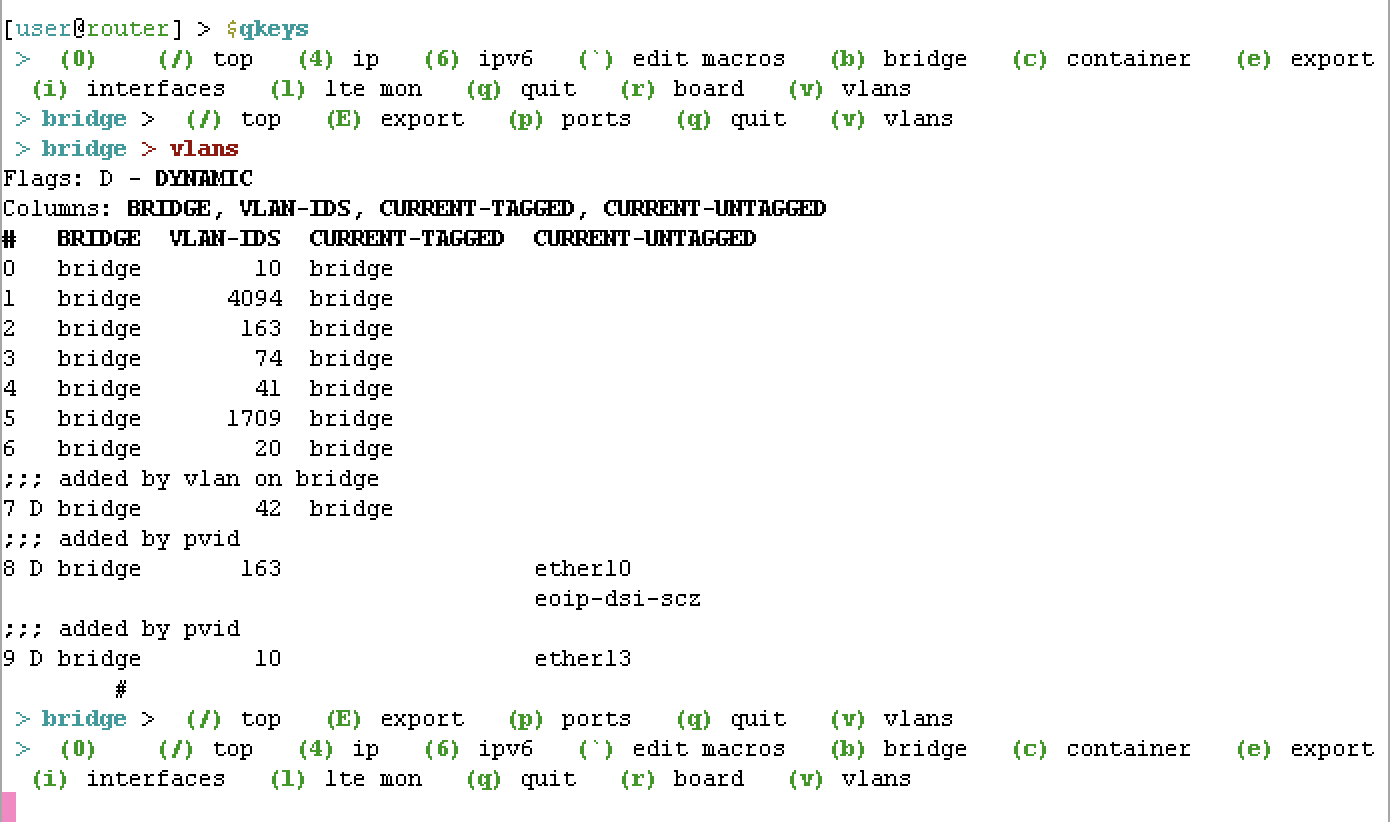
I wrote a more practical example of the $(>) syntax “quote” / "op yesterday, $qkeys. This lets you assign a keypress to a command, in a menu like tree. You can check the array, $qkeymap, to be whatever commands you regular use. Then, just run “$qkeys” at CLI and have one-key press to run any command defined in the array.
Kinda like “hotkey”, but the commands are defined in an array you can change - using the “quote” (aka “op”) type.
The $qkeys function takes an array with what to do with keypress defined in ($qkeymap). It does need 7.15, but only because it uses [:convert from=byte-array] which is new (but could be replace with @rextended’s fn that does ascii code to str conversion).
:global qkeys
:global qkeysmap
:set qkeysmap {
c={“container”;{
l=(>[/log/print follow-only proplist=message where topics~“container”])
p=(>[/container/print])
e=(>[/container/env/print])
m=(>[/container/mounts/print])
}}
“4”={“ip”;{
a={“address”;(>[/ip/address/print])}
r={“route”;(>[/ip/route/print])}
f={“firewall”;{
f={“filter”;(>[/ip/firewall/filter/print])}
n={“nat”;(>[/ip/firewall/nat/print])}
m={“mangle”;(>[/ip/firewall/mangle/print])}
c={“connections”;(>[/ip/firewall/connection/print])}
}}
}}
“6”={“ipv6”;{
a={“address”;(>[/ipv6/address/print])}
r={“route”;(>[/ipv6/route/print])}
“-”={“disable”;(>[/ipv6/settings/set disable-ipv6=yes])}
“+”={“enable”;(>[/ipv6/settings/set disable-ipv6=no])}
}}
i={“interfaces”;(>[/interface/print])}
v={“vlans”;(>[/interface/vlan/print])}
b={“bridge”;{
“E”={“export”;(>[/interface/bridge/export])}
v={“vlans”;(>[/interface/bridge/vlan/print])}
p={“ports”;(>[/interface/bridge/port/print])}
}}
r={“board”;(>[/system/routerboard/print])}
l={“lte mon”;(>[/interface/lte/monitor [find]])}
e={“export”;{
f={“file”;(>[:export file=[/terminal/ask prompt=" \1B[1;33m?\1B[0m file name:"]])}
p={“print”;(>[:export])}
}}
“`”={“edit macros”;(>[{/system/script/edit qkeys source; (>[/system/script/run qkeys])}])}
“C”={“clear”;(>[:put “\r\1Bc”])}
}
:set qkeys do={
:global qkeys
:global qkeysmap
:local loop true
:local currmap $qkeysmap
:local currpath “”
:local printHeader do={
:local cmds “\1B[1;36m$currpath >\1B[0m”
:foreach k,v in=($currmap,{q={“quit”}},{“/”={“top”}}) do={
:set cmds “$cmds \1B[1;32m($[:tostr $k]) \1B[2;39m$[:tostr ($v->0)] \1B[0m”
}
:put $cmds
}
:while (loop) do={
# normalize name so all keymaps have some name
:foreach k,v in=$currmap do={
:if ([:typeof $v]=“op”) do={
:set ($currmap->$k) {“($[:pick [:tostr $v] 10 30])”;$v}
}
}
    $printHeader currmap=$currmap currpath=$currpath

    # get key
    :local kcode [/terminal/inkey]
    :local key ([:convert to=raw from=byte-array {$kcode}])

    # find in map
    :local currval ($currmap->$key)
    :if ([:typeof $currval]!="nil") do={
        :local currname ($currval->0)
        :local currdata ($currval->1)
        :local currtype [:typeof $currdata]
        # found array (another tree)
        :if ($currtype="array") do={
            :set currpath "$currpath \1B[1;36m> $currname\1B[0m"
            :set currmap $currdata
        }
        # found op (function) to run
        :if ($currtype="op") do={
            :put "$currpath \1B[1;31m> $currname\1B[0m"
            :local rv [$currdata]
            :put "\t# \1B[2;35m$[:pick [:tostr $rv] 0 64]\1B[0m"
        }
    } else={
        # not in map
    }
    # if no "q" in map, then assign to quit
    :if ($key~"(q|Q)") do={ :set loop false }
    # / go to top
    :if ($kcode=47) do={ :set currmap $qkeysmap; :set currpath "" }

}
:return [:nothing]
}
If you save it as a /system/script names “qkeys”, there is even a command to edit the script using ` backtick at the top menu. This gets you syntax coloring to better spot error if changing the array. If you want the macros to persist, add a schedule script that runs qkeys script at startup.
To run it just run the qkeys scripts, then type $qkeys at the CLI.
There is a related “TUI” function $INQUIRE and $CHOICES that wrote a little bit ago using “op” type here: http://forum.mikrotik.com/t/inquire-prompt-user-for-input-using-arrays-choices-qkeys/167956/1