Add DNS over HTTPS (DoH) support

Thanks sindy, your script works.

But when I try to add commands to it, it does not work.

:if ([:do {tool fetch url="https://1.1.1.1/dns-query\?name=mikrotik.com%26type=A" output=file dst-path=result http-header-field=accept:application/dns-json} on-error={/ip dns set allow-remote-requests=yes servers=8.8.8.8 verify-doh-cert=yes use-doh-server=""}] = ";") do={/ip dns set allow-remote-requests=yes servers=8.8.8.8 use-doh-server=https://1.1.1.1/dns-query verify-doh-cert=yes}

Also tried to understand it and split to multiline.

:if ([:do {
	tool fetch url="https://1.1.1.1/dns-query\?name=mikrotik.com%26type=A" output=file dst-path=result http-header-field=accept:application/dns-json
} on-error={
	/ip dns set allow-remote-requests=yes servers=8.8.8.8 verify-doh-cert=yes use-doh-server=""}] = ";") do={
	/ip dns set allow-remote-requests=yes servers=8.8.8.8 use-doh-server=https://1.1.1.1/dns-query verify-doh-cert=yes
	}

PS from what I get of information, you should use column in front of commands, like :put not put

Well, if you want it indented, it would be as follows:

:if ([
  :do {
    tool fetch url="https://1.1.1.1/dns-query\?name=mikrotik.com%26type=A" output=file dst-path=result http-header-field=accept:application/dns-json
  } on-error={
    /ip dns set servers=8.8.8.8 use-doh-server=""}
] = ";") do={
  /ip dns set servers="" use-doh-server=https://1.1.1.1/dns-query
}

Or maybe even more properly structured:

:if ([
  :do {
    tool fetch url="https://1.1.1.1/dns-query\?name=mikrotik.com%26type=A" output=file dst-path=result http-header-field=accept:application/dns-json
  } on-error={:nothing}
] = ";") do={
  /ip dns set servers="" use-doh-server=https://1.1.1.1/dns-query
} else={
  /ip dns set servers=8.8.8.8 use-doh-server=""
}


Correct, but RouterOS is quite tolerant in cases where the context is unambiguous.

You don’t need to set all parameters of /ip dns, only those which you really want to change.

Thanks.

It seems to not work in the fail situation.

If I cut an past this to terminal

{
:if ([
  :do {
    tool fetch url="https://1.1.1.21/dns-query\?name=mikrotik.com%26type=A" output=file dst-path=result http-header-field=accept:application/dns-json
  } on-error={:nothing}
] = ";") do={
  /ip dns set servers="" use-doh-server=https://1.1.1.1/dns-query
} else={
  /ip dns set servers=8.8.8.8 use-doh-server=""
}
}

1.1.1.21 does not exist so should turn of DoH and set DNS. I see terminal replies with: status: failed

PS RouterOS mix of do { and do={ makes me some confused as well.

Yes, you are right, I haven’t tested it thoroughly enough, the output value is “;” regardless whether the command succeeds or fails. So you really have to use the on-error to learn the actual result. So it would look as follows:

:local result yes
:do {tool fetch url="https://1.1.1.1/dns-query\?name=mikrotik.ca%26type=A" output=file dst-path=result \
    http-header-field=accept:application/dns-json} on-error={:set result no}
:if $result do={
  /ip dns set servers="" use-doh-server=https://1.1.1.1/dns-query
} else={
  /ip dns set servers=8.8.8.8 use-doh-server=""
}

(use of the result string as a variable name has nothing to do with its use as a name of the destination file for the :tool fetch)


This is an example of where the context makes a difference. :do is a command itself, and on-error is one of its parameters; do= is a parameter of an :if command. One of other symptoms of ROS’ tolerance is that you may omit the parameter name for some mandatory parameters. So instead of the proper :do command={:put “this”}, you can abbreviate to :do {:put “this”}. With :if, it is the same case: the proper syntax is actually :if condition=($a=$b) do={:put “equals”}, but most people write just :if ($a=$b) do={:put “equals”}

Works perfectly, and thanks for the explanation of commands. Learning some new every day, even if I am not 20 any more :slight_smile:

Good. And now please explain me the idea behind hiding where you browse from your ISP or government when you can, but cowardly reverting to plaintext DNS whenever it fails.

There are not so many DoH servers out there (yet?), so it is not a big deal for an ISP with a gun (government’s or other) aimed at their head to prohibit access to all of them, nor to identify eventual newly appearing ones from your traffic alone.

It not so much what I need, but more that I can do :slight_smile:
DNS is one of the things that ISP still has control over (until DoH and other solution)
Reverting to normal DNS is needed, since there are not fail over or priority on the RouterOS DNS. If DoH server stops, everything stops.

When there are more DoH servers out there, it may be a better solution to use an another DoH server as fail over.

@Jotne

How often do you run the script with sheduler ?

Richard

00:01:00
Every minute.

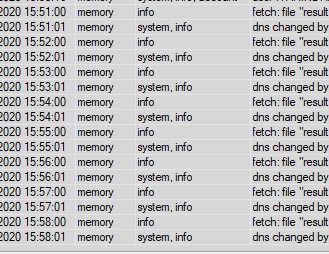
my log filled with this…


How to skip this log from script?

FYI, October 2020, and I found that the missing certificate for Cloudflare was “DigiCert ECC Secure Server CA”.
(Available from https://cacerts.digicert.com/DigiCertECCSecureServerCA.crt.pem)

After downloading the PEM file, you can upload through the Mikrotik web interface (Files), and import (Certificates).