so you mean here? syntax?
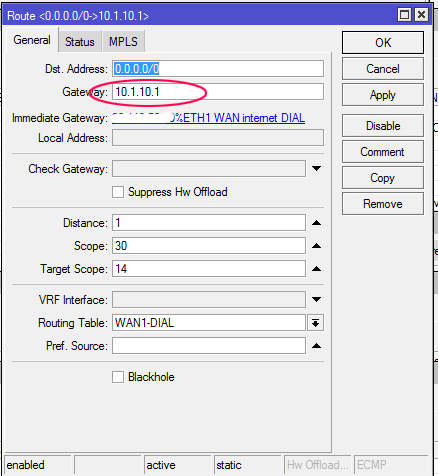
Oh, I see you added that later. Correct config for v7 is:
/ip route
add check-gateway=ping distance=1 gateway=1.1.1.1 target-scope=15
add check-gateway=ping distance=2 gateway=8.8.8.8 target-scope=15
add check-gateway=ping distance=1 dst-address=1.1.1.1/32 gateway=10.3.127.1 scope=15
add check-gateway=ping distance=1 dst-address=8.8.8.8/32 gateway=10.3.121.1 scope=15
Or anything greater than 10 at least in “target-scope” parameters
Yes. Just copy and paste interface name.
Thanks,
in fact I would like to solve this task:
- for sort of users (local IPs) I need to provide public IP via NAT 1:1 (I could route public IP directly to them but I do not want because of security reason)
- so I have sort of public IPs definned on WAN1 interface of MikroTik…and another WAN2 interface (different provider) as failover - this works perfect according to your topic, thanks!
- just because of clarity I would like use another WAN3 interface for NAT 1:1 purpose only, BUT the gateway of deffinned IPs is the same like for WAN1 (the same provider), whenever I enable WAN3 the outgoing traffic is done via this interface (and it’s IP) - in fact the traffic is going through the last enabled interface from these two…
So I hope I could manually set the interface which should be used for gateway detection? Sorry, maybe this is not the right way of thinking about this task…
Got you. Then simply use the following syntax for gateway: “IP%interface”. Like “203.1.2.3%pppoe-out1”
It seems that it is really working!  And just for sure, I should use IP like: 10.1.1.1%ETH2WAN and not the real IP of gateway there?
BTW “recursive” info is gone from Route List in v7, is there any other place to check-see that?
What do you call ‘real’ IP of gateway? You should use your provider’s gateway, not some ephemeral IP. We’re talking about ethernet interface, with ARP, right? I put “pppoe-out1” in my example, but that’s bad example, you don’t need to set IP for PPP interfaces at all.
If your “Gateway” differs from “Immediate gateway” - the route is recursive 
my prevous state was according your topic..so the gateway was set like
/ip route
add distance=1 gateway=10.1.1.1 target-scope=12 routing-mark=ISP1
add distance=2 gateway=10.2.2.2 target-scope=12 routing-mark=ISP1
add distance=1 gateway=10.2.2.2 target-scope=12 routing-mark=ISP2
add distance=2 gateway=10.1.1.1 target-scope=12 routing-mark=ISP2
so now I just put there:
/ip route
add distance=1 gateway=10.1.1.1%ETH1WAN target-scope=12 routing-mark=ISP1
add distance=2 gateway=10.2.2.2%ETH2WAN target-scope=12 routing-mark=ISP1
add distance=1 gateway=10.2.2.2%ETH2WAN target-scope=12 routing-mark=ISP2
add distance=2 gateway=10.1.1.1%ETH1WAN target-scope=12 routing-mark=ISP2
Looks like something is wrong. What are 10.1.1.1 and 10.2.2.2?
look at your initial post at the top:
Then, let’s create destinations to “virtual” hops to use in further routes. I’m using 10.1.1.1 and 10.2.2.2 …
You need to add “%interface” part to the routes to you provider(s), not to those “virtual” hops
really? but then it will not be recursive anymore… my state before I touch it was exactly like I wrote above - the gateways was defined to virtual hops and detected as recursive (in v6)
If you change a route with “dst-address=HostA gateway=203.1.2.3” with “dst-address=HostA gateway=203.1.2.3%ether1” - this doesn’t change its “recursivity”, it just binds it to the ether1 if, for example, you have 203.1.2.3 gateway IP behind both ether1 and ether2.
Thanks for the correction. Not sure why it was working correctly all weekend or during my original post, but after a reboot, what I had thought was working stopped passing traffic today.
I’ve corrected my config on the 7.2rc1 CUBEAC, and rebooted several times and it’s still working (thanks !!)
/ip route
add check-gateway=ping distance=1 gateway=1.1.1.1 target-scope=15
add check-gateway=ping distance=2 gateway=8.8.8.8 target-scope=15
add check-gateway=ping distance=1 dst-address=1.1.1.1/32 gateway=10.2.4.5 scope=15
add check-gateway=ping distance=1 dst-address=8.8.8.8/32 gateway=10.3.44.1 scope=15
Where 10.2.4.5 is the Preferred 60G route with this Cube AC
10.3.44.1 is the backup 5G failover.
Q1. Just to recap, I see some using target scope of 11, some 12 some 15, as long as ALL target scopes are scope+1, on the lines where the gw is the ISPs, that is the key??
Q2. In this post there is an insinuation of an additive component to adding values to target scope, but not verified. Ignore??
http://forum.mikrotik.com/t/recursive-routes-in-ros-7-x/154802/1
Q3. I never use mangling, its like garlic/cross to a vampire.
The unrelated question in this series of questions… I see black hole entries at the end of some peoples IP routes and assuming it has a purpose??
(I have seen similar routes for bogons for example, is their a linkage in intent?)
Caveat still using Ver6 (waiting for 7.1.2 stable)
/ip route
add check-gateway=ping distance=3 dst-address=0.0.0.0/0 gateway=1.0.0.1 scope=30 target-scope=10
add check-gateway=ping distance=4 dst-address=0.0.0.0/0 gateway=9.9.9.9 scope=30 target-scope=10
add check-gateway comment=PrimaryRecursive distance=3 dst-address=1.0.0.1/32 gateway=034.xxx.yy.bb scope=10 target-scope=10
add check-gateway comment=SecondaryRecursive distance=4 dst-address=9.9.9.9/32 gateway=034.xxx.yy.bb scope=10 target-scope=10
add check-gateway comment=SecondaryWAN distance=10 dst-address=0.0.0.0/0 gateway=04.yyy.xx.aa scope=30 target-scope=10
Q4. Assuming the default values and relationship between Purple and Light Blue, and Green and Orange (instances of scope 30 and target scope 10) are okay??
Q5. Assuming its the values in RED, that need to be greater by at least one than the scope?? ( if paying attention this confirms Q1)
Q6. Can I make the changes now in Vers6, so that when I switch its seamless?
Just in case one wanted to know how I deal with a VLAN fiber connection that unlike cable, does not switch to the new IP automagically and thus needed a script to take the new values (ISP gateway) found in status to apply to the IP routes. (Associated Script in IP DHCP for Primary WAN.)
:if ($bound=1) do={
:local iface $interface
:local gw [ /ip dhcp-client get [ find interface=$“iface” ] gateway ]
/ip route set [ find comment=“PrimaryRecursive” gateway!=$gw ] gateway=$gw
/ip route set [ find comment=“SecondaryRecursive” gateway!=$gw ] gateway=$gw
/tool e-mail send to=“my@email.ca” subject=([/system identity
get name]) body=" This is your new gateway IP: $gw";
:local sub3 ([/system clock get time])
/tool fetch “https://api.telegram.org/bot-:--?chat_id=--text=At+$sub3+BellFibre+Changed+WANIP”
:log info “Telegram notification sent VlanBell IP Changed”
}
Nope. Just two rules:
- scope of next route should be not more than target-scope of your route (can be equal or less);
- target-scope of next route should be strictly less than target-scope of your route (this one was introduced in ROS v7);
So,
Yes, v7 rules are just a bit stricter: what works in v7 - should work in v6.
Something like “Workaround 1” in the first post of this topic?
As it was told above, in v7 it’s even possible to have a configuration with multiple such uplinks (having the same IP address of gateway) by using gateway=IP%interface syntax - and still leverage recursive routes for healthchecks.
I will attempt to digest your feedback, much thanks!
Hello guys, I’ve made a separate topic to ask for support on some difficulties I faced with the recursive fail-over on v7 due to the changes of the scope/target-scope, but now I found out that there is a dedicated thread for this. As of this moment I’ve managed to push something with what it seems a working condition of my setup on v7.
/ip route
add disabled=no distance=1 dst-address=0.0.0.0/0 gateway=10.10.10.1 routing-table=main \
    scope=10 suppress-hw-offload=no target-scope=30
add disabled=no distance=2 dst-address=0.0.0.0/0 gateway=10.20.20.2 routing-table=main \
    scope=10 suppress-hw-offload=no target-scope=30
add disabled=no distance=1 dst-address=8.8.8.8/32 gateway=ISP1 GW routing-table=\
    main scope=10 suppress-hw-offload=no target-scope=10
add disabled=no distance=1 dst-address=8.8.4.4/32 gateway=ISP2 GW routing-table=\
    main scope=10 suppress-hw-offload=no target-scope=10
add check-gateway=ping disabled=no distance=1 dst-address=10.10.10.1/32 gateway=8.8.8.8 \
    routing-table=main scope=10 suppress-hw-offload=no target-scope=20
add check-gateway=ping disabled=no distance=2 dst-address=10.10.10.1/32 gateway=\
    208.67.220.220 routing-table=main scope=10 suppress-hw-offload=no target-scope=20
add check-gateway=ping disabled=no distance=1 dst-address=10.20.20.2/32 gateway=8.8.4.4 \
    routing-table=main scope=10 suppress-hw-offload=no target-scope=20
add check-gateway=ping disabled=no distance=2 dst-address=10.20.20.2/32 gateway=\
    208.67.222.222 routing-table=main scope=10 suppress-hw-offload=no target-scope=20
add disabled=no distance=1 dst-address=208.67.220.220/32 gateway=ISP1 GW \
    routing-table=main scope=10 suppress-hw-offload=no target-scope=10
add disabled=no distance=1 dst-address=208.67.222.222/32 gateway=ISP2 GW \
    routing-table=main scope=10 suppress-hw-offload=no target-scope=10
Could you guys please take a look at this configuration and give me some advises on it. It seems to work properly but I’m not completely sure with these target scopes.
Can someone post a complete working script for load balancing 2 wans with recursive failover for ROS7? Or any online guide?
Ty in advance.
You mean, like in the first post of this topic?