Scan this 93.155.148.98 - my IP address and tell me the open ports please!
It shows none now, but is this site already on your block list?Try clearing the blocked ip list before running it.Also, try actually for test put some port open like 80, i have that one and it shows it as open when i run this scan for 3 times, and firewall rule catches 3 different ip addresses from this site scaner. After that it blocks scan and shows all ports CLOSED.
As a user without insight in the internals, you can download a backup only from a router when you know the password already, right?
What is happening here is downloading files from a router without the password. Over a port that normally doesn’t even allow downloading those files.
I find it hard to believe that this is simply “a bug”. There must be base functionality of downloading, and the bug is only that it can be done without authentication.
But the downloading functionality shouldn’t even be there in the first place, in the model of “we keep all internals secret and the user can only use the config interfaces and API”.
To me, it sounds more like a debugging feature accidentally left enabled, or a requirement from law enforcement they are not allowed to tell us about.
It is a bug though, very specific check was broken for a very specific feature.
I don’t want to give ideas to other people, as the fixed versions are not out yet, and it will take a while until most people upgrade.
This is why I don’t want to give too many details away.
Concur this is a serious issue and glad Mikrotik is addressing it promptly. However it appears, (not 100% sure) that the failure by an admin to ensure WINBOX is not accessible from the outside is what allows this exploit to be used. Most experienced admins would use vpn to access the router and then muck about. It would be folks like me, ordinary users, or perhaps lazy admins that would attempt to use Winbox to gain remote access. My own personal feelings on the matter is that we should be using rolling code devices with Winbox for external access (home owner) and you experienced chaps can use VPN.  I only intend to use WINBOX internally in the current scheme.
You are right. RouterBOARD devices come with default configuration that is immune to this kind of attack. The vulnerability can only be exploited, if you specifically opened Winbox to untrusted networks.
As a user without insight in the internals, you can download a backup only from a router when you know the password already, right?
What is happening here is downloading files from a router without the password. Over a port that normally doesn’t even allow downloading those files.
I find it hard to believe that this is simply “a bug”. There must be base functionality of downloading, and the bug is only that it can be done without authentication.
But the downloading functionality shouldn’t even be there in the first place, in the model of “we keep all internals secret and the user can only use the config interfaces and API”.
To me, it sounds more like a debugging feature accidentally left enabled, or a requirement from law enforcement they are not allowed to tell us about.
[/quote]
that is indeed with having access to the router, but as I said, “but with bugs like this one, that could become very trivial in the near future”.
Don’t attribute to malice what can be easily explained by incompetence. Even a basic buffer overflow or injection bug can allow full control of any networked device on the planet remotely. Security is hard.
Also, like normis said, it would be irresponsible for the manufacturer themselves to release further details of the exploit without a fix, especially when they themselves only discovered it from their customers a few days ago (who btw, they have unusually not acknowledged).
The only problem here is a startling lack of defense in depth for security in the very core of RouterOS. The normal security assumption is that outer layers of security can always be penetrated, so further layers need to be present, and are normally even stronger. Instead of a good onion, Mikrotik have a coconut - great outer protection, but once you’re in, you’re IN.
or if you started your config from an old ROS version. Upgrades don’t put new firewall rules in place, so if one had an old config that did not include these security measures and just upgraded, they would still be vulnerable
That is true, yes.
We have a nice article on how to make your device secure, I suggest everyone read it, as it contains most of the basics:
this still is the device users/maintainers fault imo. THEY should implement basic security and best practices. Don’t attribute to the vendor what the user should do.
indeed, newer ros version have some basic firewalling in place to prevent access like this, but still, security is everyone’s problem, not only the manufacturer’s imo
Is it enough by changing the winbox port and password?
Changing the Winbox port only protects your device from being found. If the attacker finds the new port, he can still gain access.
Firewall and the new RouterOS version is the best way to protect your device.
I just added to input specific src address who can access to winbox. I hope it’s enough.
- Rest input ports will be dropped
v6.42.1 and v6.43rc4 have been released! They fix the vulnerability.
Bugfix coming soon as well.
Incompetence by MikroTik, yes. Recently it was already revealed that the webserver is running as root, now it looks like the same is true for the winbox service.
This really cannot be defended. It has to change.
The only problem here is a startling lack of defense in depth for security in the very core of RouterOS. The normal security assumption is that outer layers of security can always be penetrated, so further layers need to be present, and are normally even stronger. Instead of a good onion, Mikrotik have a coconut - great outer protection, but once you’re in, you’re IN.
Right. Services running on external ports should not have access to data that is considered secret.
In a standard Linux system, processes running at user privileges cannot access password hashes, and setuid-root programs are used to validate passwords.
That already is considered a weak system with opportunities for attacking those “trusted” programs (which have been proven faulty in the past), but nobody would consider running services as root under Linux. Why does MikroTik still do it?
If one does not have a specific FW rule ALLOWING EXTERNAL to INTERNAL access for the Winbox, then one should not be concerned as the default rules block WAN to LAN traffic, as they do for unsolicited traffic for every port. Nothing wrong for limiting access to WINBOX from the internal network as you have done and readily available in the settings.
I think Normis is saying ensure you have the basic default and recommended FW rules in place, and good practice to limit WINBOX to specific IPs in the internal network and wait for the upcoming firmware update.
If one has been using WINBOX for remote access to the WINBOX, I suggest delete the FW rule allowing this, that had to be specifically made by the admin, and learn VPN for remote access.
I still would like a rolling code type apparatus for the ‘intimidated by VPN crowd’, as remote can mean from any IP. Consider passwords in such scenarios as vulnerable but a rolling code is only of value for a very short period of time. There are good reasons why industry standard uses them and heck Ive used one for my paypal for at least 10 years.
In my posting above. I suggested to Mikrotik to integrate port-knocking in Winbox, Android APP and the router self so that external access is not possible if you don’t have the right knock sequence. The sequence can be managed in router and synced to the at that time connected Winbox and Android APP.
If a other session is setup from a Winbox or Android APP that is not synced than the sequence has to be provided by the admin that synced his/her Winbox/APP with that box. The label on the router will only be valid when the router is reset or fresh from the box.
Layered security is needed good. The user database was retrievable and one point of failure made it posible and that was that the user believed that an good password was enough to keep others out. So essential files like the database have to be save even when leaked and an audit has to made to look at other weakpoints of which Mikrotik think that they can’t be reached now.
A extra layer(s) of protection of even reaching the control interface of the router have to be implemented so that users who need external access can do that in a save an controlled way.
Password not enough and IP filtering is neglected or not possible due to dynamic source addresses. So an integrated Port-Knocking is in my opinion a good way so that we don’t have to go the way of using certificates.
Hi,
virus seems to download binary files (marchdom4.com/mikrotik/x86_64 marchdom4.com/mikrotik/powerpc marchdom4.com/mikrotik/mips)
Anyone knows what these binaries do and are they removed after RouterOS Update?
Kind Regards
Manuel Ritter
Just FYI,
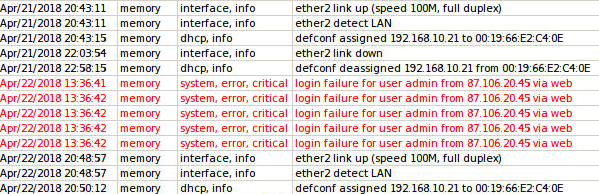
in logs I saw login attemps, but they all seems to failed, not one of them is successfull.