Make sure you accept the packets in the /ip firewall filter forward chain
Regardless if this thread is stale, it offers some good intelligence. I believe the trouble in your ipsec configuration is this:
level=require
it should be changed to:
level=unique
Mikrotik defaults an ipsec policy to level=require which allows a single pair of bidirectional crypto tunnels (SPI’s) to be reused for different ipsec policies; this works when VPN is used between Mikrotik to Mikrotik but not to any other vendor’s equipment. Using this level, “unique” SPI’s will now be established for every IP range (NAT’d or otherwise).
As a rule-of-thumb for using Mikrotik ipsec VPNs to differing vendors equipment (Cisco, Juniper, AWS, or unknown), I always set level=unique before troubleshooting the tunnel. This simply makes the tunnel much more compliant with the RFC.
0    ;;; AWS Tunnels
      src-address=0.0.0.0/0 src-port=any dst-address=172.31.0.0/16 dst-port=any protocol=all action=encrypt level=unique
      ipsec-protocols=esp tunnel=yes sa-src-address=x.x.x.x sa-dst-address=205.251.233.120 proposal=default priority=0

1    src-address=169.254.249.26/32 src-port=any dst-address=169.254.249.25/32 dst-port=any protocol=all action=encrypt level=unique
      ipsec-protocols=esp tunnel=yes sa-src-address=x.x.x.x sa-dst-address=205.251.233.119 proposal=default priority=0

2    src-address=169.254.249.30/32 src-port=any dst-address=169.254.249.29/32 dst-port=any protocol=all action=encrypt level=unique
      ipsec-protocols=esp tunnel=yes sa-src-address=x.x.x.x sa-dst-address=205.251.233.120 proposal=default priority=0

3    src-address=169.254.249.25/32 src-port=any dst-address=169.254.249.26/32 dst-port=any protocol=all action=encrypt level=unique
      ipsec-protocols=esp tunnel=yes sa-src-address=205.251.233.119 sa-dst-address=x.x.x.x proposal=default priority=0

4    src-address=169.254.249.29/32 src-port=any dst-address=169.254.249.30/32 dst-port=any protocol=all action=encrypt level=unique
      ipsec-protocols=esp tunnel=yes sa-src-address=205.251.233.120 sa-dst-address=x.x.x.x proposal=default priority=0

5	src-address=0.0.0.0/0 src-port=any dst-address=172.31.0.0/16 dst-port=any protocol=all action=encrypt level=unique
      ipsec-protocols=esp tunnel=yes sa-src-address=x.x.x.x sa-dst-address=205.251.233.119 proposal=default priority=0
AWS requires that you aren’t creating more than two SA per tunnel, so in case with AWS it is not allowed to set this value to “unique”. A quote from http://docs.aws.amazon.com/AmazonVPC/latest/NetworkAdminGuide/Introduction.html#CGRequirements:
You are limited to 1 unique Security Association (SA) pair per tunnel (1 inbound and 1 outbound), and therefore 2 unique SA pairs in total for 2 tunnels (4 SAs). Some devices use policy-based VPN and will create as many SAs as ACL entries. Therefore, you may need to consolidate your rules and then filter so you don’t permit unwanted traffic.
Quick and dirty but seems to work.
:global activeGatewayAWS [/ip route get [/ip route find dst-address=172.31.0.0/16 bgp active] gateway]
:global saDstAddress
:if ($activeGatewayAWS=ACTIVE_BGP_GATEWAY_ADDR) do={:global saDstAddress ADDR_GW_1} else={:global saDstAddress ADDR_GW_2}
/ip ipsec policy set [/ip ipsec policy find dst-address=172.31.0.0/16] sa-dst-address=$saDstAddress
What is the trigger for the script? Or it is just to manually switch between the channels?
/system scheduler
add interval=1s name=setIPSecPolicy on-event=setIPSecPolicy ...
:global activeGatewayAWS
:global saDstAddress
:global IPSecPeer1 ADDR_GW_1
:global IPSecPeer2 ADDR_GW_2

:for timer from=1 to=6 step=1 do={
:global activeGatewayAWS [/ip route get [/ip route find dst-address=172.31.0.0/16 bgp active] gateway]
:if ($activeGatewayAWS=BGP_GATEWAY_ADDR1) do={:global saDstAddress $IPSecPeer1} else={:global saDstAddress $IPSecPeer2}

:if ( $saDstAddress!=[/ip ipsec policy get [/ip ipsec policy find dst-address=172.31.0.0/16] sa-dst-address]) do={
/ip ipsec policy set [/ip ipsec policy find dst-address=172.31.0.0/16] sa-dst-address=$saDstAddress
}
:delay 100ms
}
but i can´t guarantee anything, because this is my first ros script an i did not use it in production
Nice..
But it has to be tested well, since I am afraid there may be positive loopback between the activation of the correct IPSec policy and the automatic active BGP route selection. It may even get into constant oscillation switching back and forth. Probably that is the reason you have a loop with 100ms sleep to have it stabilised…
In any case, good work. Maybe I will try this with my tunnel.
To prevent flapping between both path we used a bgp filter to set a lower distance to the preferred path.
the 100ms delay is only to switch policy faster then one second.
Sorry if I am bumping an old thread here, I can’t see a date on the thread from my phone… Odd.
Regardless, does setting level=unique get around the MikroTik Limitation??
Nope  . Even otherwise, it is recommended against, since AWS explicitly states that it will only allow two SAs per VPN channel. I mentioned it somewhere up the thread, with a reference to the docs
Hi,
Thanks for the guide, really is the only one that has worked well using my router Mikrotik. Currently I have three EC2 public instances running within my VPC, and once you establish the IPSec tunnel following the here mentioned steps, everything works perfect, but I can not access the public IP’s of this instances, only private IP. If the IPSec tunnel is disabled, i can ping and access to the public IP’s, but not private (which seems logical). I need create a route or rule within my Mikrotik to access the public IP’s of my instances, once the IPSec tunnel established? I could give a hand with this? Thank you very much
Hi all,
Has anyone tried the configuration with version 6.36 is there any change to the config, because I have a problem bringing up the tunnels, i can ping 169.x.x.x IP addresses but amazon says tunnel down, and can not ping the IPs inside the VPC.
Hello all,
I have done the following config on my Mikrotik
ip address add address=169.254.40.38/30 disabled=no interface=WAN_BR network=169.254.40.36

ip ipsec proposal add name="aws" auth-algorithms=sha1 enc-algorithms=aes-128-cbc lifetime=8m pfs-group=modp1024

ip ipsec policy add src-address=0.0.0.0/0 src-port=any dst-address=172.31.0.0/16 dst-port=any protocol=all action=encrypt level=require ipsec-protocols=esp tunnel=yes sa-src-address=MyPublicIP sa-dst-address=52.57.15.8 proposal=aws priority=0

ip ipsec policy add src-address=169.254.40.38/32 src-port=any dst-address=169.254.40.37/32 dst-port=any protocol=all action=encrypt level=require ipsec-protocols=esp tunnel=yes sa-src-address=MyPublicIP sa-dst-address=52.57.15.8 proposal=aws priority=0

ip ipsec peer add address=52.57.15.8/32 local-address=MyPublicIP passive=no port=500 auth-method=pre-shared-key \
secret="ZtkhRAD9Oehw5PvFWMCgxEssgb_Yo97A" generate-policy=no exchange-mode=main send-initial-contact=yes nat-traversal=no \
proposal-check=obey hash-algorithm=sha1 enc-algorithm=aes-128 dh-group=modp1024 lifetime=8h lifebytes=0 dpd-interval=10s \
dpd-maximum-failures=3
An I do not get any SA installed.
I see although some IPSEC traffic in the logs.
Also I am not ussing BGP but static routes, and indicate my local net on the AWS side when creating VPN.
Also here is my firewall config.
add action=accept chain=input comment="Permit ICMP" protocol=icmp
add action=accept chain=input comment="Permit already established packages" \
    connection-state=established,related
add action=accept chain=input comment=PPTP dst-port=1723 protocol=tcp
add action=accept chain=input protocol=gre
add action=accept chain=input comment="Allow IKE" dst-port=500 in-interface=\
    WAN_BR protocol=udp
add action=accept chain=input comment="Allow IPSec-esp" in-interface=WAN_BR \
    protocol=ipsec-esp
add action=accept chain=input comment="Allow IPSec-ah" protocol=ipsec-ah
add action=accept chain=input dst-port=1234 protocol=udp
add action=drop chain=input comment="Drop all other traffic" in-interface=\
    WAN_BR
add action=accept chain=forward comment=\
    "Accept established connections in Forward" connection-state=\
    established,related
add action=drop chain=forward comment="Drop all Invalid on Forward" \
    connection-state=invalid
add action=drop chain=forward comment="Drop New connections in forward" \
    connection-nat-state=!dstnat connection-state=new in-interface=WAN_BR
/ip firewall nat
add action=masquerade chain=srcnat comment=NAT out-interface=WAN_BR
I specialy did not connect the second tunnel and also can say that Mikrotik is still having the bug mentioned above.
The problem of the SA was solved. Now I am looking into the routing problems. I am able to ping machines in my Data Center from the AWS cloud but not able to do the oposite. Investigating.
UPDATE:
Problem solved.Seems Static routing has a slightly configuration.
I’ve been running a modification of this configuration for a month now. The major revision I made to this config is to terminate each AWS VPN tunnel to separate 1100AHX2’s as opposed to only one: this removed the “bug” and, most importantly, allows me to perform Mikrotik maintenance without taking the AWS VPN down.
Today I found that the performance was lacking during a large file transfer. Over a 2Gb raw connection, I was only seeing 30Mb going over the tunnel. Running pcap, I found many retransmissions.
Adding the following mangle rule adjusted the MTU over each tunnel; I’m now getting close to 750Mb on each tunnel:
/ip firewall mangle
add action=change-mss chain=forward dst-address=[my.vpc.net.aws] new-mss=1379
passthrough=yes protocol=tcp tcp-flags=syn tcp-mss=!0-1379
The MMS adjustment was suggested in the IPSec Generic document from AWS:
IPSec ESP (Encapsulating Security Payload) inserts additional
headers to transmit packets. These headers require additional space,
which reduces the amount of space available to transmit application data.
To limit the impact of this behavior, we recommend the following
configuration on your Customer Gateway:
- TCP MSS Adjustment : 1379 bytes
- Clear Don’t Fragment Bit : enabled
- Fragmentation : Before encryption
I have setup a VPN from my Mikrotik router to my AWS VPC as per instruction above (and oddly enough have gotten it work previously). Today however it is not working. I cannot get a full round ping to work from either AWS->myHost or myHost->AWS.
When pinging from AWS->myHost I see that packets are hitting the
1 chain=dstnat action=accept src-address=10.10.0.0/16 in-interface=ether1-gateway
rule as the packet count increases as I keep the pings going; however, they never reach my host (I’m running a tcpdump).
On the other side of the test myHost->AWS, I can actually see the ping hit the ec2 instance (via tcpdump) however, it never arrives back at my source. It feels like the router is dropping packets from AWS destined to my internal network for some reason. Any suggestion on what the issue maybe or how to debug?
That is worrisome. I am having a very similar issue. We took our vpn down for business reasons, and now, I’m getting BGP propagation, installed SA’s everything that you would think. but no routing, no pings, no ssh.
I’ve been staring at this all day, At least I’m not the only one.
I have created a simple parameterized script to help with this whole process. All you need to do is populate the local vars at the top of the script.
The first two vars are specified in CIDR, and all the other vars are just IPs
:local awsVpcCidr
:local onPremCidr
:local tunnelOneInsideIPVirtualPrivateGateway
:local tunnelOneOutsideIPVirtualPrivateGateway
:local tunnelOneInsideIPCustomerGateway
:local tunnelTwoInsideIPCustomerGateway
:local tunnelTwoInsideIPVirtualPrivateGateway
:local tunnelTwoOutsideIPVirtualPrivateGateway
:local myPublicIP [/ip address get [find interface="ether1-gateway"] address];
add ip address $customer gateway
/ip address add address=$tunnelTwoInsideIPCustomerGateway/30 interface=ether1-gateway
/ip address add address=$tunnelOneInsideIPCustomerGateway/30 interface=ether1-gateway
/ip ipsec proposal set 0 auth-algorithms=sha1 enc-algorithms=aes-128-cbc lifetime=8m pfs-group=modp1024
\
AWS Tunnels - ipsec policy (the first one doesn't work for me) - see if this ever does start to work
#/ip ipsec policy add src-address=0.0.0.0/0 src-port=any dst-address=$awsVpcCidr dst-port=any protocol=all action=encrypt level=require ipsec-protocols=esp tunnel=yes \
sa-src-address=$myPublicIP sa-dst-address=$tunnelTwoOutsideIPVirtualPrivateGateway proposal=default priority=0
/ip ipsec policy add src-address=0.0.0.0/0 src-port=any dst-address=$awsVpcCidr dst-port=any protocol=all action=encrypt level=require ipsec-protocols=esp tunnel=yes
sa-src-address=$myPublicIP sa-dst-address=$tunnelOneOutsideIPVirtualPrivateGateway proposal=default priority=0
/ip ipsec policy add src-address=$tunnelOneInsideIPCustomerGateway/32 src-port=any dst-address=$tunnelOneInsideIPVirtualPrivateGateway/32
dst-port=any protocol=all action=encrypt level=require ipsec-protocols=esp tunnel=yes
sa-src-address=$myPublicIP sa-dst-address=$tunnelOneOutsideIPVirtualPrivateGateway proposal=default priority=0
/ip ipsec policy add src-address=$tunnelTwoInsideIPCustomerGateway/32 src-port=any dst-address=$tunnelTwoInsideIPVirtualPrivateGateway/32
dst-port=any protocol=all action=encrypt level=require ipsec-protocols=esp tunnel=yes
sa-src-address=$myPublicIP sa-dst-address=$tunnelTwoOutsideIPVirtualPrivateGateway proposal=default priority=0
/ip ipsec policy add src-address=$tunnelOneInsideIPVirtualPrivateGateway/32 src-port=any dst-address=$tunnelOneInsideIPCustomerGateway/32
dst-port=any protocol=all action=encrypt level=require ipsec-protocols=esp tunnel=yes
sa-src-address=$tunnelOneOutsideIPVirtualPrivateGateway sa-dst-address=$myPublicIP proposal=default priority=0
/ip ipsec policy add src-address=$tunnelTwoInsideIPVirtualPrivateGateway/32 src-port=any dst-address=$tunnelTwoInsideIPCustomerGateway/32
dst-port=any protocol=all action=encrypt level=require ipsec-protocols=esp tunnel=yes
sa-src-address=$tunnelTwoOutsideIPVirtualPrivateGateway sa-dst-address=$myPublicIP proposal=default priority=0
\
ip sec peers:
#0 AWS VPC Tunnel #2
/ip ipsec peer add address=$tunnelTwoOutsideIPVirtualPrivateGateway/32 local-address=$myPublicIP passive=no port=500 auth-method=pre-shared-key
secret="5f5qC810t6mrrKxGdpIbu0gmDQUyI9rk" generate-policy=no exchange-mode=main send-initial-contact=yes nat-traversal=no
proposal-check=obey hash-algorithm=sha1 enc-algorithm=aes-128 dh-group=modp1024 lifetime=8h lifebytes=0 dpd-interval=10s
dpd-maximum-failures=3
#1 AWS VPC Tunnel #1
/ip ipsec peer add address=$tunnelOneOutsideIPVirtualPrivateGateway/32 local-address=$myPublicIP passive=no port=500 auth-method=pre-shared-key
secret="26X18YmCMDhybMqh8QpcT7yLqshY4r4c" generate-policy=no exchange-mode=main send-initial-contact=yes nat-traversal=no
proposal-check=obey hash-algorithm=sha1 enc-algorithm=aes-128 dh-group=modp1024 lifetime=8h lifebytes=0 dpd-interval=10s
dpd-maximum-failures=3
#firewall filters
/ip firewall filter add chain=input action=accept protocol=ipsec-esp src-address=$tunnelOneOutsideIPVirtualPrivateGateway dst-address=$myPublicIP in-interface=ether1-gateway
/ip firewall filter add chain=input action=accept protocol=udp src-address=$tunnelOneOutsideIPVirtualPrivateGateway dst-address=$myPublicIP in-interface=ether1-gateway src-port=500 dst-port=500
/ip firewall filter add chain=input action=accept protocol=ipsec-esp src-address=$tunnelTwoOutsideIPVirtualPrivateGateway dst-address=$myPublicIP in-interface=ether1-gateway
/ip firewall filter add chain=input action=accept protocol=udp src-address=$tunnelTwoOutsideIPVirtualPrivateGateway dst-address=$myPublicIP in-interface=ether1-gateway src-port=500 dst-port=500
#firewall filter
/ip firewall filter add chain=input action=accept protocol=tcp src-address=$tunnelOneInsideIPVirtualPrivateGateway dst-address=$tunnelOneInsideIPCustomerGateway dst-port=179
/ip firewall filter add chain=input action=accept protocol=tcp src-address=$tunnelTwoInsideIPVirtualPrivateGateway dst-address=$tunnelTwoInsideIPCustomerGateway dst-port=179
#firewall filter
VPC at AWS us-west-2x
/ip firewall filter add chain=forward action=accept src-address=$awsVpcCidr in-interface=ether1-gateway
/ip firewall filter add chain=forward action=accept dst-address=$awsVpcCidr in-interface=ether2-master-local
#nat rule
critically important to AWS connectivity that this rule be ahead of "masquerade".
/ip firewall nat add chain=srcnat action=src-nat to-addresses=$onPremCidr dst-address=$awsVpcCidr
#The following firewall NAT filter rule is OPTIONAL and to be used only if the public address you supplied to AWS for your router is different from the public address used to masquerade your private NAT network. Don't use this unless you have two public addresses! And note the exclamation point!!!
#i don't have 2 public ip addresses...
#chain=srcnat action=masquerade src-address=!$myPublicIP out-interface=ether1-gateway
#nat rule
critically important to AWS connectivity that this rule be ahead of any NAT port-mapping
/ip firewall nat add chain=dstnat action=accept src-address=$awsVpcCidr in-interface=ether1-gateway
#bgp instances
/routing bgp instance add name="vgw-1" as=65530 router-id=$tunnelTwoInsideIPCustomerGateway redistribute-connected=no redistribute-static=yes redistribute-rip=no
redistribute-ospf=no redistribute-other-bgp=no out-filter="" client-to-client-reflection=no ignore-as-path-len=no routing-table=""
/routing bgp instance add name="vgw-2" as=65530 router-id=$tunnelOneInsideIPCustomerGateway redistribute-connected=no redistribute-static=yes redistribute-rip=no
redistribute-ospf=no redistribute-other-bgp=no out-filter="" client-to-client-reflection=no ignore-as-path-len=no routing-table=""
#bgp peers
/routing bgp peer add name="awsvpc1" instance=vgw-1 remote-address=$tunnelTwoInsideIPVirtualPrivateGateway remote-as=7224 tcp-md5-key="" nexthop-choice=default multihop=no
route-reflect=yes hold-time=30s ttl=default in-filter="" out-filter="" address-families=ip update-source=$tunnelTwoInsideIPCustomerGateway
default-originate=never remove-private-as=no as-override=no passive=no use-bfd=no
/routing bgp peer add name="awsvpc2" instance=vgw-2 remote-address=$tunnelOneInsideIPVirtualPrivateGateway remote-as=7224 tcp-md5-key="" nexthop-choice=default multihop=no
route-reflect=yes hold-time=30s ttl=default in-filter="" out-filter="" address-families=ip update-source=$tunnelOneInsideIPCustomerGateway
default-originate=never remove-private-as=no as-override=no passive=no use-bfd=no
\
bpg to advertise network:
/routing bgp network add network=$onPremCidr synchronize=yes
Another solution without mirror-policies and a supernet config to bypass the mikrotik one network limitation on IPsec policies:
http://biplane.com.au/blog/?p=406
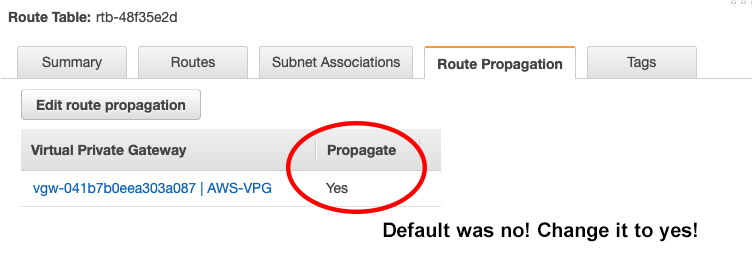
wowsers! spent a long time on troubleshooting routing + timeout issues. Make sure on the AWS side (VPC > Routing Tables > [Your VPC]) that you are propagating the routes back to your router!
Also, I updated the script for the dynamic routing config to support 6.44.3 here:
https://github.com/nitrag/aws-vpn-mikrotik/blob/master/dynamic-router-config