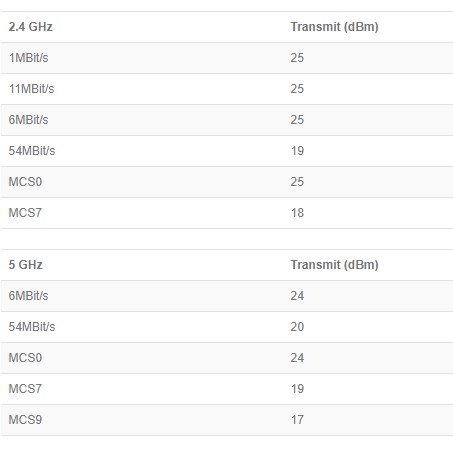
Mental masturbation: if devices are not locked against illegal settings, they can not be legally sold in certain market. While some nations are used to smuggling goods from third countries, other nations (which might represent considerable markets for MT) are used to buying goods from local businesses.
using less power than maximum allowed is not illegal. Furthermore, it is a good practice to use only as little power as needed for a stable link.
Besides, I wrote this already a few posts back, routeros does not let you set too low antenna gain and throws an error (minimal antenna gain for this country is xxx). So no, legal issues can be easily achieved by setting min. limit and it has been done already, so why the hell has Mikrotik removed the option from winbox? We don’t want to be stuck with 6.45.9 forever, and terminal is slowing things down a lot
Normis explained in post #32 above: you can set Tx power lower than default (maximum considering country regulations and hard-coded antenna gain) using parameter tx-power. In webfig it’s available in advanced section and you can set value if you select “all-rates-fixed” as “Tx Power Mode”. My RB951G shows table “Current Tx Power” right under this setting and it’s easy to verify that what @Normis wrote is correct. I’m pretty sure winbox allows you to reduce Tx power the same way.
Yes, you can always drive in 1st gear with your car to reduce the max speed you are driving …
Relative setting and absolute setting is not the same:
you have to find the max values for the regulatory domain (CLI) , and the values vary with the frequency or channel
you have to find somewhere the physical antenna gain (CLI verbose export) because now it is hidden in GUI and export.
Ron Touw advised to adjust the max power via antenna gain, at MUM, because the allowed TXpower varies over the MCSes used. (*)
You have to do the math yourselves (computers are for computing, not humans)
And for most new equipment you are just blind. The TX power indicated in status, is from the antenna gain only, the TX power table is empty!
You can hope everything works as expected because there is no feedback.
And now you work with a fixed TX power, where it should vary with the freq set (freq is dynamic with DFS, unknown with auto), but TX power should also vary dynamically with the very frequent MCS adjustments. (Poor connection, resulting in lower MCS, resulting in more TX power used)
(*) Max TX power in the specs is not what the radio can transmit with a certain MCS, but how well the radio controls the side lobes of the channel, to remain below the legal line of sidelobes in the RF spectrum. Higher MCS rates have a more complex spectrum and do leak more sidelobes than lower MCS rates. Expensive radio’s control this well, cheaper chipsets have to reduce the TX power more with higher MCS.
This is not THAT hard. We just want a setting that goes from 100% to (say) 10%. 100% is full power, obeying regulations. Anything less is X% of full power.
Things are not that bad. I guess Ron Touw made his advice based on how devices behaved at that time. I believe in the past when using “all-rates-fixed” chipset really was made to do that. Now it’s different, even using this option Tx power is reduced to maximum certified power. For example: RB951G can transmit with power between 23dBm (MCS7) and 30dBm (basic rate). Some country regulation might set maximum at e.g. 25dBm and Tx power will decrease … but not linearly, it will cap lower rates to 25dBm, while highest rates will still transmit at certified power (23dBm). Which means that even though beacon power is reduced and thus coverage shrinks, area covered with MCS7 will stay the same. And same goes if one sets “all-rates-fixed” with Tx power set at, e.g. 22 dBm. AP will transmit at 22dBm at all rates (and that’s completely fine even for MCS7) giving same coverage for all rates.
OK, coverage will not be same for all rates, this very much depends on receiving sensitivity as well and for RB951G sensitivity difference between lowest and highest rate is 18dB.
And that’s exactly how changing antenna gain affects Tx power. The only difference is that it gives opportunity to change Tx power relatively. But for those who don’t want to (or can’t) calculate power, it’s still not enough. Vendors who produce devices for masses, allow setting Tx power in % (like 10%). Not many can calculate 10% in dB in a blink of an eye.
Which means that even though beacon power is reduced and thus coverage shrinks, area covered with MCS7 will stay the same.
I know this, or let’s say I think it is indeed the implementation with MT. Unfortunately so. By doing it this way (just cap on the max power) the power curve gets flattened. The dynamic of the wifi to keep the connection when there is a glltch in the spectrum is reduced. One loses the connection sooner now. By not reducing the MCS7 the spectrum leakage and adjacent channel interference is not reduced. So you cannot make smaller interference cells, unless you reduce the power very deep, lower than the MCS7 max power setting. This makes MT loose connections even faster. The example of Normis with 18dBm for MCS0 and 16 dBm for MCS7 is not the reality. The difference, or the dynamic range is 6 or 7 dBm between MCS0 and MCS7 even MCS9 with the newer chipsets.
Some here would also remove the lower MCS rates. (Luckily ac does not allow this anymore). And then complain that MT disconnects too often. They have removed all dynamic from the wifi themselves. And it was already poor with MT to start with (no dynamic adjustment of A-MSDU and A-MPDU size based on CCQ), then one fixes the power at a power cap (while maintaining the wide sidelobes in the spectrum for the higher MCS rates), and the best here totally block the MCS algorithm.
Even looking at the working of antenna gain (no spectrum change), mounting a physical antenna with lets say 3 dBi more than the TXpower per MCS the setting was calculated for, and then reducing the TX power only for the lower MCS rates with 3 dBm, will give a spectrum that will not pass CE or FCC certification. ALL TX power has to be reduced with 3 dBm to comply. It’s not only the peak power that counts!
PS: “all-rates-fixed” of Ran Touw is probably the setting replacing the “regulatory domain”, but that one is actually called “manual tx-power”.
My last post already says what to do. Use “tx-power” to set desired power. Antenna gain setting was for specifying what antenna you use. This was never the right approach anyway.
This way you make an AP that is performing way below par, that is interfering more than any other other AP, that looses connection easily, since the chipset with 6-7dBm variation in allowed TX power according MCSrate is in use.
With the old 18-16dBm chipset the difference in handling was within the manufacturing tolerance, and not important. Now it is.
And MT AP’s with high antenna gain should be withdrawn from the market , if they reduce the TX-power the way you explain, as they do not comply with RF regulations. Their total TXpower may be within the limits, the RF spectrum line is passed in the sidelobes of the channel, at the higher MCS rates.
If you set tx-power value by hand, it will lower the value where calibrated power is higher, or leave it alone and use the value from calibration.
I already wrote this here:
for each modulation the minimum (lowest) of these 3 values is used as tx power:
1 - regulatory limit minus antenna gain,
2 - configured tx power in all-rates-fixed mode,
3 - calibrated power for modulation
The same was true when using antenna gain setting. Nothing has changed basically.
Even if your assumption that setting antenna gain higher reduces Tx power for all modulations by same margin (in dB) which is not true according to Normis (and I don’t see why I should not trust him on this) and forgetting about country limitations for a moment, I guess it’s subjective which is better or worse:
with antenna gain set to 5dBi (looking at the table you posted a few posts higher) 2.4 GHz AP is transmitting at 19dBm and MCS9 is transmitting at 12dBM. So the whole cell shrunk by 5 dB and higher modulation is only available really near AP.
with antenna gain left at 0dBi and setting Tx power to 19dBm, most of modulations will be transmitted with 19dBm (lower than default) and only MCS9 will be transmitted at 17dBm.
Which means “service” coverage of MCS9 will stay exactly the same as is, “service” coverage of MCS0 will shrink as much as with option #1 above.
Basically WiFi clients will loose WiFi coverage at the same point in both cases, only that clients will have good throughput (in Rx direction at least, and I don’t think power settings on AP affect Tx power of clients at all) in most of WiFi coverage with option #2 while throughput will start to degrade closer to AP with option #1. IMO option #2 will bring better overall experience since clients in outer part of coverage will still enjoy higher modulations and thus consume less air time. Yes, it might be a minor shock if one user has 50Mbps throughput one moment and drops second moment … but it will still be at the same elevator shaft as with option #1, only that user will have only 20Mbps throughput prior to drop with option #1.
Well if “antenna gain” works the same way, there indeed is no difference, but there is an OFI here (OFI= opportunity for improvement).
The max TX power in the Atheros list per MCS rate has indeed more to do with the required linearity of the amplifier for higher MCS rate, than the more complex and as such wider slopes in the RF spectrum (as Ron Touw demonstrated @MUM, and sent me in the wrong direction). https://www.youtube.com/watch?v=lPDNG1mjeq8&list=PLii-eQuaf57ocpSGH6NR8IKtJvB9mb81h&index=11
Nevertheless the TX power is a tradeoff between linear/non-linear power operation of the amplifier, and the noise introduced by the non-linear part. The Atheros power in the list can be seen as the max power, just still good enough for the needed SNR.
Lowering TX power is moving that trade-off point to the more linear working regime of the amplifier. And that is what we want to influence.
So a reduction of the TX power over all MCS rates would be welcome, and is most desired on the higher MCS rates, which is already 7 dB lower than the lower MCS rate.
That is also the way @r00t expected the “card rates” setting to work.
We can only speculate how it works. All those other brands that talk in 100%,90%, 75%,50%,25%,10% TX power setting, how do they implement it? Over all MCS encodings, or is that wishful thinking (again)?
Indeed we can only guess. Unless somebody with some professional measurement gear can do some measurements.
But why would you like to keep range where you offer highest possible speed at only a part of overall wifi cell coverage? I thought everybody was pulling the tricks to kick clients off certain AP while they had good wireless signal (which is needed to sustain good throughputs) in hope clients would roam to adjacent AP with marginally better signal. Reducing Tx power over all MCS rates equally is working against this idea.
It all depends … on your case at hand. Sometimes you want weak clients off ASAP (when you have other AP that will pick it up). Sometimes you just want optimal MCS rate (low noise), but do not want to lose connection (there is no other better AP, or the disconnect is disturbing, and/or is due to the physical handling and covering of the portable device in your hands.)
So I never meant to say that the overall power lowering would be better for all cases. But there are cases where you would like to have it. (Even for a PtP link I would use it)
The bag of tricks to kick off is limited (TX power, access lists with received signal limit, elevated base rate, supported rates is out (and not my choice anyway))
Some brands also offer roaming features that will support that intelligent client reconnection. We can only (ab)use what we have.
It will take some nerve to move the operational point of the amplifier down 3dB on MCS7 for better SNR, but by doing so having to lower it 10 dB for the lower MCS rates. That MCS related TX power difference of 7 dB has become important. The number of ways to set the TX power has been shrinking.(card rates, manual).
Do you feel like “you already wrote this”, nobody said you didn’t write but everybody said they did didn’t understand the reasoning or logic behind your writing.
“nothing has changed basically” then why was it implemented in the first place is the first question by everyone, especially considering the latest “recommendation” has been to use Gain for TX-adjustment.
This is same old Mikrotik considering that users of their proprietary implementation don’t need details and documentation to succesfully use the product, in which mainly every single one feature needs to be dissected in the forums before understood properly.
Well learned something here (like why the TX power is really limited for higher MCS encoding), but as I always want to find an experiment to check theories, also learned that:
the hAP ac Lite is quite comfortable in use with the TX power setting with “all rates fixed”
----- the decline in max TX power is limited
----- and you have full feedback in the “Current TX power” tab (you know what you get, you can see what it does, and can easily adjust from there)
in the hAP ac2 and the other modern MT devices I used for deployment I’m totally in the dark
----- the max TX power reduction per MCS is substantial according to the documentation
----- 2.4GHz WLAN always gives 0dBM, and the 5GHz current TX power table is empty
----- the 5GHz has different regulatory limits per freq also, and only playing with “antenna gain” gives feedback via “status”. Haven’t seen it for “all rates fixed”
I just have the hAP ac Lite as pocket/travel device, because the mAP Lite missed some features. Never had it in any deployment, so never played with TX power and other settings on that model.
This is what worries me, in all this thing. Directly from the wiki:
"sets up tx-power mode for wireless card
default - use values stored in the card
all-rates-fixed - use same transmit power for all data rates. Can damage the card if transmit power is set above rated value of the card for used rate.
manual-table - define transmit power for each rate separately. Can damage the card if transmit power is set above rated value of the card for used rate.
card-rates - use transmit power calculated for each rate based on value of tx-power parameter. Legacy mode only compatible with currently discontinued products."
Pay attention to “all-rates-fixed” and “manual-table”. How can I know WHAT is the maximum transmit power to a given wireless card? I didn’t find a field with “default-value=” of “maximum-value=” anywhere.
Yes, if I want to lower the value, no problem. But one year from now, when the unit is repurposed, how can I set the values back to the default?
Yes, yes. Just change to “default”. Very funny. What about when I used in location “A”, with less 5dB, and now want to use on location “B”, with less 3 dB?
“Just add two, you dolt!”
Yes. Because one year later I will remember lowering 5dB on location “A”, and so I know what is the maximum value. Yes, that will work.
How about, since Mikrotik doesn’t want to put a % drop down menu to us, just print the default value next to the field? This way we can change it and be sure to not destroy anything. Better yet: show the default value AND do a input sanity check, changing to maximum value anything above it. How about?
Problem is that default value very much depends on exact radio chip model used.
Not a problem with pre-ac hardware which can show exact values used. So when you’d set tx-power mode to “card-rates” and check running values, you’d get all the information you need. With newer chipsets that’s not possible (I’m holding my breathe waiting to see how ROSv7 does in this regard) and this might actually be the reason why MT doesn’t implement the “N%” tx-power setting.
But, yet again: Normis explained already twice that “all-rates-fixed” is not really absolute, it still takes HW capability and country regulations into account. So the last part of both paragraphs (this and paragraph about manual-table, claiming you can damage the card) is not true any more.