He is using L2TP/IPSEC and has an interface. 
Nope, he has a very clever arrangement where one machine provides an IKEv2 connection and another machine chooses which traffic will use the VPN and which will use the direct WAN, which he uses to beat the trouble to do that on a single machine (as you cannot tell the policy what to intercept and what to ignore using any other means than src-address whilst the src-address keeps changing).
I have to have a good look at it when I have access to Winbox and my RouterOS in front of me. Seeing what is catching the first and tailing packets. So I have to come back on this.
I am using L2TP/IPSEC on the inner box and the outer (GW) is transparant for that. IKEv2 is routed on the inner bock and is then fasttracked. The outer box does the IKEv2 stuff which can’t be fasttracked.
The advantages is more speed due to double processing power and lower temperatures in the inner box. I don’t have a 4011 which can archive even higher encrypted transfer rates.
Can someone post the config with both srcnat and mangle mark-route commands for the bridge blackhole scenario?
I’ve successfully implemented the src-nat to 127.0.0.1, which drops packets once the dynamic mode-config src-nat rule dissapears once the vpn is down, but if I try using src-nat to let’s say 192.168.255.255, I can’t make it work. The mangle to catch this traffic originating from the new source “192.168.255.255” doesn’t work because the src-nat takes place in the postrouting chain and no further routing manipulation can be done there.
I’ve created:
-blackhole bridge with no ip addresses
- 0.0.0.0/0 route with blackhole bridge as gateway and routing mark ‘blackhole’
- mangle rule for source ‘192.168.255.255’ and new routing mark ‘blackhole’.
No packets are catched by moving the mangle rule in all chains.
The src-nat does it’s job after the VPN is down, can be seen in the fw connections:
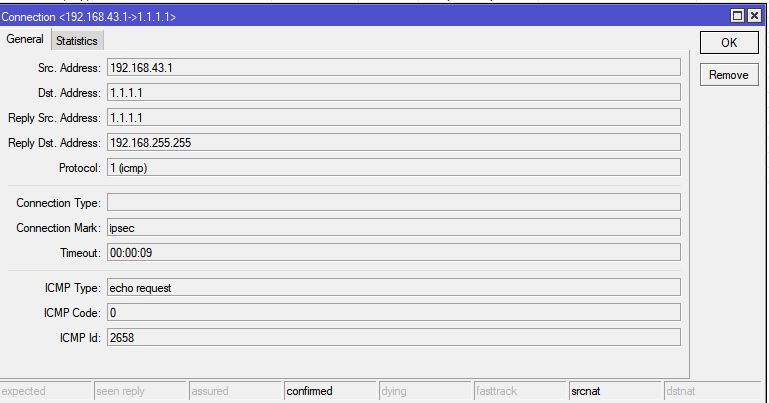
My ISP does NAT and that makes my packets escape on the internet because they don’t have source ip filters on their router.
Isn’t there any way to drop packets in the ipsec policy roules if the peer is ‘dead’ ? That would be so much easier.
I’m not sure I understand you properly. The very idea of a blackhole bridge is that if the IPsec peer is dead, the packets are sent to the blackhole bridge.
The IPsec traffic selectors themselves ignore any routing marks; the way how connection-mark is used to affect whether a packet will be sent via IPsec or not is by means of the src-nat, changing the source address of packets bearing the right connection-mark to the one matched by the IPsec policy’s traffic selector.
So the mangle rule assigning the routing-mark activating the blackhole route must match on the connection-mark if you use it the above way, or it must match on the actual src-address, i.e. the one before the src-nat.
Damn, my issue is that I also have a separate PPTP tunnel, and I wanted once the IKEv2 tunnel goes down, not ALL traffic be sent to blackhole bridge, but all except the traffic to the PPTP tunnel.
Some adjustments to my NAT rules and a separate connection-mark for the PPTP traffic should fix it.
Thanks for taking your time answering.
I don’t think it actually changes much if you use mode-config configured with an address-list and/or connection-mark.
Whatever is routed to the PPTP tunnel will be routed through it even if a less specific route for the same traffic exists via another gateway, because more specific route (with longer destination prefix) always wins (within the same routing table). IPsec policy eventually intercepts the traffic after the regular routing has been done, so it doesn’t matter whether the regular route points to the PPTP or to the blackhole bridge.
Since you need the src-nat handling to make the traffic visible to the IPsec traffic selector, you just add the static src-nat rule for the PPTP if you need one, and let the mode-config install the dynamic src-nat rule to the beginning of the chain when the peer goes up. So while the peer is up, the static NAT rule for the PPTP is shadowed by the dynamic one making the traffic visible for IPsec traffic selector.
If you actually had in mind to exclude the PPTP traffic from IPsec handling even if the IPsec peer is up, it is even simpler as you’ve suggested - a different connection-mark for PPTP traffic will make it invisible for the dynamic src-nat rule.
I am revisiting this tread again while busy to create a Kill-Switch for IKEv2. Till now I blackholed traffic by using a src-nat to 127.0.0.1 and noticed a few day ago that the traffic was reaching the next router in my network. I put a rule in that router in RAW to drop any traffic coming from 127.0.0.1 and that did the job.
But then that second router has the same rule in NAT but luckily despite that there a lot of 127.0.0.1 out there it does not com far.
I have now also put the solution by Sindy to see if that is better. Using a Bridge with no ports and a blackhole (not unreachable) in Route. So now Torch the Bridge Black hole if there is traffic coming in…should I see traffic if the IKEv2 connections are down? I deactivated temporary the src-nat to 127.0.0.1 then.
The route must be a normal one, with gateway=br-blackhole, not with type=blackhole, as using the latter would blackhole the packets before the IPsec policy is even matched.
But you won’t see any traffic if sniffing on the bridge while the IPsec policy is inactive or non-existent, because before sending an IP packet over a point-to-multipoint interface, the IP stack needs to determine a MAC address of a router, but there is none reachable via that interface. You could use a point-to-point tunnel interface like a GRE one instead of the br-blackhole, whose remote end would be “nowhere”, and with keepaliving disabled so it would appear to be always up. Point-to-point interfaces don’t need to resolve a MAC address, so you should be able to sniff the traffic on it.
Thanks Sindy and I have tried it but not traffic was seen on that GRE interface. Despite the traffic is routing marked it, it did not appear. The only way is to use dst-nat and then the traffic is seen with torch and then I can blacklist it in route then. Works great. This is ideal when the IKEv2 is out for a longer time.
The src-nat to 127.0.0.1 is still needed in the period on startup of IKEv2 and in the time the traffic, is still being connection marked in Mangle. I am using a scheduled script that removes the lines and reinsert them when the IKEv2 connections are changing.
The number of leaked traffic through src-nat 127.0.0.1 is kept to a minimum this way.
Hi All,
I am new to Mikrotik and I’ve enjoyed playing with my new hAP! I’ve got my VPN all running, and following various threads I’ve fixed what appears to be a pretty common performance problem, solved by the fasttrack issue.
Anyway, I have been trying to solve my goal of VPN-only routing via blackholing but at the moment, if I drop my VPN peer, traffic is allowed out.
I have added the blackhole bridge interface and set the route as detailed by eworm but I am a little confused by this comment:
Of course you need to add routing-mark (for route above) and connection-mark (for dynamic src-nat from mode-config) in firewall mangle.
Would anyone be so kind as to share sample configuration to solve this particular part please? I am running RouterOS 6.47.4
Thanks!
Depending on what techniques you have chosen to let the NAT rule dynamically added by IPsec mode-config match the traffic to be sent via the tunnel (connection-mark or src-address-list), you have to use the same criteria (connection-mark or src-address-list) to assign a routing-mark, using a mangle rule, so that the routing table with the route containing the br-blackhole as a gateway route would be chosen for these packets. Without that, the default route in the main routing table is used for them, so if they don’t get grabbed by the IPsec policy because the IPsec connection is down, they are sent via the default gateway (which is usually the WAN one).
So it would look like
/ip route add routing-mark=via-VPN-only gateway=br-blackhole
/ip firewall mangle add action=mark-routing src-address-list=via-VPN new-routing-mark=via-VPN-only
or, if you use connection-mark,
/ip firewall mangle add action=mark-routing connection-mark=via-VPN in-interface-list=!WAN new-routing-mark=via-VPN-only
Thankyou Sindy for taking the time to explain, that’s much clearer now 
I found this recipe to be very helpful – thank you guys! – and have been using it successfully for a while now.
Recently, I upgraded to v7 and the routing setup seems quite different, and it no longer seems possible to create routes based on connection marks.
I’m guessing the routing tables are supposed to be the solution here, but I can’t figure out a setup that works – any ideas of what the equivalent setup in v7 would look like?
Thanks in advance!
It was never possible to use connection marks in routes (to compose routing tables), these were always routing marks. A “routing mark” and a “routing table name” are more or less the same thing, the nuance is that a routing rule (not route) can match on one routing-mark value (assigned by a mangle rule) and assign another one, which may be the reason why two distinctive terms have been introduced. But it is just my speculation, as a mangle rule can also match on one routing-mark value and assign another one, but both the input (match) parameter and the output (set) parameter are named routing-mark, except that the output one is prefixed with new- for distinction.
Several things related to routing marks and routing table names differ in RouterOS 7 as compared to RouterOS 6:
- the name of the parameter on /ip/route rows (i.e. routes) is now routing-table rather than routing-mark
- in order to avoid hard to spot errors caused by typos, the names of routing tables must be added explicitly before you can use them in routes, routing rules and mangle rules:
routing/table/add name=via-VPN-only fib
(this is not my speculation, Mikrotik has published it as the official reason) - the list of routing rules has moved from ip route rule to routing/rule