Techsystem, if you didnt understand what was done and why it works, then the config might work, but the effort from my perspective is a fail.
further our discussion i can say that i understand what happen, and why it work, actually i remebered that i apply such a rule in my old routing LABs but for this situation i forget that i have to do that..! 
Hello Anav..!
so i reopen this ticket to ask you about the origin situation that i encounter
so here is the situation ..
i have a wireguard tunnel built in between my mikrotik RB951ui and my windows machine and its working very well except i cant access my mikrotik LAN network from it :
what i mean..?
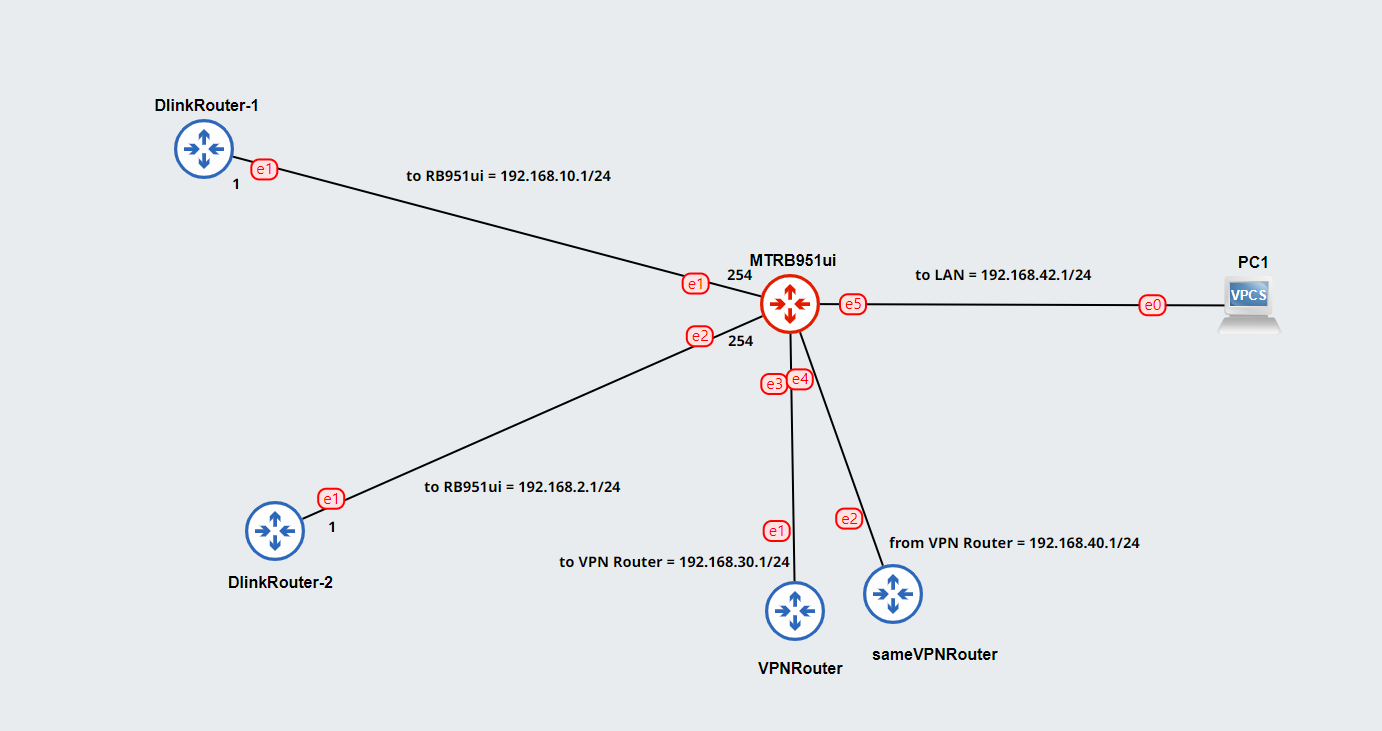
so here is my MT config:
ether-1 /as a DHCP Client and he get the IP:192.168.10.2 from my ISP-1/
ether-2 /as a DHCP Client and he get the IP:192.168.2.2 from my ISP-2/
ether-4/as a DHCP Client and he get the IP:192.168.40.22 from my VPN Router/
all this three interface are accessable from outside, i mean if i turn on my wireguard from outside network i can access my MT router using one of this ip .
ether-3 with the IP : 192.168.30.1/24 and he act as a DHCP server, and he give the VPN Router the internet //so from ether-3 in mikrotik to WAN interface in VPN router//
ether-5 with the IP : 192.168.42.1/24 and he also act as a DHCP server// and that represent my LAN with all device that connected to it//
so here is the problem i cant access any devices from this last two interface //ether-3 & ether-5// and that’s a big issue for me, becasue the main purpose from this wireguard is to get access to my LAN
by the way i don’t have a firewall rules.
here is my router config:
and here is a diagram:
so i try to use the distance method that you mentioned to it in our last scenario but the problem that in this situation and as you can see in the routing rule it is a mandatory for me to keep
the 192.168.42.170/32 in ISP-1 table and forced all other 192.168.42.1/24 traffic to pass through the VPN .
MN.rsc (3.69 KB)
I dont understand your network probably because I dont understand the use cases, you mix up users and config in such a way its not readable.
Thus forget the config for now and concentrate on use cases.
a. Identify all users/devices or group of users/device (including admiin)
b. Identify where they are local or exist
c. Identify the traffic they need to have (access to)
In terms of the diagram so your router gets
a. fixed static WAN IP from eth1
b. fixed static WAN IP from eth2
c. WANIP from eth3 but how, I do not understand From VPN…
which type of VPN and to where a third party VPN provider ???
d. same for ether4
e. Ether5 is a normal LAN??
In terms of the config viewed.
i. Why two POOls, you only have one LAN ?
ii. Where is the other end of the Wireguard tunnel ( is your router the client at handshake )
iii. If your router is the server for handshake which WAN is the WG client coming in on…
iv. If your router is the client for handshake which WAN is the WG handshake going out on…
v. Why does ether5 have two IP addresses, ???
vi. Why does ether4 have dhcp client setting and not ether3 as well…
vii. Why do you have two routing rules with same source subnet… ( no go )
viii. Why do you have wg address in the routing rules… ( no go )
so it is a home network.
the working scenario:
i have two ADSL Lines -(two ISPs)- with static ip
ether1…ISP-1
ether2…ISP-2
from ether3 on Mikrotik router there is a LAN interface go to the VPN router -(to WAN interface on VPN Router)- in 192.168.30.1/24 range to give it internet connection
and from LAN interface on VPN Router there is a link to ether4 on Mikrotik router -(so now i have an internet with VPN on my mikrotik router)- there is a schedule for this two ISPs that tell the Mikrotik to change his out interface connection every 24 hours from ether1 to ether2 -(in case you notice that i created a route rule that specify the current out interface used by the 192.168.30.1/24 range becasue if i didn’t do that i will have a big problem with my VPN connection )-
now the LAN network is the 192.168.42.1/24 range that goes out from ether5 on mikrotik.
i want from my Wireguard tunnel to see all the 192.168.42.1/24 range and until now that’s not achieved ..!
i can see all the range except the ether5 LAN range..
now to answer your questions
i. Why two POOls, you only have one LAN ?
as i said the 192.168.30.1 pool represent the ether3 out interface that goes to the VPN Router and the other 192.168.42.1 represent the final LAN from ether5 that goes to my home.
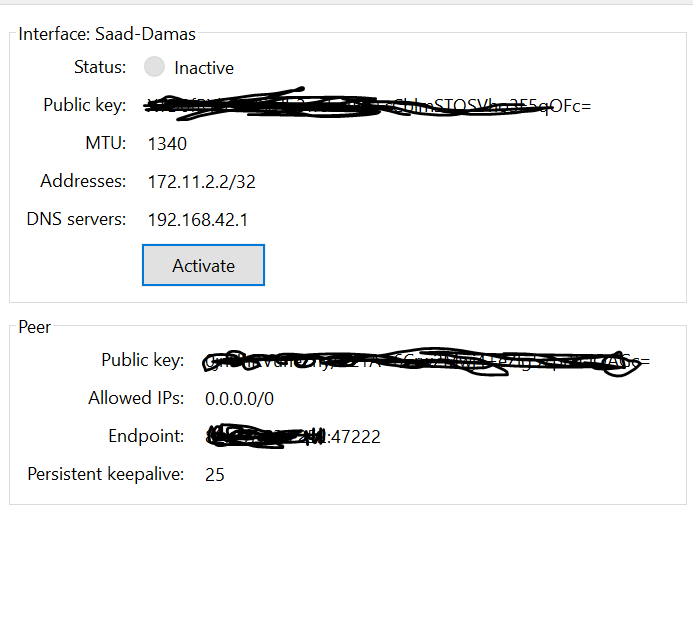
ii. Where is the other end of the Wireguard tunnel ( is your router the client at handshake )
in my windows machine and here is the config below.
iii. If your router is the server for handshake which WAN is the WG client coming in on…
in my wireguard end point config on my windows machine i put the public ip address of my WAN-2 -ether2- so in this case i guess it come from ether2
iv. If your router is the client for handshake which WAN is the WG handshake going out on…
i guess also from WAN-2 -ether2-
v. Why does ether5 have two IP addresses, ???
just an error nothing important.. i was trying something else.
vi. Why does ether4 have dhcp client setting and not ether3 as well…
because as i said the ether4 interface on mikrotik get its internet fron VPN Router so you can think in it as an WAN-3
vii. Why do you have two routing rules with same source subnet… ( no go )
that’s related to the schedule that i created to change between two interface -(ether1 and ether2)-
viii. Why do you have wg address in the routing rules… ( no go )
i was trying to make the wg traffic goes from ISP-1 but you can notice that this rule is disabled so you imagine that there is no rule there..
from ether3 on Mikrotik router there is a LAN interface go to the VPN router -(to WAN interface on VPN Router)-
That is my point what VPN router? You only have two connections to the internet.
Where is this VPN router located and what make or model is it?
Then you have a link back to the mT on ether 4 from this unknown router. Not a clue what you are doing sorry.
What is the VPN router connected to on the internet, a third party provider ???
Forget the confg port this lan that, why do you have a vpn router in the first place. YOu can do wireguard on the MT for example dont need another router.
so it is a Linksys WRT1900 AC Router it contain one WAN port and four LAN port. -(there is an expressVPN account in it with one year validation so you have to renew it every year)-
the purpose from it is change the browsing location, for example if you are from latvia you can can change your country to USA to open blocked or forbidden pages for example and so on..
how it work:
so just give him an internet connection to its WAN port and then you can connect to its wifi or you can connect to any LAN port and viola you are in USA..!
in my case where this interent connection that provide this router come from ..?
from Mikrotik router -(MT router)-
why do you have a vpn router in the first place. YOu can do wireguard on the MT for example dont need another router.
suppose that i want to navigate on my web browser just like i am in italy or in USA -as i said- and i don’t have another MT router in italy to build a wg tunnel with it, in this case i will use this
VPN router as an easy solution that one example why i use it.
Sure you do, get a wireguard account with a third party vpn provider just like you have on the linksys.
ExpressVPN doesnt have wirguard yet? … many others do.
You are making your config needlessly complex.
can you guide me on one of this provider ..!? really i don’t know any of them..!?
so please to understand the scenario more …
you mean in this case i have to create another wg tunnel on my router, but in this case the peer will be my VPN provider that he will already send to me his public key and ip..?
and in this case if i want to change my browsing server to another country can i do that as i normally do on my current VPN..?
Yes, you would create a wireguard for the third party provider.
I would keep a separate one for your own needs AKA remote into your router when travelling etc.
You can always use the third party one for internet while remote as well.
The latter question not so easy. In most VPN providers you get one account for one country, or a list of servers from various countries.
So not knowing the case I cannot make any promises.
In my own personal case I use wireguard strictly to connect two MT routers and the other end uses my internet connection ( in the same city ).
I will be using it to connect family to an NAS server in the future.
If i want to browse as if I am from a different country I use firefox VPN plug-in from a provider much like express vpn and I can be browsing from the USA or denmark.
NO need to go through so much pain as a whole linksys router setup.
+++++++++++++++++
Okay reading express VPN I see you can have device groups up to five and they dont offer wireguard.
That being the case and you have your VPN working just fine… focus on not changing the world and solving the problem now that I understand the context.
To get it straight.
Ether5 is the main LAN subnet and is 192.168.42.0/24
Ether3 is a LAN subnet to the Linksys Router where the Linksys Router gets its WANIP from ( and how the linksys gets its VPN connection ).
Ether4 is WHAT , purpose etc…???
You have a wireguard server on the router for handshake.
You have a laptop or iphone or both when away from the router which you want to connect to the router and LAN5.
Does that sum it up??
yes it is..!
( and how the linksys gets its VPN connection )
there is an ExpressVPN account on it so when ever you connect it to the internet the VPN services will become on -you already select the country before that-
Ether4 is WHAT , purpose etc…???
from LAN in Linksys router to ether4 in Mikrotik router as WAN interface to Mikrotik and i already create a routing rule to forward all the 192.168.42.1/24 range to this ether4
so ether4 is the WAN interface for the 192.168.42.1/24 range.
Okay let me get this straight.
One you are connected to the www in three different ways and have no firewall rules ???
On the mikrotik router you have two fixed WANIPs to two different providers ether1 and ether2.
On the mikrotik you have two LANS, one for users 192.168.42.0/24 on ether5, and one to feed the linksys router (for double nat) on ether3 192.168.30.0/24
The Linksys gets a WANIP via ether3 and out this WAN, the linksys reaches a third party VPN provider and the internet.
One of the LANs on the linksys is 192.168.40.0/24 which is connected to ether4 on the mikrotik.
You use ether4 on the MT as another WAN port with IP DHCP client set.
Thus ether4, gets an IP automatically like 192.168.40.X .
Then you create a static route from ether5 users to ether4.
++++++++++++++++++++++++++++++++++++++++++++++++++++++++++++++++++++
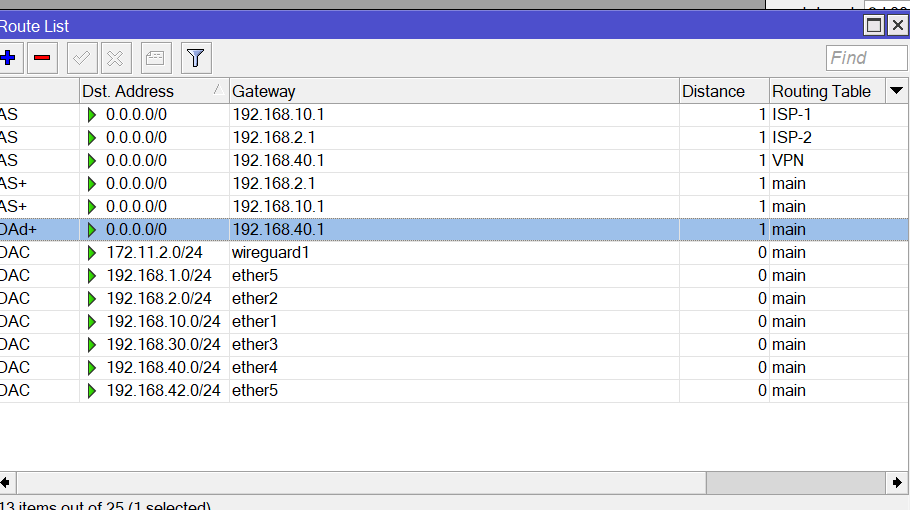
Lets look at the routes.
First you should have default routes for the real ISPs…
As we set up earlier so that ether1 is the primary and ether2 is the secondary and the only two routes available on the main table.
Then we want to ensure certain people get routed out certain paths.
/ip route
add distance=5 dst-address=0.0.0.0/0 gateway=192.168.10.1 routing-table=main check-gateway=ping
add distance=10 dst-address=0.0.0.0/0 gateway=192.168.2.1 routing-table=main
+++++++++++++++++++++++++++++++++++++++
add disabled=no dst-address=0.0.0.0/0 gateway=192.168.10.1 routing-table=
ISP-1 suppress-hw-offload=no
add disabled=no dst-address=0.0.0.0/0 gateway=192.168.2.1 routing-table=ISP-2
suppress-hw-offload=no
add disabled=no dst-address=0.0.0.0/0 gateway=192.168.40.1 routing-table=VPN
suppress-hw-offload=no
Lets see if the routing rules makes sense. YOu should use SUBNETS not IP addresses to describe the subnet!!!
(1) add action=lookup-only-in-table disabled=yes src-address=192.168.30.0/24 table=ISP-1
Not required as the distance application above will send out all traffic to ether1 and if not available to ether2.
Either way, the Linksys will be able to reach with VPN client the internet address from either public IP.
(2) add action=lookup-only-in-table disabled=no src-address=192.168.42.10/32 table=ISP-1
This makes sense as you want one particular user/device to go out ether1 for internet Prior to being forced out other rule.
(3) add action=lookup-only-in-table disabled=no src-address=192.168.30.0/24 table=ISP-2
More confusing than anything else, why do you have this subnet going out possibly two ISPs..… you need to clarify your intentions!!
(4) add action=lookup-only-in-table disabled=no src-address=192.168.42.170/32 table=ISP-1
This rule makes sense if you want this IP address not to follow some other Routing Rule because my default all users go out ISP1
I see with the rule below this rule is necessary!
(6) add action=lookup-only-in-table disabled=no src-address=192.168.42.0/24 table=VPN
Ahh the static route
(7) add action=lookup-only-in-table disabled=yes src-address=172.11.2.1/24 table=ISP-1
Not sure why this is required as the default order of rules will ensure that this subnet goes out ISP1 normally.
No other routing rules are forcing this traffic anywhere
First
Lets look at the routes.
First you should have default routes for the real ISPs…
As we set up earlier so that ether1 is the primary and ether2 is the secondary and the only two routes available on the main table.
Then we want to ensure certain people get routed out certain paths.
but what about VPN Route ..?
look to the picture below to see what i mean if i apply your rule ..well that’s fine.. but i still have a VPN route rule and some of the 192.168.42.1/24 user’s traffic will route through
ISP-1 and as i said i need all the 192.168.42.1/24 users range to use the ether4 as a WAN . remember that ISP-1 and ISP-2 is for VPN router only -(just to give the VPN Router internet)-
(2) add action=lookup-only-in-table disabled=no src-address=192.168.42.10/32 table=ISP-1
This makes sense as you want one particular user/device to go out ether1 for internet Prior to being forced out other rule.
that’s ok
my answer to your answer (1) and (3)
as i said earlier that to get benefit from this two ISP i crete a schedule rule for it
as the picture below you can see
so every day the MT router will change the rule as the following script that you will see in the picture,
(7) add action=lookup-only-in-table disabled=yes src-address=172.11.2.1/24 table=ISP-1
Not sure why this is required as the default order of rules will ensure that this subnet goes out ISP1 normally.
No other routing rules are forcing this traffic anywhere
as you see that this rule is disabled i just creted it for testing purpose and yes i have to deleted it -(well yes in the below picture the rule is enabled but please to assume that it is not exist)- i deleted
add action=lookup-only-in-table disabled=yes src-address=172.11.2.1/24 table=ISP-1

OKAY lets fix your setup.
Assuming ether1 is priority. If ether2 is the priority reverse the gateways.
By priority I mean all MT traffic 192.168.30.0/24, and 192.168.42.0/24 would follow the routes.
Local traffic will deviate because you also create ‘forcing’ routing rules.
/ip route
add distance=5 dst-address=0.0.0.0/0 gateway=192.168.10.1 routing-table=main check-gateway=ping { wan1 }
add distance=10 dst-address=0.0.0.0/0 gateway=192.168.2.1 routing-table=main { wan2 }
add dst-address=0.0.0.0/0 gateway=192.168.40.1 routing-table=vpn __ { wan3 by way of a specific table (VPN) }
…
add dst-address=0.0.0.0/0 gateway=192.168.10.1 routing-table=ISP1 { wan1 by other table, in case you need exceptions }
add dst-address=0.0.0.0/0 gateway=192.168.2.1 routing-table=ISP2 { wan2 by another table, in case you need exceptions } [/b]
Now lets figure out the right ROUTING RULES, your’s were screwed!!
/routing rule
add action=lookup-only-in-table **dst-**address=172.11.2.0/24 table=main { ensures wireguard return traffic will get back into the tunnel }
add action=lookup-only-in-table src-address=192.168.42.10/32 table=ISP-1 { ensures single/user device uses ISP1 before any other rules }
add action=lookup-only-in-table src-address=192.168.42.170/32 table=ISP-1 {ensures single/user device uses ISP1 before any other rules }
add action=lookup-only-in-table src-address=192.168.42.1/24 table=VPN { FORCE originating traffic and any return traffic leaving subnet to go out VPN }
If anything is not quite correct adjust according to your specific needs.
Okay I understand now ISp1 and ISp2 are simply for access of linksys to get internet.
Thats fine, and schedule works two, but not sure how that works…
The rules I have implemented ensure ether1 is primary and ether2 is secondary.
Since it doesnt really matter and you have a way of alternating the WANs on a daily basis fill your boots.
There is no need to use tables for ISP1 and ISP2 then.
Just need table VPN.
However, you do have two exceptions which need to go out to the internet and thus we need to tweak these rules…
FROM
/routing rule
add action=lookup-only-in-table dst-address=172.11.2.0/24 table=main { ensures wireguard return traffic will get back into the tunnel }
add action=lookup-only-in-table src-address=192.168.42.10/32 table=ISP-1 { ensures single/user device uses ISP1 before any other rules }
add action=lookup-only-in-table src-address=192.168.42.170/32 table=ISP-1 {ensures single/user device uses ISP1 before any other rules }
add action=lookup-only-in-table src-address=192.168.42.1/24 table=VPN { FORCE originating traffic and any return traffic leaving subnet to go out VPN }
TO:
/routing rule
add action=lookup-only-in-table dst-address=172.11.2.0/24 table=main { ensures wireguard return traffic will get back into the tunnel }
add action=lookup src-address=192.168.42.10/32 table=ISP-1 { ensures single/user device uses ISP1 before any other rules }
add action=lookup src-address=192.168.42.170/32 table=ISP-1 {ensures single/user device uses ISP1 before any other rules }
add action=lookup-only-in-table src-address=192.168.42.1/24 table=VPN { FORCE originating traffic and any return traffic leaving subnet to go out VPN }
If your scheduling basically turns off an ISP so only the other is available one changes the action to: LOOKUP only.
Result, the router will see the route rule and force the exception IPs to ISP1, if the ISP is not available, then the router will look on the main table for an alternate and will find ISP2 and you are good to go.
If your scheduling basically turns off an ISP so only the other is available one changes the action to: LOOKUP only.
Result, the router will see the route rule and force the exception IPs to ISP1, if the ISP is not available, then the router will look on the main table for an alternate and will find ISP2 and you are good to go.
sorry Mr anav but what is the relationship between my schedule that is already builted to deal with routing rules and between the routing table..!!?
f the ISP is not available, then the router will look on the main table for an alternate and will find ISP2 and you are good to go.
No…!! that’s will not happen.
the ISP is not available on the routing rules ok that’s fine.. but that’s doesn’t mean that this IP is not available in the routing table
for this rule
add action=lookup src-address=192.168.42.10/32 table=ISP-1 { ensures single/user device uses ISP1 before any other rules }
add action=lookup src-address=192.168.42.170/32 table=ISP-1 {ensures single/user device uses ISP1 before any other rules }
it doesnt necessary to create this rule because the ISP-1 and ISP-2 is always active in Routing table.
Like I said, care little how you handle ISp1 or ISp2 in terms of table and scheduling.
You simply need the first routing rule to be dst-address for the wireguard subnet and your windows laptop should be able to now receive the return traffic from device on .42 and .30