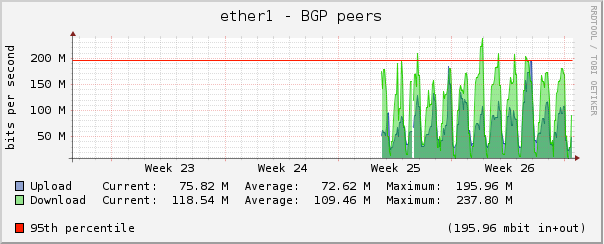
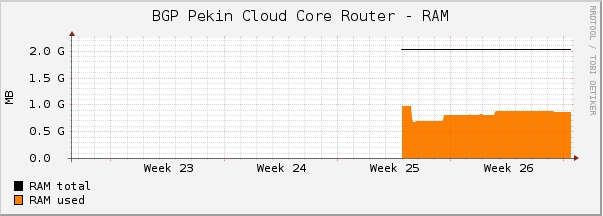
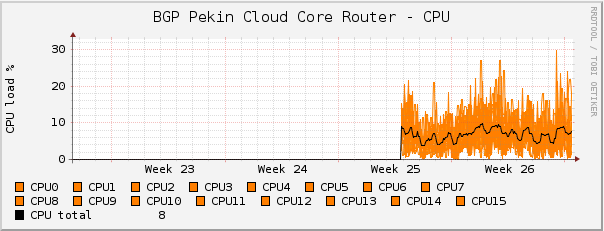
we tested a CCR1036 with RC10, RC11, RC12; with two peers (100 Mbps each) and two full tables, in production
it runs well, BUT it has a maximum uptime of 9d; after that, all interfaces disappear, and it has to be power cycled
when it runs, CPU usage is 2% on average
for comparation, a RB1100AXH2 in the same position has a 40% CPU average
we do hope that MT will soon find and remove all bugs
after that, the hardware platform has surely a big potential
so, at the moment we can still use the RB1100AXH2
but by end of the year we will upgrade to three peers, each 1Gbps, so I will really need the CCR1036 to run flawlessy (otherwise we’ll have to use a J*** or C*** as BGP router)
I can’t confirm your problems. Our BGP Sessions are up since several weeks. But our Routers are in the Lab and don’t have to push a lot of traffic around.
Hi, could you please upgrade to RC13 and report here if it works in your environment stable, as it seems working for you until now; I upgraded to RC13 but don’t want to risk again putting it in production; in our case, RC10 RC11 and RC12 are not working more than 9 days, when doing BGP in real world with high traffic
our other production CCR, doing NAT, not doing BGP, with RC10, works flawlessy, uptime 49 days and counting
Hmm i’m testing RC13 from today night (2 full bgp tables + 0.5 gbps traffic)
after half a day i have around 10k - 20k tx drops o vlan interfaces.
Are there any solution for this packet drops??
I have also noticed that i can upgrade firmware from 3.03 to 3.05 (can this fix anything?)
Where did You get RC14?
I am running two BGP route reflectors which are fed with two full views and igp. They have ~90 peers each. Currently if I disable one of the two full view, the topology change takes about 20 minutes to be completely propagated. BGP convergence is still very slow, and it uses only one core, which is almost always loaded at 100%.
No uptime problems so far. 6.0rc12 worked for more than one month. I upgraded to 6.0 two days ago and it seems stable. I hope that BGP routing table management will be optimized in the near future.
I just wonder if it’s possible to run 2xBGP Full View with 100 Mbit each on RB1100AHx2? I have routing and NAT. For current 100M load cpu utilization is about 30%. Does full view increase CPU utilization and make impact for latency?
I need time until CCR became suitable for BGP production and don’t want to feed cisco
Yesterday I replaced one of my BGP routers with CCR. So far everything runs smoothly, there are 7 peers, 3 full routing tables. I took the risk, because of full redundancy for this device, so if you have such possibility, I say try CCR now. Only problem I observed is with reboot, I wrote about it in CCR topic.
So far everything works as intended, made during this time few reboots at the beginning, at the moment CCR uptime is almost 11 days. Below are some screenshots:
3 IPv4 and 3 IPv6 full tables (one eBGP, two iBGP), 3 BGP clients, and 3 IPv4 + IPv6 OSPF peers. With this configurations everything works stable, any changes made to routing filters are applied as intended.
Do you also experience one core almost always at 100% load? How much does it take a route state-change to be applied? On my CCR (3 IPv4 full views and 3 IPv6 full views) it takes almost 20 minutes.
Yes, in fact above CPU graph is showing cores reaching 80% in a daily view, here they are averaged. Full route state-change depends on type of router on the other side of link. In my case there are 3 Quagga’s, and this takes 1-3 minutes, it’s pretty quick. But with Cisco routers used by my IP Transit provider it can take up to 5 minutes per link, sometimes quicker. So it’s pretty close to what you experience, comparing it to Quagga, it’s pretty much the same.
Does one core full utilization makes influence on traffic flow? What is the latency to nexthop via your bgp router? Is one core have 100% utilization every time or for some times?
P.S. My RB1100AHx2 with two full BGP peers has convergence time about 3 minutes, do one core of AHx2 pretty close to one core of CCR.
No, this is not a problem since traffic is ~equally divided between cores
It depends as some of nexthops are in same city, some are in totally different places. I guess what you ask is, is CCR causing higher latency than previous x86 system? The answer is: no.
This 100% usage is jumping between cores and yes, all the time one core is 100% loaded