Chateau 5G ax - Automatic cellular reconnect on provider disconnect

Unfortunately, this router seems to fail on a trivial task (one would think) where much cheaper and simpler router/modem combinations such as the ZTE MC801A, Zyxel NR5101, Huawei CPE2 Pro and Acer Predator 5G succeed: the automatic reconnect whenever the provider disconnects a mobile IP session.

For instance, the German provider O2 unfortunately (and sillily) still disconnects any established connection after 23m59h03s, so roughly once a day as in good old DSL/PPPoE - times. Probably the whole IP session thing runs on some old platform on theirs an no one dares to touch it, but anyway.

The Mikrotik router then is just overwhelmed by that and displays a “connect fail” and leaves things at that which is quite annoying, especially given the price tag.

One can circumvent this issue by setting up a scheduled task which disables and reenables the lte1 interface, so the disconnect is triggered before the provider can kick in, but out of principle, this bug bugs me so to say as it shouldn’t be necessary in the first place (except when one wants to prevent the time shifting in the long run due to the slightly less-than-24 disconnect in the case of O2, whoever came up with that glorious idea :unamused: ).

I think the “watchdog” is needed for your case.
It pings a certain page, if it fails then it reboots the device.

Thanks for your reply!

While that is certainly possible, it is not a decent solution from a technical point of view as packets may also get dropped because the link is congested, at least possibly leading to “false positives” where the watchdog is triggered although the lte1-connection has never been disconnected by the provider.

In general, a device should be able to automatically reconnect whenever a provider sends such a disconnect. After all, that kind of 24-hourly enforced disconnects aren’t anything highly exotic, but still sad common reality, depending on the provider.

Hence, it is a bug which should be fixed by Mikrotik.

Does seem like a bug. What version are you using?
If it is the latest stable v7.7, you might consider reporting to Mikrotik at help.mikrotik.com.

LTE has pretty good logs, so they should be able to get the bottom. Mikrotik support might want you increase the log level (and prevent it rolling it via memory-lines) to capture what’s going on at 24h disconnect:

/system logging action add name=support target=memory memory-lines=16384
/system logging remove [find where topics~"lte"]
/system logging add action=support topics=lte,!raw,!packet

If you collect a supout.rif after it it gets stuck, with the higher log level, I suspect the problem will be fix pretty quickly.

On making sure your at the latest stable…

You may also want to check the modem is updated, which is a seperate option:

# Check your and latest firmware version
/interface lte firmware-upgrade lte1
# Do upgrade by:
/interface lte firmware-upgrade lte1 upgrade=yes

Similar with the Routerboard firmware (which is updated directly):

# check the current-firmware match the RouterOS version 
/system/routerboard/print
# if it doesn't match...
/system/routerboard/upgrade 
# to enable automatic *firmware* upgrade *after* a RouterOS upgrade (so they match)
/system/routerboard/settings/set auto-upgrade=yes
# with auto-upgrade a second reboot is required after the package upgrade
# which you need to do *manually* via /system/reboot to trigger board fw upgrade at startup
# but will cause the board's firmware to match the RouterOS, which you'd likely want

Thanks for your input!


Yes, did so.


There seems to be already the latest (official) one installed:

[admin@MikroTik] /ip/firewall/filter> /interface lte firmware-upgrade lte1
installed: RG502QEAAAR13A02M4G
latest: RG502QEAAAR13A02M4G


Also up to date and matches.

I’d open a ticket at help.mikroitk.com. While watchdog is useful, it triggering daily is still something that should get fixed.

While congession or very poor signal could cause LTE to not connect, it has to be really, really BAD. And, if you know there is 24h drop from carrier, even less unlikely. The logs will show Mikrotik where it’s getting “stuck” – how the your specific carrier does this “drop” matters and likely leaving the modem in unexpected state.

Yes, will either do that or have the seller forwarded my results to them. Maybe it also has more influence when a distributor raises the case instead of one little customer who can easily be ignored.

You are right, mobile connects have to be pretty bad (< 120dBm RSRP and such) in order to drop which is part of its beauty. This issue however is not related to any of this but purely by the detach triggered by the provider.

Just before again as predicted. The connection is established:


status: connected
model: RG502Q-EA
revision: RG502QEAAAR13A02M4G
current-operator: o2 - de
current-cellid: [cellid]
enb-id: [enb-id]
sector-id: 53
phy-cellid: 332
data-class: 5G NSA
session-uptime: 23h58m20s
imei: [imei]
imsi: [imsi]
uicc: [uicc]
primary-band: B1@20Mhz earfcn: 300 phy-cellid: 332
ca-band: n78@70Mhz earfcn: [earfcn] phy-cellid: 538,B7@20Mhz earfcn: 3350 phy-cellid: 470,
B3@20Mhz earfcn: 1600 phy-cellid: 162,B20@10Mhz earfcn: 6200 phy-cellid: 23
dl-modulation: 64qam
cqi: 5
ri: 2
mcs: 13
rssi: -66dBm
rsrp: -103dBm
rsrq: -17dB

Peacefully, until the provider’s timer in this case reaches 23h59m10s and then, the modem seems to get disconnected even from 5G, falling back (and hanging) to LTE:

;;; connect failed
status: connect failed
model: RG502Q-EA
revision: RG502QEAAAR13A02M4G
current-operator: o2 - de
current-cellid: [cellid]
enb-id: [enb-id]
sector-id: 53
phy-cellid: 332
data-class: LTE
imei: [imei]
imsi: [imsi]
uicc: [uicc]
primary-band: B1@20Mhz earfcn: 300 phy-cellid: 332
dl-modulation: qpsk
cqi: 5
ri: 1
mcs: 2
rssi: -64dBm
rsrp: -102dBm
rsrq: -17dB
sinr: 2dB

The measurements of RSSI, etc. continue but the internet connection remains down.

Interestingly, it can also be recovered by changing the APN to something else and then back.

Since other modems/routers also reconnect within seconds here, this is a clear flaw of the Mikrotik router (not that this stupid disconnect by the provider wouldn’t be to rightously criticized). Neither does any mobile phone have that issue, they all reconnect properly.

Perhaps, since they may be more familar with your carrier, and may already know a solution. But in reality it’s the supout.rif with full LTE logs when it happens that will get action from Mikrotik. The LTE debug logs is what they need, and those be a supout.rif.

Well, since the export of the supout.rif file doesn’t work either for me (reproducible hanging at 96% and never finishing), I’ve send them the result of

[admin@MikroTik] > /log/print

instead. Let’s see …

Had similar problem with my provider on 4G using Chateau LTE12, disconnects was not too frequent, at random, approx. once at week.
Solved with netwatch:

/tool/netwatch> print
Columns: TYPE, HOST, TIMEOUT, INTERVAL, STATUS, SINCE
# TYPE    HOST     TIMEOUT  INTERVAL  STATUS  SINCE               
0 simple  1.1.1.1  1s       1m        up      feb/14/2023 23:46:53

down-script:

:local inetIf "lte1"
/interface
:if (![get $inetIf disabled]) do={
    :log error "LTE connection is DOWN! Trying to restore..."
    disable $inetIf
    :delay 5
    enable $inetIf
}

After this setup never had to manually restore connection.

I find The Dude super useful with LTE stuff. Since you can forward logs to the dude, it can store them outside /log on RouterOS. I setup some probes to track SINR,RSRP,RSRQ over time. See:
http://forum.mikrotik.com/t/how-to-track-lte-signal-using-the-dude/163250/5

And the Chateau can run the Dude package so it can essentially monitor itself (even if you don’t wire up other devices to the Dude, although you could).

A bit more involved, but helpful to troubleshoot anything. e.g. stuff like was the signal low when LTE has error (via probes in link above)? What commands was RouterOS sending/getting from modem (/system/logging type=remote to LAN IP with Dude)? etc…

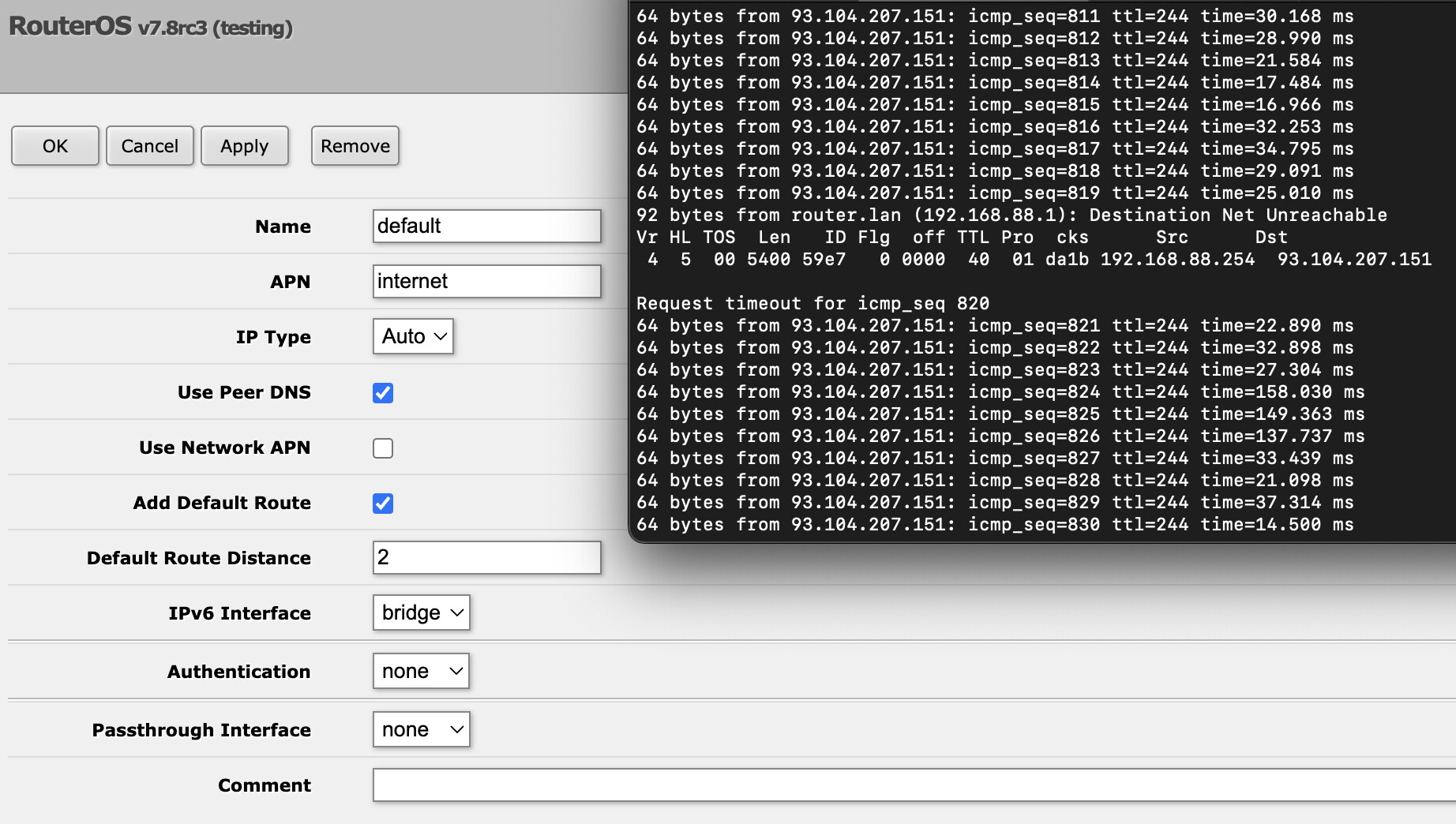
The issue seems to have been finally resolved by deselecting the option “Use Network APN” as the Mikrotik support was hinting at.

In this case, only one or two packages are lost during the ISP disconnection which is more than acceptable:

APN settings and ping result.png

@littleendian did you meanwhile upgrade ROS to 7.8?
It seems that on ROS 7.8 is better lte recconection handling, my netwatch down event is not entering in condition :if (![/interface/get lte1 disabled]) after upgrade, probably in recconection period when lte link is down lte interface is disabled. Up event is triggering ok afterwards, from where I call script to refresh IP on dyndns service.

Edit: Silly me… from your screenshot it is ROS 7.8 :slight_smile: That probably explains better reconnection behavior, on my lte apn setup “Use Network APN” was always disabled but still there was problem until 7.8.

Sorry for the late reply. Yes, I updated and at least so far, the reconnect seems to be a lot faster (being on 7.9rc3 meanwhile).

I’d like to raise a further aspect here instead of opening up another thread for this as it goes in conjunction with the reconnection topic. Since O2 disconnects every 23 hours, 59 minutes and 11-12 seconds or so, the point in time of course will roll through “business hours” sooner or later.

Now one could simply run a script and manually have the lte1 interface disconnect and reconnect every night. However, to keep the amounts of “downtime” and reconnects as little and low as possible, I thought about a different approach:

I’d like to run a script every night which checks the log output via /log/print. If there was a disconnection during “inconvenient hours”, let’s say between 6 AM and 1 AM next day, it shall trigger a reconnection to shift the ISP’s disconnection pattern to that timeframe again, e.g. 4 AM. If not, let’s keep it running until it either “rolls out” of that window due to the a bit shorter than 24h timespan or in case of maintenances, which also occur from time to time, leading to a disconnect at random times anyway.

Now the log file is already nice in the way that any entries longer ago carry a month’s name so since the script shall only check possible disconnects which happened during that very day, it should be sufficiant to only check the lines which start with a time. This is an example across a few days:

[admin@MikroTik] > /log/print where message~“lte1 link down”
apr/05 03:53:48 interface,info lte1 link down
apr/06 03:53:01 interface,info lte1 link down
apr/07 03:52:15 interface,info lte1 link down
apr/08 03:51:28 interface,info lte1 link down
apr/09 03:50:42 interface,info lte1 link down
apr/10 03:49:56 interface,info lte1 link down
apr/11 03:49:09 interface,info lte1 link down
apr/12 03:48:22 interface,info lte1 link down
apr/13 03:47:35 interface,info lte1 link down
03:46:49 interface,info lte1 link down
17:59:10 interface,info lte1 link down
21:42:59 interface,info lte1 link down

As one can see, mostly the disconnects happen due to the ISP’s “almost-24h-policy-disconnect”-policy, but once in a while, it goes down for a different reason.

My idea is to have a script run at 23:59 PM then every day to check whether there has been any entry with “lte1 link down” between 06:00:00 and 00:59:59 and if so, enable another script at e.g. 4 AM to reconnect the lte1 interface, effectively shifting the ISP-trigger disconnects to that timeframe again.

While it feels like a yet rather trivial task, both ChatGPT and myself are unfortunately already overstrained due to the lack of detailed scripting knowledge. ChatGPT’s suggestions constantly lead to syntax errors, so I’ve rather given up; even the first step to only output those lines not starting with a letter are asked for too much it seems.

I have run into a similar challenge, and I find you don’t have to check the logs. In the LTE monitor, you have a field session-uptime, which provides the information you need to decide if you want to restart your connection at a given time.

:local lteInfo [/interface/lte monitor lte1 once as-value]
:local sessionUptime ($lteInfo->"session-uptime")

:local hours [:pick $sessionUptime 0 [:find $sessionUptime ":"]]

:if ($hours > 0) do={
    :put "your restart commands"
}

If you run this script every day at 4 am, it will check if the connection has been established within the last hour. If so, we have our regular disconnect at night and we don’t need to do anything. If the connection has been up longer, you want to reconnect to keep your 23h59m3s auto reconnect within the window of 3-4am.

I am also in a similar situation: I have a CHATEAU LTE18 AX router and my spanish provider drops my LTE mode connection every 48 hours. The router is able to reconnect by itself but it does it in HSDPA mode.
To enter the LTE mode again I run every 15 minutes a script that checks the modem “data-class” parameter and if it is other than LTE it restarts the router:

/interface lte monitor numbers=0 duration=1 once do={
     :local uptime $"session-uptime";   
     :local datos $"data-class";
     :log info $uptime;
     :log info $datos;
:if ($datos != "LTE") do={
     :log warning ("La conexion ha pasado a ser " . $datos . ". Rearrancando el router... ")
     /system reboot;
} else={/log info ("Todo ok. La conexion sigue siendo " . $datos . ".")}}

“La conexion ha pasado a ser … Rearrancando el router” means “The connection has changed to … Restarting the router” and
" Todo ok. La conexion sigue siendo …" means “Everything ok. The connection is still…”

This is the log sequence:

May/07/2024 10:26:00 script,info Todo ok. La conexion sigue siendo LTE.
May/07/2024 10:41:00 script,info 1d23:44:05
May/07/2024 10:41:00 script,info LTE
May/07/2024 10:41:00 script,info Todo ok. La conexion sigue siendo LTE.
May/07/2024 10:56:00 script,info 1d23:59:05
May/07/2024 10:56:00 script,info LTE
May/07/2024 10:56:00 script,info Todo ok. La conexion sigue siendo LTE.
May/07/2024 10:57:11 lte,account lte1 session: 172816s 1208995148/1154755806 bytes 2618541/2496511 packets
May/07/2024 10:57:11 interface,info lte1 link down
May/07/2024 10:57:17 lte,info lte1 IPv4: 172.25.156.127, DNS: 212.166.128.196,212.166.167.73
May/07/2024 10:57:17 interface,info lte1 link up
May/07/2024 11:11:00 script,info 00:13:44
May/07/2024 11:11:00 script,info HSDPA
May/07/2024 11:11:00 script,warning La conexion ha pasado a ser HSDPA. Rearrancando el router…


This solution is currently almost ok for me but instead of restarting the router I´d prefer just reset the lte1 interface. I am looking for a way to just reseting the modem without restarting the router. For that purpose the AT command “AT+RESET” is suposed to do it but in my case it doesn’t work:

[vazquez@LTE_18] > /interface lte at-chat lte1 input=“AT+reset”
output: ERROR

[vazquez@LTE_18] > /interface lte at-chat lte1 input=“AT+RESET”
output: ERROR

[vazquez@LTE_18] >
[vazquez@LTE_18] >

I am doing all this steps in the web interface because I am remotely connected and don´t have access to winbox. Could this be the reason? Am I using the wrong command?

Installed Version 7.14.2
Latest Version 7.14.3

I’ll update as soon as posible but “What’s new in 7.14.3” doesn’t mention any improvements in this area.

In my experience, this completely resets the modem

/interface/ disable lte1
:delay 5
/interface/ enable lte1

Maybe worth a try?

Hi metabubble, thanks for your post.

I think the solution you propose will work but as the router is in an isolated remote location I can’t try it until I am phisically on site because if for some reason I make a mistake I could loose the connectivity. I hope to visit the place by the end of this month. I’ll post the results when the thest is completed.

Anyway, out of curiosity and just in case disabling it and enabling it again is not effective, I would like to know if it is possible to reset the lte1 interface using AT commands or in any other way using only one command.

I have updated the router to the last version 7.14.3 and the modem firmware is also at the last version.
Installed Version EG18EAPAR01A13M4G_01.002.01.002
Latest Version EG18EAPAR01A13M4G_01.002.01.002

The /interface lte at-chat lte1 input=“AT+RESET” command keeps failing after the upgrade.

There is also a “power-reset” command to kill USB power (to reboot modem).

Dunno the bus= for Chateau 5G AX, but it be either:

/system/routerboard/usb/power-reset bus=0 duration=10s
/system/routerboard/usb/power-reset bus=1 duration=10s

(and same path on left in winbox to a dialog that does it too)