CHR suggestions for new functionality

Please check this OVA. HW version has been changed to 10 and should work on the ESXi 5.5. It still works on the ESXi 6.5.

https://www.mikrotik.com/download/share/MikroTik_CHR_Release_6_40_3.ova

Our procedure is as follows:

  • We convert the VMDK file that is currently available on the download page to the the thin format (with vmkfstools on the ESXi machine)
  • Create a VMX file with basic parameters
  • Register it to the ESXi (vim-cmd solo/registervm)
  • Then from a remote machine using ‘ovftool’ we generate the OVA

For the VM name “displayName” parameter is used.

UPDATE: Adjusted the VMX, added “annotation” field which shows up as “Notes”

Big Thanks!

I confirm it’s working fine on ESXi 5.5.

Thanks!

This is wonderful! Even if you don’t plan to keep doing this process for future versions can you please make sure the link is available on your download page anyway? Install the OVA and upgrade only works if we can find the OVA :slight_smile:

Thanks! We plan to add it to the download page and publish automatically with each new RouterOS release.

Looks great! I tested it on ESXi 6.0.0 and finally we have a way to deploy CHR in 10 seconds!
I would advise to keep the RouterOS version out of the default system name. E.g. name it only MikroTik_CHR.
The actual version will change over time and this name cannot really be changed anymore.
(you can rename the VM but inside the VM directory the vmdk files will keep the original name - confusing)

Indeed. You can ‘fix’ the VM directory by migrating it to another storage and back.

VM Migration will use the VM name to create the folder on the destination storage.

Of course this is cumbersome and some people don’t even have vCenter or multiple storages to perform a migration.

I agree that a simpler VM name not including the version would be better.

So you’re saying that we should put a generic name inside the VMX, right? File name of the OVA can contain the version number right?
‘displayName’ and ‘annotation’ should just contain name without the version?

Update.

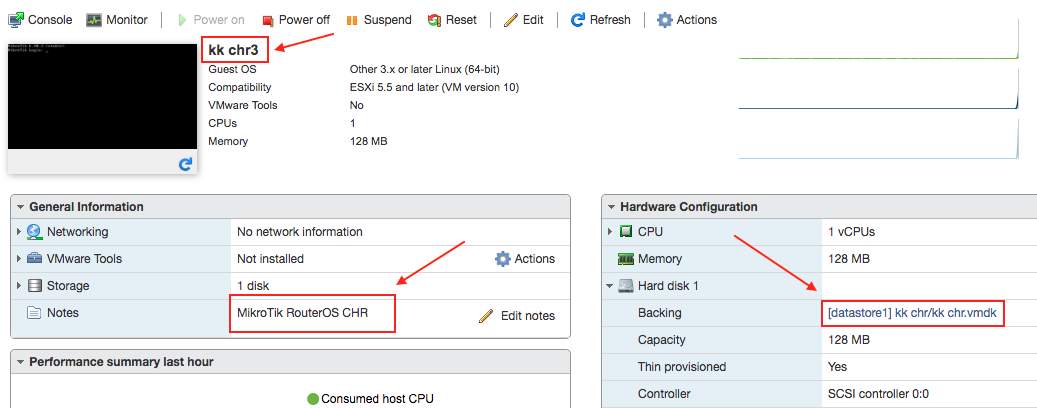
Did a test of my own with the previously published https://www.mikrotik.com/download/share/MikroTik_CHR_Release_6_40_3.ova - when importing I chose a different name (‘kk chr’), then after importing I was able to change the name and annotation. Could you please explain the problem? We’re using the ESXi web interface.
ESXi_CHR.png

Yes. The .ova of course can have a version in its name, but the name suggested in the wizard when importing the .ova is better left generic.
(and the note probably as well, although that can easily be edited afterwards when desired)

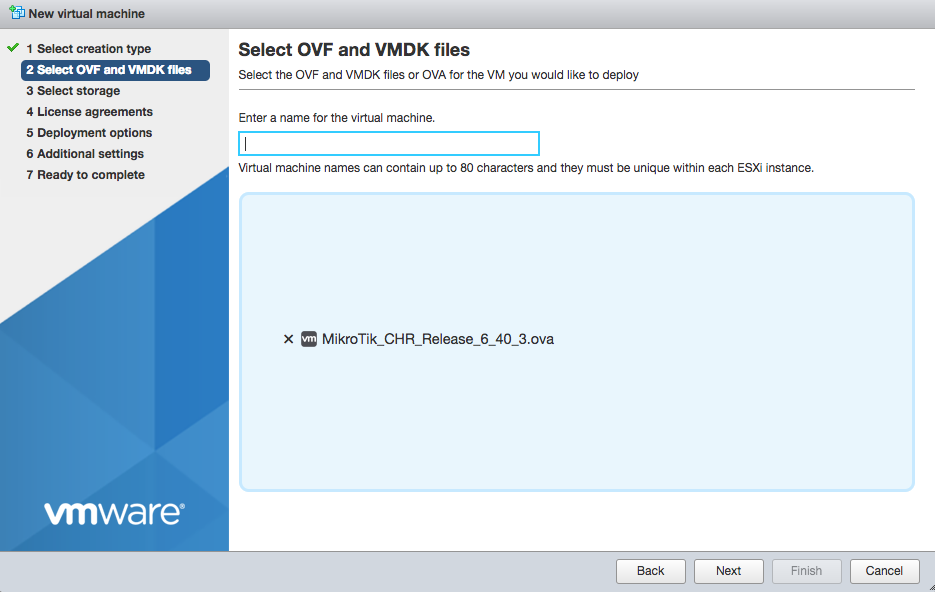
Ok, the web interface does not suggest any name, the VM name field is blank when deploying an OVA:
ESXi_OVA_deploy.png

The OVA has been updated to exclude version number from the VM name - https://www.mikrotik.com/download/share/MikroTik_CHR_release_6_40_3.ova

Please check.

Is that a change that has been made? Or maybe it depends on VMware version and/or procedure used?
In my case it suggested a name that included the version number.

BGP Route Reflector support not installing the routes would be nice.

+1 for VM-Tools and snapshots

Please try the last version I posted - https://www.mikrotik.com/download/share/MikroTik_CHR_release_6_40_3.ova, it shouldn’t have the version number in the suggested VM name.

It is correct, the latest version shows a VM name without the version number. Good!

The OVA for the newest ‘release candidate’ version is available on the download page - https://mikrotik.com/download#chr

Subsequent ‘current’ and ‘bugfix’ releases also will be available on the download page once new versions are released.

At the moment the OVA for ‘current’ version 6.40.3 is available here - https://www.mikrotik.com/download/share/MikroTik_CHR_release_6_40_3.ova

Thank you for your comments on creating the OVA file!

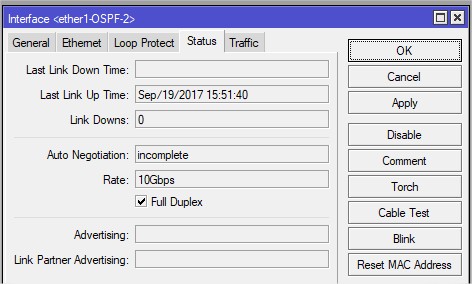
I noticed when using VMXNET3 and having a 10Gbit link there is a ‘incomplete’ status message at auto negatiotion, see attachment.
Is this something known?
errorautonego.jpg

Could you tell me please is VirtIO SCSI supported in this release?
http://forum.mikrotik.com/t/chr-on-ovh-vps-ssd/107670/1

Just leave it here: https://www.youtube.com/watch?v=PivpCKEiQOQ