Example.
The first entry here is multi-line:
/ip address
add address=192.168.88.1/24 comment=defconf \
    interface=br-main network=192.168.88.0
add address=10.0.254.1 interface=P8-MGMT network=255.255.255.0
Translated to single-lines:
/ip address
add address=192.168.88.1/24 comment=defconf interface=br-main network=192.168.88.0

add address=10.0.254.1 interface=P8-MGMT network=255.255.255.0
How would one go about (what is the process) for comparing two configs?
One opens a new spreadsheet.
Then pastes in column A an export (single lines).
Then paste in column B a modified export (single lines).
then writes in C2 the formula =IF(A2=B2;“”;“DIFF!”) and copy/pastes it down.
Then if needed it inserts blank cells in either column A or column B to synchronize the two columns rows and pastes again the formula as above until only a few DIFF! are showns (that are the changed lines).
Or copy/pastes the configurations (again single lines) to .txt files and then uses a merge/diff/compare tool to check the differences.
Which program to use is up to the user.
I’m having a hard time understanding this.
Example.
Normal firewall rules from export (column C of firewall_filter_sort) in the example there is a single chain=input rule that is out of place between two chain=forward rules, that I am bolding to highlight it:
/ip firewall filter
add action=accept chain=input comment=“defconf: accept established,related,untracked” connection-state=established,related,untracked
add action=drop chain=input comment=“defconf: drop invalid” connection-state=invalid
add action=accept chain=input comment=“defconf: accept ICMP” protocol=icmp
add action=accept chain=input comment=“defconf: accept to local loopback (for CAPsMAN)” dst-address=127.0.0.1
add action=accept chain=input in-interface=P8-MGMT
add action=accept chain=input in-interface-list=MGMT
add action=drop chain=input comment=“defconf: drop all not coming from LAN” in-interface-list=!LAN
add action=accept chain=forward comment=“defconf: accept in ipsec policy” ipsec-policy=in,ipsec
add action=accept chain=forward comment=“defconf: accept out ipsec policy” ipsec-policy=out,ipsec
add action=fasttrack-connection chain=forward comment=“defconf: fasttrack” connection-state=established,related hw-offload=yes
add action=accept chain=forward comment=“defconf: accept established,related, untracked” connection-state=established,related,untracked
add action=drop chain=forward comment=“defconf: drop invalid” connection-state=invalid
add action=drop chain=input in-interface-list=WAN
add action=drop chain=forward comment=“defconf: drop all from WAN not DSTNATed” connection-nat-state=!dstnat connection-state=new in-interface-list=WAN
you replace those in Config_Input with these (column E of firewall_filter_sort):
add action=accept chain=input comment=“defconf: accept established,related,untracked” connection-state=established,related,untracked
add action=drop chain=input comment=“defconf: drop invalid” connection-state=invalid
add action=accept chain=input comment=“defconf: accept ICMP” protocol=icmp
add action=accept chain=input comment=“defconf: accept to local loopback (for CAPsMAN)” dst-address=127.0.0.1
add action=accept chain=input in-interface=P8-MGMT
add action=accept chain=input in-interface-list=MGMT
add action=drop chain=input comment=“defconf: drop all not coming from LAN” in-interface-list=!LAN
add action=drop chain=input in-interface-list=WAN
add action=accept chain=forward comment=“defconf: accept in ipsec policy” ipsec-policy=in,ipsec
add action=accept chain=forward comment=“defconf: accept out ipsec policy” ipsec-policy=out,ipsec
add action=fasttrack-connection chain=forward comment=“defconf: fasttrack” connection-state=established,related hw-offload=yes
add action=accept chain=forward comment=“defconf: accept established,related, untracked” connection-state=established,related,untracked
add action=drop chain=forward comment=“defconf: drop invalid” connection-state=invalid
add action=drop chain=forward comment=“defconf: drop all from WAN not DSTNATed” connection-nat-state=!dstnat connection-state=new in-interface-list=WAN
You now can check all input rules together, and be sure that after the last one there won’t be any other input ones.
I’m just not getting it.
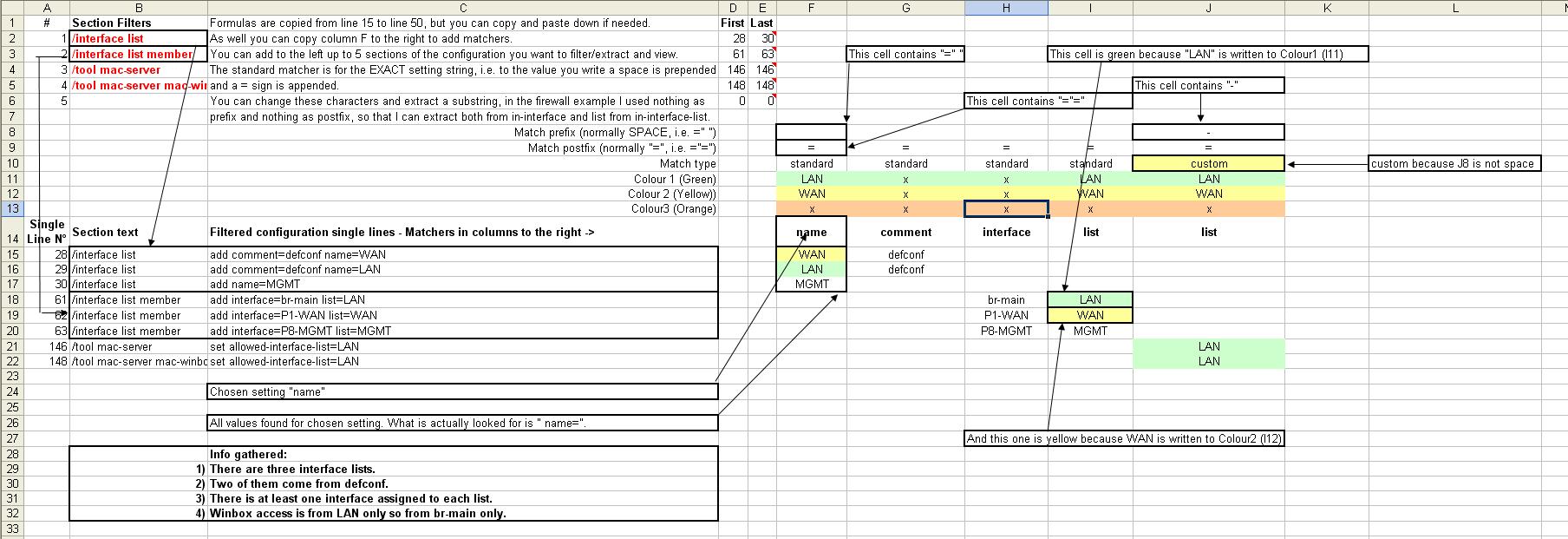
You enter in the top left B2-B6 up to 5 section names. These are the parts that will be “extracted” and will appear below starting from B15-C15.
Then in Column F (and/or in more copies of it to the right) you enter in row 14 the setting “item” that you want to extract the value for.
Then (optionally) you can add for each of the column from F → in row 11/12/13 a “matcher” that will highlight the corresponding values found with the given colours[1].
Attached screenshot of modified interface_list_check, commented.
[1] thank you for the kind proposal but you cannot really teach new tricks to old dogs, and anyway I’ll stand by my British orthography, the late Queen Elizabeth message still sounds good to me. JFYI:
https://www.eetimes.com/a-message-from-the-queen/