I’m probably being dense again (still?), but why is the following named “single lines:”
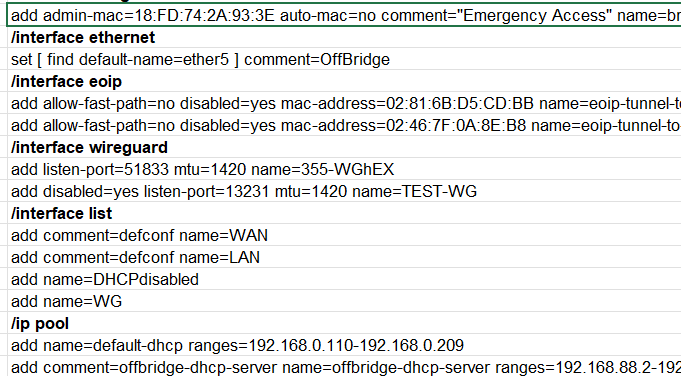
Besides the red colouring of comments and the bolding of the sections that make it much more readable than plain text, it is very useful if you want to compare side by side (on a new worksheet or in a text compare tool) two configurations (like before and after a set of changes).
How would one go about (what is the process) for comparing two configs?
The “terse” format is (IMHO) much less readable, but it is very convenient for copying/pasting snippets on an actual device. And with the (clever?) colouring of the cells makes it easy to select a whole set of settings.
I agree – I actually like the terse format, and the super clever coloring (talk American, will ya?) does indeed help.
The firewall_filter_sort sheet (> experimental> ) allows to re-order the /ip firewall filter rules by chain.
The Idea is that you:
- copy the contents of the single_line (as values) to a new worksheet
- replace the lines with numbers corresponding to those in column A of firewall_filter_sort with those in column E of firewall_filter_sort (again paste as values)
- copy the whole thus modified configuration to Config_input (in a new or the same instance of Config_parser_Alpha.xls) You can also paste the snippet directly on the corresponding lines (the whole /ip firewall filter section of the same Config_input)
- now the firewall filter rules will be ordered and appear grouped by chain in firewall_filter_check
I’m having a hard time understanding this.
The other sheets that end with _check are “free setting”, there is a blank template (aptly called blank_template_check) that you can duplicate and rename and then customize as you wish.
Then there are a few already pre-configured (but modifiable) example *_check sheets:
dhcp_server_check
interface_list_check
firewall_filter_check
that are nothing but personalized copies of blank_template_check filtering some relevant sections (top left of the sheet) and extracting the main settings (columns F-> …), additionally optionally highlighting them with colours.As an example the dhcp_server_check puts together the settings of four relevant sections:
/ip dhcp-server
/ip pool
/ip dhcp-server network
/ip address
so that one can at a glance see on which interfaces there is a dhcp server, which dhcp pool is used and which addresses/network are used, normally these settings are scattered in different areas of the configuration and you have to scroll up and down to check them.This is also convenient (see the screenshot here):
Multi WAN PBR problem
to quickly see if similar lines miss a setting that should be there, spotting the missing distance and target-scope settings in that case would have been more difficult without using the spreadsheet.
I’m just not getting it.
I do very much like the idea of your spreadsheet grouping related sections of config lines – it addresses a real weakness in how an export is inhenerently ordered.