try to get access to your Router from outside without port knocking , (using the rules about).
What u getting on your winbox?
logging in…(and stuck there) or
connecting to 1.2.3.4
Will see if I get time to do a test. It will be on a test router, since I would not open any production routers from outside to WinBox.
i’m happy to share with u my public ip-add.
6f1406302c00.sn.mynetname.net
Try to log in to it, specificate any user and pass.
Once u done that , than ill disable tarpit and i’ll get you to long in to it again, see what you will see on your end.
i do see that it just hanging. I did also needed to turn on Legacy Mode. First time I do see that I need to do that.
Post full config, it may be some wrong with it.
i’m sending my firewall.
And if u can try again, i did disable tarpit (also on this config that i’m sending Tarpit has been disabled).
u should be seeing now Connecting to 1.2.3.4
I do not see any difference in Winbox,still just hanging at Logging in
Will have a look at the firewall.
PS hope this is not your real port for port knocking. If so, change them.
As I told before you should not have Winbox open on internet. One of the rule I do post you should follow if you need to do it, change the port away from the default port
\
Use Splunk> to log/monitor your MikroTik Router(s). See link below. 
that is device just for testing only
done, atm i have, see the file:
file1.rsc (1.53 KB)
that is fine , but i’m willing to deep in dive.
on your end if can play around, can u disable the rules in RAW , and try to log in see what u will get. Play with Tarpit disable/enable
I did test on a CHR router running 7.2rc3.
This has a set of default rules with NAT setup and ether1 as Wan IP.
Only rules that are added are those from this post +
This is disabled add action=drop chain=input comment="defconf: drop all not coming from LAN" in-interface-list=!LAN
And som filter rule to ignore lan spam filling logs UDP/17500 5678 67 138 5634
I have no problem reaching router with Winbox on outside interface with and without Tarpit filter rules.
Only difference I see when Tarpit is used is that telnet to a port seems to open and just hangs (the point of using tarpit)
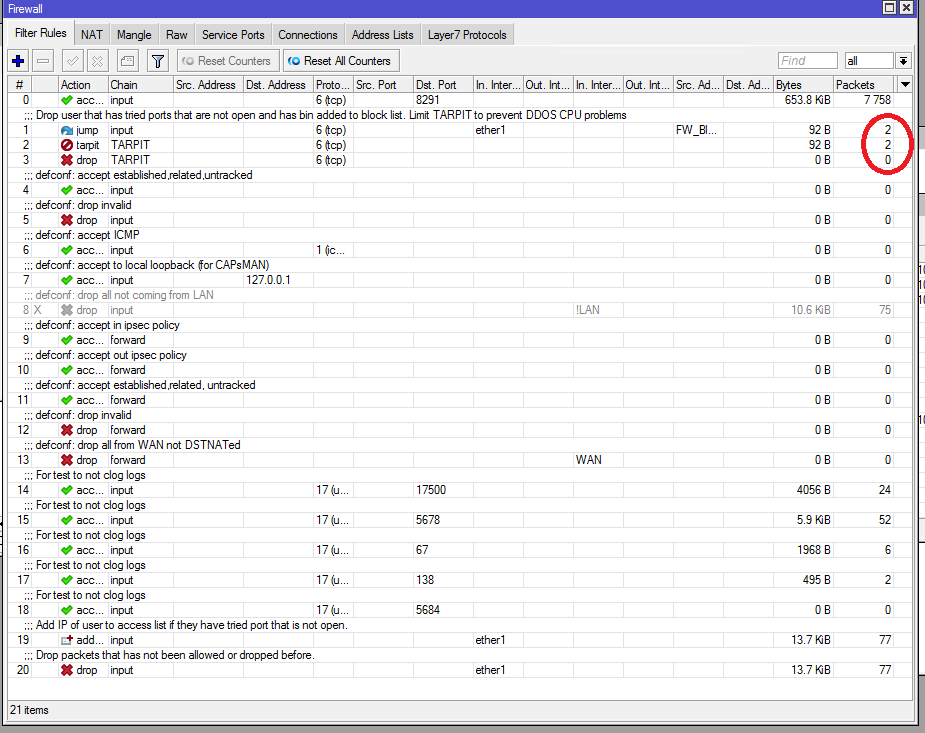
I can see Tarpit counter increase while I do the test.
.
.
Here is the complete router config
/export hide-sensitive
# aug/08/2022 08:05:10 by RouterOS 7.2rc3
# software id =
#
/interface bridge
add name=bridge1
/interface list
add name=WAN
add name=LAN
/interface wireless security-profiles
set [ find default=yes ] supplicant-identity=MikroTik
/ip pool
add name=dhcp ranges=192.168.22.10-192.168.22.100
/ip dhcp-server
add address-pool=dhcp interface=bridge1 name=dhcp1
/port
set 0 name=serial0
/interface bridge port
add bridge=bridge1 interface=ether2
add bridge=bridge1 interface=ether3
add bridge=bridge1 interface=ether4
/interface list member
add interface=ether1 list=WAN
add interface=bridge1 list=LAN
/ip address
add address=192.168.22.1/24 interface=bridge1 network=192.168.22.0
/ip dhcp-client
add interface=ether1
/ip dhcp-server network
add address=0.0.0.0/24 gateway=0.0.0.0 netmask=24
add address=192.168.22.0/24 gateway=192.168.22.1 netmask=24
/ip firewall filter
add action=accept chain=input dst-port=8291 protocol=tcp src-port=""
add action=jump chain=input comment="Drop user that has tried ports that are not open and has bin added to block list. Lim\
    it TARPIT to prevent DDOS CPU problems" in-interface=ether1 jump-target=TARPIT protocol=tcp src-address-list=\
    FW_Block_unkown_port
add action=tarpit chain=TARPIT limit=10,5:packet protocol=tcp
add action=drop chain=TARPIT protocol=tcp
add action=accept chain=input comment="defconf: accept established,related,untracked" connection-state=\
    established,related,untracked
add action=drop chain=input comment="defconf: drop invalid" connection-state=invalid
add action=accept chain=input comment="defconf: accept ICMP" protocol=icmp
add action=accept chain=input comment="defconf: accept to local loopback (for CAPsMAN)" dst-address=127.0.0.1
add action=drop chain=input comment="defconf: drop all not coming from LAN" disabled=yes in-interface-list=!LAN
add action=accept chain=forward comment="defconf: accept in ipsec policy" ipsec-policy=in,ipsec
add action=accept chain=forward comment="defconf: accept out ipsec policy" ipsec-policy=out,ipsec
add action=accept chain=forward comment="defconf: accept established,related, untracked" connection-state=\
    established,related,untracked
add action=drop chain=forward comment="defconf: drop invalid" connection-state=invalid
add action=drop chain=forward comment="defconf: drop all from WAN not DSTNATed" connection-nat-state=!dstnat \
    connection-state=new in-interface-list=WAN
add action=accept chain=input comment="For test to not clog logs" dst-port=17500 protocol=udp
add action=accept chain=input comment="For test to not clog logs" dst-port=5678 protocol=udp
add action=accept chain=input comment="For test to not clog logs" dst-port=67 protocol=udp
add action=accept chain=input comment="For test to not clog logs" dst-port=138 protocol=udp
add action=accept chain=input comment="For test to not clog logs" dst-port=5684 protocol=udp
add action=add-src-to-address-list address-list=FW_Block_unkown_port address-list-timeout=1d chain=input comment=\
    "Add IP of user to access list if they have tried port that is not open." in-interface=ether1 log-prefix=\
    FI_AS_port-test
add action=drop chain=input comment="Drop packets that has not been allowed or dropped before." in-interface=ether1 log=\
    yes log-prefix=FI_D_port-test
/ip firewall nat
add action=masquerade chain=srcnat out-interface-list=WAN
/ip firewall raw
add action=drop chain=prerouting in-interface=ether1 protocol=!tcp src-address-list=FW_Block_unkown_port
/system identity
set name=v7.2rc3
Here is a screenshot of Tarpit on a production router. 60 millions packet entered Tarpit in 69 days:
.

Use Splunk> to log/monitor your MikroTik Router(s). See link below.
I have no problem reaching router with Winbox on outside interface with and without Tarpit filter rules.
Only difference I see when Tarpit is used is that telnet to a port seems to open and just hangs (the point of using tarpit)
I can see Tarpit counter increase while I do the test.
i think that we are not on same page. I’m not saying about accessing at all. i have repeated that couple of time and i am doing that for the las time:
When i’m trying to get access from outsite with Tarpit enabled, on the winbox i can see logging in[ and is gettign stack there. (the ip-add goes on blocked list)
If i disable tarpit and becouse of drop everythings else im seeying Connecting to 1.2.3.4 (doesn’t know how to get there)
However thanks for everything!
.
.
And I say that on the test above Winbox works fine with Tarpit enabled to my test router on the Wan interface.
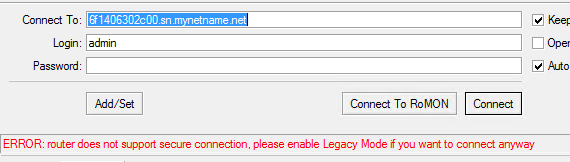
One strange thing at your side, is that Winbox tells me that I need to switch to Lagacy Mode to be able to access your router, why?
Not seeing this anywhere on my routers.
Use Splunk> to log/monitor your MikroTik Router(s). See link below.
Thanks for this. I had been wanting a way to catch all the portscanner bots and waste THEIR resources and time for a change.
Jotne rereading this thread, and will get to my questions.
But couldnt help notice your multiple comments on servers. MT ARE YOU LISTENING… put zero trust cloudfare tunnel in a package… Grow a pair and do it! ( of gonads of course ).
Okay lets say there is some validity to your approach and for me to adopt it…
A. So you detect a port searching on the router… ( not a port already open on the router I presume, not sure how the router knows that )
B. You then blog the user by firewall address list.
C. you tarpit the user?
D. you drop the user?
IM getting confused on the basic concepts here before getting into the config details…
Rextended has a unique way of trapping all other protocols except TCP okay got that but the tarpit is confusing me…
He does this in RAW so there is little ramification on CPU…
What about the tarpit CPU intensive???
Also rextended says to do something different regarding tarpit to ensure its the external hackers router that gets loaded not yours etc…
+++++++++++++++++++++++++++++++++++++++++++++++++++++++++++++++++++++++++++++++++++++++++++++++++++++++++++++++++
Once I am happy with a setup will add it ot my firewall article…
B. Add to list for 24 hour (can be changed)
C. It should only tarpit until certain degree, then go to
D. drop to not kill the router by eating CPU by tarpitting to many IP.
Tarpit is only an option as mention in first post.
I have not had any problem with this rule on my routers.
\
Use Splunk> to log/monitor your MikroTik Router(s). See link below.
Okay sounds good but dont quite understand…
add action=add-src-to-address-list address-list=FW_Block_unknown_port address-list-timeout=1d chain=input comment=
“Add IP of user to access list if they have tried port that is not open.” in-interface=ether1 log-prefix=
FI_AS_port-test
Doesnt this simply add every source address hitting every port on your router???
Why do you have winbox port coming in from the outside …?
This should be something like… . as a first rule so as to bypass all other ports being blocked.
add action=accept chain=input dst-port wireguard port protocol=udp
The next rule does something with those on the firewall address list, but then this is the second time they have attempted something…
YOu add it to a jump chain okay…
You tarpit these incoming attempts, but what does that mean ? and what effect does 10,5 limit provide…
Then you drop chain tarpit… Very confusing, if you tarpitted above why are you dropping now… ??
and WHY only TCP…
So we are tarpitting only TCP connections???
I find your order confusing… I would put jump chain physicall after the input chain to not eff with my mind LOL.
add action=add-src-to-address-list address-list=FW_Block_unkown_port address-list-timeout=1d chain=input comment=
“Add IP of user to access list if they have tried port that is not open.” in-interface=ether1 log-prefix=
FI_AS_port-test
again do you mean any port that is not specifically stated as allowed as first rules?? which is accomplished by any trapping any source other than those expected…
Okay the raw rule… it also does nothing first pass but drops all other second pass attempts at non TCP ports.
SO, Why not TCP ports as well, or for that matter, tarpit all porst and dont use raw, OR or drop all at raw not just not non TCP.
I am not sure if we talk about the same 
Nearly first thing written: This needs to be the last two filter rules.
So the port tester only adds IP that do not hit any other open/configured port above.
I have not written anything about Winbox. That is some you need to configure your self.
Tarpit config I have just copied from some else, not my work, and if I do log these setting, it seems to work as intended.
Her are the flow part. RouterOS always apply filter/rule from top to bottom (until it hit some that stops the process)
Top rule (use tarpit/drop) or use top rule block in raw.
Rule a
Rule b
Rule c
Rule d
.
.
(and then final two rules at the bottom of the config)
Second last action. Since IP does not hit any rule above. Add it to the Block list
Last action. Drop the IP and log the action
Next time same IP tries to enter the system, it will be blocked by the firs rule in raw or by the tarpit/drop section in filters.
\
Use Splunk> to log/monitor your MikroTik Router(s). See link below.
Clear as mud, sorry tired, will try tomorrow.