marlow
November 11, 2007, 12:29am
21
require-client-certificate was the problem. That doesn’t seem to work yet. Once set to “no”, both Linux and RouterOS clients will connect.
Bugger. Anyhow, I’ve updated the Wiki article at http://wiki.mikrotik.com/wiki/OpenVPN , so it should cover all angles and hopefully also the potholes now.
/Martin
acidbits : How do you get openvpn to work with usernames & passwords?
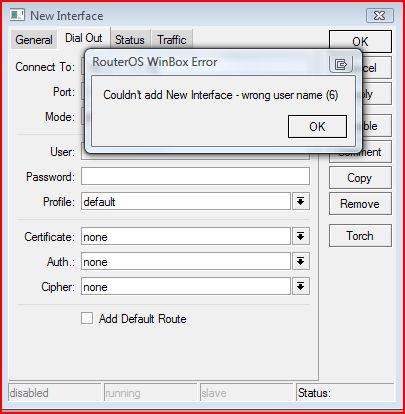
However it seems MT doesnt allow you to NOT specify a username!
marlow:
I’ve tried to get OpenVPN going proper for a while now. RouterOS client to Linux Server no problem. But RouterOS client to RouterOS server always ends up with:
00:08:57 ovpn,info TCP connection established from 192.168.0.2
The same RouterOS client has no problems connecting to a Linux OpenVPN server without configuration change.
I then tried to follow the wiki, that pingus has put together. Still NO GO. Both boxes are now 3.0rc9, still with those issues (were 3.0rc5 before).
Anyhow, I’ve send supout.rif’s of both boxes to support, let’s see, what they come up with.
/Martin
Hi!
Thank you for help.
I still cannot get openvpn client connecting to a unix/linux openvpn server.
It seems i still cannot create a client without specifying a user-name!
yesss, only username+password, no certificates
mrz
July 7, 2009, 11:58am
26
or
Unfortunately that would require a redo of the server and loss of current clients…
NAB
October 4, 2009, 8:34pm
28
These updates are now out of date and I have corrected one obvious mistake I found. However…
The command ‘/interface ovpn-server server [name] cipher=none’ is invalid as on the server, ‘none’ is not a valid option for ‘cipher’ in ROS 3.29 or 3.30. It is a valid option on the client though, so I assume that this is a bug and have e-mailed support accordingly.
I’ve followed the WIKI and I’m having similar problems when I try to get my ROS OVPN Client (v3.30) to speak to my ROS OVPN Server (v3.30).
I get the following error: terminating … TLS Handshake Failed
I don’t understand where I’m going wrong. PLEASE HELP !!!
Kindly see my configuration below:
/ip pool add name=ovpn-pool ranges=10.15.32.34-10.15.32.38
/ppp profile add change-tcp-mss=default comment=“” local-address=10.15.32.33
/ppp secret add caller-id=“” comment=“” disabled=no limit-bytes-in=0
ip firewall filter add action=accept chain=input comment=“OpenVPN” disabled=no dst-port=443 protocol=tcp
CLIENT CONFIGURATION:
/interface ovpn-client
Default profile on client side is no encryption. You are requiring encryption on the server side. Cant negotiate encryption if one side isnt configured to use it.
Thatd be my guess..
As far as I understand the “cipher= xxxx” is where we would enable encryption or not.
I have encryption on both the Server and Client side:
/interface ovpn-server server set auth=sha1,md5 cipher=blowfish128,aes128,aes192,aes256 default-profile=PROFILE
ip firewall filter add action=accept chain=input comment=“OpenVPN” disabled=no dst-port=443 protocol=tcp
CLIENT CONFIGURATION:
/interface ovpn-client cipher=aes256 add-default-route=no
Yeah, I just tried it. It doesnt matter for OVPN.
Did you try putting a cert in on the server? I never have run w/o a cert on the server before.
mrz
March 24, 2010, 6:08am
33
On a server you need CA and “server” certificates, otherwise OVPN will not work.
I’ve put a cert on the server, and on the client and still nothing.
Can someone show me their working config, I don’t know what I’m doing wrong here.
Additionally, I have an L2TP server running on the same box without any issues: clients are able to connect via L2TP without a problem. Just having a problem with OpenVPN.
PLEASE HELP, I’m getting my butt handed to me by this Mikrotik box … lol
Do you have a cert installed and assigned to the openvpn server AND the CA cert that signed it?
Yup, I used EASY-RSA Method prescribed in the Wiki.
This is what I have:
Kindly see below:
SERVER
ppp secret:
name=“username” service=ovpn caller-id=“” password=“password” profile=default routes=“” limit-bytes-in=0 limit-bytes-out=0
Ovpn Pool:
2 ovpn-pool 10.15.32.34-10.15.32.38
PPP Profile:
ppp profile print
1 name=“Beya_Voip” local-address=10.15.32.33 remote-address=ovpn-pool use-compression=default use-vj-compression=default
Ovpn-Server Server:
enabled: yesCLIENT
interface ovpn-client print detail
Flags: X - disabled, R - runningLOG
21:43:01 ovpn,info TCP connection established from W.X.Y.Z
PING from Client:
ping 10.15.32.33
Your user is assigned to the default profile and the default profile doesnt have an ip pools. Assign the user to the Beya_voip profile.
Ok, I've set my client profile to: Beya_Voip
ppp profile printBeya_Voip routes="" limit-bytes-in=0 limit-bytes-out=0
Can you post a working example.CLIENT:
interface ovpn-client print detailClient Logs:
16:24:28 ovpn,info TCP connection established from 172.16.0.254Server Logs:
16:24:28 ovpn,info TCP connection established from 172.16.0.254SERVER CONFIG
ppp profile print
1 name="Beya_Voip" local-address=10.15.32.33 remote-address=ovpn-pool use-compression=default use-vj-compression=default
ppp secret print
6 username ovpn password Beya_Voip
ip pool print
2 ovpn-pool 10.15.32.34-10.15.32.38
interface ovpn-server server print
Default profile is “Customer” which is for people authenticated via RADIUS. Irrelevant here, but I included it just so it made sense.
/interface ovpn-server server
/ppp secret
And for the client:
/ppp profile
Following your example it worked !!!
I had to reboot my RB450 (not too sure why) before it started working.
I now have two clients configured for it.
Thanks a million.
For a second there I was loosing hope in this forum …
Thanks again.